
Roast My Web vs Threat Watch
Side-by-side comparison to help you choose the right AI tool.

Get a client-ready website audit with prioritized fixes in just two minutes.
Last updated: February 28, 2026

Threat Watch
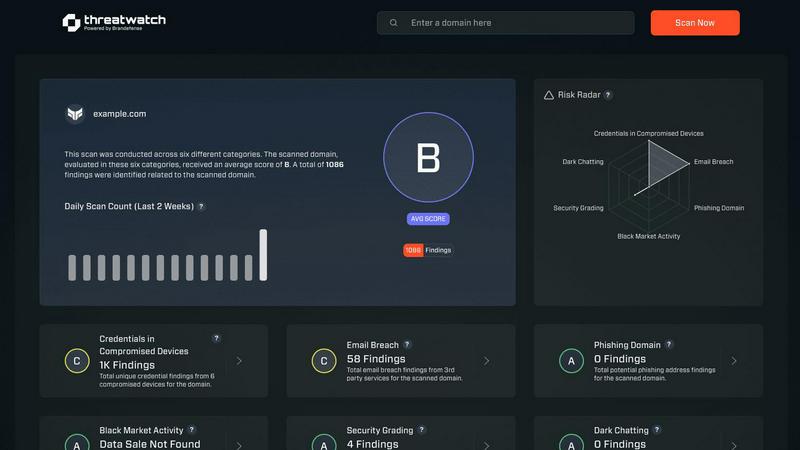
Quickly assess your cybersecurity health with Threat Watch's actionable insights on compromised accounts and devices.
Last updated: March 1, 2026
Visual Comparison
Roast My Web

Threat Watch
Feature Comparison
Roast My Web
Instant AI-Powered Audit
Get a comprehensive website analysis in just two minutes. The AI scans your URL and generates a detailed report covering design, UX, conversion rates, mobile responsiveness, and SEO, providing blunt, actionable fixes without sugarcoating the issues.
Custom-Branded, Client-Ready PDFs
Add your logo, colors, and custom text in 60 seconds to create polished, branded audit reports. Download and share professional PDFs that impress clients and showcase your expertise, eliminating the need for a designer.
Manual Report Editor
Modify the AI-generated text, hide sections, or add your own expert advice directly within the platform. This ensures every report is 100% tailored and client-ready, reflecting your unique insights and recommendations.
Priority Fixes & Competitor Comparison
See which suggested changes will impact revenue the most, allowing you to tackle high-value fixes first. Additionally, compare your site directly with competitors to understand your market position and identify key areas for improvement.
Threat Watch
Comprehensive Cyber Health Assessment
Threat Watch provides a detailed evaluation of an organization’s cybersecurity posture by continuously scanning for vulnerabilities, compromised credentials, and potential threats, ensuring a holistic view of security health.
Automated Threat Intelligence
The platform automates the gathering and analysis of complex threat intelligence, reducing manual workload and providing real-time insights that help organizations identify emerging threats and assess their risk levels swiftly.
Prioritized Action Plan
By consolidating fragmented threat data, Threat Watch generates a single prioritized action plan. This enables organizations to focus on the most critical risks and respond effectively to mitigate potential damage.
Dark Web Monitoring
Threat Watch continuously monitors dark web activities to identify compromised credentials and breached accounts, allowing organizations to take immediate action to protect their assets from potential exploitation.
Use Cases
Roast My Web
For Freelancers & Agencies
Quickly audit client websites to identify conversion barriers and UX issues. Generate branded reports in minutes to present clear, actionable strategies, demonstrating value, winning trust, and justifying retainer or project fees efficiently.
For SaaS Founders & Indie Hackers
Continuously audit your own landing pages and product sites without needing a design or SEO expert. Get specific, step-by-step fixes to improve sign-ups, sales, and user trust, especially when bootstrapping and resources are limited.
For Pre-Launch Quality Assurance
Run audits on new website designs or pages before launch. Catch critical mobile responsiveness issues, broken elements, and conversion bottlenecks proactively to ensure a strong first impression and avoid post-launch emergency fixes.
For SEO & Conversion Rate Optimization (CRO)
Combine technical SEO analysis with on-page UX and conversion tips in a single audit. Identify issues hurting search rankings and user experience simultaneously, creating a unified action plan to boost both traffic and conversion rates.
Threat Watch
IT Security Monitoring
IT security teams can leverage Threat Watch to continuously monitor their digital assets for vulnerabilities and threats. The platform provides real-time alerts, helping teams respond swiftly to emerging risks.
Risk Management
Risk managers can use Threat Watch to assess the overall cybersecurity health of the organization. The actionable insights provided enable informed decision-making and risk prioritization to protect sensitive data.
Incident Response Planning
Organizations can utilize Threat Watch to develop effective incident response plans. The platform’s real-time threat intelligence assists teams in preparing for potential security incidents, minimizing response times and impact.
Compliance Assurance
Threat Watch aids organizations in maintaining compliance with industry regulations by providing comprehensive assessments of cybersecurity practices. This ensures that organizations meet required standards while safeguarding their data.
Overview
About Roast My Web
Roast My Web is an AI-powered website audit tool designed for digital professionals who need fast, actionable insights. It delivers a comprehensive, client-ready analysis of any URL in about two minutes, automating the labor-intensive process of manual audits. The platform is engineered for freelancers, marketing agencies, SaaS founders, and indie hackers who must quickly identify what is hindering conversions and user trust on a website. Its core value proposition is turning complex web performance data into clear, actionable fixes that can be implemented swiftly to boost sales and improve client satisfaction. By instantly generating polished reports across critical areas like UX, conversion optimization, SEO, and mobile responsiveness, it saves users hours per project. With features for custom branding and report editing, Roast My Web ensures professionals can present insights professionally to stand out to clients and win more business.
About Threat Watch
Threat Watch is a unified cybersecurity intelligence platform that empowers organizations to gain a clear and actionable view of their digital security posture. Designed for IT security teams, risk managers, and business leaders, it shifts the focus from reactive security to proactive risk management. Threat Watch continuously analyzes an organization's assets, vulnerabilities, and exposures across critical security categories, providing a comprehensive cyber health assessment. Its core value proposition lies in its speed and clarity; the platform automates intricate threat intelligence gathering and analysis, delivering real-time insights. This enables users to identify, prioritize, and mitigate risks more efficiently. By consolidating data on compromised credentials, breached accounts, phishing addresses, and dark web exposures, Threat Watch transforms fragmented threat data into a prioritized action plan, ensuring organizations can act quickly to safeguard their digital environments.
Frequently Asked Questions
Roast My Web FAQ
How long does an audit take?
An audit is typically completed in about two minutes. You simply enter a URL, and the AI will scan and analyze the site across multiple dimensions before generating your comprehensive report.
What does the audit report include?
The report provides a detailed analysis across key areas: user experience (UX), conversion optimization, SEO, mobile responsiveness, and design. It offers specific, actionable suggestions for each section of your site to improve performance.
Can I edit the AI-generated report?
Yes. The built-in manual report editor allows you to modify the text, hide sections you don't want to share, and add your own custom advice. This ensures the final report is perfectly tailored for your client.
Is there a money-back guarantee?
Yes, Roast My Web offers a 30-day money-back guarantee. If you are not satisfied with the service for any reason, you can request a full refund within the first 30 days of your purchase.
Threat Watch FAQ
What types of organizations can benefit from Threat Watch?
Threat Watch is designed for a wide range of organizations, including those in finance, healthcare, and technology sectors, where cybersecurity is critical to protecting sensitive information and maintaining compliance.
How does Threat Watch automate threat intelligence?
The platform utilizes advanced algorithms and machine learning to automate the collection and analysis of threat data from various sources, significantly reducing the time and effort required for manual threat assessments.
Can Threat Watch integrate with existing security tools?
Yes, Threat Watch is designed to integrate seamlessly with existing cybersecurity tools and platforms, allowing organizations to enhance their security posture without disrupting current workflows.
What is the process for starting with Threat Watch?
Organizations can easily initiate a free scan through the Threat Watch platform. This initial assessment provides valuable insights into their cybersecurity health, helping them understand their risk landscape.
Alternatives
Roast My Web Alternatives
Roast My Web is an AI-powered website audit tool in the business intelligence and design tools category. It delivers rapid, client-ready analysis to help digital professionals quickly identify issues that hurt conversions and trust. Users may seek alternatives for various reasons, such as budget constraints, specific feature needs, or integration requirements with other platforms. Some might prefer a different reporting style or a tool focused on a single audit area like deep technical SEO. When evaluating alternatives, consider the audit depth, report customization, speed, and overall value. The right tool should efficiently turn complex data into clear, actionable steps that save you time and impress clients.
Threat Watch Alternatives
Threat Watch is a comprehensive cybersecurity intelligence platform that empowers organizations to assess their digital security health with actionable insights. Designed for IT security teams, risk managers, and business leaders, it automates complex threat intelligence gathering and offers real-time assessments of vulnerabilities and exposures. Users often seek alternatives due to factors such as pricing, unique feature sets, or specific platform compatibility needs that better align with their organizational goals. When considering alternatives, look for platforms that provide robust threat intelligence, real-time monitoring capabilities, and an intuitive user interface. It's essential to evaluate the comprehensiveness of the cyber health assessments and whether the solution can effectively prioritize risks based on severity and context to ensure proactive risk management.