
Changeflow vs Phishly
Side-by-side comparison to help you choose the right AI tool.

Changeflow
Changeflow uses AI to track and summarize only the critical website changes that matter to your business.
Last updated: March 4, 2026

Phishly
Phishly uses AI to instantly detect phishing emails with a simple one-click scan in Gmail and as a web tool.
Visual Comparison
Changeflow

Phishly
Feature Comparison
Changeflow
AI-Powered Change Intelligence
Our AI doesn't just detect that a page changed; it reads and understands the content to determine relevance. It filters out noise and false positives, delivering concise summaries that explain what changed and why it matters to your specific monitoring goals, saving you from manually deciphering screenshots.
Natural Language Setup & Smart Link Following
Describe what you want to track in plain English—no RSS feeds or complex configuration needed. Changeflow can also turn any page with links into an intelligent feed. It follows new links, reads the target pages, determines if the content is relevant to your description, and summarizes the key updates automatically.
Enterprise-Grade Reliability & Anti-Blocking
Built on over a decade of experience, Changeflow offers sophisticated anti-blocking technology that reliably monitors pages other tools cannot reach, including those behind logins or with complex JavaScript. This ensures a consistent 99.9% success rate for uninterrupted, critical intelligence.
Team Collaboration & Forensic Analysis
Shared workspaces keep entire teams aligned on the latest changes. The interactive Site Version Control allows you to navigate timestamped archives of any page to see a highlighted, forensic view of exactly what changed over time, providing complete auditability and deeper insight.
Phishly
Instant Email Scanning
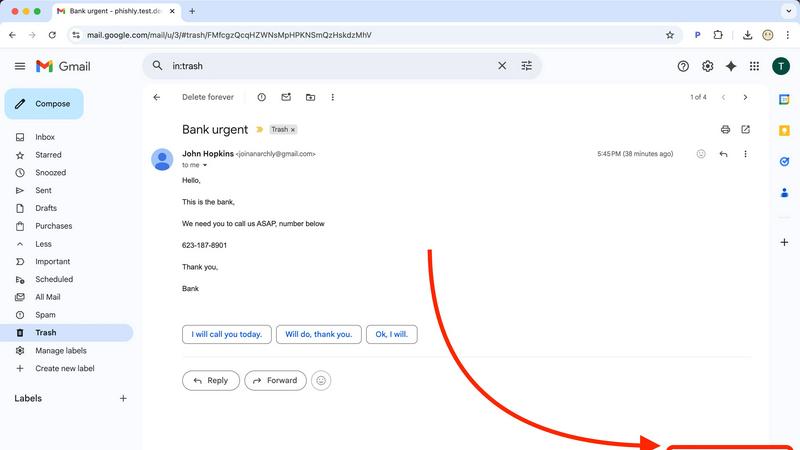
With Phishly, users can quickly scan any email by clicking the "Scan with Phishly" button in Gmail or by pasting email content on the website. This ensures rapid analysis and immediate feedback on potential phishing threats.
Comprehensive Risk Assessment
Phishly provides clear risk assessments categorized into Safe, Medium Risk, and High Risk. Each assessment comes with detailed explanations, helping users understand the specific phishing indicators detected in the email.
Privacy-Focused Analysis
Phishly prioritizes user privacy by only analyzing emails that users explicitly choose to scan. This means your sensitive information remains protected, and you retain control over what is shared with the platform.
User-Friendly Interface
Designed for simplicity, Phishly requires no technical knowledge to operate. The intuitive interface makes it easy for anyone to assess the safety of their emails, making phishing protection accessible to all.
Use Cases
Changeflow
Competitive & Pricing Intelligence
Business teams automate the tracking of competitor websites for price changes, product launches, promotional offers, and strategic content updates. This provides real-time market intelligence without manual daily checks, enabling faster, data-driven business decisions.
Legal & Regulatory Monitoring
Legal librarians at top law firms and compliance officers at Fortune 500 companies use Changeflow to monitor court dockets, legal citations, FDA guidance documents, and SEC filings. They receive immediate alerts on relevant updates, ensuring they never miss a critical regulatory change or filing.
News & Brand Mention Tracking
Marketing and PR teams track news sites, blogs, and forums for brand mentions, industry news, or executive coverage. Changeflow filters out irrelevant articles, delivering a clean feed of only the mentions and stories that impact reputation and strategy.
Market & Supply Chain Monitoring
Procurement and operations teams monitor vendor sites, industry portals, and government sites for material availability, shipping status updates, tariff changes, and market movement reports. This helps in managing risk and optimizing supply chain logistics proactively.
Phishly
Personal Email Protection
Individuals can utilize Phishly to scan their personal emails for phishing threats, ensuring they do not fall victim to malicious attacks. This is especially useful for those who frequently receive unsolicited emails.
Small Business Security
Small business owners can implement Phishly to protect their email communications. By scanning emails from clients, partners, and suppliers, they safeguard sensitive business information from phishing attacks.
Educational Institutions
Teachers and administrative staff at educational institutions can use Phishly to protect their email accounts, thereby ensuring a secure environment for communication with students and parents.
Remote Workers
As remote work becomes more common, employees can use Phishly to verify the legitimacy of emails they receive while working from home. This helps prevent phishing attempts that can jeopardize company data.
Overview
About Changeflow
Changeflow is an AI-powered web monitoring platform that intelligently tracks changes on web pages. It goes beyond simple alerts to understand the context of updates, summarizing only the important changes that matter to your business. Users simply describe what they want to track in plain English and point the tool at a target page. Changeflow then handles the complex technical work, including navigating login walls and JavaScript-heavy sites with a 99.9% success rate, turning any webpage into a clean feed of relevant updates. It is built for business and enterprise teams who need reliable, actionable intelligence from the web. Core users include competitive intelligence teams tracking pricing, legal professionals monitoring court dockets, compliance officers following regulatory updates, and marketing teams tracking news and mentions. The platform saves thousands of manual hours by eliminating false alerts and providing clear, AI-generated summaries of critical changes as they happen.
About Phishly
Phishly is an advanced AI-powered phishing detection platform designed to safeguard your email communications. Available as a Chrome extension for Gmail and as a web tool, Phishly provides users with a simple yet effective way to identify potential phishing attempts. With just a click of the "Scan with Phishly" button or by pasting suspicious emails into the website, users receive instant analysis and risk assessment. The platform utilizes sophisticated AI algorithms to detect phishing indicators, including suspicious domains, urgent language, spoofed senders, and social engineering tactics. Phishly is ideal for individuals and small businesses that require straightforward phishing protection without the complexity of enterprise solutions. Privacy is a top priority; only emails explicitly chosen for scanning are analyzed. There is no need for technical expertise, making it accessible to everyone. Best of all, it's free to use, providing immediate answers to help you determine the legitimacy of any email.
Frequently Asked Questions
Changeflow FAQ
How does Changeflow handle websites that require a login?
Changeflow employs advanced anti-blocking technology designed to navigate login walls and complex JavaScript. You can provide credentials securely, and our system will automate access with a 99.9% success rate, reliably monitoring pages that are typically inaccessible to other web scraping or monitoring tools.
What's the difference between Changeflow and traditional website monitoring tools?
Traditional tools often just alert you that "something changed" or provide side-by-side screenshots, forcing you to manually find the difference. Changeflow uses AI to read the page, understand context, filter out irrelevant changes, and deliver a plain-English summary of what actually changed and why it matters.
Can I monitor a large number of pages or an entire website?
Yes. Changeflow is built for scale, allowing you to organize thousands of web sources. For bulk imports, you can provide a list via CSV or Excel, or we can perform a site crawl. The platform then creates a unified, noise-free feed of key updates from all your monitored pages.
How are notifications delivered?
You receive concise, AI-generated notifications directly in your Changeflow dashboard and via email to specified addresses. For integration into other workflows, you can use the provided API or connect to thousands of other apps (like Slack or Teams) using Zapier for custom alerting.
Phishly FAQ
How does Phishly detect phishing emails?
Phishly utilizes advanced AI algorithms to analyze emails for common phishing indicators such as suspicious domains, urgent language, and spoofed senders, providing users with a risk assessment.
Is Phishly free to use?
Yes, Phishly is completely free for users. There are no hidden fees or subscriptions required, making it accessible for anyone who wants to protect their email communications.
Do I need technical knowledge to use Phishly?
No, Phishly is designed for users of all technical backgrounds. Its user-friendly interface allows anyone to easily scan and assess the safety of their emails without needing any expertise.
How does Phishly ensure my privacy?
Phishly only analyzes emails that you explicitly choose to scan. This means that your private information remains confidential, and you have complete control over what is shared with the platform.