Phishly
Phishly uses AI to instantly detect phishing emails with a simple one-click scan in Gmail and as a web tool.
AI tool Details
Explore More
Alternatives
About Phishly
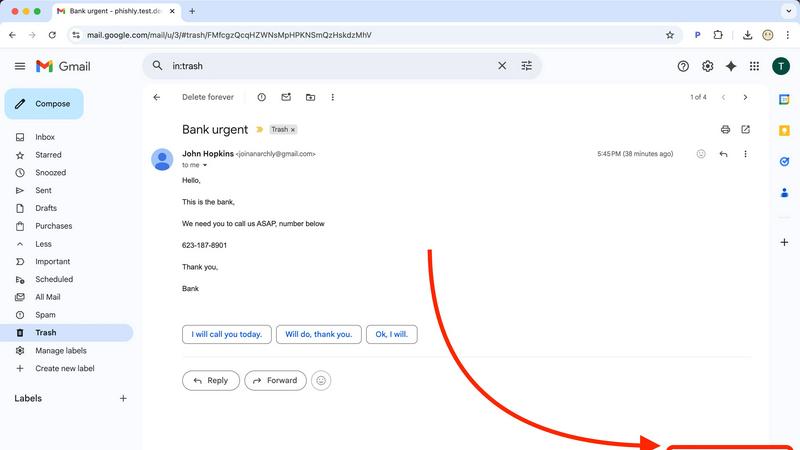
Phishly is an advanced AI-powered phishing detection platform designed to safeguard your email communications. Available as a Chrome extension for Gmail and as a web tool, Phishly provides users with a simple yet effective way to identify potential phishing attempts. With just a click of the "Scan with Phishly" button or by pasting suspicious emails into the website, users receive instant analysis and risk assessment. The platform utilizes sophisticated AI algorithms to detect phishing indicators, including suspicious domains, urgent language, spoofed senders, and social engineering tactics. Phishly is ideal for individuals and small businesses that require straightforward phishing protection without the complexity of enterprise solutions. Privacy is a top priority; only emails explicitly chosen for scanning are analyzed. There is no need for technical expertise, making it accessible to everyone. Best of all, it's free to use, providing immediate answers to help you determine the legitimacy of any email.
Features
Instant Email Scanning
With Phishly, users can quickly scan any email by clicking the "Scan with Phishly" button in Gmail or by pasting email content on the website. This ensures rapid analysis and immediate feedback on potential phishing threats.
Comprehensive Risk Assessment
Phishly provides clear risk assessments categorized into Safe, Medium Risk, and High Risk. Each assessment comes with detailed explanations, helping users understand the specific phishing indicators detected in the email.
Privacy-Focused Analysis
Phishly prioritizes user privacy by only analyzing emails that users explicitly choose to scan. This means your sensitive information remains protected, and you retain control over what is shared with the platform.
User-Friendly Interface
Designed for simplicity, Phishly requires no technical knowledge to operate. The intuitive interface makes it easy for anyone to assess the safety of their emails, making phishing protection accessible to all.
Use Cases
Personal Email Protection
Individuals can utilize Phishly to scan their personal emails for phishing threats, ensuring they do not fall victim to malicious attacks. This is especially useful for those who frequently receive unsolicited emails.
Small Business Security
Small business owners can implement Phishly to protect their email communications. By scanning emails from clients, partners, and suppliers, they safeguard sensitive business information from phishing attacks.
Educational Institutions
Teachers and administrative staff at educational institutions can use Phishly to protect their email accounts, thereby ensuring a secure environment for communication with students and parents.
Remote Workers
As remote work becomes more common, employees can use Phishly to verify the legitimacy of emails they receive while working from home. This helps prevent phishing attempts that can jeopardize company data.
Frequently Asked Questions
How does Phishly detect phishing emails?
Phishly utilizes advanced AI algorithms to analyze emails for common phishing indicators such as suspicious domains, urgent language, and spoofed senders, providing users with a risk assessment.
Is Phishly free to use?
Yes, Phishly is completely free for users. There are no hidden fees or subscriptions required, making it accessible for anyone who wants to protect their email communications.
Do I need technical knowledge to use Phishly?
No, Phishly is designed for users of all technical backgrounds. Its user-friendly interface allows anyone to easily scan and assess the safety of their emails without needing any expertise.
How does Phishly ensure my privacy?
Phishly only analyzes emails that you explicitly choose to scan. This means that your private information remains confidential, and you have complete control over what is shared with the platform.
Similar to Phishly
AppPouch
A multilingual PWA directory to discover, bookmark, and organize the best web apps in 9 languages; free tier plus Pro.
sakuttoAI
A free suite of online tools for everyday tasks like PDF compression, image conversion, text diff and CSV to Excel.
Novastart
Infinite canvas whiteboard OS where apps, files, teams and AI agents work together.
MD to Text
Convert Markdown to clean, readable plain text in your browser. Strip formatting, keep the content, and copy clean output for AI prompts and docs.

Panzoe
Panzoe is an all-in-one AI platform for personal productivity, business automation, AI assistants, content creation, and custom AI solutions.

AI Email Filter
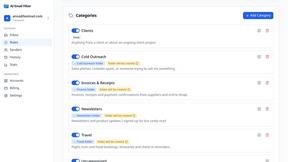
AI Email Filter sorts incoming mail into folders using plain-language prompts you write. Works with any IMAP mailbox; bring your own LLM if you want.