
Never Drop vs PDF Compiler
Side-by-side comparison to help you choose the right AI tool.

Never Drop
NeverDrop captures contacts and sends personalized follow-ups instantly, transforming every handshake into a deal.
Last updated: February 28, 2026

PDF Compiler
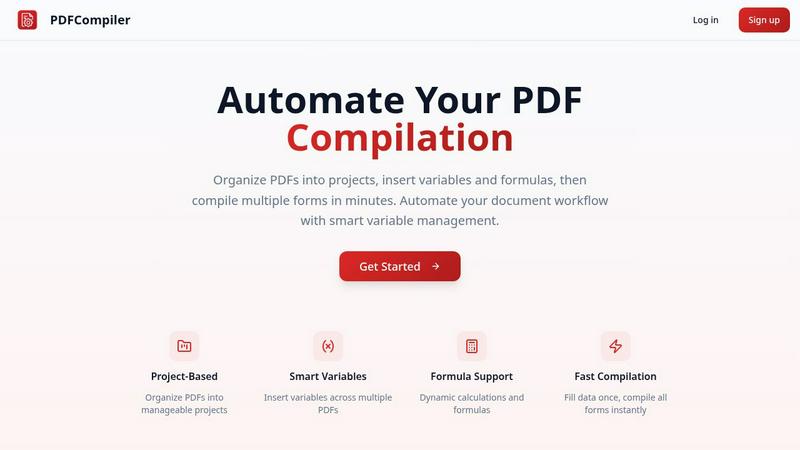
Effortlessly automate PDF compilation by entering data once to instantly generate multiple documents with smart.
Last updated: February 26, 2026
Visual Comparison
Never Drop

PDF Compiler
Feature Comparison
Never Drop
Instant Business Card Scanning
Never Drop allows users to scan any business card in seconds using their smartphone. Our AI-powered OCR technology extracts crucial contact details such as name, company, title, phone number, and email instantly, eliminating the need for manual entry.
Automatic Email Enrichment
Often, business cards contain generic or missing email addresses. Never Drop automatically enriches contact profiles by finding verified work emails based on the name and company, ensuring that users have accurate information without manual searching.
AI-Powered Follow-Up Drafting
Never Drop generates personalized follow-up emails based on users' voice notes and conversation context. This feature allows users to review and tweak the email before sending it, all in under two minutes, making follow-ups efficient and tailored to each lead.
Team Collaboration Dashboard
Never Drop offers a collaborative workspace where sales teams can organize scanned contacts by event, reassign leads among team members, and monitor team activities. This ensures that everyone stays aligned and that no lead falls through the cracks during busy events.
PDF Compiler
Configurable Fields
PDF Compiler allows users to create highly configurable fields, including dates, variables, selections, and Excel-style formulas. This flexibility ensures that documents can be tailored to specific needs and that all necessary data can be linked and referenced across multiple PDFs.
Minimal Input
With PDF Compiler, users only need to enter core data once. The software automatically populates all linked documents, eliminating repetitive data entry and streamlining the compilation process. This feature saves time and enhances accuracy, allowing users to focus on more critical tasks.
Data Linking
When a field is updated, changes propagate instantly across all PDFs in the project. This data linking capability ensures that every document reflects the most current information, maintaining consistency throughout the entire workflow and preventing errors that arise from manual updates.
Automated Workflows
PDF Compiler enables the generation of complete document sets within minutes. Users can create automated workflows that include dynamic calculations and formatting, making it easy to handle complex documentation processes efficiently. This feature significantly reduces turnaround times for projects.
Use Cases
Never Drop
Trade Shows
At trade shows, sales representatives can quickly scan business cards of potential clients, add contextual notes about conversations, and initiate personalized follow-ups, all while engaging with other prospects.
Conferences
During conferences, where networking is key, Never Drop helps attendees capture leads efficiently. Users can collect contacts, enrich profiles with verified emails, and keep track of interactions for effective follow-ups.
Networking Events
In fast-paced networking events, sales teams can utilize Never Drop to ensure they capture every lead. The app enables quick data entry and immediate follow-up drafting, maximizing conversion potential.
Business Dinners
Never Drop is also beneficial for more intimate settings like business dinners. Users can scan cards, take notes about discussions, and prepare personalized follow-ups, ensuring that every connection is nurtured.
PDF Compiler
Tender and Proposal Documentation
Organizations preparing tenders and proposals can use PDF Compiler to automate the completion of necessary forms, ensuring that all relevant data is accurately represented across all documents, thereby improving their competitiveness and efficiency.
Financial and Administrative Reports
Businesses can streamline the creation of financial statements and administrative reports with PDF Compiler. By linking data across multiple documents, users can ensure accuracy and compliance, while also saving valuable time during the reporting process.
Client Contracts
When generating client contracts, PDF Compiler simplifies the process by allowing users to enter client-specific information once, which then updates all related contract documents. This reduces the risk of discrepancies and enhances professionalism in client communications.
Invoice Bundles
For businesses handling multiple invoices, PDF Compiler can automate the generation of invoice bundles. Users can quickly compile all necessary invoices with accurate and consistent data, enabling faster billing cycles and improved cash flow management.
Overview
About Never Drop
Never Drop is a cutting-edge lead-capture app crafted specifically for sales teams engaged in fast-paced environments like trade shows, conferences, and networking events. This innovative solution streamlines the process of collecting and managing leads by enabling users to scan business cards using their smartphones. After scanning, users can enhance the captured data with voice notes or text to capture essential details about each lead. The app leverages advanced AI technology to generate personalized follow-up emails within two minutes, ensuring no leads are overlooked. With seamless integration into popular CRMs like HubSpot, Never Drop keeps your sales pipeline organized and efficient. Say farewell to lost leads and embrace a new era of prompt and streamlined follow-ups that convert leads into closed deals.
About PDF Compiler
PDF Compiler is a powerful tool designed to automate the tedious process of filling out PDF forms across multiple documents. It is particularly beneficial for businesses and professionals who frequently handle large volumes of paperwork that require consistent data entry. By allowing users to input essential information just once, PDF Compiler ensures that every linked document is populated accurately and efficiently, which significantly reduces the chances of errors and inconsistencies. Unlike standard PDF editors, PDF Compiler not only supports basic data entry but also offers advanced features such as data propagation, dynamic calculations, and field references. This makes it an invaluable asset for anyone involved in multi-document workflows, ensuring productivity and time savings.
Frequently Asked Questions
Never Drop FAQ
What is Never Drop?
Never Drop is a lead-capture app designed for sales teams at events. Users can scan business cards, add voice or text context, and receive a personalized follow-up email generated in under two minutes, enriching contacts with verified emails.
How does business card scanning work?
Users take a photo of any business card within the Never Drop app. The app utilizes AI-powered OCR technology to quickly extract essential information such as the contact's name, company, title, phone number, and email.
What types of events is Never Drop suitable for?
Never Drop is ideal for trade shows, conferences, networking events, meetups, and business dinners. The app allows users to organize scans by event, making it easier to manage and track leads.
Is my data secure with Never Drop?
Yes, Never Drop prioritizes data security. The app is developed by SCOPEO, a French company. User data is hosted in the EU, complies with GDPR, and is encrypted both in transit and at rest, ensuring privacy and security.
PDF Compiler FAQ
How does PDF Compiler ensure data accuracy?
PDF Compiler ensures data accuracy by allowing users to input information only once, which is then automatically propagated across all linked documents. This minimizes human error and maintains consistency.
Can I use PDF Compiler for different types of documents?
Yes, PDF Compiler is versatile and can be used for various document types, including contracts, financial reports, proposals, and invoices. It is designed to handle any multi-document workflow requiring accurate data entry.
Is there a limit to the number of PDFs I can compile at once?
PDF Compiler does not impose strict limits on the number of PDFs you can compile simultaneously. Users can organize their documents into projects and compile as many forms as needed, enhancing productivity.
Does PDF Compiler support formulas and calculations?
Yes, PDF Compiler supports dynamic calculations and Excel-style formulas. Users can insert these formulas into documents, allowing for real-time data processing and accurate results across all linked PDFs.
Alternatives
Never Drop Alternatives
Never Drop is a cutting-edge lead-capture application tailored for sales teams in dynamic environments like trade shows, conferences, and networking events. By facilitating the scanning of business cards, it streamlines the process of managing leads and ensures that no opportunities are missed. Users often seek alternatives to Never Drop for various reasons, including pricing, specific feature sets, or compatibility with their existing platforms and tools. When considering an alternative to Never Drop, it's essential to look for features that enhance lead management, ease of use, and integration capabilities with existing customer relationship management systems. Furthermore, evaluate the pricing structure to ensure it aligns with your budget and offers value for the features you require.
PDF Compiler Alternatives
PDF Compiler is a specialized software tool designed for automating PDF form completion, allowing users to enter data just once and populate multiple documents swiftly. It falls under the categories of Business & Finance, Legal, and Productivity & Management, catering to professionals who require accuracy and efficiency in document workflows. Users often seek alternatives due to various reasons such as pricing concerns, specific feature requirements, or the need for compatibility with different platforms. When looking for an alternative to PDF Compiler, consider factors like ease of use, the ability to handle complex data linking, and the range of configuration options available. It's essential to evaluate how well an alternative can streamline your document creation process and whether it meets your unique business needs.