

PDF Compiler
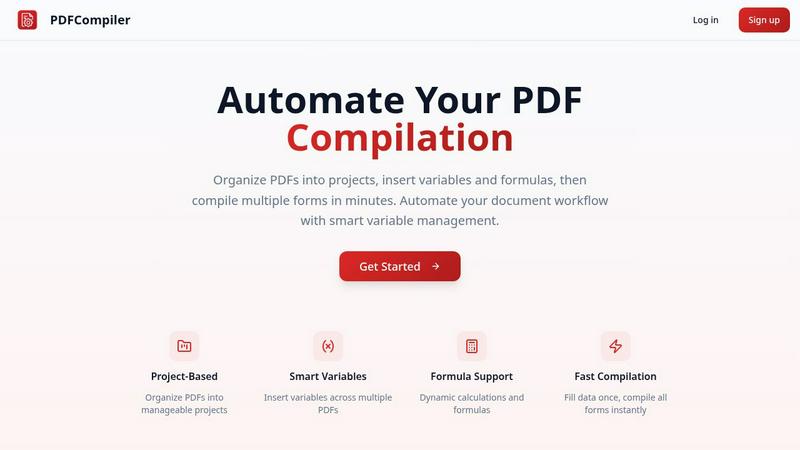
Effortlessly automate PDF compilation by entering data once to instantly generate multiple documents with smart.
AI tool Details
About PDF Compiler
PDF Compiler is a powerful tool designed to automate the tedious process of filling out PDF forms across multiple documents. It is particularly beneficial for businesses and professionals who frequently handle large volumes of paperwork that require consistent data entry. By allowing users to input essential information just once, PDF Compiler ensures that every linked document is populated accurately and efficiently, which significantly reduces the chances of errors and inconsistencies. Unlike standard PDF editors, PDF Compiler not only supports basic data entry but also offers advanced features such as data propagation, dynamic calculations, and field references. This makes it an invaluable asset for anyone involved in multi-document workflows, ensuring productivity and time savings.
Features
Configurable Fields
PDF Compiler allows users to create highly configurable fields, including dates, variables, selections, and Excel-style formulas. This flexibility ensures that documents can be tailored to specific needs and that all necessary data can be linked and referenced across multiple PDFs.
Minimal Input
With PDF Compiler, users only need to enter core data once. The software automatically populates all linked documents, eliminating repetitive data entry and streamlining the compilation process. This feature saves time and enhances accuracy, allowing users to focus on more critical tasks.
Data Linking
When a field is updated, changes propagate instantly across all PDFs in the project. This data linking capability ensures that every document reflects the most current information, maintaining consistency throughout the entire workflow and preventing errors that arise from manual updates.
Automated Workflows
PDF Compiler enables the generation of complete document sets within minutes. Users can create automated workflows that include dynamic calculations and formatting, making it easy to handle complex documentation processes efficiently. This feature significantly reduces turnaround times for projects.
Use Cases
Tender and Proposal Documentation
Organizations preparing tenders and proposals can use PDF Compiler to automate the completion of necessary forms, ensuring that all relevant data is accurately represented across all documents, thereby improving their competitiveness and efficiency.
Financial and Administrative Reports
Businesses can streamline the creation of financial statements and administrative reports with PDF Compiler. By linking data across multiple documents, users can ensure accuracy and compliance, while also saving valuable time during the reporting process.
Client Contracts
When generating client contracts, PDF Compiler simplifies the process by allowing users to enter client-specific information once, which then updates all related contract documents. This reduces the risk of discrepancies and enhances professionalism in client communications.
Invoice Bundles
For businesses handling multiple invoices, PDF Compiler can automate the generation of invoice bundles. Users can quickly compile all necessary invoices with accurate and consistent data, enabling faster billing cycles and improved cash flow management.
Frequently Asked Questions
How does PDF Compiler ensure data accuracy?
PDF Compiler ensures data accuracy by allowing users to input information only once, which is then automatically propagated across all linked documents. This minimizes human error and maintains consistency.
Can I use PDF Compiler for different types of documents?
Yes, PDF Compiler is versatile and can be used for various document types, including contracts, financial reports, proposals, and invoices. It is designed to handle any multi-document workflow requiring accurate data entry.
Is there a limit to the number of PDFs I can compile at once?
PDF Compiler does not impose strict limits on the number of PDFs you can compile simultaneously. Users can organize their documents into projects and compile as many forms as needed, enhancing productivity.
Does PDF Compiler support formulas and calculations?
Yes, PDF Compiler supports dynamic calculations and Excel-style formulas. Users can insert these formulas into documents, allowing for real-time data processing and accurate results across all linked PDFs.
Similar to PDF Compiler


What's on the menu
Smart translate any restaurant menu
Forms Plugin
The #1 Native Form Builder Plugin for Framer - No Code, No Embeds, No External Platforms.

AudioVideo
Turn podcasts, narration, voice recordings, or music into visual content with an Audio to Video AI generator.


HomeAnswerBook
Practical, independent guides to home repairs, maintenance, costs, troubleshooting, and everyday fixes.
BlazePDF
Highlight faster. Study in flow with custom shortcuts and a workflow built around you. Print smarter, or turn any page into a tiled poster.
