
Kaizen OCR vs Never Drop
Side-by-side comparison to help you choose the right AI tool.
Kaizen OCR
Kaizen OCR extracts text from images and PDFs completely offline with 100% privacy.
Last updated: February 28, 2026

Never Drop
NeverDrop captures contacts and sends personalized follow-ups instantly, transforming every handshake into a deal.
Last updated: February 28, 2026
Visual Comparison
Kaizen OCR
Never Drop

Feature Comparison
Kaizen OCR
AI-Powered Text Extraction
Utilizes an advanced, fully offline AI/ML engine for superior accuracy on complex documents. It excels at extracting structured data like tables with proper row/column formatting and automatically detecting key-value pairs. This feature supports major languages including English, Chinese, Arabic, Japanese, and Korean, all while guaranteeing complete privacy.
Extract Text from Image (Tesseract)
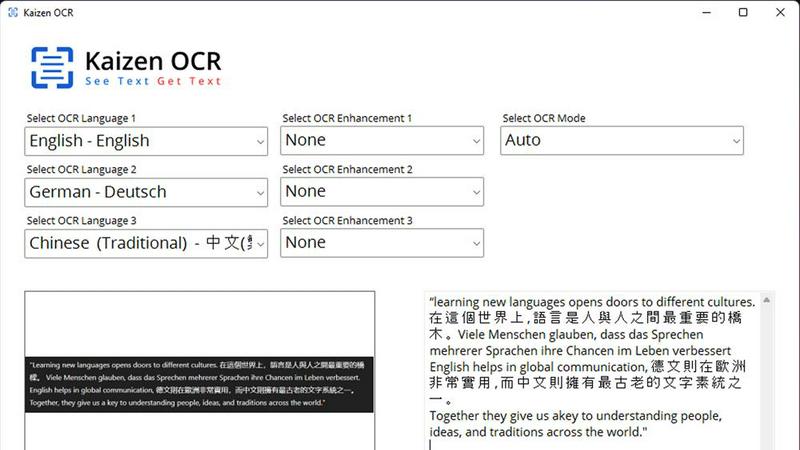
Leverages the powerful Tesseract OCR engine to pull text from any image file, such as photos of documents, receipts, or screenshots. It supports over 100 languages, allows selection of up to three languages simultaneously, and applies 11 image preprocessing steps to enhance clarity and accuracy before batch processing unlimited files.
Screenshot OCR
Features a built-in snipping tool for capturing any part of your screen and extracting text instantly. Perfect for grabbing text from videos, presentations, or locked web pages. It offers an optional hotkey (F6) for quick capture and includes table detection to maintain data structure from the source.
Merge, Split & Create PDFs
Provides comprehensive PDF manipulation tools. You can combine pages from multiple PDFs into one document, rearrange pages via drag-and-drop, insert blank pages, and add custom text annotations with personalized styling. This creates a fully offline toolkit for document assembly and customization.
Never Drop
Instant Business Card Scanning
Never Drop allows users to scan any business card in seconds using their smartphone. Our AI-powered OCR technology extracts crucial contact details such as name, company, title, phone number, and email instantly, eliminating the need for manual entry.
Automatic Email Enrichment
Often, business cards contain generic or missing email addresses. Never Drop automatically enriches contact profiles by finding verified work emails based on the name and company, ensuring that users have accurate information without manual searching.
AI-Powered Follow-Up Drafting
Never Drop generates personalized follow-up emails based on users' voice notes and conversation context. This feature allows users to review and tweak the email before sending it, all in under two minutes, making follow-ups efficient and tailored to each lead.
Team Collaboration Dashboard
Never Drop offers a collaborative workspace where sales teams can organize scanned contacts by event, reassign leads among team members, and monitor team activities. This ensures that everyone stays aligned and that no lead falls through the cracks during busy events.
Use Cases
Kaizen OCR
Academic Research & Study
Students and researchers can quickly digitize notes from textbooks, capture text from research papers or online journals via screenshot, and compile information into editable documents. The batch processing and multi-language support make literature reviews and sourcing quotes from various materials significantly faster.
Legal & Administrative Document Processing
Legal professionals and administrators handle sensitive contracts, forms, and scanned archives. Kaizen OCR allows them to extract text from these documents offline for editing and analysis, merge relevant PDFs, and add password protection—all without risking data privacy by uploading to the cloud.
Business & Receipt Management
Business users can process batches of receipts, invoices, and reports. Extract line-item details and tables into spreadsheets for expense tracking or accounting. The auto-crop and deskew features clean up phone-captured document photos, making them professional and readable.
Content Creation & Translation
Writers, translators, and content creators can extract text from images, screenshots, or foreign language PDFs as a starting point for their work. Supporting 100+ languages, it facilitates quick translation bases and repurposing of content from visual sources like infographics or video frames.
Never Drop
Trade Shows
At trade shows, sales representatives can quickly scan business cards of potential clients, add contextual notes about conversations, and initiate personalized follow-ups, all while engaging with other prospects.
Conferences
During conferences, where networking is key, Never Drop helps attendees capture leads efficiently. Users can collect contacts, enrich profiles with verified emails, and keep track of interactions for effective follow-ups.
Networking Events
In fast-paced networking events, sales teams can utilize Never Drop to ensure they capture every lead. The app enables quick data entry and immediate follow-up drafting, maximizing conversion potential.
Business Dinners
Never Drop is also beneficial for more intimate settings like business dinners. Users can scan cards, take notes about discussions, and prepare personalized follow-ups, ensuring that every connection is nurtured.
Overview
About Kaizen OCR
Kaizen OCR is a comprehensive, all-in-one desktop software for Windows that transforms how you handle documents. It combines powerful, AI-enhanced Optical Character Recognition (OCR) with essential PDF utilities in a single, fully offline package. Designed for professionals, students, researchers, and anyone who regularly works with documents, it extracts text from virtually any source: images, screenshots, and PDFs. Its core value is delivering high-accuracy text recognition without ever requiring an internet connection, ensuring 100% data privacy as your sensitive files never leave your computer. With support for over 100 languages, unlimited batch processing, and a suite of editing tools, it replaces the need for multiple online subscriptions, offering a robust, secure, and efficient solution for any digital document workflow.
About Never Drop
Never Drop is a cutting-edge lead-capture app crafted specifically for sales teams engaged in fast-paced environments like trade shows, conferences, and networking events. This innovative solution streamlines the process of collecting and managing leads by enabling users to scan business cards using their smartphones. After scanning, users can enhance the captured data with voice notes or text to capture essential details about each lead. The app leverages advanced AI technology to generate personalized follow-up emails within two minutes, ensuring no leads are overlooked. With seamless integration into popular CRMs like HubSpot, Never Drop keeps your sales pipeline organized and efficient. Say farewell to lost leads and embrace a new era of prompt and streamlined follow-ups that convert leads into closed deals.
Frequently Asked Questions
Kaizen OCR FAQ
Is Kaizen OCR truly 100% offline?
Yes. All processing, including the advanced AI text extraction, occurs locally on your Windows computer. No internet connection is required at any point, and no data is ever uploaded to external servers, ensuring complete privacy and security for your documents.
What languages does the OCR support?
Kaizen OCR supports over 100 languages for its Tesseract-based image OCR. The AI-powered extraction mode specifically supports English, Chinese, Arabic, Japanese, and Korean. You can select up to three languages simultaneously for mixed-language documents.
Can I process multiple files at once?
Absolutely. Kaizen OCR includes robust batch processing capabilities. You can add an unlimited number of images or PDF files to a queue and let the software extract text, convert formats, or apply password protection to all of them in one go, saving considerable time.
What is the difference between Tesseract and AI OCR?
The Tesseract engine is excellent for standard text extraction across many languages. The AI-powered OCR is a more advanced, offline neural network designed for higher accuracy on complex layouts, such as documents with tables, forms, or poor image quality, preserving the structural integrity of the data.
Never Drop FAQ
What is Never Drop?
Never Drop is a lead-capture app designed for sales teams at events. Users can scan business cards, add voice or text context, and receive a personalized follow-up email generated in under two minutes, enriching contacts with verified emails.
How does business card scanning work?
Users take a photo of any business card within the Never Drop app. The app utilizes AI-powered OCR technology to quickly extract essential information such as the contact's name, company, title, phone number, and email.
What types of events is Never Drop suitable for?
Never Drop is ideal for trade shows, conferences, networking events, meetups, and business dinners. The app allows users to organize scans by event, making it easier to manage and track leads.
Is my data secure with Never Drop?
Yes, Never Drop prioritizes data security. The app is developed by SCOPEO, a French company. User data is hosted in the EU, complies with GDPR, and is encrypted both in transit and at rest, ensuring privacy and security.
Alternatives
Kaizen OCR Alternatives
Kaizen OCR is a desktop software for Windows that falls into the productivity category. It specializes in extracting text from images, screenshots, and PDFs using powerful, fully offline OCR engines. This ensures all data processing happens locally on your computer for maximum privacy and security. Users may explore alternatives for various reasons. Some might seek different pricing models, such as free online tools or subscription-based services. Others may require specific features, like integration with cloud storage, or need software that runs on macOS or Linux. The search often centers on balancing cost, platform compatibility, and specific workflow needs. When evaluating an alternative, key considerations include privacy policies, offline functionality, and accuracy. Determine if the tool processes data online or locally. Check its supported languages, batch processing capabilities, and whether it includes additional utilities like PDF editing. The goal is to find a solution that matches your specific requirements for security, convenience, and power.
Never Drop Alternatives
Never Drop is a cutting-edge lead-capture application tailored for sales teams in dynamic environments like trade shows, conferences, and networking events. By facilitating the scanning of business cards, it streamlines the process of managing leads and ensures that no opportunities are missed. Users often seek alternatives to Never Drop for various reasons, including pricing, specific feature sets, or compatibility with their existing platforms and tools. When considering an alternative to Never Drop, it's essential to look for features that enhance lead management, ease of use, and integration capabilities with existing customer relationship management systems. Furthermore, evaluate the pricing structure to ensure it aligns with your budget and offers value for the features you require.