
EZ-Estimates vs Kaizen OCR
Side-by-side comparison to help you choose the right AI tool.

EZ-Estimates
EZ-Estimates turns your spoken project details into a professional contractor estimate in under 60 seconds.
Last updated: April 13, 2026
Kaizen OCR
Kaizen OCR extracts text from images and PDFs completely offline with 100% privacy.
Last updated: February 28, 2026
Visual Comparison
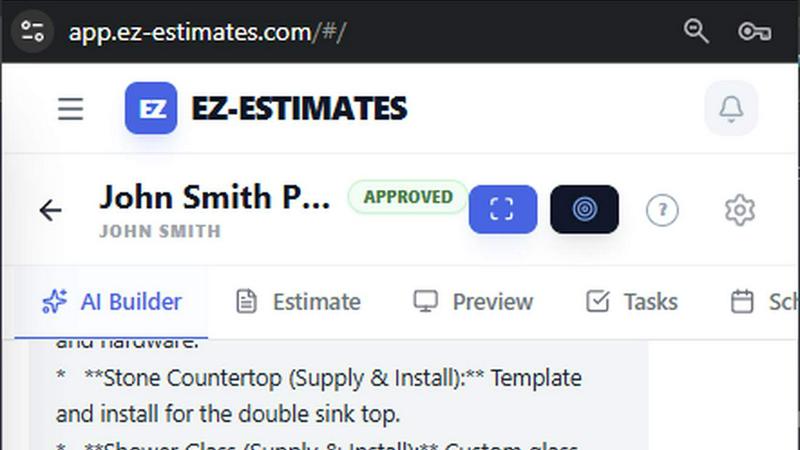
EZ-Estimates
Kaizen OCR
Feature Comparison
EZ-Estimates
Voice-to-Estimate AI
Describe your project by speaking into your phone. The AI listens and instantly generates a complete, trade-specific estimate with material lists, labor costs, line items, and your applied markup. This turns a spoken description into a professional quote before you even leave the client's driveway, with zero technical learning curve.
EZ-Takeoff Vision
Upload a blueprint, and the AI automatically identifies and measures walls, rooms, and fixtures. It provides high-precision linear and area calculations that sync directly to your material list, applying appropriate waste factors automatically. This eliminates manual scaling and measurement errors from paper plans.
EZ-Mapping Powered by Google Maps
Generate accurate exterior estimates without a site visit. Using high-resolution satellite imagery, you can click vertices on roofs, driveways, or lots to get instant surface area and linear measurements. This drastically reduces travel time for initial quotes and eliminates field measurement errors.
All-in-One Project Management Hub
Go beyond estimating with integrated tools for the entire project lifecycle. This includes a client portal for approvals and e-signatures, interactive quotes with add-ons, Gantt chart scheduling, expense tracking with receipt OCR, progress invoicing, and real-time profit margin dashboards.
Kaizen OCR
AI-Powered Text Extraction
Utilizes an advanced, fully offline AI/ML engine for superior accuracy on complex documents. It excels at extracting structured data like tables with proper row/column formatting and automatically detecting key-value pairs. This feature supports major languages including English, Chinese, Arabic, Japanese, and Korean, all while guaranteeing complete privacy.
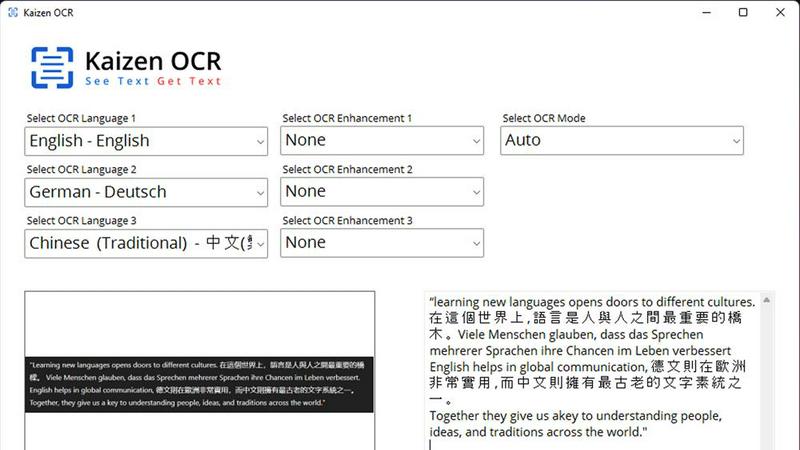
Extract Text from Image (Tesseract)
Leverages the powerful Tesseract OCR engine to pull text from any image file, such as photos of documents, receipts, or screenshots. It supports over 100 languages, allows selection of up to three languages simultaneously, and applies 11 image preprocessing steps to enhance clarity and accuracy before batch processing unlimited files.
Screenshot OCR
Features a built-in snipping tool for capturing any part of your screen and extracting text instantly. Perfect for grabbing text from videos, presentations, or locked web pages. It offers an optional hotkey (F6) for quick capture and includes table detection to maintain data structure from the source.
Merge, Split & Create PDFs
Provides comprehensive PDF manipulation tools. You can combine pages from multiple PDFs into one document, rearrange pages via drag-and-drop, insert blank pages, and add custom text annotations with personalized styling. This creates a fully offline toolkit for document assembly and customization.
Use Cases
EZ-Estimates
Rapid Bid Generation for Residential Remodelers
A kitchen remodeler can verbally describe the scope—"200 sq ft of cabinetry, quartz countertops, new flooring"—while driving between appointments. They receive a detailed, client-ready estimate in under a minute, allowing them to submit more competitive bids faster and increase their project win rate.
Accurate Exterior Measurements for Roofers and Landscapers
A roofing contractor receives an inquiry for a roof replacement. Using the satellite mapping tool, they measure the roof's exact square footage from their office, apply material specs, and generate a precise quote without climbing a ladder, saving hours of unpaid travel and inspection time.
Streamlined Takeoff for General Contractors
A GC bidding on a new construction project uploads the architectural PDFs. EZ-Takeoff AI automatically detects and calculates the square footage for each room's flooring, wall areas for drywall, and counts fixtures, creating a comprehensive bill of materials and labor estimate in a fraction of the traditional time.
Professional Client Engagement and Upselling
A deck builder sends an interactive digital quote. The client can review line items, sign electronically, and select add-on options like lighting or premium railings directly from the proposal. This creates a professional experience, speeds up approvals, and easily increases project value.
Kaizen OCR
Academic Research & Study
Students and researchers can quickly digitize notes from textbooks, capture text from research papers or online journals via screenshot, and compile information into editable documents. The batch processing and multi-language support make literature reviews and sourcing quotes from various materials significantly faster.
Legal & Administrative Document Processing
Legal professionals and administrators handle sensitive contracts, forms, and scanned archives. Kaizen OCR allows them to extract text from these documents offline for editing and analysis, merge relevant PDFs, and add password protection—all without risking data privacy by uploading to the cloud.
Business & Receipt Management
Business users can process batches of receipts, invoices, and reports. Extract line-item details and tables into spreadsheets for expense tracking or accounting. The auto-crop and deskew features clean up phone-captured document photos, making them professional and readable.
Content Creation & Translation
Writers, translators, and content creators can extract text from images, screenshots, or foreign language PDFs as a starting point for their work. Supporting 100+ languages, it facilitates quick translation bases and repurposing of content from visual sources like infographics or video frames.
Overview
About EZ-Estimates
EZ-Estimates is AI-powered construction estimating software built specifically for contractors and tradespeople. It eliminates the tedious, time-consuming process of manual estimating on spreadsheets. The core innovation is its conversational AI, which allows users to describe a project by voice or text and receive a fully detailed, line-item estimate with materials, labor, and markup in under 60 seconds. Founded by a general contractor frustrated with losing evenings to paperwork, the platform is designed for real-world efficiency. It provides a comprehensive suite of tools beyond estimating, including AI-powered blueprint takeoff, satellite mapping for site measurements, client portals, scheduling, expense tracking, and profit monitoring. Accessible via web, iOS, and Android, EZ-Estimates enables contractors to create and send professional, branded quotes directly from the job site, transforming hours of unpaid admin work into minutes and helping businesses win more work faster.
About Kaizen OCR
Kaizen OCR is a comprehensive, all-in-one desktop software for Windows that transforms how you handle documents. It combines powerful, AI-enhanced Optical Character Recognition (OCR) with essential PDF utilities in a single, fully offline package. Designed for professionals, students, researchers, and anyone who regularly works with documents, it extracts text from virtually any source: images, screenshots, and PDFs. Its core value is delivering high-accuracy text recognition without ever requiring an internet connection, ensuring 100% data privacy as your sensitive files never leave your computer. With support for over 100 languages, unlimited batch processing, and a suite of editing tools, it replaces the need for multiple online subscriptions, offering a robust, secure, and efficient solution for any digital document workflow.
Frequently Asked Questions
EZ-Estimates FAQ
How accurate is the AI-generated estimate?
The AI is trained on millions of construction data points and regional cost databases. It generates highly accurate baseline estimates based on your description. You maintain full control to review, adjust any line item, and apply your custom markup and labor rates before sending, ensuring the final quote reflects your exact pricing.
What trades does EZ-Estimates support?
The platform supports over 16+ trades including general contractors, remodelers, roofers, deck builders, landscapers, plumbers, electricians, painters, and more. The AI tailors material lists and labor calculations to the specific trade you select when creating an estimate.
Is my data secure?
Yes. EZ-Estimates uses enterprise-grade security with encrypted data transmission and storage. Your client information, financial data, and proprietary estimate templates are protected. The platform is compliant with major data protection standards to ensure your business information remains secure.
Can I use it offline?
The mobile apps offer core functionality for offline use. You can record voice descriptions, review estimates, and access recent project data. Once you regain an internet connection, the data will sync automatically, and features requiring live data (like satellite mapping) will become available.
Kaizen OCR FAQ
Is Kaizen OCR truly 100% offline?
Yes. All processing, including the advanced AI text extraction, occurs locally on your Windows computer. No internet connection is required at any point, and no data is ever uploaded to external servers, ensuring complete privacy and security for your documents.
What languages does the OCR support?
Kaizen OCR supports over 100 languages for its Tesseract-based image OCR. The AI-powered extraction mode specifically supports English, Chinese, Arabic, Japanese, and Korean. You can select up to three languages simultaneously for mixed-language documents.
Can I process multiple files at once?
Absolutely. Kaizen OCR includes robust batch processing capabilities. You can add an unlimited number of images or PDF files to a queue and let the software extract text, convert formats, or apply password protection to all of them in one go, saving considerable time.
What is the difference between Tesseract and AI OCR?
The Tesseract engine is excellent for standard text extraction across many languages. The AI-powered OCR is a more advanced, offline neural network designed for higher accuracy on complex layouts, such as documents with tables, forms, or poor image quality, preserving the structural integrity of the data.
Alternatives
EZ-Estimates Alternatives
EZ-Estimates is AI-powered construction estimating software designed to help contractors create detailed quotes in under a minute using voice or text. It belongs to the category of contractor business management software, integrating estimating with takeoff, scheduling, invoicing, and project tracking. Contractors may look for alternatives for various reasons. Common factors include budget constraints, specific feature requirements not covered, or a need for a platform that integrates with their existing accounting or CRM tools. Some may prefer a different user interface or a desktop-only versus mobile-first experience. When evaluating alternatives, consider the core estimating workflow, the accuracy of AI-powered tools, and the completeness of the business management suite. Key aspects are speed, mobility, integration capabilities, and whether the platform truly saves time on administrative tasks to allow a focus on the actual construction work.
Kaizen OCR Alternatives
Kaizen OCR is a desktop software for Windows that falls into the productivity category. It specializes in extracting text from images, screenshots, and PDFs using powerful, fully offline OCR engines. This ensures all data processing happens locally on your computer for maximum privacy and security. Users may explore alternatives for various reasons. Some might seek different pricing models, such as free online tools or subscription-based services. Others may require specific features, like integration with cloud storage, or need software that runs on macOS or Linux. The search often centers on balancing cost, platform compatibility, and specific workflow needs. When evaluating an alternative, key considerations include privacy policies, offline functionality, and accuracy. Determine if the tool processes data online or locally. Check its supported languages, batch processing capabilities, and whether it includes additional utilities like PDF editing. The goal is to find a solution that matches your specific requirements for security, convenience, and power.