
Imgezy vs ShinePhoto
Side-by-side comparison to help you choose the right AI tool.

Imgezy
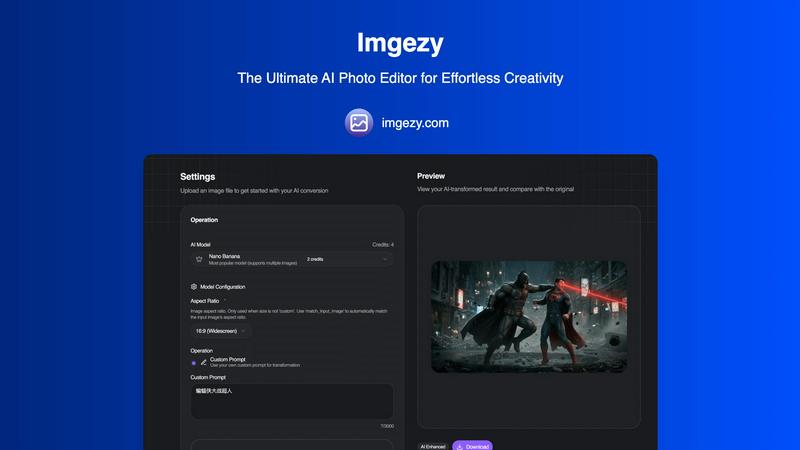
Imgezy is an AI photo editor that effortlessly removes objects and changes backgrounds for stunning results in seconds.
Last updated: February 28, 2026

ShinePhoto
ShinePhoto transforms your images with smart cropping, restoration, and upscaling for stunning, share-ready quality.
Last updated: March 1, 2026
Visual Comparison
Imgezy
ShinePhoto

Feature Comparison
Imgezy
Object Removal
Imgezy offers a powerful object removal feature that intelligently identifies and eliminates unwanted elements from your photos. Whether it's a photobomber or distracting objects, the AI reconstructs the background seamlessly, ensuring pixel-perfect accuracy in every edit.
Background Replacement
With Imgezy, changing backgrounds is a breeze. Users can replace dull or unsuitable backgrounds with vibrant landscapes, solid colors, or any desired scene instantly. This feature enhances creativity and allows for stunning visual storytelling.
Photo Enhancement
Imgezy automatically enhances photos by adjusting colors, lighting, and sharpness. This feature makes images pop, ensuring they look professional and visually appealing without the need for manual adjustments.
Batch Processing
For users working on large projects, Imgezy's batch processing capability allows for the simultaneous editing of multiple images. This time-saving feature is perfect for e-commerce managers or photographers who need to edit numerous photos quickly.
ShinePhoto
Perfect Crops
ShinePhoto's photo cropper automatically detects the subject in your images, ensuring clean, sharp, and focused crops. Users can also manually adjust the cropping area for precise framing, catering to personal preferences.
Restore Photo
The restore photo feature allows users to enhance image quality by removing scratches, reducing blur, and cleaning up compression artifacts. This tool is essential for improving the overall clarity of older or damaged images.
Batch Processing
ShinePhoto supports batch processing, enabling users to upload and process multiple photos simultaneously. This feature saves time and effort, making it ideal for large collections or projects.
Share-Ready Exports
With just a click, users can download high-resolution files after processing. The share-ready exports ensure that images are crisp and ready for social media, printing, or archiving without additional steps.
Use Cases
Imgezy
Social Media Content Creation
Social media influencers and content creators can leverage Imgezy to elevate their posts. By quickly removing distractions and enhancing photo quality, they can create visually stunning content that stands out on platforms like Instagram and Facebook.
E-commerce Product Images
E-commerce businesses can utilize Imgezy to enhance product images, ensuring they are appealing and professional. The ability to change backgrounds and remove unwanted elements helps to create attractive product listings that drive sales.
Professional Photography
Photographers can benefit from Imgezy's speed and accuracy. With the AI's assistance, they can focus more on creativity and less on manual editing, allowing for a more efficient workflow and faster turnaround times for clients.
Personal Projects and Memories
Users looking to edit family photos or personal projects can use Imgezy to make quick adjustments. Whether it's removing unwanted objects or enhancing colors in a cherished memory, Imgezy makes photo editing accessible and enjoyable for everyone.
ShinePhoto
Family Photo Restoration
Users can restore and enhance family photos that may have faded over time. ShinePhoto's tools help revive memories by improving clarity and color, making these treasured images vibrant again.
Professional Portfolio Enhancement
Photographers can quickly process their images for portfolios. By utilizing the batch processing feature, they can auto-crop and enhance multiple photos efficiently, ensuring their work looks polished and professional.
Event Photography Digitization
For those with large volumes of event photos, ShinePhoto provides an effective way to digitize and organize these images. The auto-cropping and restoration tools allow for quick uploads and enhancements, streamlining the workflow.
Social Media Content Creation
Influencers and content creators can use ShinePhoto to prepare images for their social media platforms. The ability to enhance image quality and create focused, share-ready photos ensures that their content stands out.
Overview
About Imgezy
Imgezy is the ultimate AI-powered photo editor that revolutionizes the way users create and enhance images. With its innovative approach, Imgezy allows users to execute complex editing tasks through simple text commands, making it accessible to everyone, regardless of their technical skills. The tool is designed for a diverse audience, including casual creators, social media influencers, e-commerce professionals, and seasoned photographers who require quick, high-quality edits. Imgezy's core value proposition lies in its ability to deliver professional-grade editing results in mere seconds, without the steep learning curve associated with traditional photo editing software. By leveraging advanced artificial intelligence, Imgezy enables users to remove unwanted objects, swap backgrounds, and enhance photo quality effortlessly, transforming their visions into stunning images with minimal effort.
About ShinePhoto
ShinePhoto is a freemium AI photo toolkit that revolutionizes the way users digitize and enhance their photo collections. It is designed for anyone who wants to streamline photo editing processes, from casual users to professional photographers. ShinePhoto offers an intuitive platform for batch subject auto-cropping and photo quality restoration, making it ideal for users with varying levels of expertise. With advanced features that enhance image clarity, users can easily upload both small and large volumes of photos. The intelligent subject detection technology ensures precision in cropping, while powerful restoration tools allow for the recovery of older or damaged images. ShinePhoto combines user-friendliness and efficiency, enabling everyone to create polished memories from everyday moments or restore cherished family albums with just a few clicks.
Frequently Asked Questions
Imgezy FAQ
How does Imgezy work?
Imgezy uses advanced AI technology to interpret user commands for photo editing. Users simply describe the changes they want, and the AI executes these requests, providing professional-quality edits in seconds.
What types of images can I edit with Imgezy?
Imgezy supports all major image formats, including JPG, PNG, and WebP. Users can upload their images in these formats to begin the editing process.
Is there a limit to how many images I can edit?
Imgezy offers various pricing plans, each with a specific number of credits that determine how many images you can edit per month. This allows users to select a plan that fits their editing needs.
Can I download my edited images in high resolution?
Yes, Imgezy allows users to download their edited images in full resolution without any loss of quality, ensuring that the final product meets professional standards.
ShinePhoto FAQ
What is ShinePhoto?
ShinePhoto is an AI-powered photo toolkit that combines a free photo cropper with restoration tools, allowing users to crop, enhance, and upscale images seamlessly.
Is ShinePhoto free to use?
Yes, ShinePhoto offers a free photo cropper that runs in the browser, enabling users to start editing their photos immediately without any cost.
How does photo restoration work?
Users can upload images and utilize the restore photo tools to reduce blur, noise, and damage. The effectiveness of the results is influenced by the quality of the original image.
Can I choose the subject to crop?
Yes, a feature coming soon will allow users to specify the subject for the photo cropper, ensuring more precise and tailored cropping results.
Alternatives
Imgezy Alternatives
Imgezy is a revolutionary AI-powered photo editor that simplifies the process of image editing by allowing users to make changes through straightforward text commands. It caters to a wide range of users, from casual social media creators to professional photographers, offering features like object removal and background replacement. As users seek alternatives, they often consider factors such as pricing, additional features, or compatibility with different platforms. When choosing an alternative, it’s essential to look for user-friendly interfaces, robust editing capabilities, and the ability to meet specific editing needs without a complicated learning curve.
ShinePhoto Alternatives
ShinePhoto is a freemium AI photo toolkit designed for enhancing images through smart cropping, restoration, and upscaling. As part of the image and photo category, it simplifies processes like batch subject auto-cropping and photo quality restoration, making it ideal for users looking to digitize and organize their photo collections. Users often seek alternatives to ShinePhoto for various reasons, including pricing structures, feature sets, or specific platform compatibility needs. When choosing an alternative, consider key aspects such as ease of use, the effectiveness of image enhancement features, batch processing capabilities, and the overall value for your specific photo editing requirements.