

Imgezy
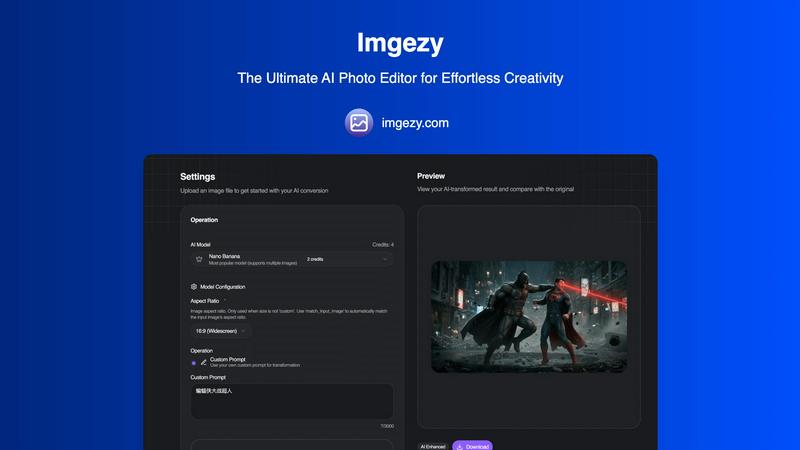
Imgezy is an AI photo editor that effortlessly removes objects and changes backgrounds for stunning results in seconds.
AI tool Details
Explore More
Alternatives
About Imgezy
Imgezy is the ultimate AI-powered photo editor that revolutionizes the way users create and enhance images. With its innovative approach, Imgezy allows users to execute complex editing tasks through simple text commands, making it accessible to everyone, regardless of their technical skills. The tool is designed for a diverse audience, including casual creators, social media influencers, e-commerce professionals, and seasoned photographers who require quick, high-quality edits. Imgezy's core value proposition lies in its ability to deliver professional-grade editing results in mere seconds, without the steep learning curve associated with traditional photo editing software. By leveraging advanced artificial intelligence, Imgezy enables users to remove unwanted objects, swap backgrounds, and enhance photo quality effortlessly, transforming their visions into stunning images with minimal effort.
Features
Object Removal
Imgezy offers a powerful object removal feature that intelligently identifies and eliminates unwanted elements from your photos. Whether it's a photobomber or distracting objects, the AI reconstructs the background seamlessly, ensuring pixel-perfect accuracy in every edit.
Background Replacement
With Imgezy, changing backgrounds is a breeze. Users can replace dull or unsuitable backgrounds with vibrant landscapes, solid colors, or any desired scene instantly. This feature enhances creativity and allows for stunning visual storytelling.
Photo Enhancement
Imgezy automatically enhances photos by adjusting colors, lighting, and sharpness. This feature makes images pop, ensuring they look professional and visually appealing without the need for manual adjustments.
Batch Processing
For users working on large projects, Imgezy's batch processing capability allows for the simultaneous editing of multiple images. This time-saving feature is perfect for e-commerce managers or photographers who need to edit numerous photos quickly.
Use Cases
Social Media Content Creation
Social media influencers and content creators can leverage Imgezy to elevate their posts. By quickly removing distractions and enhancing photo quality, they can create visually stunning content that stands out on platforms like Instagram and Facebook.
E-commerce Product Images
E-commerce businesses can utilize Imgezy to enhance product images, ensuring they are appealing and professional. The ability to change backgrounds and remove unwanted elements helps to create attractive product listings that drive sales.
Professional Photography
Photographers can benefit from Imgezy's speed and accuracy. With the AI's assistance, they can focus more on creativity and less on manual editing, allowing for a more efficient workflow and faster turnaround times for clients.
Personal Projects and Memories
Users looking to edit family photos or personal projects can use Imgezy to make quick adjustments. Whether it's removing unwanted objects or enhancing colors in a cherished memory, Imgezy makes photo editing accessible and enjoyable for everyone.
Frequently Asked Questions
How does Imgezy work?
Imgezy uses advanced AI technology to interpret user commands for photo editing. Users simply describe the changes they want, and the AI executes these requests, providing professional-quality edits in seconds.
What types of images can I edit with Imgezy?
Imgezy supports all major image formats, including JPG, PNG, and WebP. Users can upload their images in these formats to begin the editing process.
Is there a limit to how many images I can edit?
Imgezy offers various pricing plans, each with a specific number of credits that determine how many images you can edit per month. This allows users to select a plan that fits their editing needs.
Can I download my edited images in high resolution?
Yes, Imgezy allows users to download their edited images in full resolution without any loss of quality, ensuring that the final product meets professional standards.
Similar to Imgezy

Hailuo AI
Create high-quality videos from text or images with guided prompts, motion and camera controls, flexible settings, task tracking, and downloadable res
GPT Image 2 API
Generate and edit production-ready images with GPT Image 2 API, prompts, reference images, clear text, and developer workflows.

ProfileLoom
ProfileLoom turns one photo into platform-ready AI portraits for professional, social, and creator profiles, with presets and built-in editing.
Text Logo
Create a custom text logo, wordmark logo, or typography logo with editable fonts, colors, icons, shapes, and flexible export formats.

Try This Skill
One-click AI photo stylization for e-commerce & portraits

Magic Eraser
AI photo editor for removing objects and backgrounds, enhancing images, and creating polished visuals across web and mobile.
OmniGIF
Free privacy-first GIF toolkit. Convert, edit frames, apply effects, and create animations entirely in your browser—no uploads, no account.

AI Image Editor
Free AI image editor that edits, retouches, and transforms photos with natural-language text prompts.