
Dokie AI vs Image3D AI
Side-by-side comparison to help you choose the right AI tool.

Dokie AI
Dokie AI empowers users to create stunning professional PPT slides in minutes, leveraging advanced AI technology for effortless presentation design.
Last updated: March 19, 2026

Image3D AI
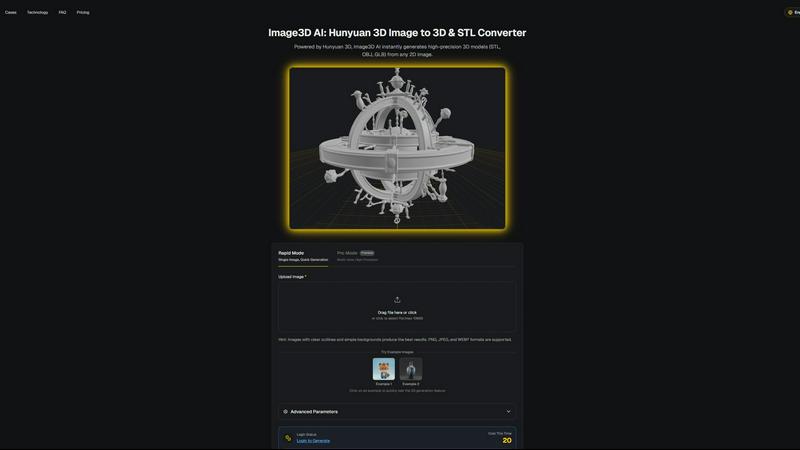
Image3D AI swiftly transforms any 2D image into high-quality 3D models for printing or gaming with no skills needed.
Last updated: March 1, 2026
Visual Comparison
Dokie AI

Image3D AI
Feature Comparison
Dokie AI
AI Generate PPT
The AI Generate PPT feature allows users to simply describe their presentation topic in plain text. In seconds, Dokie AI creates a complete slide deck that includes professional layouts, engaging charts, and compelling content tailored to your needs. This feature eliminates the stress of starting from scratch, making it ideal for time-constrained professionals.
AI Beautify PPT
With the AI Beautify PPT tool, users can upload existing presentations for automatic enhancement. Dokie AI analyzes the content and improves the design, fixing layouts and applying professional styling to ensure your slides look polished and visually cohesive. This feature is perfect for those who want to upgrade their presentations without extensive design knowledge.
Speech Notes Generation
Dokie AI's Speech Notes Generation feature automatically produces detailed speaker notes for each slide. This helps presenters articulate their thoughts clearly and confidently during presentations. The notes provide key talking points that enhance the delivery, making it easier for users to engage with their audience.
Multi-format Conversion
Dokie AI supports various conversions, including PDF to PPT, Word to PPT, and even YouTube to PPT. This feature allows users to transform different content formats into professional slide presentations seamlessly. It saves time and enhances flexibility, ensuring that users can easily integrate any relevant material into their presentations.
Image3D AI
Rapid Mode
Rapid Mode allows users to quickly generate 3D models from a single image. This feature is perfect for users looking for fast results without sacrificing quality, making it ideal for simple projects or quick prototyping.
Pro Mode
Pro Mode is designed for advanced users needing high precision. By uploading multiple views of an object, users can achieve a more accurate reconstruction, making it suitable for complex designs and detailed 3D assets.
File Format Support
Image3D AI supports a variety of industry-standard file formats, including STL, OBJ, and GLB. This flexibility ensures that users can easily integrate generated models into different workflows, whether for 3D printing, gaming, or web applications.
Intelligent Material Generation
The tool features intelligent material generation capabilities, allowing users to create realistic textures and materials automatically. This reduces the need for manual texturing, saving time and enhancing the visual quality of 3D models.
Use Cases
Dokie AI
Business Presentations
Professionals can use Dokie AI to create engaging business presentations for meetings, pitches, or reports. The AI's ability to generate high-quality slides quickly allows users to focus on their content and strategy without getting bogged down in design details.
Educational Lectures
Educators can leverage Dokie AI to craft visually appealing lecture slides. By generating presentations from lesson plans or topics, teachers can create dynamic and interactive learning materials that enhance student engagement and comprehension.
Marketing Campaigns
Marketers can utilize Dokie AI to develop compelling presentations for campaigns, product launches, or client pitches. The ability to beautify existing slides ensures that marketing materials remain current and visually impactful, helping to capture the attention of stakeholders.
Startup Pitches
Startup founders can benefit significantly from Dokie AI when preparing for investor pitches. With the AI's capability to generate professional slide decks from basic ideas, founders can present their concepts clearly and effectively, increasing their chances of securing funding.
Image3D AI
For Game Developers
Game developers can rapidly generate 3D assets for their projects using Image3D AI. Its support for PBR materials allows for seamless integration into game engines like Unity and Unreal Engine, streamlining the asset creation process.
For E-commerce Managers
E-commerce professionals can convert product images into interactive 3D models, enhancing online shopping experiences. This capability enables customers to view products from multiple angles, improving engagement and conversion rates.
For 3D Printing Enthusiasts
Image3D AI serves as a powerful image to STL converter, providing high-precision files ready for 3D printing. This feature allows users to transform their designs into tangible objects quickly and efficiently.
For Architects and Designers
Architects can leverage Image3D AI to generate detailed architectural models, significantly reducing the time spent on manual modeling. This efficiency allows for faster project iterations and improved design presentations.
Overview
About Dokie AI
Dokie AI is a cutting-edge AI presentation maker designed for professionals across various sectors, including business, education, and marketing. It empowers users to create polished, visually appealing presentations quickly and effortlessly, even without any design skills. Dokie AI leverages the advanced capabilities of Claude Opus 4.6 to automate content structure, layout selection, typography, and visual design. This results in high-quality presentations that captivate audiences. With versatile modes like Generate, Beautify, and Speech, Dokie AI offers a comprehensive solution for anyone looking to enhance their presentation workflow. Whether you are a startup founder preparing for a pitch or an educator crafting engaging lessons, Dokie AI streamlines the process, allowing you to focus on your content rather than design intricacies.
About Image3D AI
Image3D AI is a cutting-edge tool designed to revolutionize the way 2D images are transformed into high-quality 3D models. Utilizing Tencent's advanced Hunyuan 3D engine, this software allows users to upload a single photo or multiple angles of an object and receive a fully realized 3D asset in approximately 60 seconds. Tailored for various users, including 3D printing enthusiasts, game developers, e-commerce managers, and architects, Image3D AI democratizes the 3D modeling process. It eliminates the need for specialized software like Blender, significantly reducing the time required for 3D creation from hours to mere minutes. With broad file format support and intelligent material generation, it streamlines workflows, facilitating rapid prototyping, asset creation, and digital content production for both professionals and hobbyists.
Frequently Asked Questions
Dokie AI FAQ
How does Dokie AI generate presentations?
Dokie AI uses advanced AI technology to transform plain text descriptions into structured slide decks. Users provide a topic, and the AI handles layout, design, and content creation automatically.
Can I enhance my existing presentations with Dokie AI?
Yes, with the AI Beautify PPT feature, users can upload their existing presentations, and Dokie AI will enhance their design, making them more visually appealing and professionally styled.
Is it possible to generate speaker notes for my slides?
Absolutely. Dokie AI automatically creates comprehensive speaker notes for each slide, providing talking points that help presenters deliver their presentations more confidently.
What types of conversions does Dokie AI support?
Dokie AI supports various conversions, including PDF to PPT, Word to PPT, HTML to PPT, and more. This flexibility allows users to integrate different content formats into their presentations easily.
Image3D AI FAQ
How does Image3D AI work?
Image3D AI uses advanced algorithms to analyze 2D images and reconstruct them into 3D models. Simply upload a photo, and the AI processes it, generating a high-fidelity 3D asset in about 60 seconds.
What file formats does Image3D AI support?
Image3D AI supports several key file formats, including STL for 3D printing, OBJ for traditional 3D editing, and GLB for web and AR applications. This ensures compatibility with various software and platforms.
Do I need any 3D modeling skills to use Image3D AI?
No, Image3D AI is designed for users of all skill levels. You can easily generate 3D models without any prior experience in 3D modeling software, making it accessible for everyone.
Can I use multiple images for better results?
Yes, using multiple views in Pro Mode can significantly enhance the accuracy of the generated 3D model. Providing front, side, and back views allows the AI to create a more detailed and physically accurate reconstruction.
Alternatives
Dokie AI Alternatives
Dokie AI is a leading AI presentation maker designed to streamline the process of creating professional PowerPoint slides in a matter of minutes. It harnesses the power of Claude Opus 4.6 to provide users with a sophisticated tool that requires no design skills, making it ideal for business professionals, educators, marketers, and startup founders. Despite its impressive capabilities, users often seek alternatives due to factors like pricing, specific feature requirements, or compatibility with different platforms. When searching for an alternative to Dokie AI, consider aspects such as pricing models, user-friendliness, and the range of features offered. Evaluate whether the tool provides AI-driven generation, design enhancements, and the ability to convert documents into presentations. Additionally, assess the flexibility of the platform and how well it can meet your unique presentation needs.
Image3D AI Alternatives
Image3D AI is a professional tool designed to convert 2D images into high-quality 3D models, making it a valuable asset in the design tools category. Users often seek alternatives due to various factors such as pricing, specific feature sets, platform compatibility, and ease of use. Each user may have unique needs, whether it’s for 3D printing, game development, or architectural visualization, and exploring alternatives can help find the best fit for their specific projects. When choosing an alternative, consider the core functionalities that matter most to your workflow, such as export options, material generation capabilities, and user interface. Additionally, evaluate the speed of the conversion process and the level of customization available to ensure that the tool aligns with your creative goals and technical requirements.