
DocuExtractor vs Dokta
Side-by-side comparison to help you choose the right AI tool.

DocuExtractor
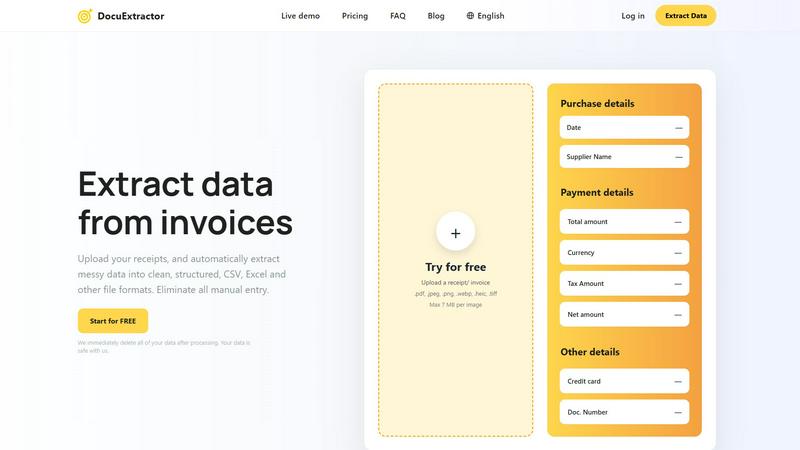
DocuExtractor instantly turns messy receipts and invoices into clean, structured Excel or CSV files.
Last updated: February 28, 2026

Dokta automates document management for SMBs and freelancers, streamlining invoicing, contracts, and cash flow in just a few clicks.
Last updated: April 4, 2026
Visual Comparison
DocuExtractor
Dokta

Feature Comparison
DocuExtractor
Triple AI-Powered Extraction Engine
DocuExtractor combines Optical Character Recognition (OCR), Deep Learning (DL), and Large Language Models (LLM/AI) to accurately identify and extract data. This multi-layered approach ensures high precision in reading text, understanding document context, and pulling out specific fields like dates, totals, supplier names, and tax amounts from even messy or complex documents.
High-Volume, Secure Processing
The platform is built for scale and security, reliably processing over 500,000 documents every month. It features enterprise-grade reliability and a firm privacy commitment: all uploaded documents and extracted data are permanently deleted immediately after conversion is complete, ensuring your sensitive financial information never remains on the servers.
Multi-Language & Multi-Format Support
Automatically process documents in over 45 languages with built-in language detection. DocuExtractor accepts a wide range of file types, including PDFs, JPG, PNG, WebP, HEIC, and TIFF images, making it a versatile tool for global teams and diverse document sources without the need for pre-processing.
Intuitive Drag-and-Drop Workflow
Designed for ease of use, the platform features a simple, three-step process. Users can drag and drop documents—even in large batches—into the workspace. The AI automatically extracts the data, and users can download the structured results in their chosen format (CSV or Excel) within seconds, requiring minimal training or setup.
Dokta
Automated Invoice Management
Dokta simplifies the invoice process by enabling users to upload any document type, which is then automatically analyzed and classified by the AI. This feature reduces the time spent on manual data entry and ensures accurate invoicing.
Real-Time Cash Flow Tracking
This feature provides users with a clear overview of their financial situation by displaying billed amounts, collected payments, outstanding invoices, and VAT. Users can visualize their cash flow trends over a 12-month period through interactive graphs.
Online Quotes and Acceptance
With Dokta, users can send quotes with a simple acceptance link. This feature allows for a seamless transition from quote to invoice in just one click, streamlining the sales process and improving client experience.
Anomaly Detection
Dokta's smart anomaly detection feature safeguards users by identifying issues such as modified IBANs, duplicate entries, inconsistent VAT, and missing numbering. This added layer of protection ensures document integrity and accuracy.
Use Cases
DocuExtractor
Automated Accounts Payable Processing
Finance teams can upload batches of supplier invoices and receipts directly into DocuExtractor. The AI instantly extracts key payment details like invoice numbers, dates, amounts, and vendor information, outputting a clean CSV file ready for import into accounting software, drastically reducing the AP cycle time and manual entry errors.
Bookkeeping and Month-End Close
Bookkeepers and accountants use DocuExtractor to quickly process a month's worth of bank statements, receipts, and expense reports. By converting these unstructured documents into structured Excel data, they can swiftly reconcile accounts, categorize expenses, and prepare financial reports, accelerating the month-end closing process by hours.
Receipt and Expense Management
Employees or managers can upload individual or bulk receipts for business expenses. DocuExtractor extracts the merchant name, date, total, and tax, organizing all data into a standardized format. This eliminates manual logbooks, simplifies expense report creation, and ensures accurate record-keeping for compliance and reimbursement.
Financial Data Migration and Auditing
During audits or system migrations, professionals need to digitize and structure historical paper-based or PDF financial records. DocuExtractor processes these legacy documents at scale, creating organized digital datasets that are easy to analyze, verify, and migrate into new accounting or audit software systems.
Dokta
Freelance IT Consultant
An IT consultant can use Dokta to automate their invoicing process. By generating invoices from their contracts automatically, they can save time and reduce the risk of errors, allowing them to focus more on coding and client work.
Creative Freelancers
Graphic designers and other creative professionals can manage their projects from start to finish using Dokta. From sending a quote to a client and receiving acceptance online, to generating a final invoice, everything is handled smoothly in one platform.
Auto-Entrepreneurs
Auto-entrepreneurs can utilize Dokta to create compliant invoices while keeping track of their cash flow. Alerts for URSSAF deadlines help them stay organized and compliant without unnecessary stress.
Small Business Owners
SMBs can benefit from Dokta's ability to manage client databases and financial data in real-time. By utilizing Dokta, they can ensure accurate cash flow tracking, automate reminders, and easily prepare for accounting needs.
Overview
About DocuExtractor
DocuExtractor is an advanced AI-powered software designed to automate financial data entry by transforming unstructured documents into clean, structured data. It serves accountants, bookkeepers, and finance teams, eliminating the tedious and error-prone task of manual data input. The platform specializes in extracting key details from receipts, invoices, bank statements, and PDFs, converting them into ready-to-use formats like CSV and Excel. By leveraging a powerful combination of Optical Character Recognition (OCR), Deep Learning, and Large Language Models (AI), it achieves a remarkable 99.6% accuracy rate. With support for over 45 languages, an intuitive drag-and-drop interface, and processing over 500,000 documents monthly, DocuExtractor streamlines workflows, saving professionals hours of work. It is built with a strong commitment to security, automatically deleting all user data immediately after processing.
About Dokta
Dokta is an AI-powered document management platform specifically designed for freelancers, solo entrepreneurs, auto-entrepreneurs, and small to medium-sized businesses (SMBs). With Dokta, users can effortlessly manage their documents by simply uploading invoices, quotes, or contracts. Within 60 seconds, Dokta's advanced AI engine reads, classifies, and extracts critical data from these documents, optimizing the entire document lifecycle. Users can create professional invoices and quotes, track payments, automate reminders for unpaid invoices, manage contracts and deadlines, and even generate tasks automatically from their documents. This eliminates the hassle of lost files and missed deadlines, allowing users to focus on their core business activities. Moreover, Dokta builds a client database from the uploaded documents, tracks cash flow in real-time, and offers easy CSV exports for accountants. Whether you are a freelance developer, a consultant, or a growing SMB, Dokta integrates document management seamlessly into your operations, supported by a free tier for up to 15 documents per month and paid plans starting at €9 per month. Data security is guaranteed with 100% GDPR compliance and hosting in Europe.
Frequently Asked Questions
DocuExtractor FAQ
What types of documents can DocuExtractor process?
DocuExtractor is specialized for financial documents. It can process receipts, invoices, bank statements, and general PDF files. Supported file formats include PDF, JPG, PNG, WebP, HEIC, and TIFF, with a maximum size of 7 MB per image file.
How accurate is the data extraction?
DocuExtractor delivers a consistently high accuracy rate of 99.6%. This is achieved through its specialized triple-engine AI system (OCR, Deep Learning, and LLM) that is specifically trained to understand and extract data from financial document layouts and contexts.
Is my data secure and private?
Yes. Security and privacy are core principles. DocuExtractor is built with enterprise-grade security measures. Most importantly, the platform is designed to delete all your uploaded documents and the extracted data immediately after the conversion process is complete. Your data is not stored or used for training.
What output formats are available?
After processing, you can download your extracted and structured data in two universally compatible formats: CSV (Comma-Separated Values) and Excel (XLSX). These formats are ready for direct import into accounting software like QuickBooks, Xero, or spreadsheet applications for further analysis.
Dokta FAQ
What types of documents can I manage with Dokta?
Dokta supports a wide range of documents including invoices, quotes, contracts, and any scanned files or PDFs. This versatility makes it a comprehensive solution for document management.
How quickly does Dokta process documents?
Dokta's AI engine analyzes and processes documents in under 60 seconds, providing users with instant insights and allowing them to take action without delay.
Is my data secure with Dokta?
Yes, Dokta is compliant with GDPR regulations and hosts data in Europe via AWS. All data is encrypted using AES-256, ensuring maximum security and privacy for users.
What is the pricing structure for Dokta?
Dokta offers a free tier allowing users to manage up to 15 documents per month. Paid plans start at €9 per month, with various tiers available to suit different business needs, ensuring flexibility and scalability.
Alternatives
DocuExtractor Alternatives
DocuExtractor is a specialized document automation tool that converts unstructured receipts, invoices, and PDFs into structured Excel or CSV data. It falls into the financial productivity and data extraction software category, designed to eliminate manual data entry for finance teams and professionals. Users often explore alternatives for various reasons, including budget constraints, specific feature requirements like custom API integrations, or the need for a platform that works within a particular existing software ecosystem. Different business sizes and workflows can also drive the search for a different solution. When evaluating alternatives, key considerations should include the accuracy of data extraction, supported file formats and output types, security and data handling policies, volume processing capabilities, and overall ease of use. The right tool should seamlessly fit into your financial workflow without creating additional steps.
Dokta Alternatives
Dokta is an AI-powered document management platform designed for freelancers, solo entrepreneurs, auto-entrepreneurs, and small to medium-sized businesses (SMBs). It automates the processing of various documents, including invoices, quotes, and contracts, streamlining their management for users. Many individuals and businesses seek alternatives to Dokta due to factors such as pricing, specific feature requirements, or the need for compatibility with other software platforms. When searching for an alternative, it's essential to evaluate the pricing structure, available features, user experience, customer support, and data security measures. Finding a solution that aligns with your specific document management needs can significantly enhance productivity and efficiency.