
Boekhouder Vinden vs Dokta
Side-by-side comparison to help you choose the right AI tool.

Boekhouder Vinden
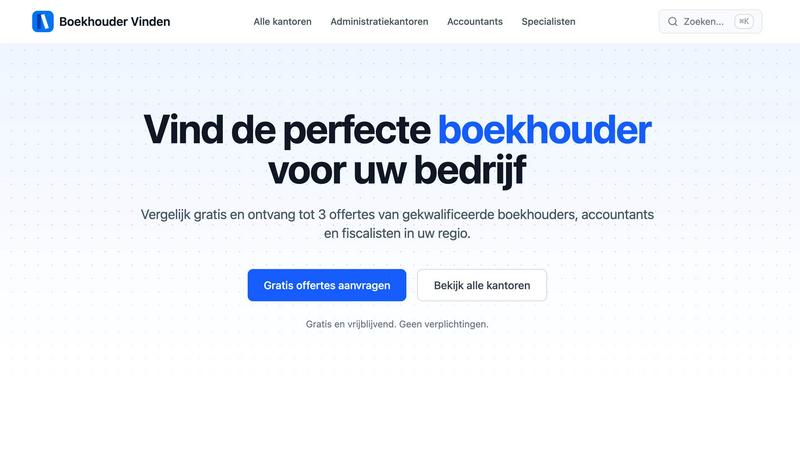
Find the right bookkeeper, accountant, or tax consultant in the Netherlands with free quotes from verified.
Last updated: February 26, 2026

Dokta automates document management for SMBs and freelancers, streamlining invoicing, contracts, and cash flow in just a few clicks.
Last updated: April 4, 2026
Visual Comparison
Boekhouder Vinden
Dokta

Feature Comparison
Boekhouder Vinden
Easy Questionnaire Process
Complete a simple two-minute questionnaire that allows us to understand your business needs and preferences. This streamlined process ensures you get matched quickly with professionals suited for your specific situation.
Tailored Matching Service
Receive up to three quotes from qualified financial professionals who match your criteria. This tailored approach means you can compare relevant offers from multiple experts, making it easier to find the right fit for your business.
Verified Professionals
All firms listed on our platform are thoroughly verified before being included in our network. This means you can trust that the professionals you engage with are qualified and reliable, giving you peace of mind in your financial decisions.
Real Reviews and Feedback
Access genuine reviews from other entrepreneurs to help guide your decision-making process. By reading real experiences, you can evaluate the quality of service offered by different professionals and make a more informed choice.
Dokta
Automated Invoice Management
Dokta simplifies the invoice process by enabling users to upload any document type, which is then automatically analyzed and classified by the AI. This feature reduces the time spent on manual data entry and ensures accurate invoicing.
Real-Time Cash Flow Tracking
This feature provides users with a clear overview of their financial situation by displaying billed amounts, collected payments, outstanding invoices, and VAT. Users can visualize their cash flow trends over a 12-month period through interactive graphs.
Online Quotes and Acceptance
With Dokta, users can send quotes with a simple acceptance link. This feature allows for a seamless transition from quote to invoice in just one click, streamlining the sales process and improving client experience.
Anomaly Detection
Dokta's smart anomaly detection feature safeguards users by identifying issues such as modified IBANs, duplicate entries, inconsistent VAT, and missing numbering. This added layer of protection ensures document integrity and accuracy.
Use Cases
Boekhouder Vinden
Finding the Right Bookkeeper
Entrepreneurs looking for assistance with daily financial matters, such as bookkeeping and VAT declarations, can easily find a qualified bookkeeper through our platform. This ensures that your financial records are maintained accurately and efficiently.
Hiring an Accountant
Businesses needing help with year-end accounts, audits, or complex financial issues can use Boekhouder Vinden to find experienced accountants who specialize in these areas. This allows for better financial planning and compliance with regulations.
Consulting a Tax Specialist
If you require strategic tax advice, fiscal planning, or optimization, our service connects you with tax consultants who can provide expert guidance. This ensures that you take advantage of all available tax benefits and minimize liabilities.
Administrative Support
Companies looking to outsource their administrative tasks can find suitable administration firms through our platform. This helps streamline operations and allows entrepreneurs to focus on core business activities while ensuring compliance and efficiency in administrative processes.
Dokta
Freelance IT Consultant
An IT consultant can use Dokta to automate their invoicing process. By generating invoices from their contracts automatically, they can save time and reduce the risk of errors, allowing them to focus more on coding and client work.
Creative Freelancers
Graphic designers and other creative professionals can manage their projects from start to finish using Dokta. From sending a quote to a client and receiving acceptance online, to generating a final invoice, everything is handled smoothly in one platform.
Auto-Entrepreneurs
Auto-entrepreneurs can utilize Dokta to create compliant invoices while keeping track of their cash flow. Alerts for URSSAF deadlines help them stay organized and compliant without unnecessary stress.
Small Business Owners
SMBs can benefit from Dokta's ability to manage client databases and financial data in real-time. By utilizing Dokta, they can ensure accurate cash flow tracking, automate reminders, and easily prepare for accounting needs.
Overview
About Boekhouder Vinden
Boekhouder Vinden is an innovative platform that connects entrepreneurs in The Netherlands with qualified financial professionals tailored to their specific needs. Whether you are searching for a bookkeeper, accountant, tax consultant, or an administrative office, our service ensures you find the perfect match. By completing a brief questionnaire, you can receive personalized quotes from verified firms within five working days. This process is completely free and non-binding, allowing entrepreneurs to make informed decisions without financial pressure. Our platform emphasizes quality and transparency, ensuring that all professionals in our network are verified and reviewed, allowing you to choose based on real experiences from other users.
About Dokta
Dokta is an AI-powered document management platform specifically designed for freelancers, solo entrepreneurs, auto-entrepreneurs, and small to medium-sized businesses (SMBs). With Dokta, users can effortlessly manage their documents by simply uploading invoices, quotes, or contracts. Within 60 seconds, Dokta's advanced AI engine reads, classifies, and extracts critical data from these documents, optimizing the entire document lifecycle. Users can create professional invoices and quotes, track payments, automate reminders for unpaid invoices, manage contracts and deadlines, and even generate tasks automatically from their documents. This eliminates the hassle of lost files and missed deadlines, allowing users to focus on their core business activities. Moreover, Dokta builds a client database from the uploaded documents, tracks cash flow in real-time, and offers easy CSV exports for accountants. Whether you are a freelance developer, a consultant, or a growing SMB, Dokta integrates document management seamlessly into your operations, supported by a free tier for up to 15 documents per month and paid plans starting at €9 per month. Data security is guaranteed with 100% GDPR compliance and hosting in Europe.
Frequently Asked Questions
Boekhouder Vinden FAQ
How long does it take to receive quotes?
After completing the questionnaire, you will receive up to three quotes from verified firms within five working days. This quick turnaround allows you to start your search for the right professional without delay.
Is there a cost associated with using Boekhouder Vinden?
No, our service is completely free for entrepreneurs. You only pay when you choose a firm to work with, making it a risk-free way to find financial professionals.
How do I know the professionals are qualified?
All firms listed on Boekhouder Vinden are verified and assessed for quality. This ensures that you only receive quotes from professionals who meet our standards and are capable of providing the services you need.
Can I compare multiple professionals?
Yes, you can easily compare up to three quotes from different professionals. This allows you to evaluate their services, reviews, and expertise, helping you make the best choice for your business needs.
Dokta FAQ
What types of documents can I manage with Dokta?
Dokta supports a wide range of documents including invoices, quotes, contracts, and any scanned files or PDFs. This versatility makes it a comprehensive solution for document management.
How quickly does Dokta process documents?
Dokta's AI engine analyzes and processes documents in under 60 seconds, providing users with instant insights and allowing them to take action without delay.
Is my data secure with Dokta?
Yes, Dokta is compliant with GDPR regulations and hosts data in Europe via AWS. All data is encrypted using AES-256, ensuring maximum security and privacy for users.
What is the pricing structure for Dokta?
Dokta offers a free tier allowing users to manage up to 15 documents per month. Paid plans start at €9 per month, with various tiers available to suit different business needs, ensuring flexibility and scalability.
Alternatives
Boekhouder Vinden Alternatives
Boekhouder Vinden is a platform that connects entrepreneurs in the Netherlands with qualified financial professionals, such as bookkeepers, accountants, and tax consultants. It falls under the Business & Finance category, offering users a streamlined way to find the right expertise tailored to their specific needs. Users often seek alternatives due to various reasons, including pricing, feature sets, and compatibility with their unique platform requirements. When considering alternatives, it's essential to evaluate the range of services offered, the level of professionalism of the listed firms, user reviews, and the overall transparency of the platform. Look for options that provide clear profiles and verified professionals to ensure you make an informed decision.
Dokta Alternatives
Dokta is an AI-powered document management platform designed for freelancers, solo entrepreneurs, auto-entrepreneurs, and small to medium-sized businesses (SMBs). It automates the processing of various documents, including invoices, quotes, and contracts, streamlining their management for users. Many individuals and businesses seek alternatives to Dokta due to factors such as pricing, specific feature requirements, or the need for compatibility with other software platforms. When searching for an alternative, it's essential to evaluate the pricing structure, available features, user experience, customer support, and data security measures. Finding a solution that aligns with your specific document management needs can significantly enhance productivity and efficiency.