
Avina vs Playwriter
Side-by-side comparison to help you choose the right AI tool.

Avina
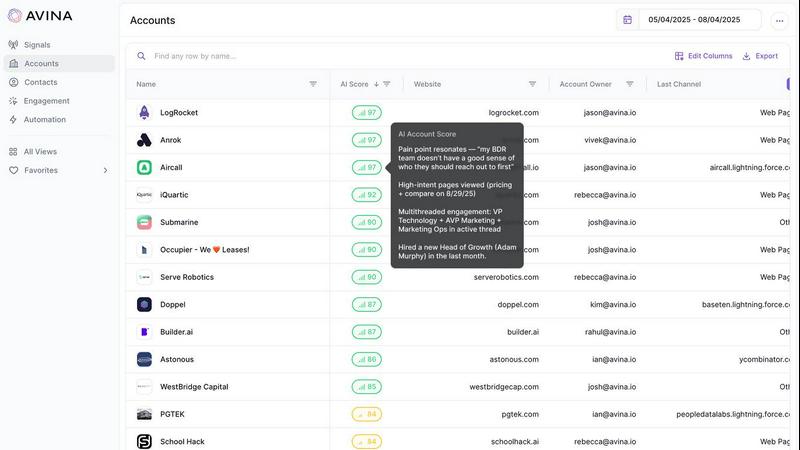
Avina uses AI to find and automatically engage your highest-intent prospects.
Last updated: February 28, 2026

Playwriter
Playwriter lets AI agents control your actual Chrome browser with all your logins and extensions intact.
Last updated: March 18, 2026
Visual Comparison
Avina
Playwriter

Feature Comparison
Avina
AI Signals Agent
This core feature allows you to describe buying behavior in plain language, and Avina's AI builds a custom signal to track it. It reads context, not just keywords, to identify subtle buying moments like feature launches, tech stack changes, or strategic pivots. This goes beyond fixed-signal platforms to capture the exact intent that matters for your business.
Web Visitor Identification (X-Ray Pixel)
Identifies the 98% of website traffic that typically leaves anonymously. Avina combines multiple data providers into a single pixel to automatically de-anonymize visitors, enrich their contact and firmographic data, and route high-intent prospects to sales in real time. This turns unknown traffic into qualified, actionable leads instantly.
Unified Intent Feed
Continuously scans and unifies signals from your website, CRM, LinkedIn, job boards, news, and the open web into a single, live feed. This gives your team full visibility into every account's activity, ensuring no buying signal slips through the cracks between disparate data sources.
AI-Powered Scoring & Prioritization
Ranks every account by real-time signal strength, company fit, and historical engagement using advanced LLMs. Scores update dynamically as new signals fire, providing a constantly prioritized pipeline so reps know exactly which accounts to focus on, eliminating manual sorting and guesswork.
Playwriter
Your Actual Browser Session
Playwriter grants AI agents direct access to your current Chrome session. This includes all your logged-in accounts, saved cookies, installed extensions, and browser settings. There is no need for a separate headless Chrome instance, which eliminates bot detection flags, doubles memory usage, and the hassle of re-authenticating on every task. The agent operates in a real user environment, making automation seamless and indistinguishable from human use.
Full Playwright API via a Single Tool
Unlike other solutions that expose a limited, fixed set of browser actions, Playwriter provides the entire Playwright automation library through one execute tool. This allows agents to run any Playwright code, from simple clicks and navigation to complex performance profiling, network interception, and setting JavaScript breakpoints. This approach minimizes context window bloat and gives the AI maximum flexibility.
Advanced Debugging & Collaboration Suite
Playwriter includes a powerful suite of debugging and collaboration features. You get accessibility snapshots (compact 5-20KB DOM summaries instead of large screenshots), a live debugger with breakpoints, real-time code editing, network request interception, and automatic screen recording. This allows you to watch and guide the AI's actions in real time, stepping in to solve CAPTCHAs or consent walls as needed.
Local-First & Open Source Architecture
The entire system runs locally on your machine. The Chrome extension connects to a local WebSocket relay, and the CLI communicates directly with it. No data is sent to remote servers, ensuring privacy and security. Being MIT-licensed and open source provides full transparency, allows for community inspection, and enables customization to fit specific workflow needs.
Use Cases
Avina
Accelerating Sales Pipeline Velocity
Sales teams use Avina to instantly surface and act on warm, in-market accounts. By receiving real-time alerts on high-intent signals directly in their CRM or Slack, reps can engage prospects while intent is hottest, dramatically shortening sales cycles and increasing close rates on qualified opportunities.
Automating Personalized Outreach Sequences
Marketing and sales teams automate hyper-relevant follow-up. When a key buying signal is detected, Avina can automatically enroll the prospect into a tailored email sequence, draft personalized messaging, and update the CRM. This ensures timely, context-aware communication without manual effort.
Optimizing Advertising Spend
Marketing teams leverage Avina to build highly targeted ad audiences based on real-time buying intent. By creating lookalike audiences from accounts showing strong signals or retargeting website visitors identified by the X-Ray Pixel, teams can improve ad relevance and ROI significantly.
Enhancing Account-Based Marketing (ABM)
RevOps and marketing teams gain a unified view of target account activity. Avina monitors for intent signals across a defined account list, scores engagement, and triggers tailored plays. This allows for coordinated, multi-channel outreach that is directly tied to an account's live buying behavior.
Playwriter
AI-Powered Web Automation & Testing
Developers can instruct their AI assistant to automate repetitive web tasks, such as filling forms, scraping data from complex authenticated dashboards, or running through multi-step user flows for testing. Since it uses the real browser, it perfectly mimics user behavior and works on sites that block headless automation.
Collaborative Web Development & Debugging
Front-end developers can work alongside an AI to debug websites. The AI can be asked to profile page load performance, intercept network requests to analyze API calls, set breakpoints in live code, or visually label elements while the developer observes and guides the process in real time, creating a powerful pair-programming dynamic.
AI-Assisted Research & Data Gathering
Researchers, analysts, or content creators can use an AI agent to conduct in-depth online research across multiple sources that require login, such as academic journals, social media platforms, or subscription news sites. The AI can navigate, extract, and summarize information from these authenticated environments efficiently.
Automated Workflow Integration
Power users can integrate Playwriter into larger scripts and workflows. The CLI can be called from other automation tools or scripts to perform browser-based actions as part of a scheduled job, data pipeline, or custom application, leveraging the stable, logged-in session for reliability.
Overview
About Avina
Avina is an AI-powered Go-To-Market (GTM) platform built for modern revenue teams. It solves the core challenge of information overload by unifying real-time buying signals from across your entire tech stack. The platform continuously monitors and analyzes data from web intent, CRM activity, email, calls, ad engagement, job changes, and company news. Its key differentiator is the use of advanced LLMs to read the full context behind every interaction, interpreting not just what a prospect did, but what it truly meant. This allows Avina to score and prioritize accounts with human-like understanding, delivering a live, ranked list of warm, in-market opportunities. Designed for sales, marketing, and revops teams, Avina integrates seamlessly with tools like Salesforce, HubSpot, and Outreach. It automatically turns identified intent into immediate action by pushing hot accounts to reps, building targeted ad audiences, and triggering personalized sequences. Avina provides the decisive edge to spot buyers early, act fast, and win more deals by ensuring every outreach is relevant and timely.
About Playwriter
Playwriter is a revolutionary open-source tool that connects AI agents directly to your real, logged-in Chrome browser. It solves the fundamental problem where AI agents either have no web access or are forced to use a fresh, "incognito-like" browser instance with no extensions, no saved logins, and high bot detection rates. Instead of spawning a new, isolated browser, Playwriter gives agents control over your existing session through a Chrome extension and a local CLI. This means the AI can interact with websites exactly as you do, with all your cookies, extensions, and authenticated sessions already in place. It provides a full Playwright automation API through a single, powerful tool, enabling complex browser interactions without the overhead of dozens of predefined tool schemas. Designed for developers and power users working with AI coding assistants like Cursor, Claude Desktop, or VS Code via the Model Context Protocol (MCP), Playwriter turns your AI into a capable, collaborative web automation partner that works within your digital environment.
Frequently Asked Questions
Avina FAQ
What makes Avina different from other intent data platforms?
Avina uses advanced LLMs to understand the full context behind signals, not just track keywords. Its AI Signals Agent allows you to create custom signals in plain language for nuanced buying behavior. It also unifies first-party, third-party, and web data into a single platform with automated actions, moving beyond simple data alerts to an automated GTM engine.
How does the Web Visitor Identification work?
Avina's X-Ray Pixel combines multiple data providers into a single snippet placed on your website. It de-anonymizes visiting companies by matching IP addresses to firmographic databases, then enriches the account with key contacts and insights. High-intent visitors are scored and routed to sales instantly, turning anonymous traffic into leads.
What kind of automations can Avina trigger?
Avina can trigger a wide range of actions automatically when a high-intent signal is detected. This includes creating and assigning tasks in your CRM (Salesforce, HubSpot), sending alerts to reps via Slack or email, enrolling contacts into personalized sales sequences in tools like Outreach, and building targeted audiences in ad platforms.
How do you ensure signal quality and reduce noise?
Avina employs a multi-layer filtering system. First, ICP filters weed out accounts that don't match your ideal customer profile. Then, AI scoring evaluates the strength and context of each signal. Finally, waterfall enrichment ensures data is complete before an alert is generated, so reps only see high-quality, actionable opportunities.
Playwriter FAQ
How does Playwriter differ from other browser automation tools?
Other tools typically launch a new, clean browser instance or offer a limited set of predefined actions. Playwriter is unique because it controls your existing Chrome session with all your logins and extensions intact, and it exposes the full Playwright API. This means no bot detection, no re-authentication, and far greater capability for complex tasks and debugging.
Is my browsing data safe with Playwriter?
Yes. Playwriter operates on a strict local-first principle. The Chrome extension communicates with a WebSocket server running on your own machine (localhost). No browser data, cookies, or session information is transmitted to any remote server. You have complete control over the entire data flow.
Can I use Playwriter with any AI assistant?
Playwriter is designed to work with any client that supports the Model Context Protocol (MCP), such as Cursor, Claude Desktop, and VS Code with an MCP plugin. You install a "skill" that teaches your specific AI agent how to use Playwriter's capabilities effectively.
What happens if the AI gets stuck or hits a CAPTCHA?
This is where Playwriter's collaborative design shines. You watch the automation happen live in your browser. If a CAPTCHA, consent pop-up, or unexpected page appears, you can simply interact with the page yourself to resolve it. Then you can re-enable the extension, and the AI agent will continue its task from the new state.
Alternatives
Avina Alternatives
Avina is an AI-powered Go-To-Market platform that identifies high-intent prospects by analyzing unified buying signals. It belongs to the sales and marketing intelligence category, helping teams act on live opportunities with automated outreach. Users may seek alternatives for various reasons, including budget constraints, specific feature requirements, or the need for a platform that integrates with a different set of existing tools. The desire for a different user experience or sales methodology alignment can also drive the search. When evaluating alternatives, consider the depth of intent data sources, the sophistication of AI and scoring logic, and the platform's ability to automate actions within your workflow. The right solution should seamlessly connect signal detection to execution, fitting your team's process and tech stack.
Playwriter Alternatives
Playwriter is an open-source automation tool that gives AI agents direct, programmatic control over a real Chrome browser session. It solves the core problem of AI web interaction by providing access to your actual logged-in browser, complete with extensions and settings, instead of a fresh, isolated instance. Users explore alternatives for various reasons. Some may need different pricing models, specific integrations beyond the Model Context Protocol (MCP), or a solution tailored for a different browser. Others might prioritize a managed cloud service over a local, open-source tool. When evaluating options, consider the core automation capability, security model for browser access, compatibility with your AI workflow stack, and the level of control you need over the browser environment and session data.