

Subclip
Subclip uses AI to edit videos, generate subtitles, and dub content with voice cloning in multiple languages.
AI tool Details
Explore More
Alternatives
About Subclip
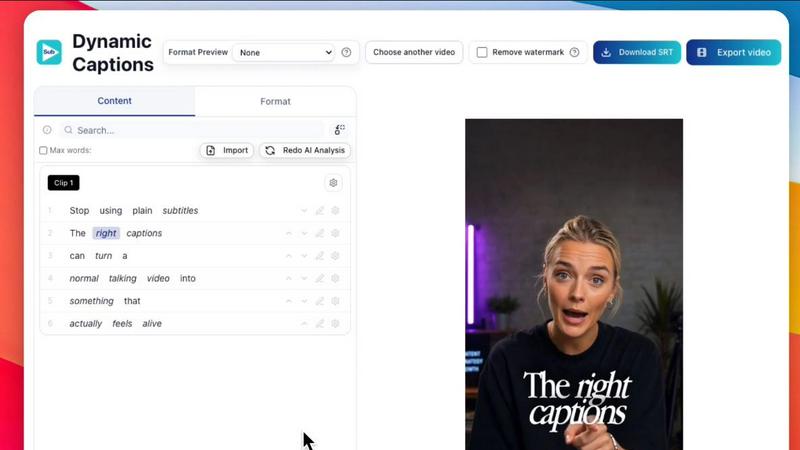
Subclip is an AI-powered video editor built for creators, marketers, and educators who want to reclaim their time from complex editing software. The core idea is simple: edit videos like a document. Instead of scrubbing through hours of raw footage on a timeline, you drag in a transcript and start editing text. Subclip automatically syncs changes to your video timeline, removing the manual grind of traditional editing. The platform supports transcription, subtitle generation, voice cloning, silence removal, filler word removal, and multi-language dubbing. It is designed for YouTubers, podcasters, course creators, coaches, vloggers, agencies, and freelancers. Subclip streamlines the entire video production workflow from raw footage to final export. It offers AI clipping to automatically find high-energy segments and punchlines, one-click dynamic auto-captions, and AI dubbing that preserves your voice tone and emotion across 21+ languages. You can also enhance audio by removing background noise and room echo. Subclip includes team collaboration features, allowing you to share projects and collect feedback in one workspace. It integrates with professional editors like DaVinci Resolve, Final Cut Pro, and Adobe Premiere Pro for advanced editing. The platform also offers built-in scheduling for YouTube and X (Twitter), with more platforms coming soon. Subclip promises to save creators up to 80% of their editing time, letting you focus on creating rather than staring at timelines. It operates directly in your browser with no upload and download wait times, making it faster than traditional tools.
Features
Rough Cut using Text Transcript
Edit your video by editing the transcript, just like a Google Doc. Trim mistakes, rearrange sections, and delete filler content instantly. The timeline updates automatically without manual rework. You can export the NLE timeline to DaVinci Resolve, Final Cut Pro, and Adobe Premiere Pro for advanced editing. This feature removes the complexity of traditional timeline-based editing and makes video editing as intuitive as writing.
AI Clipping
Subclip scans your video for high-energy segments, punchlines, and key emotional shifts. It automatically identifies the best moments and turns long videos into short, high-retention clips in minutes. Each clip is scored with a Viral Score, Engagement Score, and Retention Score, helping you pick the winners. You can export these clips directly to professional editors as .fcpxml files or publish them to social media.
One-Click Unlimited Captions
Generate unlimited subtitles and export unlimited video minutes with local transcription in 48+ languages. Customize the text and formatting, and make quick edits before publishing. The captions are dynamic and can be styled to match your brand. This feature is perfect for making your content accessible and engaging for a global audience without any limits on usage.
AI Dubbing with Voice Clone
Translate your voice into 21+ languages while maintaining your original tone and emotion. Subclip clones your voice and uses it to re-record parts of your video, ensuring the dubbing sounds natural and authentic. Background music is preserved during the dubbing process. This feature allows you to go global with your content without re-recording or hiring voice actors.
Use Cases
Creators and Podcasters
Clip long-form videos into short, high-retention clips with zero effort. Subclip automatically finds your best moments and removes silences. You can add stunning captions, dub your content into multiple languages, and schedule posts directly to YouTube and X. This workflow lets you 10x your viewership by repurposing long content into multiple short clips without manual editing.
Coaches and Course Creators
Dub your recorded videos or courses into 20+ languages using your own cloned voice. This allows you to reach a global audience without re-recording. Subclip also removes silences and filler words, making your lessons more concise and professional. You can collaborate with your team in one workspace and export the final video to any platform instantly.
Vloggers
Add captions, B-Roll, audio, and remove noise in one click without limits. Subclip cleans your audio by removing background noise and room echo. You can export your final video in multiple aspect ratios (16:9, 9:16, 1:1) for different social media platforms. The built-in scheduling feature lets you post content directly from a single calendar, saving you time on manual uploads.
Agencies and Freelancers
Increase output at a fraction of the cost with unlimited transcription, export, and team collaboration. Subclip allows you to share projects like a Google Doc with clients or team members for feedback. You can move edited clips into professional editors like DaVinci Resolve, Final Cut Pro, and Adobe Premiere Pro with one click. This streamlines the entire production pipeline from raw footage to final delivery.
Pricing
Subclip offers a Freemium pricing model with a free tier that provides access to basic features. For users who need more, affordable paid plans are available. Specific pricing details for each plan tier are not provided in the available context, but the product is designed to be cost-effective for creators, teams, and agencies.
Frequently Asked Questions
How does Subclip edit videos using a transcript?
Subclip transcribes your video and displays the text. You can edit the transcript like a Google Doc by cutting, copying, and pasting text. Each edit automatically updates the video timeline, removing the need to manually scrub through footage. This makes video editing as simple as editing a document.
What languages does Subclip support for transcription and dubbing?
Subclip supports local transcription in 48+ languages and AI dubbing with voice clone in 21+ languages. The dubbing preserves your original tone and emotion while translating the content. Background music is also preserved during the dubbing process.
Can I export my project to professional editing software?
Yes, Subclip allows you to export your edited timeline as a .fcpxml file that works with DaVinci Resolve, Final Cut Pro, and Adobe Premiere Pro. This lets you use Subclip for the rough cut and then move to advanced editing in your preferred software.
How does Subclip handle team collaboration?
Subclip lets you share projects with your team or clients like a Google Doc. You can collect feedback, make edits, and collaborate in one workspace. This eliminates the need for multiple file versions and lengthy email chains, streamlining the review process.
Similar to Subclip
Aaven - News and Audio
Turns the news topics you pick into a natural-voice spoken briefing. Free tier included, no account required.


Hush Touch | Voice-to-Text for MacOS
Hush Touch is offline voice-to-text software for Mac that learns your vocabulary and delivers precise dictation.

Glossa
Glossa offers real-time AI translation of sermons into 100+ languages, breaking language barriers for your church.

Bantr: Offline & Unlimited TTS for Mac
Bantr is an offline text-to-speech app for Mac that offers unlimited, private, and natural-sounding voice generation.

SpechAI
SpechAI is your AI speech coach for instant feedback and confident public speaking practice.

KaiCalls
KaiCalls is your 24/7 AI phone agent that instantly answers calls, qualifies leads, and schedules appointments.

Vowen
Vowen is a private voice app that turns your speech into text and commands for your computer.