

Budgeting App
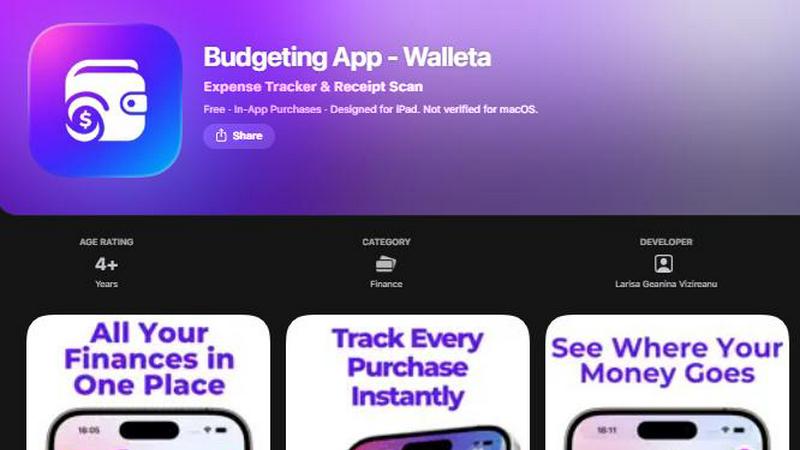
Walleta uses AI to scan receipts and track expenses so you can set monthly budgets and see where your money goes.
AI tool Details
Explore More
Alternatives
About Budgeting App
Budgeting App, also known as Walleta, is a free iOS budget planner and AI expense tracker designed for users who want complete control over their finances without connecting to their bank. Available on the App Store for iPhone and iPad, this app replaces the need for multiple finance tools by combining receipt scanning, manual expense logging, monthly budget tracking, and detailed analytics into one private, on-device solution. The app is built for travelers, expats, students, and privacy-first households who want to avoid cloud finance sync, email signups, and ad tracking. With Walleta, users can snap a photo of any receipt and let on-device AI read the merchant, total, date, and category. After verifying the details, the expense is saved instantly. The app includes fourteen built-in categories such as food, groceries, transport, shopping, health, rent, bills, subscriptions, coffee, travel, and fun. Monthly budget caps show real-time progress and send alerts when spending nears limits. Beautiful analytics including pie charts, bar graphs, calendar day views, multi-currency codes, and spending history archives support weekly, monthly, and yearly review. All data stays on the device with no bank connection, no account creation, no cloud sync, and no tracking pixels. Free users get three AI receipt scans to try the feature, and Walleta Pro unlocks unlimited scans. The app requires iOS 18.2 or later and is designed for iPhone and iPad. Manual one-tap logging remains free forever.
Features
AI Receipt Scanning
Point your camera at any receipt and Walleta's on-device AI instantly reads the merchant name, total amount, date, and category. This eliminates manual typing and saves seconds on every expense entry. The AI works best with clear, readable receipts where all details are visible. After scanning, you verify the extracted information before saving it to your spending history. Free users get three AI scans to try the feature, and upgrading to Walleta Pro unlocks unlimited AI receipt scans for frequent users who want to capture every purchase with a photo.
One-Tap Expense Logging
Log spending in seconds by selecting from fourteen built-in categories with a single tap. Categories include food, groceries, transport, shopping, health, rent, bills, subscriptions, coffee, travel, and fun. This manual logging method is completely free and always available. It works perfectly for cash purchases, online transactions, or any expense where a receipt is not available. The simple tap interface makes it easy to build a consistent tracking habit without friction, ensuring every dollar is accounted for regardless of how you pay.
Monthly Budget Tracking
Define a spending limit for each month and watch your progress in real time with a visual progress bar. Walleta alerts you when you are approaching or exceeding your budget so you can adjust your spending before it is too late. This feature helps prevent overspending and keeps your finances on track. You can set different limits for different categories or a single overall budget. The real-time feedback loop makes it easy to stay within your financial goals without constant manual calculation.
Beautiful Analytics and Calendar View
See your spending patterns with visual breakdowns including pie charts, bar graphs, and category summaries for weekly, monthly, and yearly periods. The calendar view lets you browse expenses day by day across the month, showing exactly what you spent on any date at a glance. Multi-currency support auto-detects your local currency or lets you set any currency code manually, making it ideal for travelers and expats. Spending history archives past cycles so you can review your financial behavior over time without losing data.
Use Cases
Privacy-First Household Budgeting
Families and individuals who want to track their spending without connecting to a bank account or sharing data with third parties can use Walleta as their private expense tracker. All data stays on the iPhone with no cloud sync, no email signup, and no tracking pixels. Users can set monthly budgets, log expenses manually or via receipt scan, and review analytics without worrying about their financial data being stored on external servers. This makes it ideal for privacy-conscious users who want complete control over their personal information.
Travel and Expense Tracking for Expats
Travelers and expats who deal with multiple currencies can use Walleta to track spending in local currencies without needing a bank connection. The app supports multi-currency codes and auto-detects your local currency. You can log expenses from different countries, scan receipts in various formats, and review your spending patterns across different currencies. The calendar view helps you see where your money went on specific travel dates, and the spending history archives your financial activity across multiple trips or relocations.
Student Budget Management
Students who need to manage limited funds without complex financial tools can use Walleta to set monthly budgets and track every expense. The simple one-tap logging interface makes it easy to record purchases from campus dining, transportation, textbooks, and entertainment. Real-time budget alerts help students avoid overspending before the end of the month. The analytics show where money is going, helping students identify spending patterns and make adjustments. No bank connection or account setup means students can start tracking immediately.
Cash-Based Expense Tracking
People who primarily use cash for everyday purchases can use Walleta to manually log each transaction without a bank connection. The fourteen built-in categories cover common spending areas like food, groceries, transport, and shopping. Users can also scan paper receipts for accuracy. This use case is perfect for those who want to digitize their cash spending and get the same analytical insights as digital payment users. The spending history and calendar views provide a complete picture of cash flow without requiring any bank or credit card integration.
Frequently Asked Questions
Does Walleta connect to my bank account?
No, Walleta does not connect to your bank account, credit card, or any financial institution. All expense tracking is done manually by either scanning receipts or tapping categories to log spending. Your financial data never leaves your iPhone. There is no cloud sync, no email signup, and no ad tracking. This makes Walleta a completely private expense tracker that works independently of your bank.
How many AI receipt scans do I get for free?
Free users get three AI receipt scans to try the feature. After those three scans, you can continue using the app with unlimited manual one-tap expense logging at no cost. If you want unlimited AI receipt scans, you can upgrade to Walleta Pro through an in-app purchase. The AI works best with clear, readable receipts where the merchant, total, date, and category are visible.
What categories are available in Walleta?
Walleta includes fourteen built-in categories for tracking expenses: Food, Groceries, Transport, Shopping, Health, Rent, Bills, Subscriptions, Coffee, Travel, Fun, and more. You can log spending in seconds by tapping the appropriate category. This covers the most common spending areas for individuals, students, travelers, and households. Manual logging is always free and unlimited.
Is my data safe and private?
Yes, all your data stays on your device. Walleta does not connect to your bank, require an account, ask for your email, use cloud sync, or include any tracking pixels. Your finances are yours alone, and all data remains on your iPhone. The app is designed for privacy-first users who want complete control over their financial information without any third-party access.
Similar to Budgeting App

Partly
Snap the receipt, let AI read the items, and see who owes whom in your flat, trip or dinner group.


Money Tracker App
Money Tracker App is a private iOS expense tracker that uses AI receipt scanning and offline budgets without needing a bank link or signup.
CalcFi
CalcFi offers 500+ free financial calculators for mortgages, retirement, taxes, and investing with instant results and no signup required.
kill the sub
Find and cancel forgotten subscriptions in minutes with AI for just $3.

Lightsplit
Lightsplit tracks shared expenses in LINE and Telegram so everyone knows exactly what they owe.
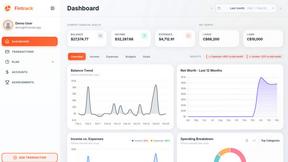
Fintrack
Fintrack is your AI-driven financial assistant that tracks spending, uncovers hidden savings, and brings clarity to your money management.