
DigitalMagicWand vs VideoDubber Video Translator
Side-by-side comparison to help you choose the right AI tool.

DigitalMagicWand
DigitalMagicWand seamlessly transforms visuals, audio, video, and text with advanced AI tools for creative and professional use.
Last updated: March 18, 2026

VideoDubber Video Translator
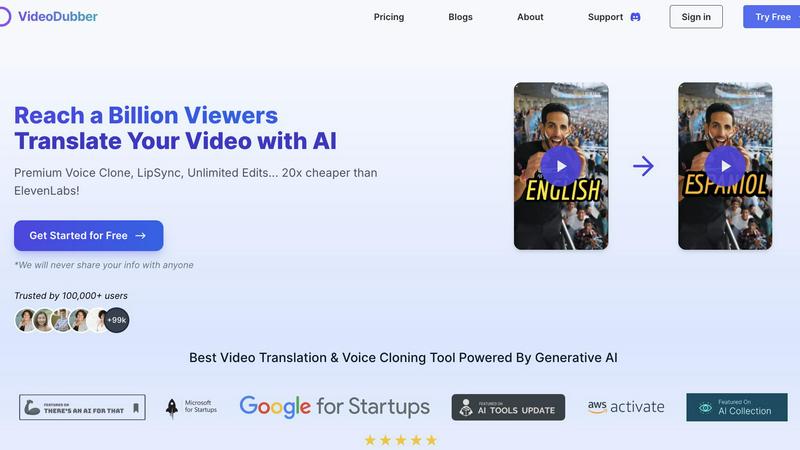
Effortlessly translate and dub your videos in 150+ languages to engage a global audience with VideoDubber's AI.
Last updated: March 1, 2026
Visual Comparison
DigitalMagicWand

VideoDubber Video Translator
Feature Comparison
DigitalMagicWand
Accurate AI Detector for Text
Instantly determine if text is human-written or AI-generated with our one-click AI detector. It provides clear confidence scores, ensuring you have reliable insights into content authenticity. This feature is perfect for educators, editors, and content managers who need to verify sources quickly and efficiently.
Undetectable AI Text Humanizer
Transform machine-generated text into natural human writing with our advanced AI humanizer. Utilizing proprietary algorithms, it removes detectable patterns while maintaining the original message. This is ideal for anyone needing to repurpose AI-generated content for academic, creative, or professional contexts.
Digital Ear™: Convert Piano Tracks to MIDI
Experience unparalleled audio-to-MIDI conversion with Digital Ear™. This feature specializes in solo piano performances, accurately transcribing complex nuances into MIDI format. It's a must-have for musicians looking to digitize their compositions or analyze piano pieces for deeper musical understanding.
AI Image Editor
Elevate your image editing experience with our AI Image Editor. Swap backgrounds, remove unwanted elements, and enhance photos with ease. This powerful tool allows users to create stunning visuals without needing advanced design skills, making it perfect for social media marketers, bloggers, and casual users alike.
VideoDubber Video Translator
Superior Voice Cloning and Dubbing
Leverage cutting-edge voice cloning technology that delivers realistic voice-overs matching the original speaker's tone and emotion. This feature enhances viewer connection, making content feel authentic and engaging.
Simple Yet Powerful 1-click UI
Enjoy an intuitive interface designed for efficiency. With just one click, you can translate entire videos. Advanced options allow for subtitle editing, timestamp adjustments, and re-translation, streamlining the translation experience.
Unlimited Free Editing and Voice-overs
Take advantage of unlimited free re-edits after translation. Change voice-overs, timestamps, or text as needed without incurring additional costs. This feature empowers users to refine their videos to perfection.
Advanced AI Translation Models
Choose from leading AI models like DeepSeek, Gemini, or OpenAI's GPT-5 for translation, ensuring high accuracy and contextual understanding. This flexibility allows users to select the best model tailored to their specific needs.
Use Cases
DigitalMagicWand
Content Creation for Educators
Educators can utilize the Accurate AI Detector to ensure the integrity of student submissions. By verifying content authenticity, they can focus on providing constructive feedback, thereby enhancing the learning experience.
Music Production for Musicians
Musicians can take advantage of Digital Ear™ to convert their piano tracks into MIDI files, allowing for easier editing and integration into larger musical projects. This feature streamlines the production process and fosters creativity.
Image Enhancement for Marketers
DigitalMagicWand's AI Image Editor is perfect for digital marketers who need to create visually appealing content for campaigns. With quick background changes and element removal, they can produce professional-quality images that stand out.
Text Refinement for Writers
Writers can benefit from the Undetectable AI Text Humanizer to refine AI-generated drafts, making them more suitable for publication. This ensures that the final output reads naturally and engages the target audience effectively.
VideoDubber Video Translator
Content Creation for YouTube
YouTube creators can use VideoDubber to translate and dub their videos into various languages, significantly increasing their global reach and audience engagement.
E-Learning and Educational Materials
Educators can translate instructional videos into multiple languages, making learning accessible to students worldwide and enhancing understanding through localized content.
Marketing Campaigns and Advertisements
Businesses can adapt promotional videos for different markets, ensuring that their marketing messages resonate with diverse audiences by using culturally relevant translations.
Corporate Training and Internal Communications
Companies can utilize VideoDubber for translating internal training videos, ensuring that all employees, regardless of language, have access to important information and training materials.
Overview
About DigitalMagicWand
DigitalMagicWand™ is an advanced online platform that harnesses the power of artificial intelligence to transform digital content creation. It offers a comprehensive suite of tools for image, audio, video, and text processing, catering to a wide range of users including content creators, musicians, educators, and businesses. Whether you are looking to enhance your multimedia projects, generate stunning visuals from text, or analyze and manipulate audio tracks, DigitalMagicWand provides intuitive solutions that promote creativity and efficiency. Its AI-driven technology ensures high-quality results with minimal effort, allowing users to focus on their creative vision rather than technical challenges. With features designed for both professionals and casual users, DigitalMagicWand is a one-stop shop for all your digital content needs.
About VideoDubber Video Translator
VideoDubber Video Translator is an advanced AI-driven platform that revolutionizes the way videos are translated and dubbed. Designed to support over 150 languages, it serves a wide array of users including content creators, educators, businesses, and marketers who aim to engage a global audience. VideoDubber simplifies the translation process while maintaining high audio quality and natural voice characteristics. It features state-of-the-art technology such as voice cloning and lip-sync capabilities, effectively removing language barriers in content. By utilizing VideoDubber, users can enhance viewer engagement, broaden their reach, and ultimately boost their audience and viewership. With over 100,000 satisfied users and a rating of 4.98/5 on industry platforms, VideoDubber stands out in the video translation market, ensuring that your message resonates across cultures.
Frequently Asked Questions
DigitalMagicWand FAQ
What types of content can I create with DigitalMagicWand?
You can create and enhance images, audio tracks, videos, and text. Our suite of AI tools allows for diverse content transformation and generation.
Is it easy to use DigitalMagicWand?
Yes, DigitalMagicWand is designed to be user-friendly. Most features require no technical skills, enabling users to achieve professional results effortlessly.
Can I trust the AI Detector for text verification?
Absolutely. The Accurate AI Detector provides clear confidence scores, giving you reliable insights into whether content is human-written or generated by AI tools.
Are there any specific requirements to use the platform?
DigitalMagicWand is web-based, so you only need a compatible browser and an internet connection. There are no special software installations required.
VideoDubber Video Translator FAQ
How does VideoDubber ensure high-quality translations?
VideoDubber utilizes advanced AI models like DeepSeek, Gemini, and GPT-5 to provide contextually accurate translations. This ensures that the essence of the original content is preserved while adapting to different languages.
What types of files can I upload to VideoDubber?
You can upload video files directly from your laptop, Google Drive, YouTube, or Dropbox. The platform supports various formats, making it easy to import your videos for translation.
Is there a limit to the number of languages I can translate my video into?
No, you can select multiple target languages in one go without needing to upload your video multiple times. This feature allows for efficient and streamlined translation.
Can I edit my translated video after downloading?
Yes, VideoDubber offers unlimited free editing of your translated videos even after download. You can adjust subtitles, voice-overs, and timestamps as many times as you want without additional costs.
Alternatives
DigitalMagicWand Alternatives
DigitalMagicWand is an AI-driven platform that offers tools for enhancing and creating visuals, audio, video, and text. As a part of the AI Assistants category, it provides users with advanced technology to streamline their digital content creation process. Users often seek alternatives to DigitalMagicWand due to various reasons such as pricing constraints, specific feature requirements, or compatibility with different platforms. When evaluating potential alternatives, it's essential to consider factors including the range of features offered, ease of use, customer support, and overall value for money.
VideoDubber Video Translator Alternatives
VideoDubber Video Translator is an innovative AI-powered tool that simplifies the process of translating and dubbing videos into over 150 languages. It caters to a wide range of users, including content creators, educators, businesses, and marketers, all aiming to reach an international audience effortlessly. Many users seek alternatives to VideoDubber due to various factors such as pricing, specific feature sets, or compatibility with different platforms. When searching for an alternative, users should consider several key aspects. These include the quality of audio output, the availability of additional features like voice cloning or lip-sync technology, and the pricing structure, including any hidden costs. It's also important to evaluate the ease of use and customer support offered by alternative platforms to ensure a smooth experience.