

VideoDubber Video Translator
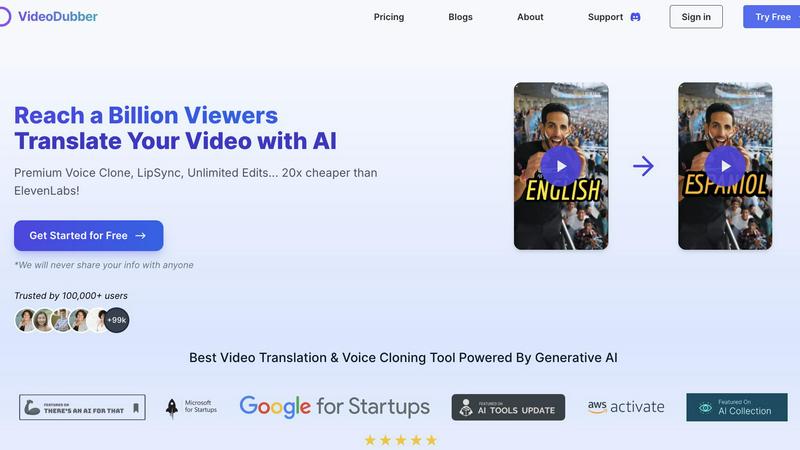
Effortlessly translate and dub your videos in 150+ languages to engage a global audience with VideoDubber's AI.
AI tool Details
Explore More
Alternatives
About VideoDubber Video Translator
VideoDubber Video Translator is an advanced AI-driven platform that revolutionizes the way videos are translated and dubbed. Designed to support over 150 languages, it serves a wide array of users including content creators, educators, businesses, and marketers who aim to engage a global audience. VideoDubber simplifies the translation process while maintaining high audio quality and natural voice characteristics. It features state-of-the-art technology such as voice cloning and lip-sync capabilities, effectively removing language barriers in content. By utilizing VideoDubber, users can enhance viewer engagement, broaden their reach, and ultimately boost their audience and viewership. With over 100,000 satisfied users and a rating of 4.98/5 on industry platforms, VideoDubber stands out in the video translation market, ensuring that your message resonates across cultures.
Features
Superior Voice Cloning and Dubbing
Leverage cutting-edge voice cloning technology that delivers realistic voice-overs matching the original speaker's tone and emotion. This feature enhances viewer connection, making content feel authentic and engaging.
Simple Yet Powerful 1-click UI
Enjoy an intuitive interface designed for efficiency. With just one click, you can translate entire videos. Advanced options allow for subtitle editing, timestamp adjustments, and re-translation, streamlining the translation experience.
Unlimited Free Editing and Voice-overs
Take advantage of unlimited free re-edits after translation. Change voice-overs, timestamps, or text as needed without incurring additional costs. This feature empowers users to refine their videos to perfection.
Advanced AI Translation Models
Choose from leading AI models like DeepSeek, Gemini, or OpenAI's GPT-5 for translation, ensuring high accuracy and contextual understanding. This flexibility allows users to select the best model tailored to their specific needs.
Use Cases
Content Creation for YouTube
YouTube creators can use VideoDubber to translate and dub their videos into various languages, significantly increasing their global reach and audience engagement.
E-Learning and Educational Materials
Educators can translate instructional videos into multiple languages, making learning accessible to students worldwide and enhancing understanding through localized content.
Marketing Campaigns and Advertisements
Businesses can adapt promotional videos for different markets, ensuring that their marketing messages resonate with diverse audiences by using culturally relevant translations.
Corporate Training and Internal Communications
Companies can utilize VideoDubber for translating internal training videos, ensuring that all employees, regardless of language, have access to important information and training materials.
Frequently Asked Questions
How does VideoDubber ensure high-quality translations?
VideoDubber utilizes advanced AI models like DeepSeek, Gemini, and GPT-5 to provide contextually accurate translations. This ensures that the essence of the original content is preserved while adapting to different languages.
What types of files can I upload to VideoDubber?
You can upload video files directly from your laptop, Google Drive, YouTube, or Dropbox. The platform supports various formats, making it easy to import your videos for translation.
Is there a limit to the number of languages I can translate my video into?
No, you can select multiple target languages in one go without needing to upload your video multiple times. This feature allows for efficient and streamlined translation.
Can I edit my translated video after downloading?
Yes, VideoDubber offers unlimited free editing of your translated videos even after download. You can adjust subtitles, voice-overs, and timestamps as many times as you want without additional costs.
Similar to VideoDubber Video Translator
Novastart
Infinite canvas whiteboard OS where apps, files, teams and AI agents work together.
Toolara Music
Describe a song in plain text and get a complete track — vocals or instrumental, custom lyrics, up to 120 seconds, MP3 download

ColdCrow
AI cold email writer with a deliverability score - describe a prospect, get a personalized draft in seconds.

LinkIntel
MCP server that gives Claude or any MCP assistant your own X post results and X's open-source ranking weights, so drafts start from evidence.

Raindance AI Video Generator
Turn two photos into the Raindance AI pier video with the soundtrack included

DanseAI - Alors on Danse AI Video Genera
Make the Alors on Danse AI meme video from two photos, soundtrack included