
Hush Touch | Voice-to-Text for MacOS vs URL to Any
Side-by-side comparison to help you choose the right AI tool.

Hush Touch | Voice-to-Text for MacOS
Hush Touch is offline voice-to-text software for Mac that learns your vocabulary and delivers precise dictation.
Last updated: February 26, 2026

URL to Any
Transform any web content into multiple formats and languages effortlessly with URL to Any’s powerful conversion tools.
Last updated: March 1, 2026
Visual Comparison
Hush Touch | Voice-to-Text for MacOS

URL to Any
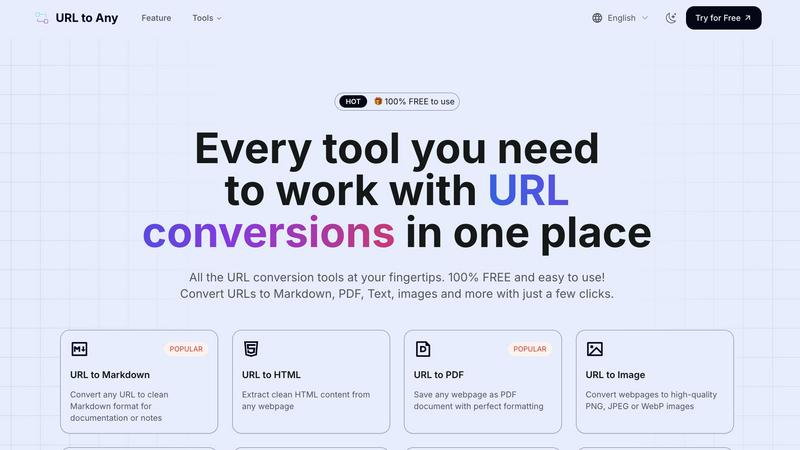
Feature Comparison
Hush Touch | Voice-to-Text for MacOS
Dual-Engine Recognition
Hush Touch combines two Apple dictation engines to optimize performance. The DictationTranscriber engine ensures natural flow and punctuation, while SFSpeechRecognizer enhances custom vocabulary recognition. This powerful duo guarantees that your dictations are accurate and contextually relevant.
Custom Vocabulary Learning
Hush Touch can recognize up to 500 custom terms and learns from your corrections. This feature is particularly beneficial for users with specialized jargon, such as medical or technical terms, ensuring that the app adapts to your unique language needs over time.
Smart Text Processing
The app excels in smart text processing, which includes removing filler words and auto-correcting common mistakes in real-time. It can also format lists and recognize voice snippets for repeated phrases, making your writing process efficient and polished.
100% On-Device Privacy
Hush Touch prioritizes user privacy by processing all voice data locally on your Mac. There is zero reliance on cloud services, meaning your data remains secure and confidential. This makes it an ideal choice for users who are concerned about privacy.
URL to Any
URL to Markdown
Convert any webpage into clean Markdown format effortlessly. This feature is perfect for documentation, note-taking, or developing content that requires structured text, saving users time and enhancing productivity.
URL to PDF
Easily save any webpage as a PDF document while preserving its original formatting. This feature is ideal for archiving web content or sharing information in a universally accessible format, ensuring that the content looks the same across devices.
URL to Image
Transform webpages into high-quality images in formats like PNG, JPEG, or WebP. This feature is useful for creating visual references, presentations, or sharing content on social media, providing a quick way to grab and share essential information visually.
URL to QR Code
Generate QR codes from any URL instantly. This feature simplifies sharing links, making it easy to direct users to websites or digital content through a quick scan, enhancing engagement at events, promotions, or in printed materials.
Use Cases
Hush Touch | Voice-to-Text for MacOS
Hands-Free Email Drafting
Use Hush Touch to compose emails without typing. Simply start dictating your message, and the app will auto-insert text after a short pause, allowing you to focus on your thoughts without distraction.
Note Taking in Meetings
During meetings or lectures, Hush Touch allows you to take notes hands-free. You can dictate important points and ideas, ensuring you capture everything without fumbling with pen and paper.
Content Creation for Writers
Freelance writers can leverage Hush Touch to draft articles and documents effortlessly. The app's accuracy and vocabulary learning capabilities make it easier to express ideas quickly and effectively.
Medical and Technical Documentation
Professionals in specialized fields can use Hush Touch to dictate complex terminology and detailed notes. The app's ability to learn specific vocabulary helps ensure that critical terms are recorded accurately.
URL to Any
Content Creation
Writers and bloggers can use URL to Any to convert articles or resources into Markdown or plain text, streamlining the content creation process and allowing for easier editing and organization.
Research and Reference
Researchers can quickly extract essential information from numerous webpages and convert them to PDF or text formats for analysis and citation, making the gathering of resources much more efficient.
Education and Training
Educators can convert webpages into images or PDFs to create instructional materials or handouts that are easy to distribute and reference, enhancing the learning experience for students.
Digital Marketing
Marketers can utilize the QR code feature to create scannable codes for promotional materials, linking directly to campaigns or landing pages, thereby improving user engagement and tracking.
Overview
About Hush Touch | Voice-to-Text for MacOS
Hush Touch is an innovative voice-to-text application designed exclusively for macOS users. It transforms dictation into a seamless and natural experience, prioritizing both speed and privacy. Unlike many dictation tools that rely on cloud processing, Hush Touch operates fully on-device, ensuring that users can dictate their thoughts offline without compromising their data security. By integrating two advanced Apple transcription engines along with an Apple Intelligence final pass, Hush Touch delivers exceptionally accurate text outputs. Ideal for professionals, students, and anyone who prefers hands-free writing, this app allows users to draft emails, messages, notes, and documents effortlessly. With a lightweight footprint of only 5.5 MB and a straightforward setup, Hush Touch easily integrates into daily writing routines. Users can initiate dictation with a simple hotkey or through Siri, making it a versatile tool for diverse writing needs.
About URL to Any
URL to Any is an innovative web content conversion tool that enables users to transform any webpage into multiple formats instantly. With just a few clicks, this powerful platform allows content creators, researchers, developers, and professionals to extract and repurpose online information efficiently. By simply pasting a URL, users can convert content into formats such as Markdown, PDF, plain text, images, and QR codes, making it a versatile solution for diverse needs. The tool stands out for its simplicity, offering a user-friendly interface with no registration or software installation required. This means that anyone can harness advanced web content manipulation capabilities without any associated costs. URL to Any prioritizes speed and accessibility, ensuring that users can quickly access and utilize the features they need to manage digital information effectively.
Frequently Asked Questions
Hush Touch | Voice-to-Text for MacOS FAQ
How does Hush Touch ensure privacy?
Hush Touch processes all data on-device, which means your voice recordings and transcriptions are never sent to the cloud. This guarantees complete privacy and security for your dictation.
Can I use Hush Touch offline?
Yes, Hush Touch is designed for offline use. You can dictate your text anywhere without needing an internet connection, making it incredibly convenient.
What platforms is Hush Touch compatible with?
Hush Touch is exclusively designed for macOS, providing tailored features and performance for Apple users.
Is there a trial version available?
Yes, Hush Touch offers a 7-day free trial with no credit card required, allowing users to explore its features before making a purchase decision.
URL to Any FAQ
How do I convert a URL using URL to Any?
To convert a URL, simply paste the web address into the tool, select your desired output format, and click convert. Your content will be ready in seconds.
Is there a limit to the number of URLs I can convert?
No, there is no limit to the number of URLs you can convert. You can convert as many URLs as you need, making it a flexible solution for all users.
Do I need to install any software to use URL to Any?
No installation is required. URL to Any operates entirely in the cloud, allowing you to access the tool from any device with an internet connection.
Is my data safe when using URL to Any?
Yes, your data is processed securely and not stored on our servers. Privacy and security are top priorities, ensuring your information remains confidential.
Alternatives
Hush Touch | Voice-to-Text for MacOS Alternatives
Hush Touch | Voice-to-Text for MacOS is an innovative dictation app designed to enhance productivity by converting spoken words into text. As part of the AI Assistants category, it offers users a seamless offline experience with high accuracy through advanced Apple transcription engines. Users often seek alternatives to Hush Touch due to a variety of reasons, including pricing, feature sets, or specific platform requirements. When choosing an alternative, it’s important to consider factors such as the accuracy of transcription, ease of use, offline capabilities, and how well the app integrates with existing workflows to ensure a smooth dictation experience.
URL to Any Alternatives
URL to Any is a versatile web content conversion tool that enables users to transform any webpage into various formats such as Markdown, PDF, plain text, images, and QR codes. It belongs to the category of AI Assistants, streamlining the process of extracting and repurposing online content without the need for multiple applications. Users often seek alternatives due to factors such as pricing structures, feature sets, or specific platform compatibility. When selecting an alternative, it is essential to consider the ease of use, the range of supported formats, any associated costs, and the overall speed of the conversion process to ensure it meets your specific needs.