
Nano Banana vs ShinePhoto
Side-by-side comparison to help you choose the right AI tool.

Nano Banana
Create stunning images in seconds with Nano Banana's AI-powered generator for all your creative needs.
Last updated: February 26, 2026

ShinePhoto
ShinePhoto transforms your images with smart cropping, restoration, and upscaling for stunning, share-ready quality.
Last updated: March 1, 2026
Visual Comparison
Nano Banana
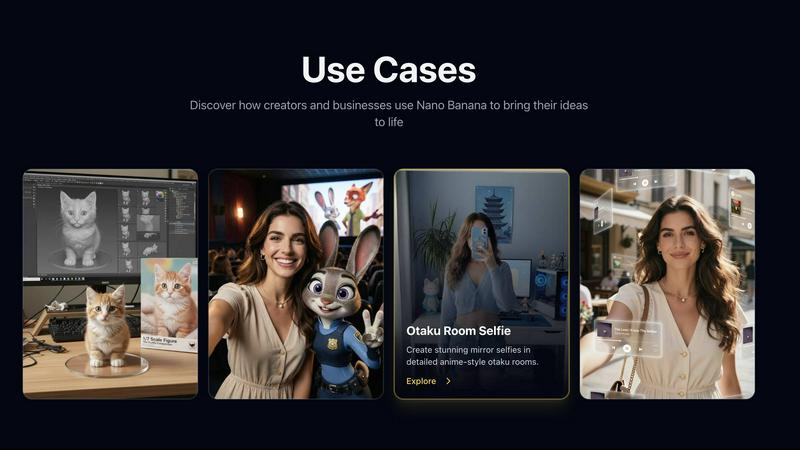
ShinePhoto
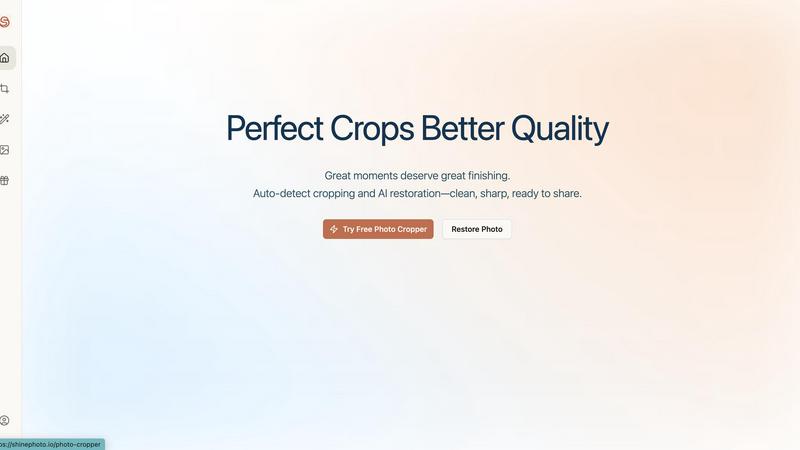
Feature Comparison
Nano Banana
Trending AI Image Prompts
Nano Banana offers a curated collection of trending and viral AI image prompts that inspire creativity. Users can explore high-demand styles and concepts, enabling them to create compelling visuals that resonate with current trends.
High-Quality Creative Use Cases
With real-world examples of successful creative applications, Nano Banana helps users understand how to effectively utilize AI image generation. These use cases serve as practical guides for implementing the platform’s capabilities in various projects.
User-Friendly Interface
The platform boasts a clean and intuitive browsing experience, designed specifically for creators. This streamlined interface allows users to find inspiration and generate images with ease, enhancing productivity and creativity.
Smart Editing Tools
Nano Banana features robust AI-powered editing tools that let users enhance their images with precision. From adjusting colors to fine-tuning details, these tools provide control over the final output, ensuring professional quality.
ShinePhoto
Perfect Crops
ShinePhoto's photo cropper automatically detects the subject in your images, ensuring clean, sharp, and focused crops. Users can also manually adjust the cropping area for precise framing, catering to personal preferences.
Restore Photo
The restore photo feature allows users to enhance image quality by removing scratches, reducing blur, and cleaning up compression artifacts. This tool is essential for improving the overall clarity of older or damaged images.
Batch Processing
ShinePhoto supports batch processing, enabling users to upload and process multiple photos simultaneously. This feature saves time and effort, making it ideal for large collections or projects.
Share-Ready Exports
With just a click, users can download high-resolution files after processing. The share-ready exports ensure that images are crisp and ready for social media, printing, or archiving without additional steps.
Use Cases
Nano Banana
Product Photography
Transform ideas into stunning product photos with ease. Nano Banana's AI capabilities allow marketers and businesses to create high-quality visuals that showcase their products in the best light, elevating branding efforts.
Social Media Content Creation
Creators can leverage Nano Banana to generate eye-catching images for social media posts. With trending prompts and visual styles, users can keep their content fresh and engaging, driving higher audience interaction.
Character Design
Design unique characters using Nano Banana's AI tools. Whether for games, animations, or personal projects, the platform facilitates the creation of diverse character styles, helping artists bring their visions to life.
Illustrative Art
Artists can explore various illustrative styles with Nano Banana. The platform supports a range of artistic expressions, allowing users to experiment and create bespoke illustrations that stand out in any portfolio.
ShinePhoto
Family Photo Restoration
Users can restore and enhance family photos that may have faded over time. ShinePhoto's tools help revive memories by improving clarity and color, making these treasured images vibrant again.
Professional Portfolio Enhancement
Photographers can quickly process their images for portfolios. By utilizing the batch processing feature, they can auto-crop and enhance multiple photos efficiently, ensuring their work looks polished and professional.
Event Photography Digitization
For those with large volumes of event photos, ShinePhoto provides an effective way to digitize and organize these images. The auto-cropping and restoration tools allow for quick uploads and enhancements, streamlining the workflow.
Social Media Content Creation
Influencers and content creators can use ShinePhoto to prepare images for their social media platforms. The ability to enhance image quality and create focused, share-ready photos ensures that their content stands out.
Overview
About Nano Banana
Nano Banana is an innovative platform tailored for creators, designers, and indie makers who leverage AI image generation tools. It serves as a curated hub where users can easily access trending AI image prompts, viral visual styles, and successful real-world creative use cases. By eliminating the need to start from scratch, Nano Banana provides a wealth of inspiration that accelerates the creative process. Each prompt is designed for speed, reusability, and high-quality results, allowing users to generate popular AI images quickly. Whether you are a hobbyist experimenting with visuals or a professional building content for social media, Nano Banana ensures you remain at the forefront of visual trends. From product photos to artistic designs, this platform simplifies the image creation journey.
About ShinePhoto
ShinePhoto is a freemium AI photo toolkit that revolutionizes the way users digitize and enhance their photo collections. It is designed for anyone who wants to streamline photo editing processes, from casual users to professional photographers. ShinePhoto offers an intuitive platform for batch subject auto-cropping and photo quality restoration, making it ideal for users with varying levels of expertise. With advanced features that enhance image clarity, users can easily upload both small and large volumes of photos. The intelligent subject detection technology ensures precision in cropping, while powerful restoration tools allow for the recovery of older or damaged images. ShinePhoto combines user-friendliness and efficiency, enabling everyone to create polished memories from everyday moments or restore cherished family albums with just a few clicks.
Frequently Asked Questions
Nano Banana FAQ
What is Nano Banana?
Nano Banana is a curated platform for AI image generation, designed for creators, designers, and indie makers. It offers trending prompts, real-world use cases, and an easy-to-navigate interface to enhance the creative process.
Can I try it for free?
Yes, Nano Banana offers a free trial without requiring a credit card. This allows users to explore the platform's features and capabilities before committing to a paid plan.
Can I use the images commercially?
All images generated with Nano Banana are commercial-ready. Users can download and utilize these images for various business and marketing purposes without restrictions.
How do I get started?
To get started with Nano Banana, simply visit the website, sign up for a free trial, and explore the platform. Enter a prompt to generate your first AI image and start creating.
ShinePhoto FAQ
What is ShinePhoto?
ShinePhoto is an AI-powered photo toolkit that combines a free photo cropper with restoration tools, allowing users to crop, enhance, and upscale images seamlessly.
Is ShinePhoto free to use?
Yes, ShinePhoto offers a free photo cropper that runs in the browser, enabling users to start editing their photos immediately without any cost.
How does photo restoration work?
Users can upload images and utilize the restore photo tools to reduce blur, noise, and damage. The effectiveness of the results is influenced by the quality of the original image.
Can I choose the subject to crop?
Yes, a feature coming soon will allow users to specify the subject for the photo cropper, ensuring more precise and tailored cropping results.
Alternatives
Nano Banana Alternatives
Nano Banana is a curated hub specifically designed for creators, designers, and indie makers who leverage AI image generation tools. It offers a selection of trending AI image prompts and creative use cases, aimed at streamlining the creative process. As visual trends evolve, users often seek alternatives to enhance their experience, whether due to pricing, specific features, or compatibility with other platforms. When considering alternatives, users should prioritize factors such as the variety of prompts available, the quality of creative use cases, ease of navigation, and overall user experience. A suitable alternative should provide robust resources and support for generating high-quality, engaging images efficiently.
ShinePhoto Alternatives
ShinePhoto is a freemium AI photo toolkit designed for enhancing images through smart cropping, restoration, and upscaling. As part of the image and photo category, it simplifies processes like batch subject auto-cropping and photo quality restoration, making it ideal for users looking to digitize and organize their photo collections. Users often seek alternatives to ShinePhoto for various reasons, including pricing structures, feature sets, or specific platform compatibility needs. When choosing an alternative, consider key aspects such as ease of use, the effectiveness of image enhancement features, batch processing capabilities, and the overall value for your specific photo editing requirements.