
Seedream 4.0 vs ShinePhoto
Side-by-side comparison to help you choose the right AI tool.

Seedream 4.0
Seedream 4.0 is an advanced AI that creates and edits high-quality images from your simple text instructions.
Last updated: March 1, 2026

ShinePhoto
ShinePhoto transforms your images with smart cropping, restoration, and upscaling for stunning, share-ready quality.
Last updated: March 1, 2026
Visual Comparison
Seedream 4.0
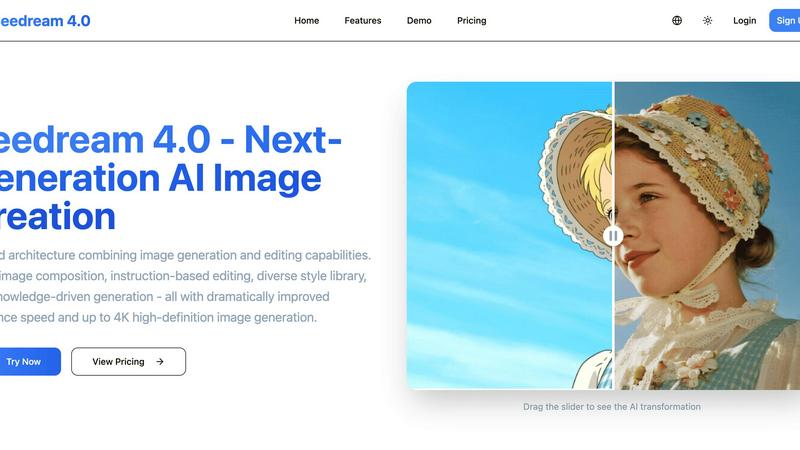
ShinePhoto

Feature Comparison
Seedream 4.0
Multi-Image Composition
Input multiple reference images and achieve complex compositions with a single sentence instruction. This feature supports batch output for more efficient creative workflows. It is perfect for complex visual storytelling, brand asset creation, and merging concepts from several sources into one cohesive image, saving significant time and effort.
Instruction-Based Editing
Edit images precisely using simple text commands. Describe the change you want, and the AI executes it, making image generation and editing truly "what you say is what you get." This intuitive approach allows for high-quality transformations without requiring complex manual editing skills or software knowledge.
Diverse Style Library
Access a wide range of professional artistic styles at your fingertips. Whether generating new stylized images from text or applying styles to your own uploaded photos, you can easily create a unique visual language. The library includes everything from watercolor and oil painting to cyberpunk and anime styles.
Knowledge-Driven Generation
Leverages rich knowledge and reasoning capabilities to produce beautiful and accurate educational illustrations, scientific charts, and professional diagrams. This feature ensures generated content is not only visually appealing but also contextually correct and informative, ideal for academic, technical, and professional use cases.
ShinePhoto
Perfect Crops
ShinePhoto's photo cropper automatically detects the subject in your images, ensuring clean, sharp, and focused crops. Users can also manually adjust the cropping area for precise framing, catering to personal preferences.
Restore Photo
The restore photo feature allows users to enhance image quality by removing scratches, reducing blur, and cleaning up compression artifacts. This tool is essential for improving the overall clarity of older or damaged images.
Batch Processing
ShinePhoto supports batch processing, enabling users to upload and process multiple photos simultaneously. This feature saves time and effort, making it ideal for large collections or projects.
Share-Ready Exports
With just a click, users can download high-resolution files after processing. The share-ready exports ensure that images are crisp and ready for social media, printing, or archiving without additional steps.
Use Cases
Seedream 4.0
Marketing & Social Media Content Creation
Quickly produce eye-catching graphics, ad banners, and social media posts from text prompts. Edit product photos or create branded visuals with specific styles, enabling marketers to maintain a consistent and professional online presence without a full design team.
Professional Design & Concept Art
Generate original artwork, illustrations, and concept art for games, films, or publications. Use the multi-image composition to blend references and the style library to explore different artistic directions rapidly, accelerating the ideation and prototyping phases.
Educational & Technical Illustration
Create accurate and visually engaging educational materials, textbook diagrams, scientific charts, and technical manuals. The knowledge-driven generation ensures complex concepts are depicted correctly, enhancing learning and communication of detailed information.
Personal Photo Enhancement & Art Projects
Transform personal photos into artistic masterpieces by applying different style filters or making precise edits through simple instructions. Users can restore old photos, change backgrounds, or create unique digital art for personal enjoyment or portfolios.
ShinePhoto
Family Photo Restoration
Users can restore and enhance family photos that may have faded over time. ShinePhoto's tools help revive memories by improving clarity and color, making these treasured images vibrant again.
Professional Portfolio Enhancement
Photographers can quickly process their images for portfolios. By utilizing the batch processing feature, they can auto-crop and enhance multiple photos efficiently, ensuring their work looks polished and professional.
Event Photography Digitization
For those with large volumes of event photos, ShinePhoto provides an effective way to digitize and organize these images. The auto-cropping and restoration tools allow for quick uploads and enhancements, streamlining the workflow.
Social Media Content Creation
Influencers and content creators can use ShinePhoto to prepare images for their social media platforms. The ability to enhance image quality and create focused, share-ready photos ensures that their content stands out.
Overview
About Seedream 4.0
Seedream 4.0 is a next-generation AI image generator and editor built on a unified architecture. It seamlessly combines the power of creating images from scratch with advanced editing tools in a single platform. This eliminates the need to switch between multiple applications, streamlining the creative workflow. Designed for creators, marketers, designers, and businesses, it transforms simple text descriptions and existing images into high-quality, professional visual assets. Its core value proposition is making professional-grade image creation and manipulation accessible, fast, and intuitive for everyone. With dramatically improved inference speed and support for up to 4K resolution output, users can generate and refine stunning visuals efficiently. Whether you need to create original artwork, edit photos with simple instructions, compose complex scenes from multiple references, or produce accurate educational graphics, Seedream 4.0 provides a comprehensive, all-in-one solution to bring any visual idea to life.
About ShinePhoto
ShinePhoto is a freemium AI photo toolkit that revolutionizes the way users digitize and enhance their photo collections. It is designed for anyone who wants to streamline photo editing processes, from casual users to professional photographers. ShinePhoto offers an intuitive platform for batch subject auto-cropping and photo quality restoration, making it ideal for users with varying levels of expertise. With advanced features that enhance image clarity, users can easily upload both small and large volumes of photos. The intelligent subject detection technology ensures precision in cropping, while powerful restoration tools allow for the recovery of older or damaged images. ShinePhoto combines user-friendliness and efficiency, enabling everyone to create polished memories from everyday moments or restore cherished family albums with just a few clicks.
Frequently Asked Questions
Seedream 4.0 FAQ
Can I try it for free?
Yes, you can experience Seedream 4.0 by using the demo on the website. This allows you to upload images and test the instruction-based editing capabilities to see the power of the AI transformation before committing to a subscription plan.
How does Seedream 4.0 work?
Seedream 4.0 uses a unified AI architecture. You provide input either as a text description, an uploaded image, or a combination of multiple images with a text instruction. The AI then interprets your request and generates or edits the image accordingly, outputting a high-quality visual result.
What makes Seedream 4.0 different?
Its key differentiator is the unified platform that combines generation and advanced editing, eliminating app switching. It offers unique features like multi-image composition and knowledge-driven generation, all delivered with dramatically improved speed and up to 4K resolution output.
Can I use the generated images commercially?
Yes, you can use the images generated with Seedream 4.0 for commercial purposes, depending on your subscription plan. It is always recommended to review the specific Terms of Service for detailed licensing information related to your account tier.
ShinePhoto FAQ
What is ShinePhoto?
ShinePhoto is an AI-powered photo toolkit that combines a free photo cropper with restoration tools, allowing users to crop, enhance, and upscale images seamlessly.
Is ShinePhoto free to use?
Yes, ShinePhoto offers a free photo cropper that runs in the browser, enabling users to start editing their photos immediately without any cost.
How does photo restoration work?
Users can upload images and utilize the restore photo tools to reduce blur, noise, and damage. The effectiveness of the results is influenced by the quality of the original image.
Can I choose the subject to crop?
Yes, a feature coming soon will allow users to specify the subject for the photo cropper, ensuring more precise and tailored cropping results.
Alternatives
Seedream 4.0 Alternatives
Seedream 4.0 is a leading AI image generator and editor, positioned in the image and photo category. It is an all-in-one platform that creates and edits high-quality visuals from text instructions and reference images, known for its speed and professional-grade results. Users often explore alternatives for various reasons. These can include budget constraints, as pricing models differ widely. Others may seek specific features not offered, require a different platform like a mobile app, or need a simpler tool for less complex tasks. Finding the right fit depends on individual project needs and workflow. When evaluating alternatives, consider your primary use case. Key factors include the quality and resolution of generated images, the availability of editing tools, the cost structure, and the overall ease of use. The goal is to find a tool that balances power with accessibility for your specific creative or business requirements.
ShinePhoto Alternatives
ShinePhoto is a freemium AI photo toolkit designed for enhancing images through smart cropping, restoration, and upscaling. As part of the image and photo category, it simplifies processes like batch subject auto-cropping and photo quality restoration, making it ideal for users looking to digitize and organize their photo collections. Users often seek alternatives to ShinePhoto for various reasons, including pricing structures, feature sets, or specific platform compatibility needs. When choosing an alternative, consider key aspects such as ease of use, the effectiveness of image enhancement features, batch processing capabilities, and the overall value for your specific photo editing requirements.