
Receipt Generator vs SupaSidebar
Side-by-side comparison to help you choose the right AI tool.

Receipt Generator
Generate realistic custom receipts instantly with 400+ free templates for business or personal use.
Last updated: April 4, 2026

SupaSidebar
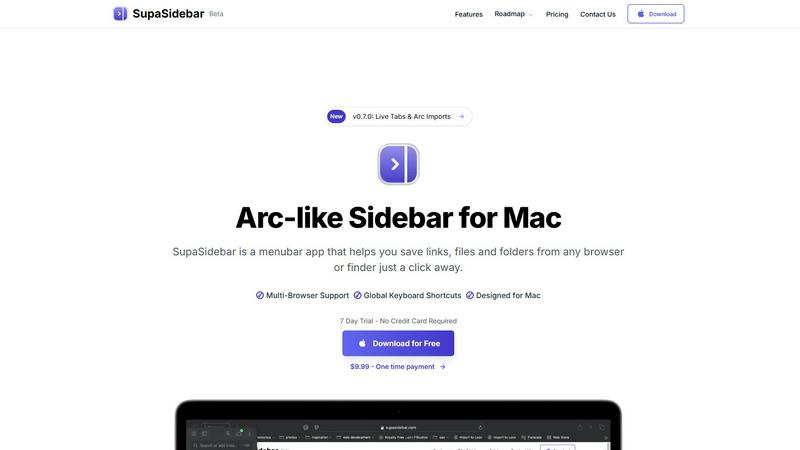
SupaSidebar is a Mac app that saves and organizes your links, files, and folders for instant access with keyboard.
Last updated: February 28, 2026
Visual Comparison
Receipt Generator

SupaSidebar
Feature Comparison
Receipt Generator
400+ Store-Specific Templates
Choose from an extensive library of over 400 professionally crafted receipt templates. These templates accurately replicate the layout, branding, and specific details of popular stores including Walmart, Target, CVS, Starbucks, Best Buy, and McDonald's. Each template includes authentic thermal-style fonts, correct store headers, and standard receipt sections like itemized lists, tax breakdowns, and payment details, providing a perfect starting point for any scenario.
AI "Place in Scene" Visualization
Transform your digital receipt into a photorealistic image without a printer. This advanced AI feature allows you to generate a photo of your receipt placed on any surface you choose, such as a wooden desk, kitchen counter, inside a wallet, or crumpled in a pocket. It adds realistic shadows, textures, and lighting to create a convincing image perfect for content mockups, inventory documentation, and visual storytelling projects.
Full Customization & Drag-and-Drop Editor
Maintain complete control over every element of your receipt. The intuitive drag-and-drop editor lets you add, remove, and rearrange nine different block types, including headers, line items, totals, barcodes, and QR codes. You can customize all text, prices, dates, store information, payment methods, and even stylistic elements like fonts, spacing, and paper texture to match your exact requirements.
Instant High-Resolution Export
Download your finished receipt immediately with no delays or mandatory account sign-ups. Export your creation as a high-resolution PNG or PDF file ready for use in presentations, expense reports, or digital content. Pro plans offer unlimited, watermark-free downloads, ensuring you get professional-quality files in seconds to streamline your workflow.
SupaSidebar
Universal Command Center
SupaSidebar serves as a universal command center where users can access all their essential files, folders, and browser tabs without switching between multiple applications. This feature streamlines workflow and enhances productivity by keeping everything organized in one easily accessible location.
Global Keyboard Shortcuts
With global keyboard shortcuts, users can quickly save links or copy URLs directly to the sidebar using simple commands. Pressing CMD CTRL S saves the current page, while CMD CTRL C copies the link, allowing for a seamless and efficient way to gather resources without interrupting your workflow.
Recents Tracking
The Recents feature automatically tracks your activity, showing every website you've visited in the last 48 hours. This functionality ensures that you can quickly find and revisit important resources without the hassle of remembering specific URLs or searching through browser history.
Fast Search Functionality
SupaSidebar includes a powerful search function that lets users find any file, folder, website, or app instantly. By pressing CMD CTRL K and typing your query, you can locate what you need without navigating through multiple menus or windows, significantly speeding up your workflow.
Use Cases
Receipt Generator
Small Business & Freelancer Expense Reporting
Create professional, customized receipts for expense tracking, client reimbursements, and tax documentation. Freelancers and small business owners can quickly generate receipts for services rendered, office supplies, or business meals using appropriate store templates, ensuring their financial records are clear, organized, and presentable for accounting purposes.
Content Creation & Social Media Mockups
Generate realistic receipt visuals for digital content, tutorials, advertisements, and social media posts. Content creators, marketers, and graphic designers use the AI "Place in Scene" feature to produce engaging photos of receipts in relatable settings, enhancing the authenticity of their stories, product reviews, budgeting tips, or promotional materials.
Reselling & Inventory Documentation
Document transactions and inventory for online reselling platforms like eBay, Poshmark, or Facebook Marketplace. Resellers can create proof-of-purchase receipts for buyers, verify the authenticity of goods, or maintain a personal record of acquisitions and sales by customizing receipts with specific item details, prices, and dates from relevant retailers.
Personal Finance & Budgeting Visualization
Mock up receipts for personal finance tracking, budgeting spreadsheets, or educational purposes. Individuals can visualize spending habits, create examples for financial literacy tutorials, or plan future purchases by generating realistic receipts from various stores to see a breakdown of costs, taxes, and potential savings.
SupaSidebar
For Students
Students can use SupaSidebar to keep track of research materials, important links, and study resources in one place. This organization enhances focus and ensures that they have quick access to all the materials needed for their academic success.
For Professionals
Professionals who juggle multiple projects will find SupaSidebar invaluable. It allows them to pin frequently used files and links, making it easy to switch between tasks without losing track of important resources or information.
For Researchers
Researchers can benefit from the Recents feature, which helps them revisit sources and articles they've recently accessed. This capability streamlines the research process and minimizes time wasted searching for previously viewed content.
For Content Creators
Content creators can utilize SupaSidebar to organize their favorite tools, websites, and research materials. By keeping everything accessible through a single interface, they can maintain their creative flow and focus on producing high-quality content.
Pricing Comparison
Receipt Generator
Receipt Generator offers simple, transparent pricing with a free tier and paid plans. The free plan allows creation and download with a watermark. The best-value option is a Lifetime plan, often offered at a discount (e.g., 50% off), which provides a one-time payment for unlimited receipt downloads, access to all 400+ templates, watermark-free exports, the ability to save custom templates, and includes AI credits. There are also Pro subscription plans that unlock unlimited downloads and provide free AI credits on a recurring basis. All paid plans allow cancellation at any time.
SupaSidebar
- Free Forever: All major browsers supported, 3 spaces included, 7-day trial for Pro features.
- Pro Plan: $19.99/month or $13.99/year with unlimited spaces, priority support, and early access to new features.
- Lifetime License: One-time payment of $49.99, includes unlimited spaces and can be used across 5 devices.
Overview
About Receipt Generator
Receipt Generator is the definitive online tool for creating authentic, store-specific receipts in seconds. It provides a comprehensive library of over 400 professionally designed templates for major retailers like Walmart, Target, Starbucks, CVS, and Best Buy, as well as restaurants, pharmacies, and grocery stores. The platform offers full customization, allowing you to edit every detail including line items, prices, dates, taxes, and payment methods. Once customized, you can instantly download your receipt as a high-resolution PNG or PDF file. What truly sets it apart is its innovative AI "Place in Scene" feature, which generates photorealistic images of your digital receipts placed on real-world surfaces like desks, wallets, or countertops, eliminating the need for physical printing. Designed for legitimate business, creative, and personal use, it serves small business owners, freelancers, content creators, and resellers globally. With a free tier available and a focus on lightning-fast, no-lag performance, Receipt Generator combines extensive template options with powerful AI visualization for all your receipt creation needs.
About SupaSidebar
SupaSidebar is an elegantly designed menubar application for macOS that enhances digital workflow by providing a central hub for all your important links, files, folders, and browser tabs. Inspired by the sleek aesthetics of Arc, it is perfect for professionals, students, researchers, and multitaskers who need to manage various applications and browsers without the clutter typically associated with traditional workflows. The core value proposition of SupaSidebar is its ability to eliminate inefficiencies, allowing users to access everything they need with just a keyboard shortcut. No more searching through endless bookmarks or tabs; SupaSidebar organizes your digital life into a distraction-free sidebar. Compatible with all major browsers, including Safari, Chrome, Firefox, Arc, and Brave, it keeps your data private as everything is stored locally on your Mac. With features like a global command panel and live tab overview, SupaSidebar transforms how you interact with your Mac, making browsing faster, more efficient, and focused on what truly matters.
Frequently Asked Questions
Receipt Generator FAQ
Is Receipt Generator free to use?
Yes, Receipt Generator offers a free tier that allows you to create and download receipts. However, receipts downloaded on the free plan include a watermark. To access unlimited downloads without watermarks, save custom templates, and use AI credits for the "Place in Scene" feature, you can upgrade to a paid Pro plan or a one-time Lifetime plan.
What is the AI "Place in Scene" feature?
The AI "Place in Scene" feature is a tool that uses artificial intelligence to generate a photorealistic image of your digital receipt placed onto a photo of a real-world surface. You can choose scenes like a desk, countertop, or wallet. The AI seamlessly blends your receipt into the image with proper lighting and perspective, creating a realistic photo without ever needing to print the receipt.
Can I customize every part of the receipt?
Absolutely. Receipt Generator provides full customization capabilities. You can edit all text, including store names, addresses, phone numbers, line item descriptions, quantities, unit prices, taxes, discounts, and payment details. The drag-and-drop editor also allows you to change the structure by adding or removing sections like barcodes, QR codes, and footers.
Are the receipts legally valid for returns or taxes?
No. Receipt Generator is designed for legitimate business, creative, and personal use only, such as mockups, documentation, and expense visualization. The receipts created are not intended and should not be used for fraudulent purposes, including attempting returns at retail stores, claiming false expenses on taxes, or deceiving others. Always refer to the platform's Terms of Service for acceptable use guidelines.
SupaSidebar FAQ
Is SupaSidebar a browser extension?
No, SupaSidebar is a standalone menubar application designed for macOS. It integrates with multiple browsers but operates independently, ensuring a seamless experience without being limited to a single browser.
Which browsers does SupaSidebar work with?
SupaSidebar is compatible with all major browsers, including Safari, Chrome, Firefox, Arc, and Brave. This flexibility allows users to maintain their preferred browsing environment while enjoying the benefits of the sidebar application.
What macOS version do I need?
SupaSidebar requires macOS version 13 or later to ensure optimal performance and compatibility with the latest features and updates.
Where is my data stored?
All data associated with SupaSidebar is stored locally on your Mac, ensuring your privacy and security. No information is sent to external servers, allowing you to manage your resources safely and privately.
Alternatives
Receipt Generator Alternatives
Receipt Generator is a comprehensive online tool in the productivity and management category, designed for creating custom, high-quality receipts. Users often explore alternatives for various reasons, such as budget constraints, the need for different feature sets like advanced data export, or a preference for a different platform like a mobile app or desktop software. When evaluating other options, key considerations include the template library's size and realism, the level of customization available for receipt details, and the quality of the final output. It's also wise to assess the pricing model, any usage limits, and whether the tool offers unique capabilities like AI-enhanced visual features for realistic mockups. Ultimately, the best choice depends on your specific use case, whether for business documentation, content creation, or personal finance tracking. Prioritizing ease of use, output quality, and value for money will guide you to the right solution for your receipt generation needs.
SupaSidebar Alternatives
SupaSidebar is an innovative Arc-style sidebar application designed for macOS, serving as a centralized hub for managing links, files, and folders. It falls under the productivity and management category, catering to professionals, students, and anyone who juggles multiple tasks across different applications and browsers. Users frequently seek alternatives to SupaSidebar for various reasons, including pricing, feature sets, and compatibility with different platforms. Finding the right alternative involves evaluating similar functionalities, ease of use, and how well an option integrates into your existing workflow. When choosing an alternative, it’s essential to consider factors such as the user interface, the ability to handle multiple browsers, and how effectively it helps streamline your digital organization. Additionally, look for features that enhance productivity, like quick access to resources, customizable settings, and privacy assurances. These elements will ensure that the alternative meets your specific needs while enhancing your overall experience.