
Prompt Builder vs QuickImg
Side-by-side comparison to help you choose the right AI tool.

Prompt Builder
Create, optimize, and manage AI prompts effortlessly, saving time and ensuring quality across all major AI models.
Last updated: April 13, 2026

QuickImg is your all-in-one AI platform for generating, enhancing, and editing stunning images effortlessly.
Last updated: February 28, 2026
Visual Comparison
Prompt Builder
QuickImg
Feature Comparison
Prompt Builder
Prompt Generator
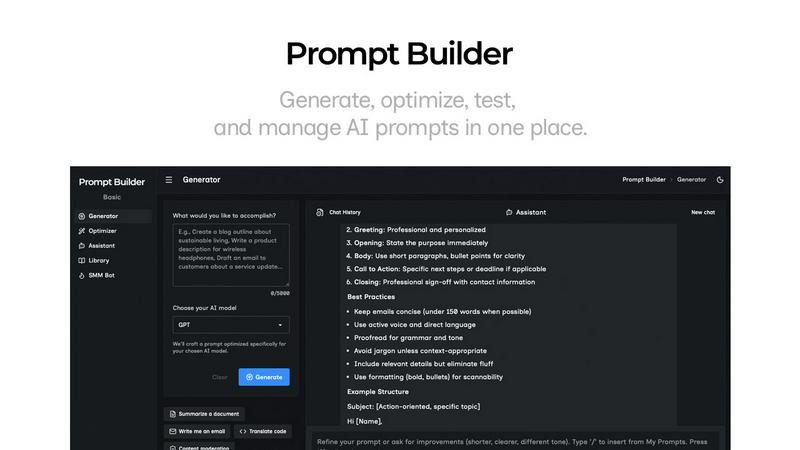
The Prompt Generator allows users to describe their ideas and select a target AI model to generate a professional-grade prompt. This feature ensures that the generated prompts are optimized specifically for models like Gemini, Claude, and GPT, making it easy to create effective prompts without starting from scratch.
Chat Refinement
With the integrated chat refinement feature, users can quickly refine their generated prompts through a built-in chat workspace. This allows for rapid iterations and modifications, ensuring the final prompt meets the specific needs of the chosen AI model and enhances the quality of outputs.
Prompt Library
The Prompt Library serves as a centralized hub for saving, organizing, and reusing the best prompts across various projects and teams. Users can easily search, filter, pin, edit, or delete prompts, making it an efficient tool for managing prompt assets and ensuring quick access to high-quality prompts.
Prompt Optimizer
The Prompt Optimizer enhances existing prompts by providing structured improvements in clarity, constraints, and output format. Users can paste their prompts into the Optimizer and receive clearer, better-structured versions almost instantly, allowing for quick adjustments and testing.
QuickImg
Multiple AI Models Access
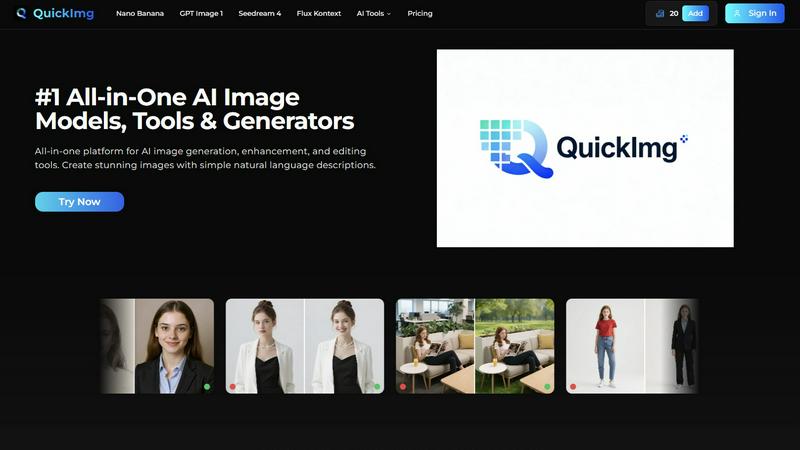
QuickImg provides access to multiple cutting-edge AI models within a single platform. Users can choose from Nano Banana, GPT Image 1, Seedream 4, and more, each optimized for specific tasks. This flexibility allows users to achieve the best results based on their project requirements without juggling between different tools.
Natural Language Processing
With QuickImg, users can create and edit images by simply describing their needs in natural language. This feature eliminates the need for technical knowledge or complicated prompts, making the platform accessible to both seasoned professionals and beginners alike.
One-Click Tools
QuickImg offers a suite of one-click tools designed to simplify complex workflows. Tasks such as background removal, image upscaling, and watermark removal can be executed effortlessly, saving users time and enabling them to focus on creativity rather than technical details.
Ready-to-Use Templates
The platform includes a vast collection of professionally designed templates tailored for various scenarios, such as product photos and social media posts. These templates enable users to kickstart their projects quickly, ensuring high-quality visuals without the need for extensive design experience.
Use Cases
Prompt Builder
Content Creation
Writers and marketers can utilize Prompt Builder to generate compelling content for blogs, social media, and marketing campaigns. By using the tailored prompts for different AI models, they can create engaging posts and articles that resonate with their target audience.
Customer Support Automation
Businesses can streamline their customer support processes by crafting AI prompts that guide virtual assistants. With Prompt Builder, support teams can create and refine prompts that ensure consistent and accurate responses to customer inquiries, improving overall service quality.
Educational Tools
Educators can leverage Prompt Builder to develop AI-driven educational content and quizzes. By generating prompts tailored to specific learning objectives, teachers can create engaging materials that enhance student learning experiences and foster interactive education.
Research and Development
Researchers can use Prompt Builder to formulate precise queries for AI models, facilitating data gathering and analysis. By generating optimized prompts, they can extract relevant information quickly, aiding in the efficiency and accuracy of their research projects.
QuickImg
Marketing Campaigns
Marketers can leverage QuickImg to create eye-catching visuals for campaigns, social media posts, and advertisements. With its intuitive interface and powerful AI models, generating promotional content becomes a streamlined process that enhances brand visibility.
Content Creation for Blogs
Content creators can use QuickImg to generate images that complement their written content. By simply describing the desired visuals, they can produce high-quality images that enhance engagement and improve the overall aesthetic of their blogs.
Design Projects
Graphic designers can utilize QuickImg for quick edits and enhancements. The platform's advanced editing tools and AI models allow designers to efficiently modify images, ensuring that they meet client specifications while saving time on tedious tasks.
Personal Art Projects
Hobbyists and artists can explore their creativity by generating unique artworks with QuickImg. Whether transforming photos into anime-style images or creating original characters, the platform empowers users to experiment with AI art effortlessly.
Overview
About Prompt Builder
Prompt Builder is an advanced prompt engineering workspace designed for users who want to streamline the process of writing, testing, and saving AI prompts. It caters to a diverse audience, including writers, developers, and marketers, who require precise and effective prompts for various AI models. The platform simplifies the creation of tailored prompts by allowing users to start with a draft, refine it through an intuitive chat interface, and save or pin different versions for future use. Prompt Builder works seamlessly with popular AI models such as GPT, Claude, Gemini, Llama, Mistral, DeepSeek, Grok, and Perplexity, ensuring compatibility across the board. Its main value proposition lies in its ability to transform ideas into ready-to-use prompts in seconds, significantly reducing the time and effort typically involved in prompt crafting. With features like the Optimizer for enhancing existing prompts and a community library for reusable templates, Prompt Builder empowers users to achieve better results with fewer iterations.
About QuickImg
QuickImg is an innovative all-in-one platform that integrates advanced AI image generation, enhancement, and editing tools into a single, user-friendly interface. It aims to simplify the image creation process by allowing users to generate stunning visuals with just natural language descriptions, eliminating the need for complex prompts. Ideal for marketers, content creators, designers, and hobbyists, QuickImg ensures that anyone can produce high-quality images effortlessly. With direct access to leading AI models such as Nano Banana Pro, GPT Image 1, Seedream 4, and Flux Kontext, users can create, edit, and enhance images without switching between different services. The platform's core value proposition lies in its simplicity and power, providing ready-to-use templates and one-click tools for various tasks like background removal, upscaling, and watermark removal. QuickImg democratizes professional-grade image creation, making it accessible and efficient for everyone.
Frequently Asked Questions
Prompt Builder FAQ
How does Prompt Builder work?
Prompt Builder simplifies the prompt creation process by allowing users to start with an idea, choose a target AI model, generate a prompt, refine it in chat, and save or run it as needed. This streamlined workflow enhances productivity and effectiveness.
Can I use Prompt Builder with multiple AI models?
Yes, Prompt Builder is designed to work with various AI models, including GPT, Claude, Gemini, Llama, Mistral, DeepSeek, Grok, and Perplexity. Users can generate and optimize prompts specifically for each model to ensure compatibility and better results.
Is there a limit to how many prompts I can create?
With the free plan, users can make up to 25 assistant requests per month. This allows for ample opportunity to create, test, and refine prompts without the need for a credit card or additional fees.
What if I need help with crafting prompts?
Prompt Builder provides an integrated chat feature where users can refine their prompts in real-time. Additionally, the community library offers reusable prompts and templates that can serve as starting points or inspiration for crafting effective prompts.
QuickImg FAQ
How do I get started with QuickImg?
Getting started with QuickImg is easy. Simply sign up for an account, describe your image requirements or upload an existing image, and choose an AI model to generate or edit your visuals.
What types of images can I create with QuickImg?
QuickImg allows users to create a wide range of images, from promotional graphics and social media posts to artistic renditions and character designs. The versatility of the platform accommodates various creative needs.
Is there a learning curve to using QuickImg?
No, QuickImg is designed for users of all skill levels. Its intuitive interface and natural language processing capabilities mean you can create and edit images without any prior technical knowledge or experience.
Are there any limitations on the image generation?
While QuickImg offers powerful AI models for image generation, the quality and resolution of images may vary based on the chosen model and specific task. However, users can achieve professional-quality results consistently across various scenarios.
Alternatives
Prompt Builder Alternatives
Prompt Builder is a comprehensive prompt engineering workspace designed for users who want to create, optimize, test, and manage AI prompts seamlessly. It supports a wide range of AI models, making it a versatile tool for anyone looking to enhance their interactions with AI technologies. Despite its robust features, users may seek alternatives for various reasons such as pricing, specific feature sets, or compatibility with preferred platforms. When searching for an alternative to Prompt Builder, consider factors like ease of use, available features, and integration capabilities with the AI models you utilize. Look for options that offer similar functionalities, such as prompt optimization and community resources, to ensure you can maintain efficiency in your AI prompt management.
QuickImg Alternatives
QuickImg is an all-in-one platform designed for AI image generation, enhancement, and editing. It consolidates advanced tools and models into a single interface, catering to a diverse user base that includes marketers, content creators, and designers. Users often seek alternatives to QuickImg for various reasons such as pricing, specific feature sets, or platform compatibility that better fits their unique needs. When looking for an alternative, consider factors like ease of use, the range of AI models available, editing capabilities, and the overall cost. Additionally, evaluate whether the platform supports natural language commands for image creation and whether it provides comprehensive editing tools that streamline your workflow.