
poseup vs ShinePhoto
Side-by-side comparison to help you choose the right AI tool.

poseup
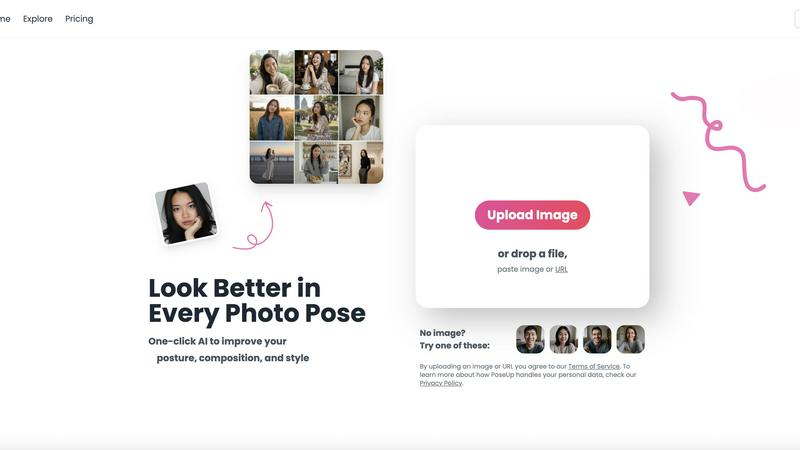
PoseUp enhances your photos with AI-driven posture correction and composition optimization for stunning results in.
Last updated: February 28, 2026

ShinePhoto
ShinePhoto transforms your images with smart cropping, restoration, and upscaling for stunning, share-ready quality.
Last updated: March 1, 2026
Visual Comparison
poseup
ShinePhoto

Feature Comparison
poseup
AI-Driven Posture Correction
PoseUp utilizes cutting-edge AI technology to analyze your images and automatically suggest better posture adjustments. This feature ensures that users can achieve a more natural and confident stance in their photos without manual adjustments.
One-Click Enhancement
With PoseUp, enhancing your photos is as simple as a single click. The AI scans your image, making instant improvements in posture, composition, and style. This user-friendly approach allows even those with no editing experience to create professional-quality images effortlessly.
Versatile Image Support
PoseUp supports a wide range of image formats including JPG, PNG, WEBP, and HEIC. Users can upload images up to 5MB in size, making it convenient for various types of photographs. This versatility ensures that everyone can benefit from PoseUp's enhancement capabilities regardless of their image source.
Community Engagement and Support
PoseUp encourages users to join its vibrant Discord community, where they can share experiences, seek advice, and connect with fellow photography enthusiasts. Additionally, the platform offers customer support to assist with any inquiries or technical issues users may encounter.
ShinePhoto
Perfect Crops
ShinePhoto's photo cropper automatically detects the subject in your images, ensuring clean, sharp, and focused crops. Users can also manually adjust the cropping area for precise framing, catering to personal preferences.
Restore Photo
The restore photo feature allows users to enhance image quality by removing scratches, reducing blur, and cleaning up compression artifacts. This tool is essential for improving the overall clarity of older or damaged images.
Batch Processing
ShinePhoto supports batch processing, enabling users to upload and process multiple photos simultaneously. This feature saves time and effort, making it ideal for large collections or projects.
Share-Ready Exports
With just a click, users can download high-resolution files after processing. The share-ready exports ensure that images are crisp and ready for social media, printing, or archiving without additional steps.
Use Cases
poseup
Social Media Creators
Social media influencers and content creators can use PoseUp to enhance their images, ensuring that their posts stand out. With improved posture and composition, creators can attract more followers and engagement on their profiles.
Professional Portraits
Individuals needing professional headshots can benefit from PoseUp's automatic enhancements, achieving polished images suitable for LinkedIn or corporate profiles. This tool saves time and money on professional photography services.
Fitness Enthusiasts
Fitness enthusiasts can utilize PoseUp to enhance their workout photos or videos. By correcting posture and improving visual appeal, users can showcase their fitness journey more effectively, inspiring others.
Casual Photography
For casual photographers capturing family gatherings, vacations, or everyday moments, PoseUp provides an easy way to enhance those photos. Users can quickly improve their images for sharing with friends and family, ensuring every memory looks its best.
ShinePhoto
Family Photo Restoration
Users can restore and enhance family photos that may have faded over time. ShinePhoto's tools help revive memories by improving clarity and color, making these treasured images vibrant again.
Professional Portfolio Enhancement
Photographers can quickly process their images for portfolios. By utilizing the batch processing feature, they can auto-crop and enhance multiple photos efficiently, ensuring their work looks polished and professional.
Event Photography Digitization
For those with large volumes of event photos, ShinePhoto provides an effective way to digitize and organize these images. The auto-cropping and restoration tools allow for quick uploads and enhancements, streamlining the workflow.
Social Media Content Creation
Influencers and content creators can use ShinePhoto to prepare images for their social media platforms. The ability to enhance image quality and create focused, share-ready photos ensures that their content stands out.
Overview
About poseup
PoseUp is an innovative, AI-powered photo enhancement tool that focuses on elevating the quality of portrait images effortlessly. It leverages advanced machine learning algorithms to analyze and correct human posture, composition, and overall style with a simple one-click solution. This tool is designed for anyone who wants to improve their photographs without needing extensive photography skills or expensive editing software. By uploading an image, users can automatically fix awkward stances, eliminate slouching, and achieve a well-balanced composition. PoseUp is perfect for social media creators, selfie enthusiasts, professionals needing polished headshots, and photographers looking for a quick enhancement. With support for various image formats and a starting point of free credits, PoseUp transforms casual, fitness, or professional images into stunning, visually appealing photos in a matter of seconds.
About ShinePhoto
ShinePhoto is a freemium AI photo toolkit that revolutionizes the way users digitize and enhance their photo collections. It is designed for anyone who wants to streamline photo editing processes, from casual users to professional photographers. ShinePhoto offers an intuitive platform for batch subject auto-cropping and photo quality restoration, making it ideal for users with varying levels of expertise. With advanced features that enhance image clarity, users can easily upload both small and large volumes of photos. The intelligent subject detection technology ensures precision in cropping, while powerful restoration tools allow for the recovery of older or damaged images. ShinePhoto combines user-friendliness and efficiency, enabling everyone to create polished memories from everyday moments or restore cherished family albums with just a few clicks.
Frequently Asked Questions
poseup FAQ
How does PoseUp enhance my photos?
PoseUp employs advanced AI technology to analyze your images and automatically improve posture, composition, and style with a single click, producing professional-quality results.
Is there a limit to the number of photos I can enhance?
PoseUp offers free credits for new users to start enhancing their photos. Once credits are used, users can refer to the pricing plans for additional enhancements or subscriptions.
What image formats does PoseUp support?
PoseUp supports various image formats including JPG, PNG, WEBP, and HEIC, allowing users to upload images from different sources without compatibility issues.
Is PoseUp suitable for amateur photographers?
Absolutely! PoseUp is designed for users of all skill levels. Its user-friendly interface and one-click enhancement make it accessible for amateurs who want to improve their photography without extensive editing knowledge.
ShinePhoto FAQ
What is ShinePhoto?
ShinePhoto is an AI-powered photo toolkit that combines a free photo cropper with restoration tools, allowing users to crop, enhance, and upscale images seamlessly.
Is ShinePhoto free to use?
Yes, ShinePhoto offers a free photo cropper that runs in the browser, enabling users to start editing their photos immediately without any cost.
How does photo restoration work?
Users can upload images and utilize the restore photo tools to reduce blur, noise, and damage. The effectiveness of the results is influenced by the quality of the original image.
Can I choose the subject to crop?
Yes, a feature coming soon will allow users to specify the subject for the photo cropper, ensuring more precise and tailored cropping results.
Alternatives
poseup Alternatives
PoseUp is an AI-powered photo enhancement tool that specializes in improving posture and composition in images. This innovative solution is designed for anyone looking to elevate their portraits, from social media creators to professionals needing polished headshots. Users often seek alternatives to PoseUp for various reasons, including pricing concerns, specific feature requirements, or compatibility with different platforms. When choosing an alternative, it's essential to consider the ease of use, the effectiveness of the AI technology, and the range of functionalities offered to ensure the tool meets your specific needs.
ShinePhoto Alternatives
ShinePhoto is a freemium AI photo toolkit designed for enhancing images through smart cropping, restoration, and upscaling. As part of the image and photo category, it simplifies processes like batch subject auto-cropping and photo quality restoration, making it ideal for users looking to digitize and organize their photo collections. Users often seek alternatives to ShinePhoto for various reasons, including pricing structures, feature sets, or specific platform compatibility needs. When choosing an alternative, consider key aspects such as ease of use, the effectiveness of image enhancement features, batch processing capabilities, and the overall value for your specific photo editing requirements.