
Kling 5 vs Pinssaver
Side-by-side comparison to help you choose the right AI tool.

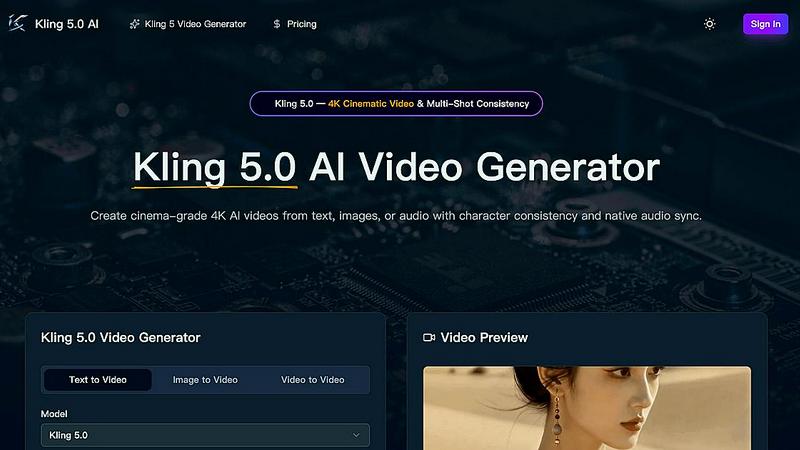
Kling 5.0 is an AI video generator that creates professional 4K cinematic clips from text, images, or audio.
Last updated: April 13, 2026

Pinssaver
Pinssaver instantly downloads Pinterest videos, images, and GIFs for free in high quality.
Last updated: February 28, 2026
Visual Comparison
Kling 5
Pinssaver

Feature Comparison
Kling 5
4K Cinematic Video Generation
Kling 5.0 generates videos in full 4K resolution with a professional, cinematic look and feel. The AI model renders scenes with realistic textures, accurate lighting, and atmospheric effects, making the output suitable for commercial use, social media, and broadcast.
Multi-Shot Character Consistency
The Omni Subject Library allows you to lock a character's facial features, proportions, and appearance across multiple shots and camera angles. This ensures characters remain identical throughout a scene or project, which is essential for episodic content, storyboarding, and brand campaigns.
Native Audio Generation & Lip-Sync
Kling 5.0 produces synchronized audio—including dialogue, ambient sound, and Foley effects—alongside the video. It features phoneme-level lip-sync for accurate mouth movements in five languages: English, Chinese, Japanese, Korean, and Spanish, with emotion-matched expressions.
Advanced Physics Simulation
The built-in physics engine simulates natural movement for elements like water, fabric, fire, and human anatomy. This results in fluid dynamics and material interactions that are visually indistinguishable from reality, adding a layer of authenticity to every generated scene.
Pinssaver
Free Multi-Format Downloader
Pinssaver allows you to download Pinterest content in all its forms. This includes videos, high-resolution images, and animated GIFs from a single platform. There are no hidden fees, subscriptions, or premium tiers. You get unlimited access to download your favorite Pinterest finds completely free of charge.
High-Quality Output
The tool preserves the original quality of the Pinterest content. It automatically fetches and offers the best available resolution for download, which can include standard definition, HD, 2K, or even 4K for videos. This ensures your saved files are crisp, clear, and perfect for reference or offline enjoyment.
No-Watermark Downloads
Content downloaded via Pinssaver is clean and original. The tool does not add any branding, logos, or watermarks to the saved files. You receive the media exactly as it appears on Pinterest, making it ideal for personal mood boards, creative references, and archives.
Browser-Based & Cross-Device
Pinssaver operates entirely within your web browser, requiring no software installation or app downloads. It is fully optimized to work seamlessly on any device, including Android and iOS smartphones, Windows and Mac desktops, and tablets of all sizes, providing a consistent experience everywhere.
Use Cases
Kling 5
Social Media Content Creation
Ideal for creators needing a constant stream of high-quality video content for platforms like YouTube, TikTok, and Instagram. Quickly generate eye-catching, cinematic clips from text prompts to engage audiences and grow your channel without a production team.
Marketing & Advertising Campaigns
Marketing teams can rapidly prototype and produce professional adverts, product showcases, and brand story videos. The 4K broadcast-ready quality and consistent character features ensure a polished, cohesive look for any campaign across multiple shots.
Film & Game Pre-Visualization
Filmmakers and game developers can use Kling 5.0 to storyboard scenes, visualize concepts, and create cutscene prototypes. The realistic physics and character consistency allow for efficient planning and pitching of creative ideas before full-scale production begins.
Educational & Explainer Videos
Educators and businesses can transform scripts or concepts into engaging animated or cinematic explainer videos. The easy-to-use platform and versatile styles make it simple to create compelling visual content that simplifies complex topics for any audience.
Pinssaver
For Content Creators & Designers
Professionals like graphic designers, influencers, and bloggers use Pinssaver to efficiently collect visual inspiration. They can save mood boards, color palettes, tutorial videos, and styling ideas to build a personal reference library for projects, ensuring they have offline access to critical creative resources.
Saving DIY Tutorials & Recipes
Hobbyists and home enthusiasts frequently find detailed DIY craft guides or cooking tutorials on Pinterest. Pinssaver lets them download these video tutorials directly to their device, allowing them to follow the steps easily in a workshop or kitchen without relying on an internet connection.
Building Personal Archives
Users who love to curate content for personal enjoyment use Pinssaver to build their own digital scrapbooks or archives. They can save travel clips, fashion lookbooks, home decor ideas, and funny GIFs to their device, creating a permanent, organized collection of inspiration.
Offline Viewing & Sharing
For users with limited or unreliable internet access, Pinssaver is essential. It enables them to download inspiring videos, travel guides, or workout routines while connected, so they can watch, learn, or share the content later anytime and anywhere, completely offline.
Overview
About Kling 5
Kling 5.0 is a next-generation AI video generator that transforms text, images, or audio into high-quality, cinematic videos. It is designed to empower creators, marketers, filmmakers, and businesses to produce professional-grade video content without the need for complex editing software or extensive technical skills. The platform leverages cutting-edge AI to generate videos up to 15 seconds long in stunning 4K resolution, featuring realistic physics, fluid motion, and advanced lighting effects. Its core value proposition lies in delivering broadcast-ready video output with powerful, creator-focused features like multi-shot character consistency and native audio generation. Kling 5.0 simplifies the entire production pipeline, allowing users to bring their creative visions to life in minutes with just a few clicks and a descriptive prompt.
About Pinssaver
Pinssaver is a free, multi-language online tool designed to solve a core frustration for millions of Pinterest users: the inability to save content natively. It enables the direct download of videos, images, and GIFs from Pinterest for offline viewing and personal archiving. The tool is built for anyone who uses Pinterest for inspiration, including designers, content creators, hobbyists, bloggers, and everyday users. Its primary value proposition is delivering a fast, safe, and high-quality downloading experience without any cost or complexity. With a beautifully designed, intuitive interface, Pinssaver requires no installation, accounts, or subscriptions. You simply paste a Pinterest link to download content in the best available quality, including HD, 2K, or 4K, quickly and without any watermarks. It works directly in your web browser on any device and prioritizes user privacy by not storing personal data or tracking activity.
Frequently Asked Questions
Kling 5 FAQ
What video formats and lengths does Kling 5.0 support?
Kling 5.0 generates videos up to 15 seconds in length. The output is delivered in MP4 format, ready for download and use on various platforms. You can select different aspect ratios, including 16:9, 9:16, and 1:1, to suit your project needs.
How does the character consistency feature work?
You can activate the Omni Subject Library when generating a video. This "locks" a subject's key features. When you generate subsequent shots mentioning the same subject, Kling 5.0's AI ensures the character maintains identical appearance and proportions across all scenes.
What languages are supported for audio and lip-sync?
Kling 5.0 supports native audio generation and precise lip-synchronization for five languages: English, Chinese, Japanese, Korean, and Spanish. The AI matches mouth movements at the phoneme level and adjusts facial expressions to match the emotional tone of the dialogue.
Do I need credits to use Kling 5.0?
Yes, video generation consumes credits. The interface shows the cost per generation (e.g., 40 credits) and your remaining balance. You can purchase additional credits directly through the platform to continue creating videos.
Pinssaver FAQ
Is Pinssaver free to use?
Yes, Pinssaver is completely free. There are no hidden fees, subscription plans, or premium tiers. You can download an unlimited number of Pinterest videos, images, and GIFs without any cost.
Is it safe and private to use?
Absolutely. Pinssaver prioritizes user privacy and safety. It does not require you to create an account, log in, or provide any personal information. The service does not store your download history, track your activity, or collect your data.
What quality are the downloads?
Pinssaver downloads content in the best available quality provided by Pinterest. This often includes high-definition options like HD, 1080p, 2K, or even 4K resolution for videos, ensuring you get a clear and high-fidelity copy of the original media.
Do I need to install an app?
No installation is required. Pinssaver is a web-based tool that works directly in your internet browser (like Chrome, Safari, or Firefox) on any device. You simply visit the website, paste your link, and download—no apps or software updates are needed.
Alternatives
Kling 5 Alternatives
Kling 5.0 is a leading AI video generator that transforms text prompts into professional-quality videos. It belongs to the rapidly growing category of AI-powered creative tools designed to simplify video production for marketers, content creators, and businesses. Users often explore alternatives for various reasons. Common factors include budget constraints, specific feature requirements like advanced editing controls or unique AI models, and compatibility with different operating systems or existing workflows. The need for different pricing tiers, output styles, or integration capabilities also drives the search for other options. When evaluating alternatives, consider your primary use case, required video quality and resolution, ease of use, and the total cost of ownership. Look for a tool that balances powerful AI capabilities with an intuitive interface, ensuring it aligns with your skill level and content creation goals.
Pinssaver Alternatives
Pinssaver is a free online tool in the social media downloader category, designed to save videos, images, and GIFs from Pinterest. It provides a fast, high-quality solution for users who want to keep Pinterest content for offline use without a native save option. Users may explore alternatives for various reasons. Some might seek tools with different feature sets, such as batch downloading or support for additional social platforms. Others may prioritize different interfaces, device compatibility, or have specific concerns about privacy policies and data handling. When evaluating other options, key factors to consider include the range of supported content formats and quality, the overall user experience and speed, and the tool's approach to security and user privacy. The ideal choice balances these elements with your specific needs for saving Pinterest inspiration.