
JobHustler vs PDF Compiler
Side-by-side comparison to help you choose the right AI tool.

JobHustler
JobHustler instantly tailors your resume and cover letter for any job.
Last updated: March 4, 2026

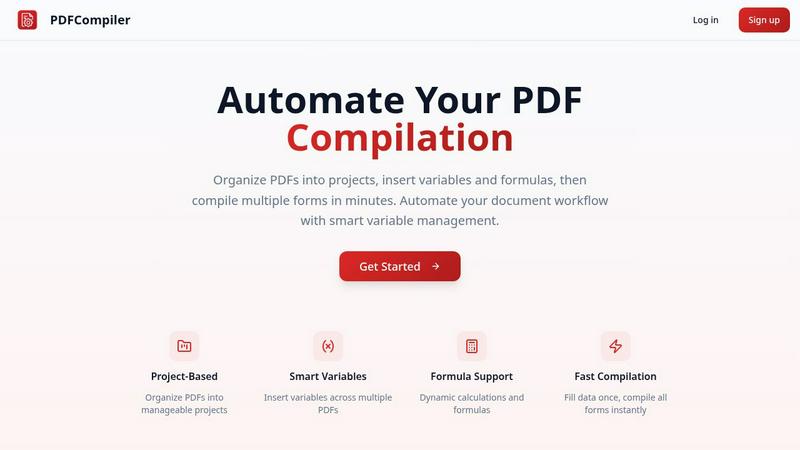
Effortlessly automate PDF compilation by entering data once to instantly generate multiple documents with smart.
Last updated: February 26, 2026
Visual Comparison
JobHustler

PDF Compiler
Feature Comparison
JobHustler
AI-Powered Tailoring
JobHustler's core engine analyzes any pasted job description to understand key skills, keywords, and requirements. It then tailors your resume and cover letter content specifically to match what the employer is seeking, moving beyond a generic one-size-fits-all document to a targeted application that stands out.
ATS-Optimized Formatting
The tool ensures all generated documents are formatted to be parsed correctly by Applicant Tracking Systems, the software used by most companies to screen resumes. This includes clean structure, standard headings, and proper keyword placement to help your application pass the initial digital filter and reach a human recruiter.
Professional Cover Letter Generation
Beyond just filling in blanks, JobHustler creates fully customized cover letters. It tailors the opening, body, and closing to the specific company and role, using a professional tone and structure. Users can select from multiple cover letter types and tones to match the company culture and position seniority.
Employer Lens Scoring & Refinement
This feature provides an analytical score that estimates how well your generated document aligns with the job description. It acts as a quality check, offering insights and opportunities for refinement to ensure your resume and cover letter are as compelling and relevant as possible before you submit your application.
PDF Compiler
Configurable Fields
PDF Compiler allows users to create highly configurable fields, including dates, variables, selections, and Excel-style formulas. This flexibility ensures that documents can be tailored to specific needs and that all necessary data can be linked and referenced across multiple PDFs.
Minimal Input
With PDF Compiler, users only need to enter core data once. The software automatically populates all linked documents, eliminating repetitive data entry and streamlining the compilation process. This feature saves time and enhances accuracy, allowing users to focus on more critical tasks.
Data Linking
When a field is updated, changes propagate instantly across all PDFs in the project. This data linking capability ensures that every document reflects the most current information, maintaining consistency throughout the entire workflow and preventing errors that arise from manual updates.
Automated Workflows
PDF Compiler enables the generation of complete document sets within minutes. Users can create automated workflows that include dynamic calculations and formatting, making it easy to handle complex documentation processes efficiently. This feature significantly reduces turnaround times for projects.
Use Cases
JobHustler
Tailoring Applications for Multiple Roles
Job seekers applying to several different positions can use JobHustler to quickly create a unique, optimized resume for each role. Instead of manually editing one master document, simply paste each new job description to generate a perfectly tailored version in minutes, saving significant time and effort.
Overcoming ATS Screening Hurdles
For applicants who suspect their well-designed resume is being rejected by automated systems, JobHustler provides a solution. By generating ATS-optimized documents with the correct formatting and keyword integration, it increases the chances of the resume being seen by an actual hiring manager.
Crafting a First Professional Cover Letter
Recent graduates or career changers who lack experience writing cover letters can use JobHustler to create a strong foundation. The AI provides a professionally structured, role-specific letter that they can then personalize, eliminating the stress of starting from a blank page and ensuring a polished result.
Refining and Updating an Existing Resume
Professionals looking to update an old resume can paste their current content and a target job description into JobHustler. The AI will reframe existing experience with powerful, relevant bullet points and modern, impactful language, giving a stale resume a fresh, competitive edge.
PDF Compiler
Tender and Proposal Documentation
Organizations preparing tenders and proposals can use PDF Compiler to automate the completion of necessary forms, ensuring that all relevant data is accurately represented across all documents, thereby improving their competitiveness and efficiency.
Financial and Administrative Reports
Businesses can streamline the creation of financial statements and administrative reports with PDF Compiler. By linking data across multiple documents, users can ensure accuracy and compliance, while also saving valuable time during the reporting process.
Client Contracts
When generating client contracts, PDF Compiler simplifies the process by allowing users to enter client-specific information once, which then updates all related contract documents. This reduces the risk of discrepancies and enhances professionalism in client communications.
Invoice Bundles
For businesses handling multiple invoices, PDF Compiler can automate the generation of invoice bundles. Users can quickly compile all necessary invoices with accurate and consistent data, enabling faster billing cycles and improved cash flow management.
Overview
About JobHustler
JobHustler is an AI-powered tool designed to streamline and elevate the job application process. It specializes in generating professional, ATS-friendly resumes and cover letters tailored to specific job descriptions in minutes. The core value proposition is speed, precision, and effectiveness. Users simply paste a job description, and JobHustler's AI analyzes it to produce documents aligned with employer expectations. It crafts role-specific bullet points, optimizes formatting for Applicant Tracking Systems (ATS), and refines language for maximum clarity and impact. Cover letters are customized to the company and position, featuring a professional structure and tone ready for immediate submission. With no account setup required and a free tier that recharges over time, JobHustler is built for accessibility, allowing users to test and refine their documents effortlessly. It is ideal for job seekers at any level who want to create powerful, tailored application materials faster and with greater confidence.
About PDF Compiler
PDF Compiler is a powerful tool designed to automate the tedious process of filling out PDF forms across multiple documents. It is particularly beneficial for businesses and professionals who frequently handle large volumes of paperwork that require consistent data entry. By allowing users to input essential information just once, PDF Compiler ensures that every linked document is populated accurately and efficiently, which significantly reduces the chances of errors and inconsistencies. Unlike standard PDF editors, PDF Compiler not only supports basic data entry but also offers advanced features such as data propagation, dynamic calculations, and field references. This makes it an invaluable asset for anyone involved in multi-document workflows, ensuring productivity and time savings.
Frequently Asked Questions
JobHustler FAQ
How does JobHustler work?
You paste a job description into the tool. JobHustler's AI analyzes the text to identify key requirements, skills, and keywords. It then uses this data to tailor your existing resume content or generate new, optimized bullet points and a matching cover letter that aligns directly with the job you want.
Is my data secure with JobHustler?
JobHustler is designed with privacy in mind. No account setup is required for basic use, minimizing stored personal data. For any concerns, you can contact the support team directly at [email protected] for specific questions about data handling and security practices.
What is the "Employer Lens" scoring?
The Employer Lens is an analytical feature that scores your generated document based on its alignment with the provided job description. It evaluates factors like keyword matching and content relevance, giving you a metric to gauge effectiveness and identify areas for potential improvement before submission.
Can I try JobHustler for free?
Yes. JobHustler offers a free tier where credits recharge over time, allowing you to test the core generation capabilities without an immediate purchase. This lets you evaluate the quality of the AI-generated content and see how the tool works with your information before buying additional credits or a plan.
PDF Compiler FAQ
How does PDF Compiler ensure data accuracy?
PDF Compiler ensures data accuracy by allowing users to input information only once, which is then automatically propagated across all linked documents. This minimizes human error and maintains consistency.
Can I use PDF Compiler for different types of documents?
Yes, PDF Compiler is versatile and can be used for various document types, including contracts, financial reports, proposals, and invoices. It is designed to handle any multi-document workflow requiring accurate data entry.
Is there a limit to the number of PDFs I can compile at once?
PDF Compiler does not impose strict limits on the number of PDFs you can compile simultaneously. Users can organize their documents into projects and compile as many forms as needed, enhancing productivity.
Does PDF Compiler support formulas and calculations?
Yes, PDF Compiler supports dynamic calculations and Excel-style formulas. Users can insert these formulas into documents, allowing for real-time data processing and accurate results across all linked PDFs.
Alternatives
JobHustler Alternatives
JobHustler is an AI-powered tool in the productivity and management category that instantly generates tailored resumes and cover letters. It simplifies job document creation by analyzing a job description and producing ATS-optimized, professional results without requiring an account. Users may seek alternatives for various reasons. Some need different pricing models, such as subscription plans or one-time purchases. Others require advanced features like portfolio builders, interview coaching, or integration with specific platforms like LinkedIn. The need for a permanent document library or more extensive customization options can also drive the search. When evaluating alternatives, consider your primary needs. Key factors include the cost structure, the depth of AI customization, the quality of ATS optimization, and whether the platform requires an account. Also, assess the availability of additional career tools and the overall ease of use to find the best fit for your job search strategy.
PDF Compiler Alternatives
PDF Compiler is a specialized software tool designed for automating PDF form completion, allowing users to enter data just once and populate multiple documents swiftly. It falls under the categories of Business & Finance, Legal, and Productivity & Management, catering to professionals who require accuracy and efficiency in document workflows. Users often seek alternatives due to various reasons such as pricing concerns, specific feature requirements, or the need for compatibility with different platforms. When looking for an alternative to PDF Compiler, consider factors like ease of use, the ability to handle complex data linking, and the range of configuration options available. It's essential to evaluate how well an alternative can streamline your document creation process and whether it meets your unique business needs.