
echoloc vs PDF Compiler
Side-by-side comparison to help you choose the right AI tool.

echoloc
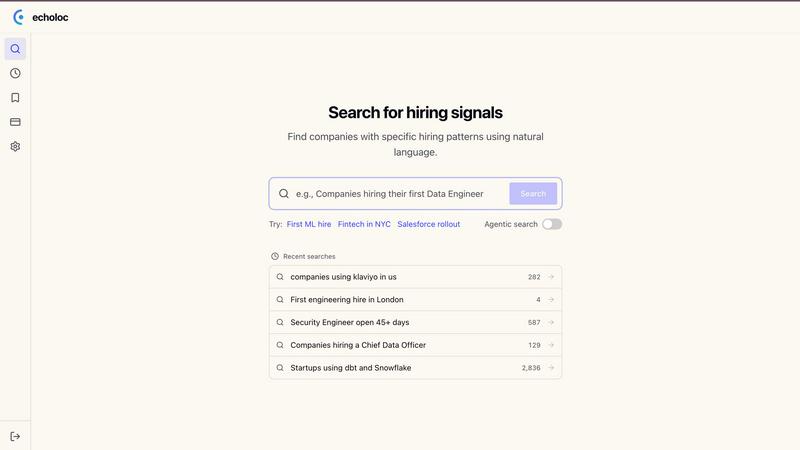
Echoloc turns job posts into actionable buying signals, helping sales teams target ready-to-buy accounts efficiently.
Last updated: February 28, 2026

PDF Compiler
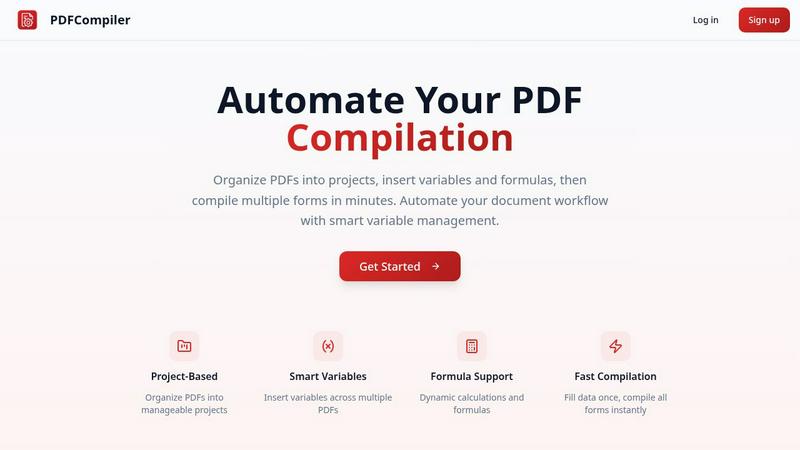
Effortlessly automate PDF compilation by entering data once to instantly generate multiple documents with smart.
Last updated: February 26, 2026
Visual Comparison
echoloc
PDF Compiler
Feature Comparison
echoloc
Job Posting Analysis
Echoloc analyzes millions of job postings to extract actionable buying signals. This feature allows users to identify companies that are actively hiring for roles indicative of growth and investment, ensuring that sales efforts are directed toward high-potential targets.
Real-Time Updates
Stay ahead with Echoloc's real-time updates on job postings and hiring trends. This ensures that sales teams receive the most current information, allowing them to act swiftly on emerging opportunities before competitors do.
Searchable Signals
Echoloc transforms job postings into searchable signals, allowing users to find specific hiring trends easily. By simply typing queries in plain English, users can discover which companies are making significant hires or experiencing growth spurts.
Evidence-Based Results
Every match generated by Echoloc includes snippets from job postings, providing transparent and verifiable evidence of buying intent. This feature eliminates guesswork, allowing sales teams to approach potential clients with confidence and clarity.
PDF Compiler
Configurable Fields
PDF Compiler allows users to create highly configurable fields, including dates, variables, selections, and Excel-style formulas. This flexibility ensures that documents can be tailored to specific needs and that all necessary data can be linked and referenced across multiple PDFs.
Minimal Input
With PDF Compiler, users only need to enter core data once. The software automatically populates all linked documents, eliminating repetitive data entry and streamlining the compilation process. This feature saves time and enhances accuracy, allowing users to focus on more critical tasks.
Data Linking
When a field is updated, changes propagate instantly across all PDFs in the project. This data linking capability ensures that every document reflects the most current information, maintaining consistency throughout the entire workflow and preventing errors that arise from manual updates.
Automated Workflows
PDF Compiler enables the generation of complete document sets within minutes. Users can create automated workflows that include dynamic calculations and formatting, making it easy to handle complex documentation processes efficiently. This feature significantly reduces turnaround times for projects.
Use Cases
echoloc
Identifying Growth Companies
Sales teams can use Echoloc to pinpoint companies hiring for critical roles, such as data engineers or sales leaders, indicating a strong likelihood of upcoming technology investments.
Targeting Expanding Markets
Echoloc helps sales professionals identify companies in expansion phases, such as those hiring multiple engineers within a short timeframe. This insight prepares teams to offer relevant solutions that align with new infrastructure needs.
Timing Outreach Campaigns
With real-time updates on job postings, sales teams can time their outreach campaigns more effectively. Engaging companies as they post critical roles ensures that sales efforts align with buyer intent.
Streamlining Sales Processes
By providing evidence-based insights directly from job postings, Echoloc streamlines the sales process. Sales representatives can focus their efforts on leads with verified intent, reducing the time spent on unqualified prospects.
PDF Compiler
Tender and Proposal Documentation
Organizations preparing tenders and proposals can use PDF Compiler to automate the completion of necessary forms, ensuring that all relevant data is accurately represented across all documents, thereby improving their competitiveness and efficiency.
Financial and Administrative Reports
Businesses can streamline the creation of financial statements and administrative reports with PDF Compiler. By linking data across multiple documents, users can ensure accuracy and compliance, while also saving valuable time during the reporting process.
Client Contracts
When generating client contracts, PDF Compiler simplifies the process by allowing users to enter client-specific information once, which then updates all related contract documents. This reduces the risk of discrepancies and enhances professionalism in client communications.
Invoice Bundles
For businesses handling multiple invoices, PDF Compiler can automate the generation of invoice bundles. Users can quickly compile all necessary invoices with accurate and consistent data, enabling faster billing cycles and improved cash flow management.
Overview
About echoloc
Echoloc is an innovative platform tailored for sales professionals seeking to optimize their approach to identifying and engaging potential buyers. By leveraging advanced analysis of job postings, Echoloc reveals valuable buying signals that indicate when companies are primed to invest in new technologies or services. This unique feature equips sales development representatives (SDRs), account executives (AEs), and revenue teams with the ability to uncover opportunities ahead of traditional intent data providers. For example, a job posting for a first data engineer or a significant expansion in a sales team signals growth and potential spending. Echoloc ensures that sales outreach is based on concrete evidence from job descriptions, leading to timely and relevant engagement. This proactive capability not only enhances targeting but also empowers sales teams to stay ahead of the competition by catching buyer intent before it becomes widely recognized.
About PDF Compiler
PDF Compiler is a powerful tool designed to automate the tedious process of filling out PDF forms across multiple documents. It is particularly beneficial for businesses and professionals who frequently handle large volumes of paperwork that require consistent data entry. By allowing users to input essential information just once, PDF Compiler ensures that every linked document is populated accurately and efficiently, which significantly reduces the chances of errors and inconsistencies. Unlike standard PDF editors, PDF Compiler not only supports basic data entry but also offers advanced features such as data propagation, dynamic calculations, and field references. This makes it an invaluable asset for anyone involved in multi-document workflows, ensuring productivity and time savings.
Frequently Asked Questions
echoloc FAQ
How does Echoloc identify buying signals?
Echoloc analyzes job postings to uncover patterns that indicate a company's readiness to invest in new technologies. This includes roles being hired and the context of those hires.
Can I search for specific types of hiring signals?
Yes, Echoloc allows users to search for specific hiring signals by typing queries in plain English, making it easy to find relevant opportunities based on unique business needs.
Is there a demo available for Echoloc?
Yes, interested users can sign up for a demo to explore how Echoloc works and see firsthand the insights it provides into potential buyer intent.
What industries does Echoloc cover?
Echoloc tracks job postings across a wide range of industries, including FinTech, SaaS, DevTools, and more, ensuring that sales professionals have access to diverse opportunities.
PDF Compiler FAQ
How does PDF Compiler ensure data accuracy?
PDF Compiler ensures data accuracy by allowing users to input information only once, which is then automatically propagated across all linked documents. This minimizes human error and maintains consistency.
Can I use PDF Compiler for different types of documents?
Yes, PDF Compiler is versatile and can be used for various document types, including contracts, financial reports, proposals, and invoices. It is designed to handle any multi-document workflow requiring accurate data entry.
Is there a limit to the number of PDFs I can compile at once?
PDF Compiler does not impose strict limits on the number of PDFs you can compile simultaneously. Users can organize their documents into projects and compile as many forms as needed, enhancing productivity.
Does PDF Compiler support formulas and calculations?
Yes, PDF Compiler supports dynamic calculations and Excel-style formulas. Users can insert these formulas into documents, allowing for real-time data processing and accurate results across all linked PDFs.
Alternatives
echoloc Alternatives
Echoloc is an innovative platform that identifies buying signals in job posts, specifically designed for sales professionals in the business and finance sector. By analyzing job postings, it helps sales teams target accounts that are poised to make purchases. Users often seek alternatives to Echoloc due to factors such as pricing, the need for specific features, or compatibility with existing platforms. When evaluating alternatives, it's essential to consider the ease of integration, the comprehensiveness of data provided, and the overall value proposition to ensure the solution meets your sales team's unique needs.
PDF Compiler Alternatives
PDF Compiler is a specialized software tool designed for automating PDF form completion, allowing users to enter data just once and populate multiple documents swiftly. It falls under the categories of Business & Finance, Legal, and Productivity & Management, catering to professionals who require accuracy and efficiency in document workflows. Users often seek alternatives due to various reasons such as pricing concerns, specific feature requirements, or the need for compatibility with different platforms. When looking for an alternative to PDF Compiler, consider factors like ease of use, the ability to handle complex data linking, and the range of configuration options available. It's essential to evaluate how well an alternative can streamline your document creation process and whether it meets your unique business needs.