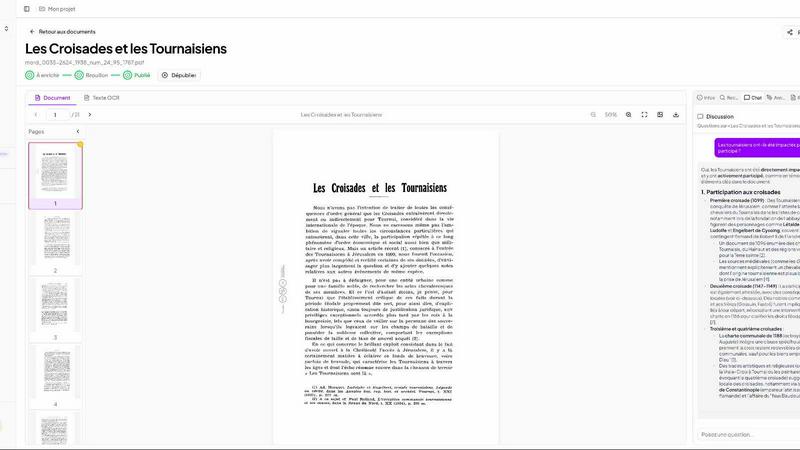
Patrivox vs Playwriter
Side-by-side comparison to help you choose the right AI tool.
Patrivox
Patrivox uses AI to digitize and make your entire document archive instantly searchable.
Last updated: March 4, 2026
Playwriter
Playwriter lets AI agents control your actual Chrome browser with all your logins and extensions intact.
Last updated: March 18, 2026
Visual Comparison
Patrivox

Playwriter

Feature Comparison
Patrivox
Next-Gen OCR & Automated Indexing
Patrivox uses Mistral AI for superior optical character recognition, reading every page you upload. It automatically identifies and extracts key entities like people, places, organizations, and dates from your documents. This happens in batch for hundreds of files at once, eliminating all manual data entry and configuration, so your collection becomes fully searchable in minutes.
AI-Powered Search & Chat
Find information instantly with a powerful search engine that includes typo tolerance and filters by date, author, or document type. Go beyond keywords by asking questions in plain language. The AI chat function understands your query and provides concise answers, directly citing the source documents it pulled the information from for complete transparency.
Interactive Knowledge Graph
The platform doesn't just index text; it maps connections. Automatically identified entities are linked in a visual, interactive knowledge graph called "Constellation." Navigate from person to place to organization to discover hidden relationships and contextual links across your entire archive that were previously impossible to see at a glance.
Sovereign European Hosting
Patrivox is built on a foundation of data sovereignty and security. All data is processed and stored 100% within the European Union, ensuring full GDPR compliance. The platform includes features like audit logs and provides unlimited read-only access for sharing your archives securely with researchers, teams, or the public.
Playwriter
Your Actual Browser Session
Playwriter grants AI agents direct access to your current Chrome session. This includes all your logged-in accounts, saved cookies, installed extensions, and browser settings. There is no need for a separate headless Chrome instance, which eliminates bot detection flags, doubles memory usage, and the hassle of re-authenticating on every task. The agent operates in a real user environment, making automation seamless and indistinguishable from human use.
Full Playwright API via a Single Tool
Unlike other solutions that expose a limited, fixed set of browser actions, Playwriter provides the entire Playwright automation library through one execute tool. This allows agents to run any Playwright code, from simple clicks and navigation to complex performance profiling, network interception, and setting JavaScript breakpoints. This approach minimizes context window bloat and gives the AI maximum flexibility.
Advanced Debugging & Collaboration Suite
Playwriter includes a powerful suite of debugging and collaboration features. You get accessibility snapshots (compact 5-20KB DOM summaries instead of large screenshots), a live debugger with breakpoints, real-time code editing, network request interception, and automatic screen recording. This allows you to watch and guide the AI's actions in real time, stepping in to solve CAPTCHAs or consent walls as needed.
Local-First & Open Source Architecture
The entire system runs locally on your machine. The Chrome extension connects to a local WebSocket relay, and the CLI communicates directly with it. No data is sent to remote servers, ensuring privacy and security. Being MIT-licensed and open source provides full transparency, allows for community inspection, and enables customization to fit specific workflow needs.
Use Cases
Patrivox
Municipal Archives
Digitize and open access to historical city records, including council deliberations, civil registers, and official correspondence. Patrivox makes these documents easily searchable for administrative staff, historians, and citizens, preserving public heritage and improving transparency.
Historical Societies & Associations
Transform bulletins, yearbooks, and documentary collections into a living resource. Members and researchers can instantly search across decades of publications, discover connections between historical figures, and access information without manual indexing.
Heritage Libraries & Special Collections
Open rare and special collections to a wider audience without compromising document safety. Scholars can perform deep, full-text research online, using AI chat to query specific topics across thousands of pages of manuscripts or printed material efficiently.
Diocesan & Parish Archives
Preserve and index delicate historical records like parish registers, ecclesiastical correspondence, and property deeds. Patrivox helps volunteers and historians manage these collections, making genealogical and historical research faster and more accessible.
Playwriter
AI-Powered Web Automation & Testing
Developers can instruct their AI assistant to automate repetitive web tasks, such as filling forms, scraping data from complex authenticated dashboards, or running through multi-step user flows for testing. Since it uses the real browser, it perfectly mimics user behavior and works on sites that block headless automation.
Collaborative Web Development & Debugging
Front-end developers can work alongside an AI to debug websites. The AI can be asked to profile page load performance, intercept network requests to analyze API calls, set breakpoints in live code, or visually label elements while the developer observes and guides the process in real time, creating a powerful pair-programming dynamic.
AI-Assisted Research & Data Gathering
Researchers, analysts, or content creators can use an AI agent to conduct in-depth online research across multiple sources that require login, such as academic journals, social media platforms, or subscription news sites. The AI can navigate, extract, and summarize information from these authenticated environments efficiently.
Automated Workflow Integration
Power users can integrate Playwriter into larger scripts and workflows. The CLI can be called from other automation tools or scripts to perform browser-based actions as part of a scheduled job, data pipeline, or custom application, leveraging the stable, logged-in session for reliability.
Overview
About Patrivox
Patrivox is a European SaaS platform that transforms static document archives into dynamic, searchable knowledge bases. It is designed for heritage institutions, municipal archives, historical societies, libraries, and similar organizations burdened with large collections of scanned documents like PDFs. The platform leverages Mistral AI to perform advanced OCR and automatically extract, classify, and connect information. Its core value proposition is unlocking inaccessible knowledge, turning thousands of unsearchable pages into an intelligent system where any word or concept can be found in seconds. Users can search with typo tolerance or ask questions in natural language, receiving AI-generated answers with direct citations from the source material. Built with European data sovereignty as a priority, Patrivox is GDPR-native and hosted entirely within the EU, offering a secure solution for public and private archival collections to enhance research, operational efficiency, and public access.
About Playwriter
Playwriter is a revolutionary open-source tool that connects AI agents directly to your real, logged-in Chrome browser. It solves the fundamental problem where AI agents either have no web access or are forced to use a fresh, "incognito-like" browser instance with no extensions, no saved logins, and high bot detection rates. Instead of spawning a new, isolated browser, Playwriter gives agents control over your existing session through a Chrome extension and a local CLI. This means the AI can interact with websites exactly as you do, with all your cookies, extensions, and authenticated sessions already in place. It provides a full Playwright automation API through a single, powerful tool, enabling complex browser interactions without the overhead of dozens of predefined tool schemas. Designed for developers and power users working with AI coding assistants like Cursor, Claude Desktop, or VS Code via the Model Context Protocol (MCP), Playwriter turns your AI into a capable, collaborative web automation partner that works within your digital environment.
Frequently Asked Questions
Patrivox FAQ
How does Patrivox handle data privacy and security?
Patrivox is a fully European solution. All data processing and storage occurs on servers located within the European Union. The platform is designed to be GDPR-native from the ground up, ensuring compliance with strict European data protection regulations. Additional security features like audit logs are included.
What file formats and sizes does Patrivox support?
The primary supported format is PDF. You can upload files individually or in bulk batches. File size limits depend on your plan, ranging from 250 MB per file on starter plans up to 1 GB per file on larger plans. This accommodates everything from single documents to large, scanned volume files.
What is included in the free trial?
The free "Découverte" plan offers 100 trial pages to process, 200 MB of storage, and 50 AI queries per month. It includes one administrator and unlimited readers. No credit card is required to start, allowing you to test the core functionality with a sample of your documents.
Can I collaborate and share my archives with others?
Yes. Every Patrivox plan includes unlimited read-only users ("readers"). You can securely share access to your searchable knowledge base with an entire research team, your organization's members, or the public. The number of administrators who can manage the system varies by plan.
Playwriter FAQ
How does Playwriter differ from other browser automation tools?
Other tools typically launch a new, clean browser instance or offer a limited set of predefined actions. Playwriter is unique because it controls your existing Chrome session with all your logins and extensions intact, and it exposes the full Playwright API. This means no bot detection, no re-authentication, and far greater capability for complex tasks and debugging.
Is my browsing data safe with Playwriter?
Yes. Playwriter operates on a strict local-first principle. The Chrome extension communicates with a WebSocket server running on your own machine (localhost). No browser data, cookies, or session information is transmitted to any remote server. You have complete control over the entire data flow.
Can I use Playwriter with any AI assistant?
Playwriter is designed to work with any client that supports the Model Context Protocol (MCP), such as Cursor, Claude Desktop, and VS Code with an MCP plugin. You install a "skill" that teaches your specific AI agent how to use Playwriter's capabilities effectively.
What happens if the AI gets stuck or hits a CAPTCHA?
This is where Playwriter's collaborative design shines. You watch the automation happen live in your browser. If a CAPTCHA, consent pop-up, or unexpected page appears, you can simply interact with the page yourself to resolve it. Then you can re-enable the extension, and the AI agent will continue its task from the new state.
Alternatives
Patrivox Alternatives
Patrivox is an AI-powered SaaS platform in the content creation and automation space. It specializes in transforming scanned documents and PDFs into a fully searchable digital knowledge base using advanced OCR and entity recognition. Users may seek alternatives for various reasons, including budget constraints, specific feature requirements not covered, or the need for integration with different software ecosystems. Platform compatibility and data security standards are also common considerations. When evaluating alternatives, key factors include the accuracy of text extraction (OCR), the depth of search capabilities, tools for organizing information, and the overall cost relative to your document volume. The ideal solution should efficiently unlock the data trapped in your documents.
Playwriter Alternatives
Playwriter is an open-source automation tool that gives AI agents direct, programmatic control over a real Chrome browser session. It solves the core problem of AI web interaction by providing access to your actual logged-in browser, complete with extensions and settings, instead of a fresh, isolated instance. Users explore alternatives for various reasons. Some may need different pricing models, specific integrations beyond the Model Context Protocol (MCP), or a solution tailored for a different browser. Others might prioritize a managed cloud service over a local, open-source tool. When evaluating options, consider the core automation capability, security model for browser access, compatibility with your AI workflow stack, and the level of control you need over the browser environment and session data.