
OC Maker vs ShinePhoto
Side-by-side comparison to help you choose the right AI tool.

OC Maker
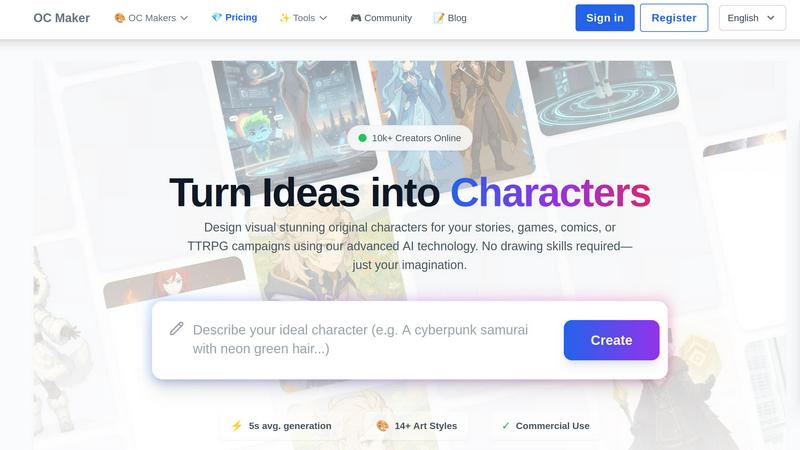
OC Maker instantly creates custom characters for stories and games using AI.
Last updated: March 1, 2026

ShinePhoto
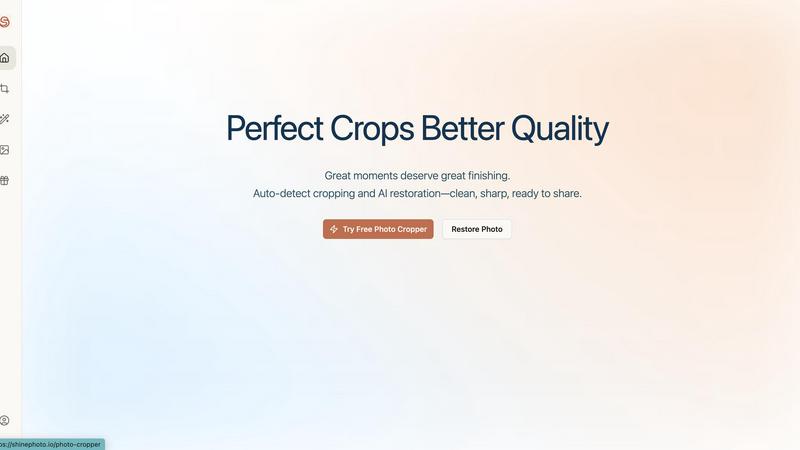
ShinePhoto transforms your images with smart cropping, restoration, and upscaling for stunning, share-ready quality.
Last updated: March 1, 2026
Visual Comparison
OC Maker
ShinePhoto
Feature Comparison
OC Maker
AI Character Generator
The core engine creates full-body, original characters from text prompts in an average of 5 seconds. It supports detailed descriptions of appearance, personality, and fantasy elements across more than 14 distinct art styles, from anime to photorealistic.
Themed Style Universes
Dive into specific fandoms with AI models trained on particular art styles. Generate perfect characters for universes like Sonic, Genshin Impact, Naruto, or My Little Pony without needing to describe the style manually.
Creative Power Tools Suite
A professional set of AI tools extends beyond character creation. This suite includes AI Video generation, AI Headshot creation for professional portraits, Face Swap capabilities, and an Image to Prompt reverse-engineering tool.
Character Consistency Gallery
This feature allows users to see how a single character concept translates across different art styles. It ensures a character's core identity remains consistent whether rendered in anime, cartoon, or realistic styles.
ShinePhoto
Perfect Crops
ShinePhoto's photo cropper automatically detects the subject in your images, ensuring clean, sharp, and focused crops. Users can also manually adjust the cropping area for precise framing, catering to personal preferences.
Restore Photo
The restore photo feature allows users to enhance image quality by removing scratches, reducing blur, and cleaning up compression artifacts. This tool is essential for improving the overall clarity of older or damaged images.
Batch Processing
ShinePhoto supports batch processing, enabling users to upload and process multiple photos simultaneously. This feature saves time and effort, making it ideal for large collections or projects.
Share-Ready Exports
With just a click, users can download high-resolution files after processing. The share-ready exports ensure that images are crisp and ready for social media, printing, or archiving without additional steps.
Use Cases
OC Maker
Story & Comic Development
Writers and comic artists can visualize protagonists, antagonists, and supporting cast instantly. Generate reference art for characters to aid in writing descriptions, scene setting, and maintaining visual consistency throughout a narrative.
Game & TTRPG Character Design
Game masters and players can create unique avatars, NPCs, and campaign artwork. Quickly design party members, villains, and creatures to enhance immersion and provide visual aids for tabletop or digital game sessions.
Fan Art & Fandom Projects
Fans can create original characters that seamlessly fit into existing beloved universes. Design your own Sonic OC, Genshin Impact character, or Jedi without requiring advanced artistic skills to match the canonical style.
Professional Branding & Portraits
Utilize the AI Headshot tool to generate studio-quality professional portraits for LinkedIn, company websites, or business cards. Achieve a consistent, polished corporate look with perfect lighting and attire.
ShinePhoto
Family Photo Restoration
Users can restore and enhance family photos that may have faded over time. ShinePhoto's tools help revive memories by improving clarity and color, making these treasured images vibrant again.
Professional Portfolio Enhancement
Photographers can quickly process their images for portfolios. By utilizing the batch processing feature, they can auto-crop and enhance multiple photos efficiently, ensuring their work looks polished and professional.
Event Photography Digitization
For those with large volumes of event photos, ShinePhoto provides an effective way to digitize and organize these images. The auto-cropping and restoration tools allow for quick uploads and enhancements, streamlining the workflow.
Social Media Content Creation
Influencers and content creators can use ShinePhoto to prepare images for their social media platforms. The ability to enhance image quality and create focused, share-ready photos ensures that their content stands out.
Overview
About OC Maker
OC Maker is an AI-powered platform that instantly generates unique Original Characters (OCs) from text descriptions. It eliminates the need for drawing skills, turning imaginative ideas into visual characters in seconds. The platform serves writers, artists, game developers, and TTRPG enthusiasts who need visual designs for their projects. Its core value is democratizing professional character design through accessible AI. OC Maker offers over 14 specialized art styles, including Anime, Sonic, Photorealistic, and fandom-specific models for universes like Genshin Impact and Cuphead. Beyond generation, it provides a suite of creative tools for editing, animating, and perfecting characters. With a community of over 10,000 creators, it also functions as a space to share and showcase work. The platform is web-based, ensuring easy access from any device.
About ShinePhoto
ShinePhoto is a freemium AI photo toolkit that revolutionizes the way users digitize and enhance their photo collections. It is designed for anyone who wants to streamline photo editing processes, from casual users to professional photographers. ShinePhoto offers an intuitive platform for batch subject auto-cropping and photo quality restoration, making it ideal for users with varying levels of expertise. With advanced features that enhance image clarity, users can easily upload both small and large volumes of photos. The intelligent subject detection technology ensures precision in cropping, while powerful restoration tools allow for the recovery of older or damaged images. ShinePhoto combines user-friendliness and efficiency, enabling everyone to create polished memories from everyday moments or restore cherished family albums with just a few clicks.
Frequently Asked Questions
OC Maker FAQ
What is an OC Maker prompt?
An OC Maker prompt is a detailed text description you provide to the AI to generate a character. Effective prompts include details on gender, age, clothing, hair, colors, personality traits, and any fantasy or fandom-specific elements you want included.
Do I own the characters I create?
Yes, characters generated on OC Maker are intended for your use. The platform indicates commercial use is permitted, meaning you can typically use the created characters in your personal and commercial projects, like games or books.
What is the Character Consistency feature?
This feature lets you generate multiple images of the same core character in different art styles. It helps artists and writers see how their OC would look in anime, cartoon, or realistic forms while maintaining key identifying features.
Can I animate the characters I make?
Yes, OC Maker includes an AI Video tool as part of its Creative Power Tools suite. This allows you to turn your generated character images into cinematic AI videos, adding motion and life to your creations.
ShinePhoto FAQ
What is ShinePhoto?
ShinePhoto is an AI-powered photo toolkit that combines a free photo cropper with restoration tools, allowing users to crop, enhance, and upscale images seamlessly.
Is ShinePhoto free to use?
Yes, ShinePhoto offers a free photo cropper that runs in the browser, enabling users to start editing their photos immediately without any cost.
How does photo restoration work?
Users can upload images and utilize the restore photo tools to reduce blur, noise, and damage. The effectiveness of the results is influenced by the quality of the original image.
Can I choose the subject to crop?
Yes, a feature coming soon will allow users to specify the subject for the photo cropper, ensuring more precise and tailored cropping results.
Alternatives
OC Maker Alternatives
OC Maker is an AI-powered platform in the image and photo category, specializing in the instant generation and customization of original characters for creative projects. Users often seek alternatives for various reasons, such as different pricing models, the need for specific art styles not offered, or a preference for other platforms like desktop software versus web apps. When evaluating other tools, consider your primary needs. Key factors include the range and quality of supported art styles, the depth of editing and animation features, licensing terms for commercial use, and the overall user experience. The right alternative should align with your project's aesthetic requirements and usage goals. --- FAQ_SEPARATOR--- [{"question": "What is OC Maker?", "answer": "OC Maker is an AI platform that allows users to instantly create and customize unique original characters for stories, games, and other creative projects without needing drawing skills."}, {"question": "Who is OC Maker for?", "answer": "It is designed for writers, artists, gamers, and creators of all skill levels who need to visualize original characters quickly across various art styles like Anime and Photorealistic."}, {"question": "What are the main features of OC Maker?", "answer": "Key features include instant character generation in seconds, support for over 14 art styles, commercial use rights for creations, and advanced AI tools for editing and animation."}, {"question": "Is OC Maker free?", "answer": "The provided content does not specify pricing, so you would need to check the official OC Maker website for current plan details and any free tier availability."}]
ShinePhoto Alternatives
ShinePhoto is a freemium AI photo toolkit designed for enhancing images through smart cropping, restoration, and upscaling. As part of the image and photo category, it simplifies processes like batch subject auto-cropping and photo quality restoration, making it ideal for users looking to digitize and organize their photo collections. Users often seek alternatives to ShinePhoto for various reasons, including pricing structures, feature sets, or specific platform compatibility needs. When choosing an alternative, consider key aspects such as ease of use, the effectiveness of image enhancement features, batch processing capabilities, and the overall value for your specific photo editing requirements.