
Never Drop vs Refbox
Side-by-side comparison to help you choose the right AI tool.

Never Drop
NeverDrop captures contacts and sends personalized follow-ups instantly, transforming every handshake into a deal.
Last updated: February 28, 2026

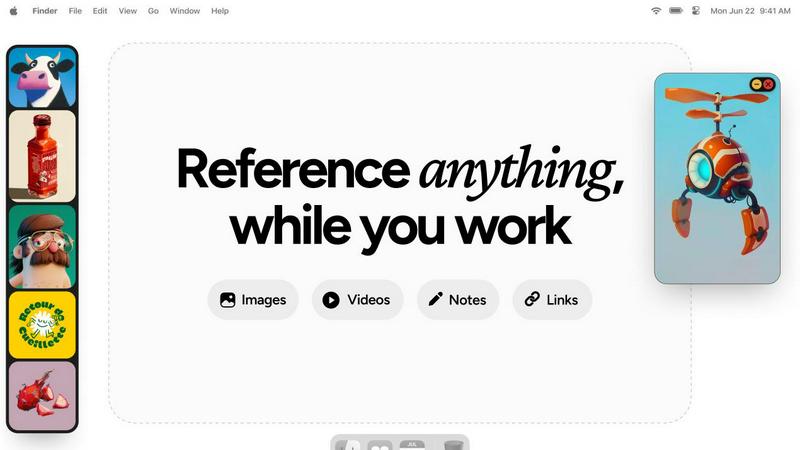
Refbox keeps your reference images and notes visible above any workspace.
Last updated: February 28, 2026
Visual Comparison
Never Drop

Refbox
Feature Comparison
Never Drop
Instant Business Card Scanning
Never Drop allows users to scan any business card in seconds using their smartphone. Our AI-powered OCR technology extracts crucial contact details such as name, company, title, phone number, and email instantly, eliminating the need for manual entry.
Automatic Email Enrichment
Often, business cards contain generic or missing email addresses. Never Drop automatically enriches contact profiles by finding verified work emails based on the name and company, ensuring that users have accurate information without manual searching.
AI-Powered Follow-Up Drafting
Never Drop generates personalized follow-up emails based on users' voice notes and conversation context. This feature allows users to review and tweak the email before sending it, all in under two minutes, making follow-ups efficient and tailored to each lead.
Team Collaboration Dashboard
Never Drop offers a collaborative workspace where sales teams can organize scanned contacts by event, reassign leads among team members, and monitor team activities. This ensures that everyone stays aligned and that no lead falls through the cracks during busy events.
Refbox
Always-On-Top Floating Frames
Pin any image, GIF, video, or note in a resizable, always-on-top window that floats above all other applications. This allows you to keep critical references in your direct line of sight while you work in your primary software, eliminating the need to constantly switch windows and break your concentration.
Centralized Media Sidebar & Collections
Gather all your references from the web, your computer, or clipboard into a single, organized sidebar. Organize media into different Collections for various projects or themes. Swap between entire sets of references instantly with a single click, keeping your workspace clean and your workflow agile.
Advanced Media Controls & Utilities
Go beyond simple viewing with powerful tools tailored for creatives. Step through GIFs frame-by-frame for detailed animation reference. Use the built-in color picker on any media to sample and copy colors. Crop images to focus on specific details and take screenshots of websites directly by pasting a URL.
Markdown Notes & Interactive Bookmarks
Keep text-based inspiration and task lists within your workflow. Create markdown-enabled notes for ideas, briefs, or checklists that stay pinned alongside your visuals. Save clickable bookmarks to tutorials, articles, or resource pages for one-click access without leaving your creative environment.
Use Cases
Never Drop
Trade Shows
At trade shows, sales representatives can quickly scan business cards of potential clients, add contextual notes about conversations, and initiate personalized follow-ups, all while engaging with other prospects.
Conferences
During conferences, where networking is key, Never Drop helps attendees capture leads efficiently. Users can collect contacts, enrich profiles with verified emails, and keep track of interactions for effective follow-ups.
Networking Events
In fast-paced networking events, sales teams can utilize Never Drop to ensure they capture every lead. The app enables quick data entry and immediate follow-up drafting, maximizing conversion potential.
Business Dinners
Never Drop is also beneficial for more intimate settings like business dinners. Users can scan cards, take notes about discussions, and prepare personalized follow-ups, ensuring that every connection is nurtured.
Refbox
Digital Illustration & Concept Art
Illustrators and concept artists can pin multiple character sketches, environment photos, and color palettes as floating references directly over their canvas in Photoshop or Procreate. This enables constant visual comparison and ensures artistic consistency without breaking focus to search for files.
UI/UX & Web Design
Designers can collect inspiration screenshots, component libraries, and brand guidelines into Collections. They can float specific UI references or style tiles next to their design tool (like Figma or Sketch) for precise alignment, spacing, and color matching, streamlining the design replication process.
3D Modeling & Animation
3D artists and animators can keep orthographic reference images, texture maps, and motion study videos pinned in view while working in complex software like Blender or Maya. Frame-by-frame GIF scrubbing is essential for analyzing movement, and locking frames allows them to work behind the reference model.
Motion Graphics & Video Editing
Motion designers and editors can maintain a mood board of visual effects, typography examples, and storyboard sequences on a second monitor in full-screen gallery mode. Having video references and notes readily accessible accelerates the creative decision-making process during editing.
Overview
About Never Drop
Never Drop is a cutting-edge lead-capture app crafted specifically for sales teams engaged in fast-paced environments like trade shows, conferences, and networking events. This innovative solution streamlines the process of collecting and managing leads by enabling users to scan business cards using their smartphones. After scanning, users can enhance the captured data with voice notes or text to capture essential details about each lead. The app leverages advanced AI technology to generate personalized follow-up emails within two minutes, ensuring no leads are overlooked. With seamless integration into popular CRMs like HubSpot, Never Drop keeps your sales pipeline organized and efficient. Say farewell to lost leads and embrace a new era of prompt and streamlined follow-ups that convert leads into closed deals.
About Refbox
Refbox is a specialized floating reference application designed for creative professionals who need constant, distraction-free access to inspiration and resources. It eliminates the disruptive cycle of alt-tabbing between windows or digging through folders by allowing you to pin images, GIFs, videos, and notes in always-on-top frames directly over your primary work applications. Whether you're sketching, designing, animating, or modeling, your references stay visible and within reach, keeping you in a state of deep focus and flow.
The core value proposition is seamless integration into the creative workflow. You can gather media from the web, your computer, or clipboard into a central, resizable sidebar. From there, view everything in a Masonry grid, drag individual items onto your desktop as independent floating windows, or use a full-screen gallery mode for a second monitor. Beyond visuals, Refbox supports markdown-enabled notes for ideas and checklists, and clickable bookmarks for tutorials. With features like frame-by-frame GIF scrubbing, instant collection swapping, and powerful shortcuts, Refbox transforms your desktop into an organized, always-accessible inspiration hub tailored for speed and precision. It is built for professionals in 3D art, animation, UI/UX design, illustration, concept art, motion graphics, photography, and pixel art who cannot afford workflow distractions.
Frequently Asked Questions
Never Drop FAQ
What is Never Drop?
Never Drop is a lead-capture app designed for sales teams at events. Users can scan business cards, add voice or text context, and receive a personalized follow-up email generated in under two minutes, enriching contacts with verified emails.
How does business card scanning work?
Users take a photo of any business card within the Never Drop app. The app utilizes AI-powered OCR technology to quickly extract essential information such as the contact's name, company, title, phone number, and email.
What types of events is Never Drop suitable for?
Never Drop is ideal for trade shows, conferences, networking events, meetups, and business dinners. The app allows users to organize scans by event, making it easier to manage and track leads.
Is my data secure with Never Drop?
Yes, Never Drop prioritizes data security. The app is developed by SCOPEO, a French company. User data is hosted in the EU, complies with GDPR, and is encrypted both in transit and at rest, ensuring privacy and security.
Refbox FAQ
What types of media files does Refbox support?
Refbox supports a wide range of media essential for creatives. You can import and pin standard images (JPG, PNG, SVG), animated GIFs (with frame-by-frame control), and various video formats. It also supports text notes, checklists, and live website screenshots created from pasted URLs.
How does Refbox help maintain focus?
Refbox is designed to minimize context switching. By allowing references to float above your work in always-on-top windows, it removes the need to alt-tab or search through folders. Features like auto-hiding the main sidebar, keyboard shortcuts for swapping references, and minimizing individual frames keep your screen and mind clear.
Can I use Refbox with multiple monitors?
Yes, Refbox is ideal for multi-monitor setups. You can use the full-screen gallery mode to turn a secondary display into a dedicated reference board. Meanwhile, you can drag individual floating frames onto your primary monitor to place them directly over your active application window.
Is there a free trial or version available?
Based on the provided context, Refbox is offered as a one-time purchase license. The website highlights a "One-time" purchase option, suggesting there is no subscription model. For the most current details on trials or pricing, please check the official Refbox website.
Alternatives
Never Drop Alternatives
Never Drop is a cutting-edge lead-capture application tailored for sales teams in dynamic environments like trade shows, conferences, and networking events. By facilitating the scanning of business cards, it streamlines the process of managing leads and ensures that no opportunities are missed. Users often seek alternatives to Never Drop for various reasons, including pricing, specific feature sets, or compatibility with their existing platforms and tools. When considering an alternative to Never Drop, it's essential to look for features that enhance lead management, ease of use, and integration capabilities with existing customer relationship management systems. Furthermore, evaluate the pricing structure to ensure it aligns with your budget and offers value for the features you require.
Refbox Alternatives
Refbox is a specialized floating reference application in the productivity and management category. It allows creative professionals to pin images, videos, and notes in always-on-top windows over their primary work software, maintaining focus and workflow continuity. Users may seek alternatives for various reasons, including budget constraints, specific feature requirements, or compatibility with different operating systems. Some may need more robust project management integration or prefer a different pricing model. When evaluating alternatives, consider your core needs. Key factors include the ability to keep references visible, ease of importing and organizing media, support for different file types, and overall integration with your creative process. The right tool should minimize distractions and keep your inspiration seamlessly accessible.