
LuxSign vs MeetingMind
Side-by-side comparison to help you choose the right AI tool.

LuxSign lets you securely sign and manage documents online in minutes, ensuring legal validity across the EU.
Last updated: February 26, 2026

MeetingMind
MeetingMind automatically records and summarizes your Zoom meetings, ensuring you never miss important details again.
Last updated: March 1, 2026
Visual Comparison
LuxSign

MeetingMind
Feature Comparison
LuxSign
Multiple Signature Methods
LuxSign supports various signature methods, allowing users to draw their signature, type their name, or upload an image. This flexibility makes it simple for signers to complete documents quickly and according to their preferences.
Advanced Security
The platform employs industry-standard encryption to secure documents during upload, storage, and transmission. With secure hosting in Luxembourg, LuxSign guarantees compliance with GDPR and local data protection laws, providing peace of mind for businesses.
Collaboration Workspaces
LuxSign enables teams to create shared workspaces for better collaboration. Users can organize documents in folders, manage member access, and work together seamlessly on signing workflows, enhancing productivity and teamwork.
Complete Audit Trail
Every action taken within LuxSign is logged with detailed timestamps, IP addresses, and signer information. This comprehensive audit trail aids in compliance and verification, ensuring that organizations can maintain transparency and accountability in their signing processes.
MeetingMind
Automatic Detection
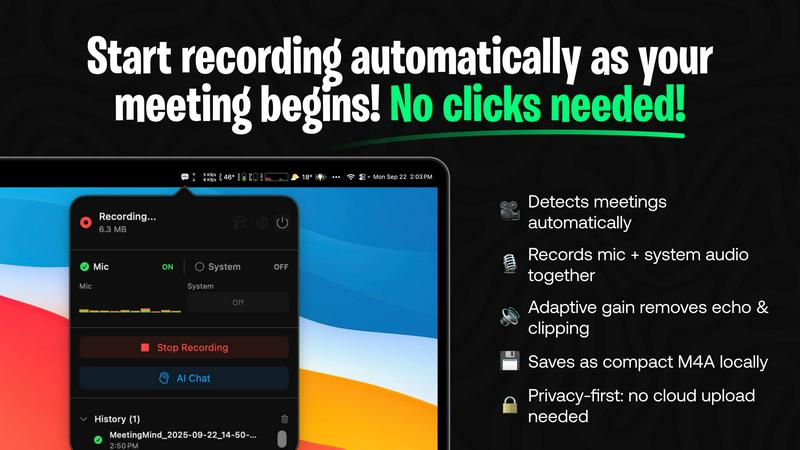
MeetingMind automatically detects when you start or join a Zoom meeting, eliminating any need for manual clicks or prompts. This seamless integration ensures that you never miss a detail, allowing you to focus entirely on the discussion at hand.
Records Everything
The app captures both microphone and system audio simultaneously, utilizing adaptive gain technology for optimal sound quality. This comprehensive recording capability ensures that every voice and sound during the meeting is accurately documented.
AI Assistant
Choose between local processing via Ollama or cloud-based summaries using OpenRouter. This flexibility allows you to tailor the app to your preferences while receiving insightful AI-generated summaries and action items post-meeting.
Markdown Export
Post-meeting, MeetingMind generates formatted markdown files containing transcripts and summaries. This feature provides you with a clean and easily accessible format for storing and reviewing important meeting details.
Use Cases
LuxSign
Contract Signing for Remote Teams
LuxSign allows remote teams to sign contracts quickly and securely. By using its cloud-based platform, team members can sign documents from anywhere, ensuring that workflows remain uninterrupted despite geographical barriers.
Compliance Documentation
Businesses in regulated industries can use LuxSign to manage compliance documentation requiring multiple signatures. The platform's advanced security features and audit trails help organizations stay compliant while efficiently processing necessary paperwork.
Real Estate Transactions
Real estate professionals can leverage LuxSign to facilitate the signing of purchase agreements and lease contracts. With its easy-to-use interface and multiple signing options, agents can ensure timely signatures, speeding up the closing process.
Human Resources Onboarding
HR departments can utilize LuxSign to streamline the onboarding process. By digitizing the signing of employment contracts and policy documents, organizations can enhance their onboarding efficiency while maintaining security and compliance.
MeetingMind
Effortless Meeting Documentation
MeetingMind is perfect for busy professionals who attend multiple meetings daily. By automatically capturing and summarizing discussions, users can save time and focus on their responsibilities rather than manual note-taking.
Enhanced Collaboration
Teams can utilize MeetingMind to ensure that all members have access to comprehensive meeting records. This fosters better communication and collaboration, as everyone can review summaries and action items, regardless of their attendance.
Improved Accountability
With AI-generated summaries and action items, MeetingMind helps teams stay accountable for tasks discussed in meetings. Users can easily track who is responsible for what, leading to improved project management and follow-through.
Ideal for Remote Work
As remote work becomes more common, MeetingMind serves as an essential tool for remote teams. It ensures that all discussions are documented and accessible, bridging the communication gap that can occur in virtual environments.
Overview
About LuxSign
LuxSign is a cutting-edge electronic signature platform designed for businesses that prioritize security and compliance. Built in Luxembourg, it offers a reliable, cloud-based solution that ensures all documents are encrypted end-to-end and stored locally, thereby maintaining full compliance with GDPR regulations. LuxSign is tailored for organizations that require a legally valid signature solution across the European Union, supporting eIDAS SES standards. Its user-friendly interface allows for quick document signing and management, making it ideal for professionals and teams who need an efficient way to handle contracts and agreements. With features such as automated notifications, advanced audit trails, and collaborative workspaces, LuxSign empowers businesses to streamline their signing processes while ensuring maximum security and compliance.
About MeetingMind
MeetingMind is an intelligent meeting assistant designed specifically for macOS, aimed at professionals, remote workers, and teams who rely heavily on video conferencing tools like Zoom. This innovative software automatically captures, transcribes, and summarizes meetings, removing the burden of manual note-taking. With an intuitive setup, MeetingMind detects when you join a Zoom meeting and begins recording both microphone and system audio immediately, ensuring clear and accurate capture. Utilizing on-device AI, it generates real-time, speaker-attributed transcripts and post-meeting summaries in clean markdown format. The app's core value proposition lies in delivering a comprehensive, searchable record of discussions with zero effort, all while prioritizing user privacy through local processing. This allows you to remain fully engaged in conversations, while MeetingMind efficiently handles documentation.
Frequently Asked Questions
LuxSign FAQ
What documents can I sign with LuxSign?
LuxSign supports PDF, DOC, and DOCX formats, allowing users to upload files up to 10MB. The platform automatically converts documents as needed, simplifying the signing process.
Is LuxSign GDPR compliant?
Yes, LuxSign is fully compliant with GDPR and Luxembourg data protection laws. All documents are encrypted and stored securely within the country, ensuring your data privacy is maintained.
Can I track the signing process?
Absolutely. LuxSign provides real-time tracking of document status, including when documents are sent, viewed, and signed. Users receive automatic email notifications to stay informed throughout the process.
How does LuxSign ensure security?
LuxSign employs end-to-end encryption for documents during upload, storage, and transmission. Additionally, all actions are logged with tamper-proof audit trails, ensuring transparency and security for all signed documents.
MeetingMind FAQ
How does MeetingMind ensure privacy?
MeetingMind prioritizes user privacy by conducting all processing locally on your Apple Silicon Mac. This means that your meeting data never leaves your device, keeping your discussions secure and private.
What if I only need to record short meetings?
MeetingMind offers a free tier that allows 60 minutes of recording per day. This is ideal for daily stand-ups or brief meetings, ensuring that you can capture essential details without needing a full subscription.
Is there a subscription model for MeetingMind?
No, MeetingMind operates on a one-time purchase model for its unlimited version. You pay once to unlock unlimited recording capabilities and enjoy lifetime updates without any recurring fees.
How do I get started with MeetingMind?
Getting started is simple. Just download MeetingMind from the Mac App Store, grant the necessary permissions, and you'll be set up in less than a minute. After that, you can join a Zoom meeting, and the app will take care of the rest.
Alternatives
LuxSign Alternatives
LuxSign is a cloud-based electronic signature platform based in Luxembourg, designed for businesses that require secure and compliant signing solutions. As an eIDAS SES compliant service, it ensures that signatures are legally valid across all EU member states. With features like end-to-end encryption and GDPR compliance, it caters to organizations focused on document security and regulatory adherence. Users often seek alternatives to LuxSign for various reasons, including cost considerations, specific feature requirements, and integration capabilities with existing systems. When evaluating alternatives, it's essential to prioritize factors such as ease of use, compliance with legal standards, and the ability to customize workflows and branding to suit business needs.
MeetingMind Alternatives
MeetingMind is an intelligent meeting assistant designed for macOS that captures, transcribes, and summarizes Zoom meetings, making it an innovative tool in the productivity and management category. Users often seek alternatives for various reasons, including pricing, specific feature requirements, or compatibility with other platforms. It’s essential to consider factors such as ease of use, integration capabilities, transcription accuracy, and privacy features when selecting a suitable alternative. Finding the right solution involves evaluating whether it meets your unique needs, especially concerning audio capture quality, AI-powered transcription capabilities, and the ability to summarize and store meeting data securely. A thoughtful approach to selecting an alternative can enhance your meeting productivity and documentation processes, ensuring you choose a tool that aligns with your workflow.