
Mechasm.ai vs Playwriter
Side-by-side comparison to help you choose the right AI tool.

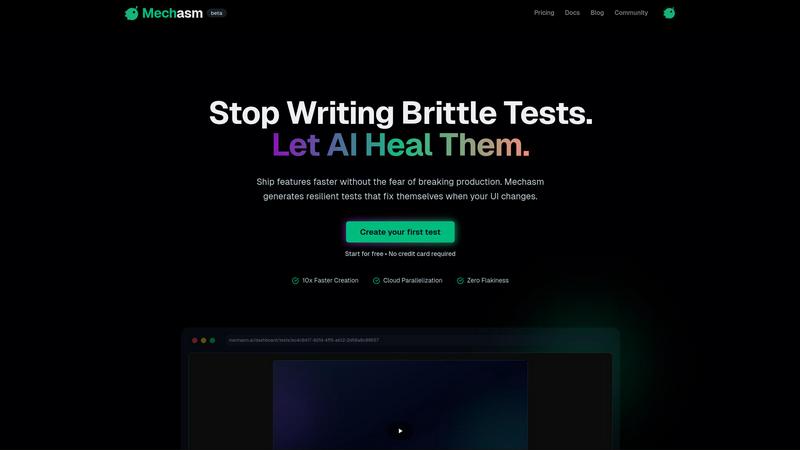
Mechasm.ai automates resilient end-to-end testing in plain English, enabling faster, self-healing, bug-free software.
Last updated: February 28, 2026

Playwriter
Playwriter lets AI agents control your actual Chrome browser with all your logins and extensions intact.
Last updated: March 18, 2026
Visual Comparison
Mechasm.ai
Playwriter

Feature Comparison
Mechasm.ai
Self-Healing Tests
Mechasm.ai eliminates the frustration of brittle tests by incorporating self-healing technology. When UI changes occur, the AI automatically identifies and fixes broken selectors, adapting tests in real time. This feature reduces maintenance efforts by up to 90%, allowing teams to focus on developing new features rather than troubleshooting outdated tests.
Natural Language Authoring
With natural language authoring, users can write test scenarios in plain English. For example, typing "User adds to cart and proceeds to checkout" directly generates a robust automated test. This intuitive approach empowers non-technical team members, such as product managers, to engage in the testing process, fostering collaboration and improving overall product quality.
Cloud Parallelization
Mechasm.ai supports cloud parallelization, enabling teams to run multiple tests simultaneously on secure cloud infrastructure. This feature significantly accelerates the QA process, allowing for rapid deployments without the need for extensive setup. The ability to scale tests quickly helps teams maintain a fast development cycle without sacrificing quality.
Actionable Analytics
Gain actionable insights with comprehensive analytics tools that track health scores, performance trends, and test velocity. Mechasm.ai provides detailed metrics and visualizations, allowing teams to monitor their testing efforts and make informed decisions to improve their QA processes continuously.
Playwriter
Your Actual Browser Session
Playwriter grants AI agents direct access to your current Chrome session. This includes all your logged-in accounts, saved cookies, installed extensions, and browser settings. There is no need for a separate headless Chrome instance, which eliminates bot detection flags, doubles memory usage, and the hassle of re-authenticating on every task. The agent operates in a real user environment, making automation seamless and indistinguishable from human use.
Full Playwright API via a Single Tool
Unlike other solutions that expose a limited, fixed set of browser actions, Playwriter provides the entire Playwright automation library through one execute tool. This allows agents to run any Playwright code, from simple clicks and navigation to complex performance profiling, network interception, and setting JavaScript breakpoints. This approach minimizes context window bloat and gives the AI maximum flexibility.
Advanced Debugging & Collaboration Suite
Playwriter includes a powerful suite of debugging and collaboration features. You get accessibility snapshots (compact 5-20KB DOM summaries instead of large screenshots), a live debugger with breakpoints, real-time code editing, network request interception, and automatic screen recording. This allows you to watch and guide the AI's actions in real time, stepping in to solve CAPTCHAs or consent walls as needed.
Local-First & Open Source Architecture
The entire system runs locally on your machine. The Chrome extension connects to a local WebSocket relay, and the CLI communicates directly with it. No data is sent to remote servers, ensuring privacy and security. Being MIT-licensed and open source provides full transparency, allows for community inspection, and enables customization to fit specific workflow needs.
Use Cases
Mechasm.ai
Speeding Up Release Cycles
Mechasm.ai allows engineering teams to accelerate their release cycles by generating automated tests quickly. As a result, teams can deploy features faster without sacrificing quality or reliability, enabling a more agile development approach.
Enhancing Team Collaboration
The natural language authoring feature encourages collaboration among team members with varying technical backgrounds. Product managers can contribute directly to test coverage, ensuring that the testing process reflects the entire team's insights and requirements.
Reducing Maintenance Overhead
With self-healing tests, teams can significantly reduce the time spent on maintaining outdated tests. This feature allows engineers to focus on new features and improvements rather than constantly fixing broken tests, leading to increased productivity.
Integrating with CI/CD Pipelines
Mechasm.ai seamlessly integrates with popular CI/CD tools like GitHub Actions and GitLab. This integration provides immediate feedback on test results, ensuring that teams can catch issues early in the development cycle and maintain high-quality standards throughout the deployment process.
Playwriter
AI-Powered Web Automation & Testing
Developers can instruct their AI assistant to automate repetitive web tasks, such as filling forms, scraping data from complex authenticated dashboards, or running through multi-step user flows for testing. Since it uses the real browser, it perfectly mimics user behavior and works on sites that block headless automation.
Collaborative Web Development & Debugging
Front-end developers can work alongside an AI to debug websites. The AI can be asked to profile page load performance, intercept network requests to analyze API calls, set breakpoints in live code, or visually label elements while the developer observes and guides the process in real time, creating a powerful pair-programming dynamic.
AI-Assisted Research & Data Gathering
Researchers, analysts, or content creators can use an AI agent to conduct in-depth online research across multiple sources that require login, such as academic journals, social media platforms, or subscription news sites. The AI can navigate, extract, and summarize information from these authenticated environments efficiently.
Automated Workflow Integration
Power users can integrate Playwriter into larger scripts and workflows. The CLI can be called from other automation tools or scripts to perform browser-based actions as part of a scheduled job, data pipeline, or custom application, leveraging the stable, logged-in session for reliability.
Overview
About Mechasm.ai
Mechasm.ai is an advanced AI-driven automated testing platform that transforms quality assurance (QA) for today's fast-paced engineering teams. As software development cycles quicken, traditional end-to-end (E2E) testing frameworks often become cumbersome, leading to significant resource expenditure on maintenance. Mechasm.ai tackles this issue by introducing Agentic QA, which seamlessly connects human intent with technical execution. With its natural language authoring capability, users can express test scenarios in plain English, which Mechasm then translates into powerful automated tests nearly instantaneously. This innovation empowers development teams to release features with increased speed and confidence, effectively eliminating the anxiety of disrupting production systems. Ideal for developers, product managers, and QA engineers, Mechasm.ai democratizes the testing process, enabling every member of the team to actively contribute to the overall quality of the product.
About Playwriter
Playwriter is a revolutionary open-source tool that connects AI agents directly to your real, logged-in Chrome browser. It solves the fundamental problem where AI agents either have no web access or are forced to use a fresh, "incognito-like" browser instance with no extensions, no saved logins, and high bot detection rates. Instead of spawning a new, isolated browser, Playwriter gives agents control over your existing session through a Chrome extension and a local CLI. This means the AI can interact with websites exactly as you do, with all your cookies, extensions, and authenticated sessions already in place. It provides a full Playwright automation API through a single, powerful tool, enabling complex browser interactions without the overhead of dozens of predefined tool schemas. Designed for developers and power users working with AI coding assistants like Cursor, Claude Desktop, or VS Code via the Model Context Protocol (MCP), Playwriter turns your AI into a capable, collaborative web automation partner that works within your digital environment.
Frequently Asked Questions
Mechasm.ai FAQ
What is Mechasm.ai?
Mechasm.ai is an AI-driven automated testing platform designed to simplify and enhance the quality assurance process for engineering teams. It allows users to create automated tests using natural language, reducing maintenance and increasing testing efficiency.
How do self-healing tests work?
Self-healing tests utilize AI to automatically identify and correct broken selectors when UI changes occur. This feature minimizes the need for manual intervention and drastically reduces maintenance time, allowing tests to remain effective despite frequent updates.
Can non-technical team members use Mechasm.ai?
Yes, the natural language authoring feature enables non-technical team members, such as product managers, to create and contribute to test scenarios. This democratizes the testing process and encourages collaboration across the team.
How does Mechasm.ai integrate with existing workflows?
Mechasm.ai integrates smoothly with popular CI/CD tools, allowing teams to run tests in parallel on a secure cloud infrastructure. This ensures that testing is part of the development workflow, providing immediate feedback and enhancing overall product quality.
Playwriter FAQ
How does Playwriter differ from other browser automation tools?
Other tools typically launch a new, clean browser instance or offer a limited set of predefined actions. Playwriter is unique because it controls your existing Chrome session with all your logins and extensions intact, and it exposes the full Playwright API. This means no bot detection, no re-authentication, and far greater capability for complex tasks and debugging.
Is my browsing data safe with Playwriter?
Yes. Playwriter operates on a strict local-first principle. The Chrome extension communicates with a WebSocket server running on your own machine (localhost). No browser data, cookies, or session information is transmitted to any remote server. You have complete control over the entire data flow.
Can I use Playwriter with any AI assistant?
Playwriter is designed to work with any client that supports the Model Context Protocol (MCP), such as Cursor, Claude Desktop, and VS Code with an MCP plugin. You install a "skill" that teaches your specific AI agent how to use Playwriter's capabilities effectively.
What happens if the AI gets stuck or hits a CAPTCHA?
This is where Playwriter's collaborative design shines. You watch the automation happen live in your browser. If a CAPTCHA, consent pop-up, or unexpected page appears, you can simply interact with the page yourself to resolve it. Then you can re-enable the extension, and the AI agent will continue its task from the new state.
Alternatives
Mechasm.ai Alternatives
Mechasm.ai is an innovative AI-powered automated testing platform designed to streamline quality assurance for contemporary development teams. It falls under the category of AI Assistants and No Code & Low Code tools, emphasizing ease of use and efficiency in end-to-end testing processes. Users often seek alternatives to Mechasm.ai due to various reasons such as pricing concerns, specific feature requirements, or compatibility with their existing platforms. When searching for an alternative, it's essential to consider factors like ease of integration, user interface, support options, and the specific testing needs of your organization. Finding the right fit for your team may involve exploring the scalability of the solution, the ability to customize testing scenarios, and the overall user experience. Focusing on platforms that provide flexibility and robust support can enhance your team's testing capabilities while ensuring you maintain quality in your software releases.
Playwriter Alternatives
Playwriter is an open-source automation tool that gives AI agents direct, programmatic control over a real Chrome browser session. It solves the core problem of AI web interaction by providing access to your actual logged-in browser, complete with extensions and settings, instead of a fresh, isolated instance. Users explore alternatives for various reasons. Some may need different pricing models, specific integrations beyond the Model Context Protocol (MCP), or a solution tailored for a different browser. Others might prioritize a managed cloud service over a local, open-source tool. When evaluating options, consider the core automation capability, security model for browser access, compatibility with your AI workflow stack, and the level of control you need over the browser environment and session data.