
LLMWise vs VideoDubber Video Translator
Side-by-side comparison to help you choose the right AI tool.

LLMWise
Access 62+ AI models with one API, auto-routing prompts to the best options without subscriptions, just pay as you go.
Last updated: February 26, 2026

VideoDubber Video Translator
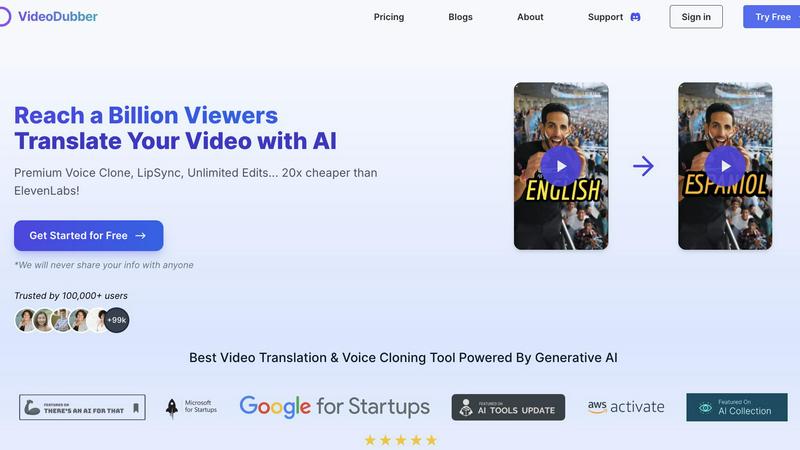
Effortlessly translate and dub your videos in 150+ languages to engage a global audience with VideoDubber's AI.
Last updated: March 1, 2026
Visual Comparison
LLMWise

VideoDubber Video Translator
Feature Comparison
LLMWise
Smart Routing
LLMWise features intelligent routing that automatically directs prompts to the optimal model. For example, coding queries are sent to GPT, while creative writing prompts go to Claude, and translation tasks are assigned to Gemini. This ensures that every request is handled by the most capable model, enhancing the quality of responses.
Compare & Blend
This feature allows users to run prompts across multiple models simultaneously, enabling side-by-side comparisons. The blending function combines the best parts of each model's output into a single, stronger response. This is particularly useful for generating high-quality content or making critical decisions based on the best insights from different models.
Always Resilient
LLMWise includes a circuit-breaker failover system that automatically reroutes requests to backup models if a primary provider goes down. This ensures that applications remain operational at all times, significantly reducing downtime and maintaining reliability.
Test & Optimize
Developers can take advantage of comprehensive benchmarking suites, batch tests, and optimization policies tailored for speed, cost, or reliability. Automated regression checks help maintain performance standards and ensure that applications remain efficient and effective over time.
VideoDubber Video Translator
Superior Voice Cloning and Dubbing
Leverage cutting-edge voice cloning technology that delivers realistic voice-overs matching the original speaker's tone and emotion. This feature enhances viewer connection, making content feel authentic and engaging.
Simple Yet Powerful 1-click UI
Enjoy an intuitive interface designed for efficiency. With just one click, you can translate entire videos. Advanced options allow for subtitle editing, timestamp adjustments, and re-translation, streamlining the translation experience.
Unlimited Free Editing and Voice-overs
Take advantage of unlimited free re-edits after translation. Change voice-overs, timestamps, or text as needed without incurring additional costs. This feature empowers users to refine their videos to perfection.
Advanced AI Translation Models
Choose from leading AI models like DeepSeek, Gemini, or OpenAI's GPT-5 for translation, ensuring high accuracy and contextual understanding. This flexibility allows users to select the best model tailored to their specific needs.
Use Cases
LLMWise
Application Development
Developers can utilize LLMWise to create applications that require diverse AI functionalities. By accessing multiple models through a single API, they can build more sophisticated features without the overhead of managing different systems.
Content Creation
Writers and marketers can leverage LLMWise to generate high-quality content. By using the compare and blend features, they can produce articles, social media posts, and marketing materials that leverage the strengths of various LLMs.
Data Analysis
Analysts can use LLMWise to process and interpret large datasets. By routing data queries to the most appropriate model, they can obtain insights and generate reports more efficiently, improving decision-making processes.
Language Translation
Businesses operating in multiple regions can rely on LLMWise for accurate and context-aware translations. By utilizing its routing capabilities, they can choose the best model for language translation tasks, ensuring clarity and accuracy in communication.
VideoDubber Video Translator
Content Creation for YouTube
YouTube creators can use VideoDubber to translate and dub their videos into various languages, significantly increasing their global reach and audience engagement.
E-Learning and Educational Materials
Educators can translate instructional videos into multiple languages, making learning accessible to students worldwide and enhancing understanding through localized content.
Marketing Campaigns and Advertisements
Businesses can adapt promotional videos for different markets, ensuring that their marketing messages resonate with diverse audiences by using culturally relevant translations.
Corporate Training and Internal Communications
Companies can utilize VideoDubber for translating internal training videos, ensuring that all employees, regardless of language, have access to important information and training materials.
Overview
About LLMWise
LLMWise is a revolutionary AI integration platform that streamlines access to multiple large language models (LLMs) through a single API. By aggregating major providers like OpenAI, Anthropic, Google, Meta, xAI, and DeepSeek, LLMWise eliminates the hassle of managing various subscriptions and keys. It intelligently routes prompts to the most suitable model based on task requirements—whether it's coding, creative writing, or translation. This versatility allows developers to optimize their applications without the complexity of juggling different APIs. With features like side-by-side comparisons, blending outputs, and failover resilience, LLMWise is designed for developers who demand the best AI solutions across tasks without incurring unnecessary costs. Its flexible pricing model permits pay-as-you-go usage, ensuring that you only pay for what you need.
About VideoDubber Video Translator
VideoDubber Video Translator is an advanced AI-driven platform that revolutionizes the way videos are translated and dubbed. Designed to support over 150 languages, it serves a wide array of users including content creators, educators, businesses, and marketers who aim to engage a global audience. VideoDubber simplifies the translation process while maintaining high audio quality and natural voice characteristics. It features state-of-the-art technology such as voice cloning and lip-sync capabilities, effectively removing language barriers in content. By utilizing VideoDubber, users can enhance viewer engagement, broaden their reach, and ultimately boost their audience and viewership. With over 100,000 satisfied users and a rating of 4.98/5 on industry platforms, VideoDubber stands out in the video translation market, ensuring that your message resonates across cultures.
Frequently Asked Questions
LLMWise FAQ
What models does LLMWise support?
LLMWise provides access to over 62 models from 20 different providers, including major names like OpenAI, Anthropic, Google, Meta, and more.
How does the pricing work?
LLMWise operates on a pay-as-you-go model, allowing users to only pay for the credits they use. There are also 30 free models available for unlimited testing and fallback options without any charges.
Can I use my existing API keys?
Yes, LLMWise supports a "Bring Your Own Key" (BYOK) feature, enabling users to integrate their existing API keys for various providers, ensuring flexibility and cost management.
How quickly can I get started with LLMWise?
Getting started is straightforward: sign up for an account, obtain your API key, and begin making requests within minutes. The platform is designed to be user-friendly and efficient for developers.
VideoDubber Video Translator FAQ
How does VideoDubber ensure high-quality translations?
VideoDubber utilizes advanced AI models like DeepSeek, Gemini, and GPT-5 to provide contextually accurate translations. This ensures that the essence of the original content is preserved while adapting to different languages.
What types of files can I upload to VideoDubber?
You can upload video files directly from your laptop, Google Drive, YouTube, or Dropbox. The platform supports various formats, making it easy to import your videos for translation.
Is there a limit to the number of languages I can translate my video into?
No, you can select multiple target languages in one go without needing to upload your video multiple times. This feature allows for efficient and streamlined translation.
Can I edit my translated video after downloading?
Yes, VideoDubber offers unlimited free editing of your translated videos even after download. You can adjust subtitles, voice-overs, and timestamps as many times as you want without additional costs.
Alternatives
LLMWise Alternatives
LLMWise is an innovative API platform that provides seamless access to multiple large language models (LLMs) such as GPT, Claude, and Gemini. It falls under the AI Assistants category, streamlining the process of utilizing various AI technologies without needing to manage multiple providers. Users commonly seek alternatives to LLMWise for reasons such as pricing, specific feature sets, or compatibility with their existing systems. When choosing an alternative, it's crucial to consider aspects like model coverage, ease of integration, reliability, and flexibility in pricing to ensure it meets your unique requirements.
VideoDubber Video Translator Alternatives
VideoDubber Video Translator is an innovative AI-powered tool that simplifies the process of translating and dubbing videos into over 150 languages. It caters to a wide range of users, including content creators, educators, businesses, and marketers, all aiming to reach an international audience effortlessly. Many users seek alternatives to VideoDubber due to various factors such as pricing, specific feature sets, or compatibility with different platforms. When searching for an alternative, users should consider several key aspects. These include the quality of audio output, the availability of additional features like voice cloning or lip-sync technology, and the pricing structure, including any hidden costs. It's also important to evaluate the ease of use and customer support offered by alternative platforms to ensure a smooth experience.