
Kaizen OCR vs Mailopoly
Side-by-side comparison to help you choose the right AI tool.
Kaizen OCR
Kaizen OCR extracts text from images and PDFs completely offline with 100% privacy.
Last updated: February 28, 2026

Mailopoly
Mailopoly is your AI email assistant that organizes your inbox, extracts key details, and drafts replies effortlessly.
Last updated: February 26, 2026
Visual Comparison
Kaizen OCR
Mailopoly

Feature Comparison
Kaizen OCR
AI-Powered Text Extraction
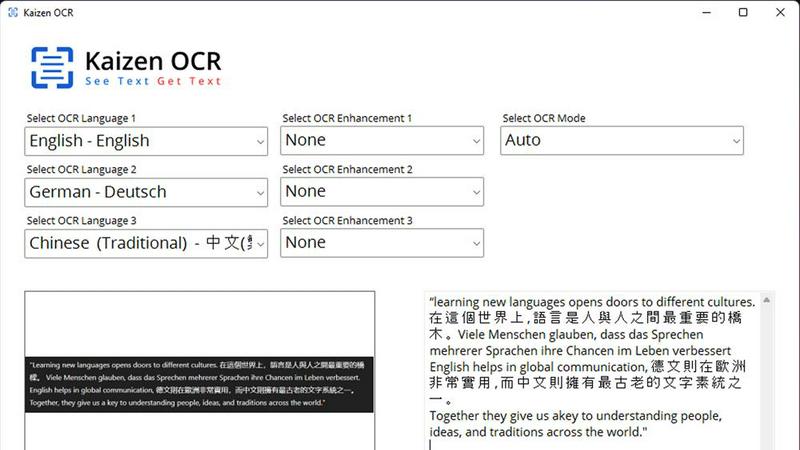
Utilizes an advanced, fully offline AI/ML engine for superior accuracy on complex documents. It excels at extracting structured data like tables with proper row/column formatting and automatically detecting key-value pairs. This feature supports major languages including English, Chinese, Arabic, Japanese, and Korean, all while guaranteeing complete privacy.
Extract Text from Image (Tesseract)
Leverages the powerful Tesseract OCR engine to pull text from any image file, such as photos of documents, receipts, or screenshots. It supports over 100 languages, allows selection of up to three languages simultaneously, and applies 11 image preprocessing steps to enhance clarity and accuracy before batch processing unlimited files.
Screenshot OCR
Features a built-in snipping tool for capturing any part of your screen and extracting text instantly. Perfect for grabbing text from videos, presentations, or locked web pages. It offers an optional hotkey (F6) for quick capture and includes table detection to maintain data structure from the source.
Merge, Split & Create PDFs
Provides comprehensive PDF manipulation tools. You can combine pages from multiple PDFs into one document, rearrange pages via drag-and-drop, insert blank pages, and add custom text annotations with personalized styling. This creates a fully offline toolkit for document assembly and customization.
Mailopoly
Cleanbox
Cleanbox ensures that only essential emails appear in your inbox. By automatically filtering out noise, it helps you focus on what truly matters without overwhelming you with unnecessary notifications. The system learns your preferences with a simple tap, making your inbox organized from day one.
Instant Information Extraction
Mailopoly’s AI extracts critical information from your emails instantly, allowing you to access important details at a glance. You can quickly find invoice amounts, booking information, delivery updates, and more without needing to open each email. This saves you time and reduces the cognitive load associated with managing your inbox.
AI-Powered Replies
Say goodbye to writer's block with Mailopoly's AI-driven reply feature. The tool drafts responses in your unique voice and tone, allowing you to send personalized emails without the hassle of typing. With multiple suggestions available, you can edit or send responses in seconds, making communication seamless.
Poly - Your AI Life Assistant
Poly acts as your personal assistant, helping you manage various life aspects such as bills, travel plans, and side hustles. You can ask Poly questions like "What do I need to pay this week?" or "Summarize emails from my accountant," and it will provide concise answers, streamlining your daily tasks.
Use Cases
Kaizen OCR
Academic Research & Study
Students and researchers can quickly digitize notes from textbooks, capture text from research papers or online journals via screenshot, and compile information into editable documents. The batch processing and multi-language support make literature reviews and sourcing quotes from various materials significantly faster.
Legal & Administrative Document Processing
Legal professionals and administrators handle sensitive contracts, forms, and scanned archives. Kaizen OCR allows them to extract text from these documents offline for editing and analysis, merge relevant PDFs, and add password protection—all without risking data privacy by uploading to the cloud.
Business & Receipt Management
Business users can process batches of receipts, invoices, and reports. Extract line-item details and tables into spreadsheets for expense tracking or accounting. The auto-crop and deskew features clean up phone-captured document photos, making them professional and readable.
Content Creation & Translation
Writers, translators, and content creators can extract text from images, screenshots, or foreign language PDFs as a starting point for their work. Supporting 100+ languages, it facilitates quick translation bases and repurposing of content from visual sources like infographics or video frames.
Mailopoly
Office Professionals
Mailopoly is perfect for office workers who handle numerous emails daily. Its intelligent filtering keeps their inbox focused on important communications, allowing them to prioritize tasks effectively and respond to urgent messages promptly.
Busy Parents
Parents juggling family schedules can benefit greatly from Mailopoly. The email extraction feature helps them stay on top of school events, appointments, and other important notices without being overwhelmed by irrelevant messages.
Freelancers and Side-Hustlers
Freelancers managing multiple clients can use Mailopoly to streamline their communications and tasks. With organized emails and AI-generated replies, they can focus on delivering quality work instead of getting lost in their inbox.
Event Planners
Event planners can take advantage of Mailopoly's event management capabilities. By tracking custom invitations and responses, they can ensure smooth coordination and organization, all while staying updated on necessary logistics and communications.
Overview
About Kaizen OCR
Kaizen OCR is a comprehensive, all-in-one desktop software for Windows that transforms how you handle documents. It combines powerful, AI-enhanced Optical Character Recognition (OCR) with essential PDF utilities in a single, fully offline package. Designed for professionals, students, researchers, and anyone who regularly works with documents, it extracts text from virtually any source: images, screenshots, and PDFs. Its core value is delivering high-accuracy text recognition without ever requiring an internet connection, ensuring 100% data privacy as your sensitive files never leave your computer. With support for over 100 languages, unlimited batch processing, and a suite of editing tools, it replaces the need for multiple online subscriptions, offering a robust, secure, and efficient solution for any digital document workflow.
About Mailopoly
Mailopoly is a revolutionary email client designed to transform how you manage your inbox and life. Unlike traditional email systems, Mailopoly employs advanced AI technology to automatically extract vital information from your emails, reducing the need for you to read through every message. This intelligent filtering significantly cuts down on inbox clutter and notifications, ensuring you only see what truly matters. Ideal for busy professionals, multitaskers, and anyone juggling multiple responsibilities, Mailopoly consolidates your emails while also managing personal finances, events, and shipments through its built-in task manager. With features like smart replies, an instant unsubscriber, and an AI chatbot named Poly, Mailopoly enhances productivity and minimizes stress, making your inbox a personal command center rather than a source of anxiety. It's available on web, mobile, and desktop platforms, ensuring seamless access to your organized life.
Frequently Asked Questions
Kaizen OCR FAQ
Is Kaizen OCR truly 100% offline?
Yes. All processing, including the advanced AI text extraction, occurs locally on your Windows computer. No internet connection is required at any point, and no data is ever uploaded to external servers, ensuring complete privacy and security for your documents.
What languages does the OCR support?
Kaizen OCR supports over 100 languages for its Tesseract-based image OCR. The AI-powered extraction mode specifically supports English, Chinese, Arabic, Japanese, and Korean. You can select up to three languages simultaneously for mixed-language documents.
Can I process multiple files at once?
Absolutely. Kaizen OCR includes robust batch processing capabilities. You can add an unlimited number of images or PDF files to a queue and let the software extract text, convert formats, or apply password protection to all of them in one go, saving considerable time.
What is the difference between Tesseract and AI OCR?
The Tesseract engine is excellent for standard text extraction across many languages. The AI-powered OCR is a more advanced, offline neural network designed for higher accuracy on complex layouts, such as documents with tables, forms, or poor image quality, preserving the structural integrity of the data.
Mailopoly FAQ
How does Mailopoly manage my email accounts?
Mailopoly supports multiple email providers, including Gmail, Outlook, and Yahoo. It allows you to connect all your accounts seamlessly, providing a unified platform for managing your emails.
Is my data secure with Mailopoly?
Yes, Mailopoly is SOC 2 certified, ensuring that your data is handled with the highest level of security and privacy. Your information is safe while you enjoy a streamlined email experience.
Do I need to set up filters or rules?
No, Mailopoly requires zero setup. Its intelligent system automatically learns your preferences and filters your inbox from day one, making it easy to use without additional configuration.
Can I unsubscribe from unwanted emails easily?
Absolutely. Mailopoly includes an instant unsubscriber feature that allows you to remove yourself from unwanted email lists with just a click, reducing inbox clutter effectively.
Alternatives
Kaizen OCR Alternatives
Kaizen OCR is a desktop software for Windows that falls into the productivity category. It specializes in extracting text from images, screenshots, and PDFs using powerful, fully offline OCR engines. This ensures all data processing happens locally on your computer for maximum privacy and security. Users may explore alternatives for various reasons. Some might seek different pricing models, such as free online tools or subscription-based services. Others may require specific features, like integration with cloud storage, or need software that runs on macOS or Linux. The search often centers on balancing cost, platform compatibility, and specific workflow needs. When evaluating an alternative, key considerations include privacy policies, offline functionality, and accuracy. Determine if the tool processes data online or locally. Check its supported languages, batch processing capabilities, and whether it includes additional utilities like PDF editing. The goal is to find a solution that matches your specific requirements for security, convenience, and power.
Mailopoly Alternatives
Mailopoly is an innovative AI-powered email client designed to streamline your inbox and enhance productivity. By intelligently extracting crucial information from your emails, it significantly reduces the volume of notifications and simplifies task management, making it an essential tool for users looking to optimize their communication and organization. Users often seek alternatives to Mailopoly due to various reasons such as pricing structures, specific feature sets, or compatibility with different platforms. When selecting an alternative, it's important to consider factors like ease of use, customization options, integration capabilities, and the overall user experience to ensure the chosen solution aligns with individual needs and preferences.