
JobHustler vs Kaizen OCR
Side-by-side comparison to help you choose the right AI tool.

JobHustler
JobHustler instantly tailors your resume and cover letter for any job.
Last updated: March 4, 2026

Kaizen OCR
Kaizen OCR extracts text from images and PDFs completely offline with 100% privacy.
Last updated: February 28, 2026
Visual Comparison
JobHustler

Kaizen OCR
Feature Comparison
JobHustler
AI-Powered Tailoring
JobHustler's core engine analyzes any pasted job description to understand key skills, keywords, and requirements. It then tailors your resume and cover letter content specifically to match what the employer is seeking, moving beyond a generic one-size-fits-all document to a targeted application that stands out.
ATS-Optimized Formatting
The tool ensures all generated documents are formatted to be parsed correctly by Applicant Tracking Systems, the software used by most companies to screen resumes. This includes clean structure, standard headings, and proper keyword placement to help your application pass the initial digital filter and reach a human recruiter.
Professional Cover Letter Generation
Beyond just filling in blanks, JobHustler creates fully customized cover letters. It tailors the opening, body, and closing to the specific company and role, using a professional tone and structure. Users can select from multiple cover letter types and tones to match the company culture and position seniority.
Employer Lens Scoring & Refinement
This feature provides an analytical score that estimates how well your generated document aligns with the job description. It acts as a quality check, offering insights and opportunities for refinement to ensure your resume and cover letter are as compelling and relevant as possible before you submit your application.
Kaizen OCR
AI-Powered Text Extraction
Utilizes an advanced, fully offline AI/ML engine for superior accuracy on complex documents. It excels at extracting structured data like tables with proper row/column formatting and automatically detecting key-value pairs. This feature supports major languages including English, Chinese, Arabic, Japanese, and Korean, all while guaranteeing complete privacy.
Extract Text from Image (Tesseract)
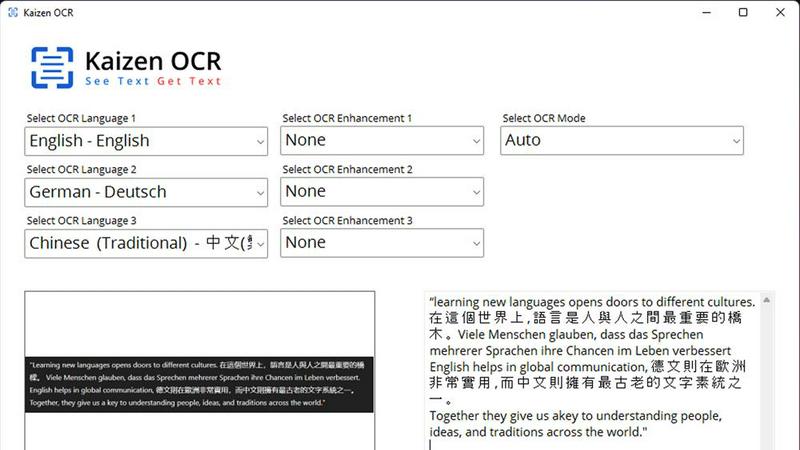
Leverages the powerful Tesseract OCR engine to pull text from any image file, such as photos of documents, receipts, or screenshots. It supports over 100 languages, allows selection of up to three languages simultaneously, and applies 11 image preprocessing steps to enhance clarity and accuracy before batch processing unlimited files.
Screenshot OCR
Features a built-in snipping tool for capturing any part of your screen and extracting text instantly. Perfect for grabbing text from videos, presentations, or locked web pages. It offers an optional hotkey (F6) for quick capture and includes table detection to maintain data structure from the source.
Merge, Split & Create PDFs
Provides comprehensive PDF manipulation tools. You can combine pages from multiple PDFs into one document, rearrange pages via drag-and-drop, insert blank pages, and add custom text annotations with personalized styling. This creates a fully offline toolkit for document assembly and customization.
Use Cases
JobHustler
Tailoring Applications for Multiple Roles
Job seekers applying to several different positions can use JobHustler to quickly create a unique, optimized resume for each role. Instead of manually editing one master document, simply paste each new job description to generate a perfectly tailored version in minutes, saving significant time and effort.
Overcoming ATS Screening Hurdles
For applicants who suspect their well-designed resume is being rejected by automated systems, JobHustler provides a solution. By generating ATS-optimized documents with the correct formatting and keyword integration, it increases the chances of the resume being seen by an actual hiring manager.
Crafting a First Professional Cover Letter
Recent graduates or career changers who lack experience writing cover letters can use JobHustler to create a strong foundation. The AI provides a professionally structured, role-specific letter that they can then personalize, eliminating the stress of starting from a blank page and ensuring a polished result.
Refining and Updating an Existing Resume
Professionals looking to update an old resume can paste their current content and a target job description into JobHustler. The AI will reframe existing experience with powerful, relevant bullet points and modern, impactful language, giving a stale resume a fresh, competitive edge.
Kaizen OCR
Academic Research & Study
Students and researchers can quickly digitize notes from textbooks, capture text from research papers or online journals via screenshot, and compile information into editable documents. The batch processing and multi-language support make literature reviews and sourcing quotes from various materials significantly faster.
Legal & Administrative Document Processing
Legal professionals and administrators handle sensitive contracts, forms, and scanned archives. Kaizen OCR allows them to extract text from these documents offline for editing and analysis, merge relevant PDFs, and add password protection—all without risking data privacy by uploading to the cloud.
Business & Receipt Management
Business users can process batches of receipts, invoices, and reports. Extract line-item details and tables into spreadsheets for expense tracking or accounting. The auto-crop and deskew features clean up phone-captured document photos, making them professional and readable.
Content Creation & Translation
Writers, translators, and content creators can extract text from images, screenshots, or foreign language PDFs as a starting point for their work. Supporting 100+ languages, it facilitates quick translation bases and repurposing of content from visual sources like infographics or video frames.
Overview
About JobHustler
JobHustler is an AI-powered tool designed to streamline and elevate the job application process. It specializes in generating professional, ATS-friendly resumes and cover letters tailored to specific job descriptions in minutes. The core value proposition is speed, precision, and effectiveness. Users simply paste a job description, and JobHustler's AI analyzes it to produce documents aligned with employer expectations. It crafts role-specific bullet points, optimizes formatting for Applicant Tracking Systems (ATS), and refines language for maximum clarity and impact. Cover letters are customized to the company and position, featuring a professional structure and tone ready for immediate submission. With no account setup required and a free tier that recharges over time, JobHustler is built for accessibility, allowing users to test and refine their documents effortlessly. It is ideal for job seekers at any level who want to create powerful, tailored application materials faster and with greater confidence.
About Kaizen OCR
Kaizen OCR is a comprehensive, all-in-one desktop software for Windows that transforms how you handle documents. It combines powerful, AI-enhanced Optical Character Recognition (OCR) with essential PDF utilities in a single, fully offline package. Designed for professionals, students, researchers, and anyone who regularly works with documents, it extracts text from virtually any source: images, screenshots, and PDFs. Its core value is delivering high-accuracy text recognition without ever requiring an internet connection, ensuring 100% data privacy as your sensitive files never leave your computer. With support for over 100 languages, unlimited batch processing, and a suite of editing tools, it replaces the need for multiple online subscriptions, offering a robust, secure, and efficient solution for any digital document workflow.
Frequently Asked Questions
JobHustler FAQ
How does JobHustler work?
You paste a job description into the tool. JobHustler's AI analyzes the text to identify key requirements, skills, and keywords. It then uses this data to tailor your existing resume content or generate new, optimized bullet points and a matching cover letter that aligns directly with the job you want.
Is my data secure with JobHustler?
JobHustler is designed with privacy in mind. No account setup is required for basic use, minimizing stored personal data. For any concerns, you can contact the support team directly at [email protected] for specific questions about data handling and security practices.
What is the "Employer Lens" scoring?
The Employer Lens is an analytical feature that scores your generated document based on its alignment with the provided job description. It evaluates factors like keyword matching and content relevance, giving you a metric to gauge effectiveness and identify areas for potential improvement before submission.
Can I try JobHustler for free?
Yes. JobHustler offers a free tier where credits recharge over time, allowing you to test the core generation capabilities without an immediate purchase. This lets you evaluate the quality of the AI-generated content and see how the tool works with your information before buying additional credits or a plan.
Kaizen OCR FAQ
Is Kaizen OCR truly 100% offline?
Yes. All processing, including the advanced AI text extraction, occurs locally on your Windows computer. No internet connection is required at any point, and no data is ever uploaded to external servers, ensuring complete privacy and security for your documents.
What languages does the OCR support?
Kaizen OCR supports over 100 languages for its Tesseract-based image OCR. The AI-powered extraction mode specifically supports English, Chinese, Arabic, Japanese, and Korean. You can select up to three languages simultaneously for mixed-language documents.
Can I process multiple files at once?
Absolutely. Kaizen OCR includes robust batch processing capabilities. You can add an unlimited number of images or PDF files to a queue and let the software extract text, convert formats, or apply password protection to all of them in one go, saving considerable time.
What is the difference between Tesseract and AI OCR?
The Tesseract engine is excellent for standard text extraction across many languages. The AI-powered OCR is a more advanced, offline neural network designed for higher accuracy on complex layouts, such as documents with tables, forms, or poor image quality, preserving the structural integrity of the data.
Alternatives
JobHustler Alternatives
JobHustler is an AI-powered tool in the productivity and management category that instantly generates tailored resumes and cover letters. It simplifies job document creation by analyzing a job description and producing ATS-optimized, professional results without requiring an account. Users may seek alternatives for various reasons. Some need different pricing models, such as subscription plans or one-time purchases. Others require advanced features like portfolio builders, interview coaching, or integration with specific platforms like LinkedIn. The need for a permanent document library or more extensive customization options can also drive the search. When evaluating alternatives, consider your primary needs. Key factors include the cost structure, the depth of AI customization, the quality of ATS optimization, and whether the platform requires an account. Also, assess the availability of additional career tools and the overall ease of use to find the best fit for your job search strategy.
Kaizen OCR Alternatives
Kaizen OCR is a desktop software for Windows that falls into the productivity category. It specializes in extracting text from images, screenshots, and PDFs using powerful, fully offline OCR engines. This ensures all data processing happens locally on your computer for maximum privacy and security. Users may explore alternatives for various reasons. Some might seek different pricing models, such as free online tools or subscription-based services. Others may require specific features, like integration with cloud storage, or need software that runs on macOS or Linux. The search often centers on balancing cost, platform compatibility, and specific workflow needs. When evaluating an alternative, key considerations include privacy policies, offline functionality, and accuracy. Determine if the tool processes data online or locally. Check its supported languages, batch processing capabilities, and whether it includes additional utilities like PDF editing. The goal is to find a solution that matches your specific requirements for security, convenience, and power.