
FahrerApp vs Kaizen OCR
Side-by-side comparison to help you choose the right AI tool.

FahrerApp
FahrerApp is the all-in-one platform for private hire fleets to manage drivers, vehicles, and compliance seamlessly.
Last updated: April 13, 2026
Kaizen OCR
Kaizen OCR extracts text from images and PDFs completely offline with 100% privacy.
Last updated: February 28, 2026
Visual Comparison
FahrerApp
Kaizen OCR
Feature Comparison
FahrerApp
Driver Mobile App
The dedicated mobile app supports drivers in all daily tasks, enabling digital shift capture, vehicle condition reporting with photo uploads, and easy documentation of expenses like fuel receipts. It provides drivers with a clear overview of their earnings and facilitates communication via a built-in multilingual chat.
Business Management Portal
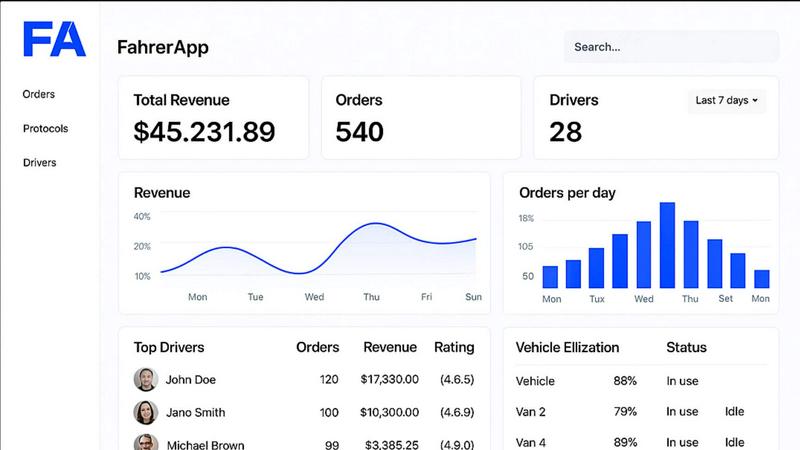
This central web dashboard gives operators powerful tools to oversee their entire operation. It includes features for shift evaluation with AI-assisted error detection, detailed driver and vehicle performance analytics, centralized employee data management, and direct communication with drivers via push notifications.
Fleet & Maintenance Management
Operators gain complete control over their vehicle fleet. The system allows for efficient fleet management, automated scheduling of maintenance appointments based on usage or time, and digital vehicle protocols to track condition and history, ensuring optimal fleet health and utilization.
Integrated Telematics & Seat Recognition
FahrerApp offers proprietary telematics hardware that delivers crucial vehicle data for operational insights. Its standout innovation is passenger seat recognition technology, which automatically and reliably records all trips conducted, providing undeniable data for billing and optimizing business processes.
Kaizen OCR
AI-Powered Text Extraction
Utilizes an advanced, fully offline AI/ML engine for superior accuracy on complex documents. It excels at extracting structured data like tables with proper row/column formatting and automatically detecting key-value pairs. This feature supports major languages including English, Chinese, Arabic, Japanese, and Korean, all while guaranteeing complete privacy.
Extract Text from Image (Tesseract)
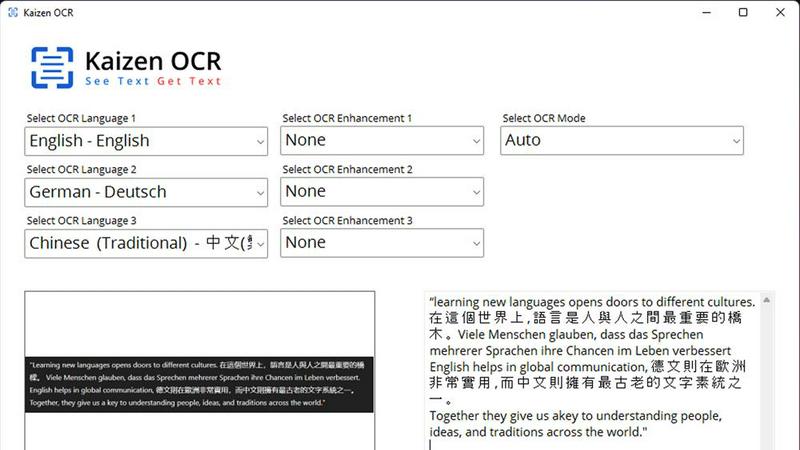
Leverages the powerful Tesseract OCR engine to pull text from any image file, such as photos of documents, receipts, or screenshots. It supports over 100 languages, allows selection of up to three languages simultaneously, and applies 11 image preprocessing steps to enhance clarity and accuracy before batch processing unlimited files.
Screenshot OCR
Features a built-in snipping tool for capturing any part of your screen and extracting text instantly. Perfect for grabbing text from videos, presentations, or locked web pages. It offers an optional hotkey (F6) for quick capture and includes table detection to maintain data structure from the source.
Merge, Split & Create PDFs
Provides comprehensive PDF manipulation tools. You can combine pages from multiple PDFs into one document, rearrange pages via drag-and-drop, insert blank pages, and add custom text annotations with personalized styling. This creates a fully offline toolkit for document assembly and customization.
Use Cases
FahrerApp
Streamlining Shift Planning & Driver Coordination
Dispatch managers use the Unternehmerportal to plan and assign shifts efficiently. Drivers accept and log their shifts via the mobile app, with all hours automatically calculated. This eliminates phone calls and spreadsheets, providing real-time visibility into driver availability and assignments.
Automated Operational Compliance & Reporting
Companies automate the documentation of mandatory vehicle checks and driver working hours. Digital protocols with timestamps and photos ensure compliance. All data flows into centralized reports for shift evaluation and revenue analysis, simplifying accounting and regulatory audits.
Optimizing Fleet Utilization & Maintenance
Fleet managers monitor vehicle usage and performance through the portal's analytics. The system automatically generates maintenance tasks based on mileage or time, preventing costly breakdowns and downtime. This proactive approach extends vehicle lifespan and maximizes fleet ROI.
Enhancing Driver Communication & Satisfaction
Operators use the platform's push notification and multilingual chat to broadcast announcements or communicate directly with drivers. The driver app's self-service features for shift tracking and earnings transparency empower drivers, reducing administrative queries and improving job satisfaction.
Kaizen OCR
Academic Research & Study
Students and researchers can quickly digitize notes from textbooks, capture text from research papers or online journals via screenshot, and compile information into editable documents. The batch processing and multi-language support make literature reviews and sourcing quotes from various materials significantly faster.
Legal & Administrative Document Processing
Legal professionals and administrators handle sensitive contracts, forms, and scanned archives. Kaizen OCR allows them to extract text from these documents offline for editing and analysis, merge relevant PDFs, and add password protection—all without risking data privacy by uploading to the cloud.
Business & Receipt Management
Business users can process batches of receipts, invoices, and reports. Extract line-item details and tables into spreadsheets for expense tracking or accounting. The auto-crop and deskew features clean up phone-captured document photos, making them professional and readable.
Content Creation & Translation
Writers, translators, and content creators can extract text from images, screenshots, or foreign language PDFs as a starting point for their work. Supporting 100+ languages, it facilitates quick translation bases and repurposing of content from visual sources like infographics or video frames.
Overview
About FahrerApp
FahrerApp is a comprehensive, all-in-one software platform designed specifically for rental car and private hire vehicle operators. It serves as the central nervous system for businesses in the passenger transport industry, seamlessly connecting the needs of drivers and management. The platform eliminates operational silos by providing a unified system to manage the entire workflow, from driver shift logging and vehicle maintenance to fleet utilization and detailed revenue analytics. For operators, it replaces manual, error-prone coordination with automated processes and a clear dashboard overview, dramatically increasing operational efficiency. For drivers, it offers a dedicated mobile app that simplifies daily tasks like shift recording and vehicle checks. Ultimately, FahrerApp empowers companies to optimize their personnel and fleet resources, reduce administrative overhead, and make data-driven decisions to improve their bottom line.
About Kaizen OCR
Kaizen OCR is a comprehensive, all-in-one desktop software for Windows that transforms how you handle documents. It combines powerful, AI-enhanced Optical Character Recognition (OCR) with essential PDF utilities in a single, fully offline package. Designed for professionals, students, researchers, and anyone who regularly works with documents, it extracts text from virtually any source: images, screenshots, and PDFs. Its core value is delivering high-accuracy text recognition without ever requiring an internet connection, ensuring 100% data privacy as your sensitive files never leave your computer. With support for over 100 languages, unlimited batch processing, and a suite of editing tools, it replaces the need for multiple online subscriptions, offering a robust, secure, and efficient solution for any digital document workflow.
Frequently Asked Questions
FahrerApp FAQ
What types of businesses is FahrerApp designed for?
FahrerApp is specifically built for rental car companies (Mietwagenunternehmen) and private hire vehicle (Personenbeförderung) operators. It is ideal for businesses that manage a fleet of vehicles and a team of drivers, such as taxi services, limousine companies, and passenger van rental services.
Does FahrerApp require special hardware to work?
While the core software for shift and fleet management works with standard smartphones and computers, the advanced telematics and automatic seat recognition features require FahrerApp's proprietary hardware devices to be installed in the vehicles for full functionality and data capture.
How does the platform handle communication with international drivers?
The integrated chat function within the driver app supports multilingual communication. It features automatic translation, allowing managers and drivers who speak different languages to communicate seamlessly, which is essential for diverse teams in the transport industry.
Can I try FahrerApp before committing to a purchase?
The provided content does not specify a free trial, but it strongly encourages potential customers to make contact for more information. You should use the "Kontakt aufnehmen" (Make Contact) option on their website to inquire directly about demo options, pricing plans, and trial availability.
Kaizen OCR FAQ
Is Kaizen OCR truly 100% offline?
Yes. All processing, including the advanced AI text extraction, occurs locally on your Windows computer. No internet connection is required at any point, and no data is ever uploaded to external servers, ensuring complete privacy and security for your documents.
What languages does the OCR support?
Kaizen OCR supports over 100 languages for its Tesseract-based image OCR. The AI-powered extraction mode specifically supports English, Chinese, Arabic, Japanese, and Korean. You can select up to three languages simultaneously for mixed-language documents.
Can I process multiple files at once?
Absolutely. Kaizen OCR includes robust batch processing capabilities. You can add an unlimited number of images or PDF files to a queue and let the software extract text, convert formats, or apply password protection to all of them in one go, saving considerable time.
What is the difference between Tesseract and AI OCR?
The Tesseract engine is excellent for standard text extraction across many languages. The AI-powered OCR is a more advanced, offline neural network designed for higher accuracy on complex layouts, such as documents with tables, forms, or poor image quality, preserving the structural integrity of the data.
Alternatives
FahrerApp Alternatives
FahrerApp is a fleet management software designed for rental car and private hire operators. It provides an all-in-one platform to manage drivers, vehicles, and bookings, streamlining administrative tasks and improving operational efficiency. Users may explore alternatives for various reasons. These can include budget constraints, the need for different feature sets, or specific platform requirements like mobile app functionality or deeper integration with other business tools. The search for the right fit is common in this software category. When evaluating alternatives, consider your core operational needs. Key factors include the platform's ability to handle driver self-service, shift planning, compliance tracking, and reporting. The ideal solution should reduce manual work and provide clear visibility into your fleet's performance.
Kaizen OCR Alternatives
Kaizen OCR is a desktop software for Windows that falls into the productivity category. It specializes in extracting text from images, screenshots, and PDFs using powerful, fully offline OCR engines. This ensures all data processing happens locally on your computer for maximum privacy and security. Users may explore alternatives for various reasons. Some might seek different pricing models, such as free online tools or subscription-based services. Others may require specific features, like integration with cloud storage, or need software that runs on macOS or Linux. The search often centers on balancing cost, platform compatibility, and specific workflow needs. When evaluating an alternative, key considerations include privacy policies, offline functionality, and accuracy. Determine if the tool processes data online or locally. Check its supported languages, batch processing capabilities, and whether it includes additional utilities like PDF editing. The goal is to find a solution that matches your specific requirements for security, convenience, and power.