
documentorium vs Kaizen OCR
Side-by-side comparison to help you choose the right AI tool.

documentorium
Generate professional contractor documents and PDFs in seconds with guided forms tailored for your trade, all for a simple annual fee.
Last updated: March 26, 2026
Kaizen OCR
Kaizen OCR extracts text from images and PDFs completely offline with 100% privacy.
Last updated: February 28, 2026
Visual Comparison
documentorium

Kaizen OCR
Feature Comparison
documentorium
Guided Forms
documentorium provides guided forms that simplify the document creation process. Each form is tailored to specific trades, allowing users to fill in necessary information without confusion. This feature ensures you create accurate documents quickly.
Instant PDF Generation
With documentorium, you can generate a professional PDF in seconds after completing a guided form. This feature eliminates formatting hassles, providing you with a ready-to-use document that looks polished and professional.
Comprehensive Document History
documentorium saves your document history, making it easy to access past documents. This feature allows you to quickly retrieve, view, and download previously created documents whenever needed, streamlining your workflow.
Simple Pricing Model
The platform offers a straightforward pricing model at $99 per year for full access to all documents and forms. This ensures that users know exactly what they are paying for without hidden costs, making budgeting easier for service professionals.
Kaizen OCR
AI-Powered Text Extraction
Utilizes an advanced, fully offline AI/ML engine for superior accuracy on complex documents. It excels at extracting structured data like tables with proper row/column formatting and automatically detecting key-value pairs. This feature supports major languages including English, Chinese, Arabic, Japanese, and Korean, all while guaranteeing complete privacy.
Extract Text from Image (Tesseract)
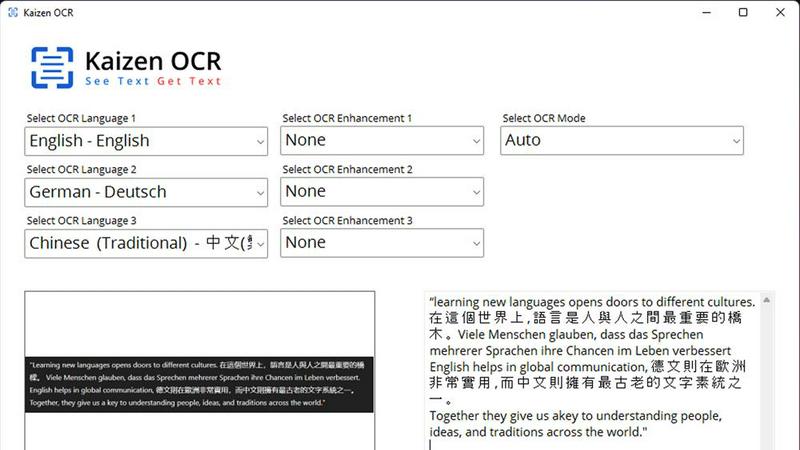
Leverages the powerful Tesseract OCR engine to pull text from any image file, such as photos of documents, receipts, or screenshots. It supports over 100 languages, allows selection of up to three languages simultaneously, and applies 11 image preprocessing steps to enhance clarity and accuracy before batch processing unlimited files.
Screenshot OCR
Features a built-in snipping tool for capturing any part of your screen and extracting text instantly. Perfect for grabbing text from videos, presentations, or locked web pages. It offers an optional hotkey (F6) for quick capture and includes table detection to maintain data structure from the source.
Merge, Split & Create PDFs
Provides comprehensive PDF manipulation tools. You can combine pages from multiple PDFs into one document, rearrange pages via drag-and-drop, insert blank pages, and add custom text annotations with personalized styling. This creates a fully offline toolkit for document assembly and customization.
Use Cases
documentorium
Creating Quotes and Estimates
As a contractor, you can quickly generate quotes and estimates for your clients using documentorium's guided templates. This saves time and improves client communication by providing clear, professional documentation.
Generating Invoices
Electricians can utilize documentorium to create invoices swiftly after completing a job. The instant PDF generation ensures that clients receive timely billing, improving cash flow and professional image.
Managing Work Orders
Plumbers can create detailed work orders using the platform, ensuring that all necessary information is documented. This helps in maintaining clear communication with clients and tracking job progress efficiently.
Preparing Proposals
HVAC technicians can use documentorium to craft proposals for new projects or services. The guided forms help ensure that all relevant details are included, making it easier to win new business and retain clients.
Kaizen OCR
Academic Research & Study
Students and researchers can quickly digitize notes from textbooks, capture text from research papers or online journals via screenshot, and compile information into editable documents. The batch processing and multi-language support make literature reviews and sourcing quotes from various materials significantly faster.
Legal & Administrative Document Processing
Legal professionals and administrators handle sensitive contracts, forms, and scanned archives. Kaizen OCR allows them to extract text from these documents offline for editing and analysis, merge relevant PDFs, and add password protection—all without risking data privacy by uploading to the cloud.
Business & Receipt Management
Business users can process batches of receipts, invoices, and reports. Extract line-item details and tables into spreadsheets for expense tracking or accounting. The auto-crop and deskew features clean up phone-captured document photos, making them professional and readable.
Content Creation & Translation
Writers, translators, and content creators can extract text from images, screenshots, or foreign language PDFs as a starting point for their work. Supporting 100+ languages, it facilitates quick translation bases and repurposing of content from visual sources like infographics or video frames.
Overview
About documentorium
documentorium is a streamlined document engine designed specifically for tradespeople such as electricians, plumbers, contractors, HVAC technicians, and roofers. It eliminates the hassle of starting from scratch by providing over 200 guided templates tailored to 26 trade categories. Whether you need quotes, estimates, invoices, work orders, bids, contracts, or service reports, documentorium offers a comprehensive solution for creating professional business documents in a matter of seconds. Each template is built with fields specific to your trade, ensuring that you capture all necessary information without the frustration of generic blanks. With documentorium, you can easily fill out a form and generate a clean, print-ready PDF, saving you valuable time and effort in your daily operations.
About Kaizen OCR
Kaizen OCR is a comprehensive, all-in-one desktop software for Windows that transforms how you handle documents. It combines powerful, AI-enhanced Optical Character Recognition (OCR) with essential PDF utilities in a single, fully offline package. Designed for professionals, students, researchers, and anyone who regularly works with documents, it extracts text from virtually any source: images, screenshots, and PDFs. Its core value is delivering high-accuracy text recognition without ever requiring an internet connection, ensuring 100% data privacy as your sensitive files never leave your computer. With support for over 100 languages, unlimited batch processing, and a suite of editing tools, it replaces the need for multiple online subscriptions, offering a robust, secure, and efficient solution for any digital document workflow.
Frequently Asked Questions
documentorium FAQ
Can I cancel anytime?
Yes, you can cancel your subscription at any time directly from your account. Your access remains active until the end of the billing period, and there are no penalties or lock-in periods.
What happens when my trial ends?
When your trial ends, all your existing documents remain accessible. To create new documents, you will need to activate your subscription, but no data is deleted upon trial expiration.
Do I lose my documents if I don't subscribe?
No, your documents will remain in your history, and you can view and download them anytime. Subscribing simply allows you to create and edit new documents.
What types of documents can I create?
documentorium offers a wide array of documents, including quotes, estimates, invoices, work orders, bids, contracts, service reports, inspection reports, proposals, warranties, change orders, and more, catering to various trades.
Kaizen OCR FAQ
Is Kaizen OCR truly 100% offline?
Yes. All processing, including the advanced AI text extraction, occurs locally on your Windows computer. No internet connection is required at any point, and no data is ever uploaded to external servers, ensuring complete privacy and security for your documents.
What languages does the OCR support?
Kaizen OCR supports over 100 languages for its Tesseract-based image OCR. The AI-powered extraction mode specifically supports English, Chinese, Arabic, Japanese, and Korean. You can select up to three languages simultaneously for mixed-language documents.
Can I process multiple files at once?
Absolutely. Kaizen OCR includes robust batch processing capabilities. You can add an unlimited number of images or PDF files to a queue and let the software extract text, convert formats, or apply password protection to all of them in one go, saving considerable time.
What is the difference between Tesseract and AI OCR?
The Tesseract engine is excellent for standard text extraction across many languages. The AI-powered OCR is a more advanced, offline neural network designed for higher accuracy on complex layouts, such as documents with tables, forms, or poor image quality, preserving the structural integrity of the data.
Alternatives
documentorium Alternatives
documentorium is a specialized document engine designed for tradespeople, enabling them to create various professional business documents quickly and efficiently. It falls under the category of productivity and management tools, catering specifically to the needs of electricians, plumbers, contractors, HVAC technicians, roofers, and other service professionals. Users often seek alternatives to documentorium for various reasons, including pricing considerations, the need for additional features, or compatibility with specific platforms. When choosing an alternative, it's crucial to assess the range of templates available, the level of customization offered, and the overall ease of use to ensure it aligns with your business needs.
Kaizen OCR Alternatives
Kaizen OCR is a desktop software for Windows that falls into the productivity category. It specializes in extracting text from images, screenshots, and PDFs using powerful, fully offline OCR engines. This ensures all data processing happens locally on your computer for maximum privacy and security. Users may explore alternatives for various reasons. Some might seek different pricing models, such as free online tools or subscription-based services. Others may require specific features, like integration with cloud storage, or need software that runs on macOS or Linux. The search often centers on balancing cost, platform compatibility, and specific workflow needs. When evaluating an alternative, key considerations include privacy policies, offline functionality, and accuracy. Determine if the tool processes data online or locally. Check its supported languages, batch processing capabilities, and whether it includes additional utilities like PDF editing. The goal is to find a solution that matches your specific requirements for security, convenience, and power.