
Browsable vs Kaizen OCR
Side-by-side comparison to help you choose the right AI tool.

Browsable
Browsable turns any website into a clean, reliable API for structured data without coding or blocks.
Last updated: March 18, 2026
Kaizen OCR
Kaizen OCR extracts text from images and PDFs completely offline with 100% privacy.
Last updated: February 28, 2026
Visual Comparison
Browsable
Kaizen OCR
Feature Comparison
Browsable
AI-Powered Scraper Generation
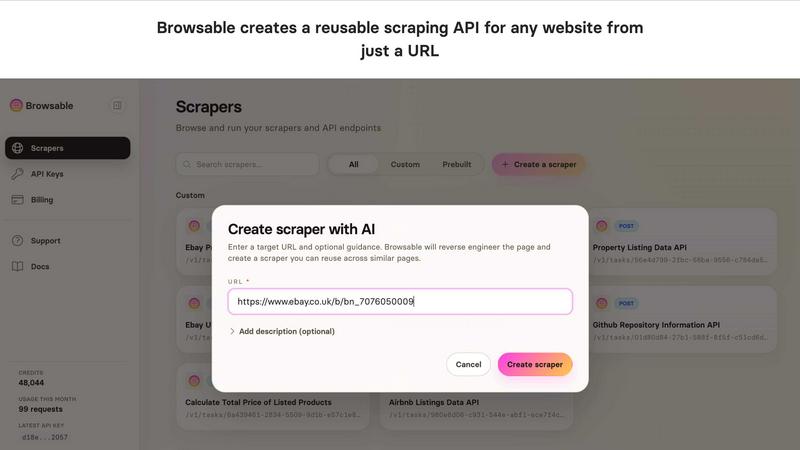
Simply provide a URL, and Browsable's AI agent takes over. It autonomously navigates the website, analyzes the page structure, determines what data can be extracted, and builds a robust scraping API tailored to that specific site layout. This removes the need for manual HTML parsing and XPath/CSS selector writing, dramatically reducing development time from hours to minutes.
Reusable & Parameterized APIs
The generated API is not a one-time extraction tool. It creates a persistent endpoint that can be called repeatedly with different parameters. For example, a YouTube channel scraper can accept a channel URL and a max_videos parameter, allowing you to scrape data from any channel with the same page structure, making it ideal for building data pipelines and integrated applications.
Advanced Anti-Bot Evasion
Websites frequently update their anti-scraping defenses. Browsable manages this challenge proactively by handling proxies, browser fingerprinting, request headers, and intelligent retry logic. This infrastructure is designed to bypass aggressive blocking systems, ensuring high success rates and reliable data delivery without requiring user intervention.
No-Code Dashboard & Pre-built APIs
For users who don't want to code, Browsable offers a full-featured web dashboard. You can run scraping tasks, view results, and download data directly as CSV or JSON files. Additionally, a library of pre-built, ready-to-use APIs for sites like Airbnb, Amazon, and Instagram allows for instant data extraction without any setup.
Kaizen OCR
AI-Powered Text Extraction
Utilizes an advanced, fully offline AI/ML engine for superior accuracy on complex documents. It excels at extracting structured data like tables with proper row/column formatting and automatically detecting key-value pairs. This feature supports major languages including English, Chinese, Arabic, Japanese, and Korean, all while guaranteeing complete privacy.
Extract Text from Image (Tesseract)
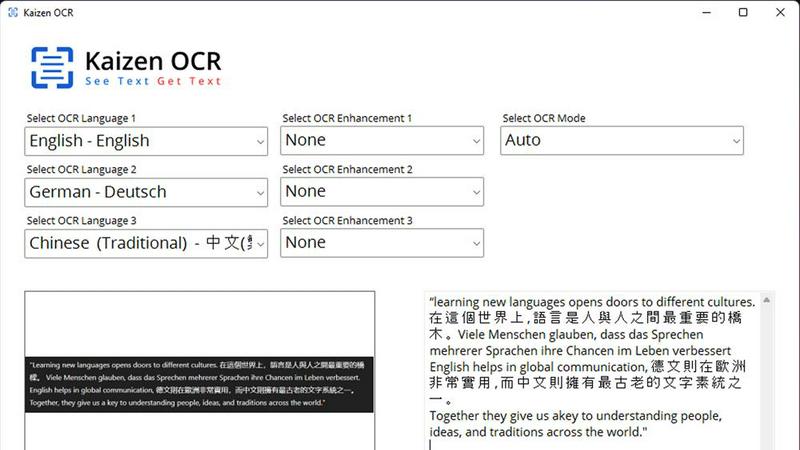
Leverages the powerful Tesseract OCR engine to pull text from any image file, such as photos of documents, receipts, or screenshots. It supports over 100 languages, allows selection of up to three languages simultaneously, and applies 11 image preprocessing steps to enhance clarity and accuracy before batch processing unlimited files.
Screenshot OCR
Features a built-in snipping tool for capturing any part of your screen and extracting text instantly. Perfect for grabbing text from videos, presentations, or locked web pages. It offers an optional hotkey (F6) for quick capture and includes table detection to maintain data structure from the source.
Merge, Split & Create PDFs
Provides comprehensive PDF manipulation tools. You can combine pages from multiple PDFs into one document, rearrange pages via drag-and-drop, insert blank pages, and add custom text annotations with personalized styling. This creates a fully offline toolkit for document assembly and customization.
Use Cases
Browsable
Competitive Intelligence & Market Research
Automate the collection of pricing, product listings, and feature sets from competitor websites or marketplaces like Amazon and eBay. Track changes over time to inform pricing strategies, product development, and market positioning without manual, error-prone data gathering.
Lead Generation & Recruitment
Scrape professional profiles from platforms like LinkedIn or company data from directories to build targeted lead lists. Recruiters can gather candidate information from job boards like Indeed to source talent efficiently and populate their CRM or ATS systems automatically.
Content & Social Media Aggregation
Monitor brand mentions, track trends, or aggregate content from news sites, forums like Reddit, and social media platforms such as Twitter and Instagram. This is essential for social listening, content strategy, and creating curated news feeds or research databases.
Real Estate & Travel Data Analysis
Collect detailed listing data from Airbnb, Zillow, or Rightmove for investment analysis, price benchmarking, and availability monitoring. Travel companies can scrape flight prices from aggregators or hotel listings to build comparison tools and dynamic pricing models.
Kaizen OCR
Academic Research & Study
Students and researchers can quickly digitize notes from textbooks, capture text from research papers or online journals via screenshot, and compile information into editable documents. The batch processing and multi-language support make literature reviews and sourcing quotes from various materials significantly faster.
Legal & Administrative Document Processing
Legal professionals and administrators handle sensitive contracts, forms, and scanned archives. Kaizen OCR allows them to extract text from these documents offline for editing and analysis, merge relevant PDFs, and add password protection—all without risking data privacy by uploading to the cloud.
Business & Receipt Management
Business users can process batches of receipts, invoices, and reports. Extract line-item details and tables into spreadsheets for expense tracking or accounting. The auto-crop and deskew features clean up phone-captured document photos, making them professional and readable.
Content Creation & Translation
Writers, translators, and content creators can extract text from images, screenshots, or foreign language PDFs as a starting point for their work. Supporting 100+ languages, it facilitates quick translation bases and repurposing of content from visual sources like infographics or video frames.
Overview
About Browsable
Browsable is an AI-powered web scraping platform that transforms any public webpage into a structured, reusable API. It solves the fundamental problem of accessing valuable web data that isn't available through official APIs. The process is simple: you provide a target URL, and Browsable's AI agent analyzes the page, identifies the extractable data, and reverse-engineers the site's structure to generate a dedicated scraping API. This API doesn't just work for the single page you submitted; it is designed to work for any page on the site with an identical or similar layout, enabling scalable data collection.
The platform is built for developers, data analysts, businesses, and AI agents who need reliable access to web data without the maintenance burden. It eliminates the need to write, test, and constantly update custom scraping scripts. Browsable handles the complexities of modern web scraping, including anti-bot protections, JavaScript rendering, and pagination, delivering clean JSON or CSV data. With a free tier offering 100 credits and pre-built APIs for major platforms like Airbnb and Amazon, users can start extracting data immediately, either via API integration or through a no-code dashboard.
About Kaizen OCR
Kaizen OCR is a comprehensive, all-in-one desktop software for Windows that transforms how you handle documents. It combines powerful, AI-enhanced Optical Character Recognition (OCR) with essential PDF utilities in a single, fully offline package. Designed for professionals, students, researchers, and anyone who regularly works with documents, it extracts text from virtually any source: images, screenshots, and PDFs. Its core value is delivering high-accuracy text recognition without ever requiring an internet connection, ensuring 100% data privacy as your sensitive files never leave your computer. With support for over 100 languages, unlimited batch processing, and a suite of editing tools, it replaces the need for multiple online subscriptions, offering a robust, secure, and efficient solution for any digital document workflow.
Frequently Asked Questions
Browsable FAQ
How does Browsable handle websites with login requirements?
Browsable can manage authenticated scraping sessions. The AI agent can be configured to handle login forms, allowing it to access and scrape data from behind login walls, such as private social media groups or membership sites, provided you supply valid credentials.
What happens if a website changes its layout?
Browsable's AI agents are designed to be resilient. While major site overhauls may require re-analysis, the system is built to handle minor structural changes. For critical pipelines, users can trigger a re-analysis of the target page to update the scraping logic, ensuring long-term reliability.
Is web scraping with Browsable legal?
Browsable provides the technology to scrape publicly available data. It is the user's responsibility to comply with the target website's Terms of Service, robots.txt file, and relevant data protection laws like the GDPR. Always ensure you have the right to collect and use the data for your intended purpose.
Can I schedule automated scraping jobs?
Yes. Once you have a generated API endpoint, you can integrate it into your own applications and set up scheduled calls using cron jobs, workflow automators like Zapier, or cloud functions. This allows for fully automated, regular data collection and updates.
Kaizen OCR FAQ
Is Kaizen OCR truly 100% offline?
Yes. All processing, including the advanced AI text extraction, occurs locally on your Windows computer. No internet connection is required at any point, and no data is ever uploaded to external servers, ensuring complete privacy and security for your documents.
What languages does the OCR support?
Kaizen OCR supports over 100 languages for its Tesseract-based image OCR. The AI-powered extraction mode specifically supports English, Chinese, Arabic, Japanese, and Korean. You can select up to three languages simultaneously for mixed-language documents.
Can I process multiple files at once?
Absolutely. Kaizen OCR includes robust batch processing capabilities. You can add an unlimited number of images or PDF files to a queue and let the software extract text, convert formats, or apply password protection to all of them in one go, saving considerable time.
What is the difference between Tesseract and AI OCR?
The Tesseract engine is excellent for standard text extraction across many languages. The AI-powered OCR is a more advanced, offline neural network designed for higher accuracy on complex layouts, such as documents with tables, forms, or poor image quality, preserving the structural integrity of the data.
Alternatives
Browsable Alternatives
Browsable is an AI-powered web scraping API that automatically generates reusable APIs from any website. It belongs to the data extraction and web automation software category. Users can provide a URL, and Browsable analyzes the page to determine what data can be extracted, reverse-engineering the structure to create a functional API. Users often explore alternatives to find a solution that best fits their specific needs. Common reasons include budget constraints, the need for different feature sets like advanced proxy management or specific data export formats, and compatibility with existing tech stacks or platforms. Some may require more hands-on control or a different pricing model. When evaluating alternatives, key factors to consider are the tool's ability to handle JavaScript-heavy sites, its success rate in avoiding blocks, ease of use and integration, scalability, and the total cost of ownership. The ideal solution should reliably deliver clean, structured data with minimal maintenance overhead.
Kaizen OCR Alternatives
Kaizen OCR is a desktop software for Windows that falls into the productivity category. It specializes in extracting text from images, screenshots, and PDFs using powerful, fully offline OCR engines. This ensures all data processing happens locally on your computer for maximum privacy and security. Users may explore alternatives for various reasons. Some might seek different pricing models, such as free online tools or subscription-based services. Others may require specific features, like integration with cloud storage, or need software that runs on macOS or Linux. The search often centers on balancing cost, platform compatibility, and specific workflow needs. When evaluating an alternative, key considerations include privacy policies, offline functionality, and accuracy. Determine if the tool processes data online or locally. Check its supported languages, batch processing capabilities, and whether it includes additional utilities like PDF editing. The goal is to find a solution that matches your specific requirements for security, convenience, and power.