
Invoice Guru vs Tailride
Side-by-side comparison to help you choose the right AI tool.

Invoice Guru
Invoice Guru enables UK tradespeople to create compliant invoices in under a minute, streamlining their invoicing.
Last updated: February 28, 2026

Tailride
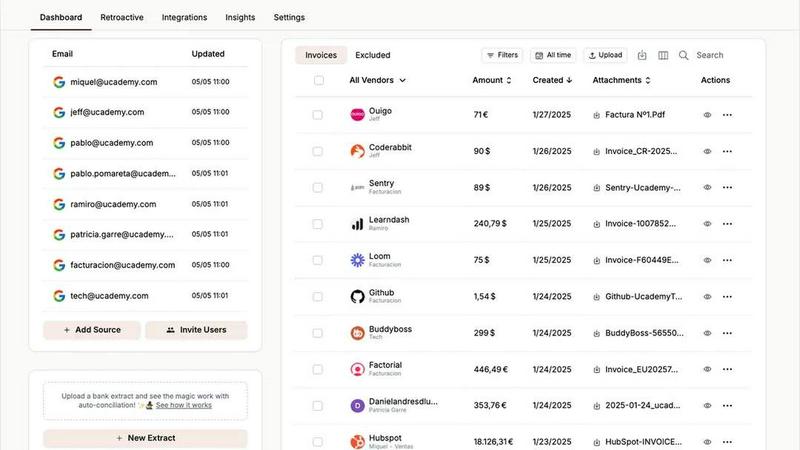
Tailride automates invoice and receipt management from your inbox, saving you time and hassle for seamless accounting.
Last updated: February 26, 2026
Visual Comparison
Invoice Guru

Tailride
Feature Comparison
Invoice Guru
Instant Invoice Creation
Create and send professional invoices in under a minute. Simply input your client's details and items, and Invoice Guru automatically adds your logo, VAT, payment terms, and due date.
Automatic Invoice Numbering
Invoices are automatically numbered and dated according to your fiscal year settings, ensuring organized record-keeping without manual effort.
OCR Receipt Scanner (AI)
Use the AI-driven OCR receipt scanner to snap a photo of your receipts. The app reads the details and saves them as expense entries, eliminating the need for manual data entry and saving valuable time.
Smart Payment Tracking
Automatically match incoming bank transactions with unpaid invoices. This feature provides clear visibility on which clients have paid and which invoices are overdue, streamlining your cash flow management.
Tailride
Inbox Scanning
Tailride's Inbox Scanning feature monitors your email inbox for incoming invoices, regardless of format. It captures invoices from PDF files, images, or email bodies, ensuring you never miss an important document.
Online Portals
With the Online Portals feature, Tailride allows you to extract invoices directly from various websites. This functionality enables business owners to handle the administrative burden without relying solely on their accountants.
Integrations
Tailride seamlessly integrates with various accounting platforms and cloud storage services, including QuickBooks, Xero, and Google Drive. This connectivity simplifies the workflow by allowing users to organize and share their financial documents effortlessly.
AI Processing
The AI Processing feature utilizes advanced algorithms to intelligently categorize and organize extracted invoices. Users can set custom rules to automate this process, ensuring that every document is accurately classified according to their business needs.
Use Cases
Invoice Guru
On-Site Invoicing for Tradespeople
Tradespeople can create and send invoices immediately after completing a job, enhancing customer satisfaction by providing instant billing and reducing payment delays.
Expense Management for Small Businesses
Small business owners can effortlessly track expenses using the OCR receipt scanning feature, allowing them to focus on growth without getting bogged down by paperwork.
Compliance with Tax Regulations
Professionals can rest easy knowing that Invoice Guru is designed to meet HMRC compliance standards and adapt to future regulations, allowing users to focus on their work instead of worrying about compliance issues.
Custom Branding for Professional Image
Businesses can personalize invoices with their own branding, including logos and company information, ensuring a professional presentation that enhances credibility with clients.
Tailride
Small Business Owners
Small business owners can streamline their financial management by using Tailride to automate invoice extraction and processing. This saves time and minimizes errors, allowing them to focus on growing their business.
Accountants
For accountants managing multiple clients, Tailride simplifies the task of collecting and organizing invoices. The platform’s ability to connect to various email accounts means that accountants can easily access all necessary documents in one place.
Teams with Multiple Users
Teams can leverage Tailride to link multiple user accounts, enabling employees to submit their receipts and invoices directly through the platform. This enhances collaboration and keeps all financial documents organized and accessible.
Freelancers
Freelancers can benefit from Tailride by quickly capturing invoices from clients and managing their expense receipts. This not only saves time but also ensures accurate financial records, making tax preparation easier.
Overview
About Invoice Guru
Invoice Guru is a cutting-edge mobile-first invoicing application designed specifically for tradespeople and small service businesses. Unlike conventional desktop invoicing tools, Invoice Guru enables professionals like painters, plumbers, electricians, and cleaners to swiftly create and send invoices directly from their mobile devices. This application is engineered for both speed and simplicity, allowing users to generate invoices in less than 60 seconds, thereby minimizing the time spent on administrative tasks. Key features include automatic accountant reports for efficient bookkeeping, seamless bank integration for easy payment tracking, and OCR receipt scanning to simplify expense management. Additionally, Invoice Guru is designed with future regulations in mind, ensuring compliance with HMRC in the UK and KSeF in Poland without the need for users to switch tools as legislation evolves. Created by a tradesperson, this app effectively addresses the everyday challenges of running a small business, making it an essential tool for busy professionals seeking efficiency and compliance.
About Tailride
Tailride is an innovative AI-powered accounting automation platform designed to simplify the invoice management process. By seamlessly connecting to your email inbox, Tailride automatically detects and extracts invoices and receipts from emails and attachments. This powerful tool uses intelligent document recognition for efficient processing, significantly reducing the time spent on manual data entry. Tailride caters to accountants, small business owners, and teams managing multiple clients, offering them a robust solution for organizing financial documents. With features such as a Chrome extension for one-click invoice extraction from over 20 platforms, customizable AI rules for categorization, and integrations with popular accounting software like QuickBooks and Xero, Tailride aims to save users hundreds of hours each month. It ensures that all invoices are captured and organized, making tax filings and financial management stress-free.
Frequently Asked Questions
Invoice Guru FAQ
How does Invoice Guru ensure compliance with UK tax regulations?
Invoice Guru is designed to meet HMRC compliance standards. It automatically generates reports and invoices that adhere to current regulations, ensuring users remain compliant without additional effort.
Can I use Invoice Guru internationally?
Yes, Invoice Guru supports multiple languages and currencies, making it suitable for international business operations. This feature allows users to adapt their invoicing processes as needed based on their location.
Is there a free trial available for Invoice Guru?
Yes, Invoice Guru offers a 10-day free trial along with a free plan for users who want to start invoicing without financial commitment. This allows potential users to explore the app's features before subscribing.
What types of payments can I accept through Invoice Guru?
Invoice Guru enables users to accept payments via bank transfers, PayPal, and Stripe, providing flexibility in how clients can settle their invoices. This variety enhances convenience for both businesses and their customers.
Tailride FAQ
How does Tailride capture invoices from my inbox?
Tailride connects to your email inbox and automatically detects incoming invoices, regardless of their format, including PDFs and images. It processes these documents using advanced AI technology for efficient categorization.
Can Tailride work with any email client?
Yes, Tailride is compatible with all email clients, including Gmail, Outlook, and any service that supports IMAP. This flexibility ensures that you can manage your invoices regardless of your preferred email platform.
Is there a limit to the number of users I can add?
No, Tailride allows you to link as many users as needed. This feature is beneficial for teams, enabling all members to submit and track their invoices and receipts seamlessly.
What types of documents can Tailride process?
Tailride can process various types of documents, including invoices, receipts, and other financial statements, regardless of whether they are in PDF, image, or email body formats. This comprehensive capability ensures that no important documents are overlooked.
Alternatives
Invoice Guru Alternatives
Invoice Guru is a mobile-first invoicing application specifically designed for tradespeople and small service businesses in the UK. It simplifies the invoicing process, enabling users to create and send compliant invoices in under a minute, directly from their mobile devices. Users often seek alternatives due to factors such as pricing, feature sets, platform compatibility, and specific business needs. When choosing an alternative, it's crucial to consider the app's ease of use, compliance with regulations, integration capabilities, and support for mobile functionality, ensuring it aligns with the demands of on-site professionals.
Tailride Alternatives
Tailride is an AI-powered accounting automation platform designed to simplify the management of invoices and receipts. It operates by connecting to your email inbox, intelligently detecting and extracting relevant financial documents from emails and attachments. This tool falls under the Business & Finance category, promoting efficiency through advanced document recognition and seamless integrations with popular accounting software. Users often seek alternatives to Tailride due to various factors such as pricing, specific feature sets, and compatibility with different platforms. When exploring alternatives, it's essential to consider ease of use, the range of integrations offered, and the ability to automate processes according to your unique business needs. Evaluating customer support and user reviews can also provide insight into the reliability and effectiveness of the alternative solutions.