
Image3D AI vs Proofapp
Side-by-side comparison to help you choose the right AI tool.

Image3D AI
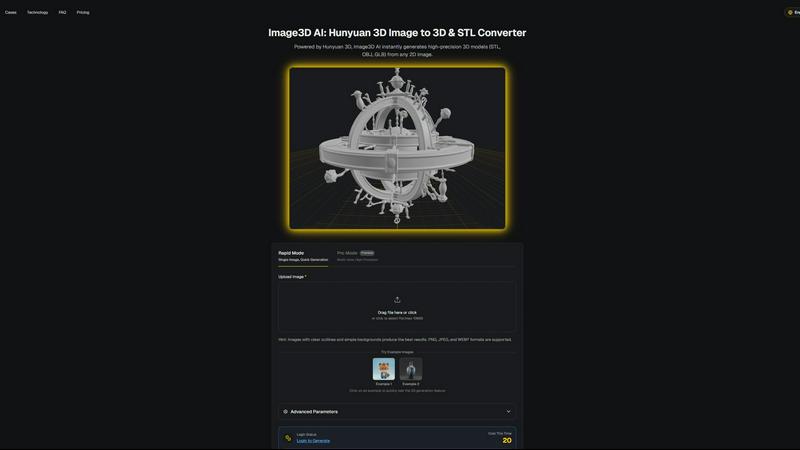
Image3D AI swiftly transforms any 2D image into high-quality 3D models for printing or gaming with no skills needed.
Last updated: March 1, 2026

Proofapp
Pin visual feedback directly on any webpage to stop endless email revisions.
Last updated: March 4, 2026
Visual Comparison
Image3D AI
Proofapp

Feature Comparison
Image3D AI
Rapid Mode
Rapid Mode allows users to quickly generate 3D models from a single image. This feature is perfect for users looking for fast results without sacrificing quality, making it ideal for simple projects or quick prototyping.
Pro Mode
Pro Mode is designed for advanced users needing high precision. By uploading multiple views of an object, users can achieve a more accurate reconstruction, making it suitable for complex designs and detailed 3D assets.
File Format Support
Image3D AI supports a variety of industry-standard file formats, including STL, OBJ, and GLB. This flexibility ensures that users can easily integrate generated models into different workflows, whether for 3D printing, gaming, or web applications.
Intelligent Material Generation
The tool features intelligent material generation capabilities, allowing users to create realistic textures and materials automatically. This reduces the need for manual texturing, saving time and enhancing the visual quality of 3D models.
Proofapp
Visual Commenting
Click directly on any part of a live website screenshot to leave a pinned comment. This eliminates vague descriptions like "top left, under the nav" by providing exact, visual context for every piece of feedback. Team members and clients can reply in threads and attach supporting files, keeping all discussion centralized and clear.
Multi-Breakpoint Testing
Proofapp automatically captures and presents screenshots of your website at both desktop and mobile breakpoints. This allows for comprehensive review across different device views in one place, ensuring design and functionality issues are caught no matter how a user accesses the site.
Secure Share Links
Collaborate seamlessly with clients and external stakeholders by sharing projects via secure, expirable links. Reviewers can view and comment without needing to sign up for an account, simplifying the feedback process while maintaining control over project access and security.
Real-time Collaboration & Dashboard
See comments from your team and clients as they are posted, in real-time. A central dashboard organizes all feedback across projects, allowing you to track, reply to, and resolve comments efficiently. This ensures everyone is aligned and prevents feedback from getting lost in scattered communication channels.
Use Cases
Image3D AI
For Game Developers
Game developers can rapidly generate 3D assets for their projects using Image3D AI. Its support for PBR materials allows for seamless integration into game engines like Unity and Unreal Engine, streamlining the asset creation process.
For E-commerce Managers
E-commerce professionals can convert product images into interactive 3D models, enhancing online shopping experiences. This capability enables customers to view products from multiple angles, improving engagement and conversion rates.
For 3D Printing Enthusiasts
Image3D AI serves as a powerful image to STL converter, providing high-precision files ready for 3D printing. This feature allows users to transform their designs into tangible objects quickly and efficiently.
For Architects and Designers
Architects can leverage Image3D AI to generate detailed architectural models, significantly reducing the time spent on manual modeling. This efficiency allows for faster project iterations and improved design presentations.
Proofapp
Freelancer Client Approvals
Freelancers can present website designs or updates to clients using Proofapp. Clients click to leave precise, visual feedback directly on the mockup, which drastically reduces back-and-forth emails and misinterpretation. This professional workflow saves hours per project and accelerates final approvals.
Agency Project Management
Marketing and design agencies managing multiple client projects use Proofapp to consolidate all feedback. Internal teams and clients collaborate on the same visual canvas, streamlining review cycles, reducing revision rounds, and providing a clear audit trail of all comments and decisions.
In-House Development Teams
Internal product and development teams use Proofapp for internal website and application reviews. Designers, developers, and product managers can pin bugs, suggest UI changes, and discuss features directly on the staging site, leading to clearer technical specifications and faster iteration.
Marketing Campaign Reviews
Marketing teams launching new landing pages or campaign assets share a Proofapp link for cross-departmental review. Colleagues from content, design, and leadership can leave contextual comments on the live page, ensuring all feedback is gathered visually and organized before launch.
Overview
About Image3D AI
Image3D AI is a cutting-edge tool designed to revolutionize the way 2D images are transformed into high-quality 3D models. Utilizing Tencent's advanced Hunyuan 3D engine, this software allows users to upload a single photo or multiple angles of an object and receive a fully realized 3D asset in approximately 60 seconds. Tailored for various users, including 3D printing enthusiasts, game developers, e-commerce managers, and architects, Image3D AI democratizes the 3D modeling process. It eliminates the need for specialized software like Blender, significantly reducing the time required for 3D creation from hours to mere minutes. With broad file format support and intelligent material generation, it streamlines workflows, facilitating rapid prototyping, asset creation, and digital content production for both professionals and hobbyists.
About Proofapp
Proofapp is a visual feedback and website review platform designed to eliminate the chaos of traditional feedback loops. It streamlines collaboration between designers, developers, and their clients by moving conversations out of endless email chains and onto the actual design. Users simply paste any website URL, and Proofapp automatically captures both desktop and mobile screenshots. Reviewers can then click directly on the screenshot to pin comments, creating visual, contextual feedback that is impossible to misinterpret. The platform supports threaded replies, file attachments, and resolution tracking, all without requiring reviewers to create an account. With features like real-time notifications, Slack integration, and multi-page support, Proofapp keeps all feedback organized and actionable. It is built for freelancers, agencies, and in-house teams who need a simple, efficient, and professional way to collect precise feedback, reduce revision cycles, and ship projects faster.
Frequently Asked Questions
Image3D AI FAQ
How does Image3D AI work?
Image3D AI uses advanced algorithms to analyze 2D images and reconstruct them into 3D models. Simply upload a photo, and the AI processes it, generating a high-fidelity 3D asset in about 60 seconds.
What file formats does Image3D AI support?
Image3D AI supports several key file formats, including STL for 3D printing, OBJ for traditional 3D editing, and GLB for web and AR applications. This ensures compatibility with various software and platforms.
Do I need any 3D modeling skills to use Image3D AI?
No, Image3D AI is designed for users of all skill levels. You can easily generate 3D models without any prior experience in 3D modeling software, making it accessible for everyone.
Can I use multiple images for better results?
Yes, using multiple views in Pro Mode can significantly enhance the accuracy of the generated 3D model. Providing front, side, and back views allows the AI to create a more detailed and physically accurate reconstruction.
Proofapp FAQ
How do reviewers leave feedback without an account?
You generate a secure, shareable link from your Proofapp project dashboard and send it to your clients or team members. When they open the link, they can immediately click on the website screenshot to leave comments, attach files, and participate in threads without any sign-up process.
What websites can I review with Proofapp?
You can paste any publicly accessible website URL into Proofapp. The platform will automatically capture screenshots of that page. It works on live sites, staging environments, and password-protected sites if you provide the login credentials during the capture setup.
Is there a free plan available?
Yes, Proofapp offers a generous free tier to get started. This allows you to test the core functionality, including visual commenting and secure sharing, on a limited number of projects. You can upgrade to a paid plan for more projects, pages, and advanced features.
How does Proofapp compare to sending screenshots via email?
Email feedback is slow, fragmented, and prone to miscommunication. Proofapp centralizes all feedback visually on the actual design, provides real-time updates, and keeps a structured record of all conversations. This typically reduces revision cycles by 60% and saves teams over 5 hours per week.
Alternatives
Image3D AI Alternatives
Image3D AI is a professional tool designed to convert 2D images into high-quality 3D models, making it a valuable asset in the design tools category. Users often seek alternatives due to various factors such as pricing, specific feature sets, platform compatibility, and ease of use. Each user may have unique needs, whether it’s for 3D printing, game development, or architectural visualization, and exploring alternatives can help find the best fit for their specific projects. When choosing an alternative, consider the core functionalities that matter most to your workflow, such as export options, material generation capabilities, and user interface. Additionally, evaluate the speed of the conversion process and the level of customization available to ensure that the tool aligns with your creative goals and technical requirements.
Proofapp Alternatives
Proofapp is a visual feedback and website review platform in the design tools category. It streamlines collaboration by letting teams and clients pin comments directly on live website screenshots, eliminating scattered feedback. Users often seek alternatives for various reasons. These can include budget constraints, the need for specific integrations, or requiring more advanced features like video review or in-depth project management tools beyond simple feedback collection. When evaluating alternatives, consider your team's core needs. Key factors include the ease of use for clients, the range of supported file types, integration capabilities with your existing workflow, and the overall pricing structure for your team size and project volume.