
Gomotion vs Image3D AI
Side-by-side comparison to help you choose the right AI tool.

Gomotion
Gomotion instantly creates AI-powered motion graphics for creators and marketers.
Last updated: February 28, 2026

Image3D AI
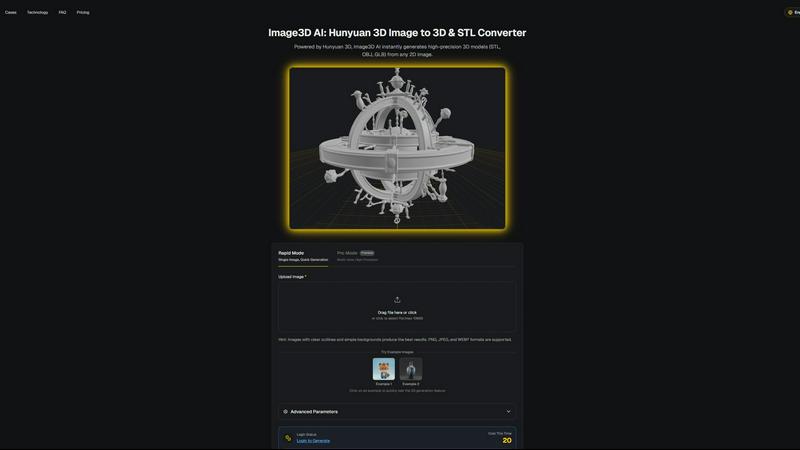
Image3D AI swiftly transforms any 2D image into high-quality 3D models for printing or gaming with no skills needed.
Last updated: March 1, 2026
Visual Comparison
Gomotion

Image3D AI
Feature Comparison
Gomotion
Text-to-Motion Animation
Transform written prompts into animated text with cinematic flair. Simply describe how you want your text, titles, captions, or logos to move. The AI instantly generates the animation, skipping the manual keyframing process entirely. This allows for rapid creation of professional-looking motion graphics perfect for product demos and social content.
Narrative Mode for Full Stories
Turn a simple script into a complete, end-to-end animated video. Narrative Mode automatically syncs your text with images and video clips to create ready-to-publish ads or short stories in minutes. This feature is designed for creating cohesive narrative content without needing to animate each element separately.
Multi-Platform Design & Brand Import
Create animations optimized for every screen size, from mobile smartphones and tablets to desktop displays. Ensure your content looks perfect on Instagram, TikTok, or a website. Additionally, you can import your brand assets (like logos and colors) in one click to maintain consistent branding across all videos.
Complex Animation & Data Visualization
Go beyond basic text animation to create sophisticated motion graphics. Generate animated charts and graphs directly from your data for explainer videos and presentations. The tool also supports creating complex simulations and shape dynamics, enabling impactful visual storytelling for more advanced projects.
Image3D AI
Rapid Mode
Rapid Mode allows users to quickly generate 3D models from a single image. This feature is perfect for users looking for fast results without sacrificing quality, making it ideal for simple projects or quick prototyping.
Pro Mode
Pro Mode is designed for advanced users needing high precision. By uploading multiple views of an object, users can achieve a more accurate reconstruction, making it suitable for complex designs and detailed 3D assets.
File Format Support
Image3D AI supports a variety of industry-standard file formats, including STL, OBJ, and GLB. This flexibility ensures that users can easily integrate generated models into different workflows, whether for 3D printing, gaming, or web applications.
Intelligent Material Generation
The tool features intelligent material generation capabilities, allowing users to create realistic textures and materials automatically. This reduces the need for manual texturing, saving time and enhancing the visual quality of 3D models.
Use Cases
Gomotion
Social Media Content Creation
Ideal for marketers and creators needing to produce high-volume, engaging content for platforms like Instagram Reels and TikTok. Quickly animate text overlays, create product teasers, and design brand stories that capture attention and drive engagement without a lengthy production timeline.
Brand Advertising & Product Launches
Create professional, polished advertisement videos and launch campaigns from a simple script or image. The Narrative Mode allows brands to produce cohesive ad narratives with synced visuals, perfect for announcing new products or services with cinematic quality.
Business Presentations & Explainer Videos
Enhance reports, pitches, and educational content with animated data visualizations and simplified complex concepts. Create animated charts and simulations that make data engaging and easier to understand for stakeholders, clients, or a general audience.
Consistent Brand Video Marketing
Maintain a unified brand identity across all video marketing materials. By importing brand kits, teams can quickly generate on-brand animations for various needs, from social posts to website banners, ensuring visual consistency and strengthening brand recognition.
Image3D AI
For Game Developers
Game developers can rapidly generate 3D assets for their projects using Image3D AI. Its support for PBR materials allows for seamless integration into game engines like Unity and Unreal Engine, streamlining the asset creation process.
For E-commerce Managers
E-commerce professionals can convert product images into interactive 3D models, enhancing online shopping experiences. This capability enables customers to view products from multiple angles, improving engagement and conversion rates.
For 3D Printing Enthusiasts
Image3D AI serves as a powerful image to STL converter, providing high-precision files ready for 3D printing. This feature allows users to transform their designs into tangible objects quickly and efficiently.
For Architects and Designers
Architects can leverage Image3D AI to generate detailed architectural models, significantly reducing the time spent on manual modeling. This efficiency allows for faster project iterations and improved design presentations.
Overview
About Gomotion
Gomotion is an AI-powered motion design tool that transforms how creators and marketers produce animations. It combines the professional-grade capabilities of traditional software with an intuitive, user-friendly interface. The core value proposition is simple: generate captivating, high-quality motion graphics from simple text or image prompts, eliminating the need for complex keyframing and extensive technical knowledge. It is designed for marketers, entrepreneurs, content creators, and brands who need to produce engaging video content quickly and efficiently. Gomotion saves significant time and resources by automating the animation process, allowing users to focus on storytelling and brand messaging. From animated text and logos to complete narrative ads, Gomotion enables the creation of professional animations for any screen, making it the ideal tool for enhancing brand visibility across social media, presentations, and advertising.
About Image3D AI
Image3D AI is a cutting-edge tool designed to revolutionize the way 2D images are transformed into high-quality 3D models. Utilizing Tencent's advanced Hunyuan 3D engine, this software allows users to upload a single photo or multiple angles of an object and receive a fully realized 3D asset in approximately 60 seconds. Tailored for various users, including 3D printing enthusiasts, game developers, e-commerce managers, and architects, Image3D AI democratizes the 3D modeling process. It eliminates the need for specialized software like Blender, significantly reducing the time required for 3D creation from hours to mere minutes. With broad file format support and intelligent material generation, it streamlines workflows, facilitating rapid prototyping, asset creation, and digital content production for both professionals and hobbyists.
Frequently Asked Questions
Gomotion FAQ
Who is Gomotion designed for?
Gomotion is built for creators, marketers, entrepreneurs, and brands of all sizes. It is particularly valuable for anyone who needs to produce professional motion graphics quickly but may lack the time, budget, or technical expertise in complex animation software like After Effects.
What kind of animations can I create with Gomotion?
You can create a wide range of animations, from simple animated text and logos to complex narrative ads, data-driven charts, and simulations. It supports creating content for any screen size, making it suitable for social media, presentations, advertisements, and explainer videos.
Do I need animation experience to use Gomotion?
No, you do not need prior animation experience. Gomotion is designed to be intuitive and user-friendly. Its AI-powered features, like Text-to-Motion and Narrative Mode, allow you to generate animations by simply providing text prompts or scripts, removing the barrier of technical knowledge.
How does Gomotion save time compared to traditional software?
Gomotion automates the most time-consuming parts of animation, such as manual keyframing and asset syncing. By generating motion from text prompts and automating story creation in Narrative Mode, it reduces production time from hours or days to just minutes, enabling rapid content creation.
Image3D AI FAQ
How does Image3D AI work?
Image3D AI uses advanced algorithms to analyze 2D images and reconstruct them into 3D models. Simply upload a photo, and the AI processes it, generating a high-fidelity 3D asset in about 60 seconds.
What file formats does Image3D AI support?
Image3D AI supports several key file formats, including STL for 3D printing, OBJ for traditional 3D editing, and GLB for web and AR applications. This ensures compatibility with various software and platforms.
Do I need any 3D modeling skills to use Image3D AI?
No, Image3D AI is designed for users of all skill levels. You can easily generate 3D models without any prior experience in 3D modeling software, making it accessible for everyone.
Can I use multiple images for better results?
Yes, using multiple views in Pro Mode can significantly enhance the accuracy of the generated 3D model. Providing front, side, and back views allows the AI to create a more detailed and physically accurate reconstruction.
Alternatives
Gomotion Alternatives
Gomotion is an AI-powered motion design tool that simplifies creating professional animations for marketers and creators. It belongs to the category of design tools, specifically focusing on AI-assisted motion graphics generation. Users often seek alternatives for various reasons. Common factors include budget constraints, the need for different feature sets, or compatibility with specific operating systems or workflows. Some may require more advanced manual controls, while others prioritize different export formats or integration capabilities. When evaluating alternatives, consider your primary needs. Key factors are the learning curve, output quality, pricing model, and the specific types of animations you create most often. The right tool balances power with ease-of-use for your unique projects.
Image3D AI Alternatives
Image3D AI is a professional tool designed to convert 2D images into high-quality 3D models, making it a valuable asset in the design tools category. Users often seek alternatives due to various factors such as pricing, specific feature sets, platform compatibility, and ease of use. Each user may have unique needs, whether it’s for 3D printing, game development, or architectural visualization, and exploring alternatives can help find the best fit for their specific projects. When choosing an alternative, consider the core functionalities that matter most to your workflow, such as export options, material generation capabilities, and user interface. Additionally, evaluate the speed of the conversion process and the level of customization available to ensure that the tool aligns with your creative goals and technical requirements.