
Formflow vs Receipt Generator
Side-by-side comparison to help you choose the right AI tool.

Formflow is an AI-powered no-code builder for interactive, personalized forms.
Last updated: March 1, 2026

Receipt Generator
Generate realistic custom receipts instantly with 400+ free templates for business or personal use.
Last updated: April 4, 2026
Visual Comparison
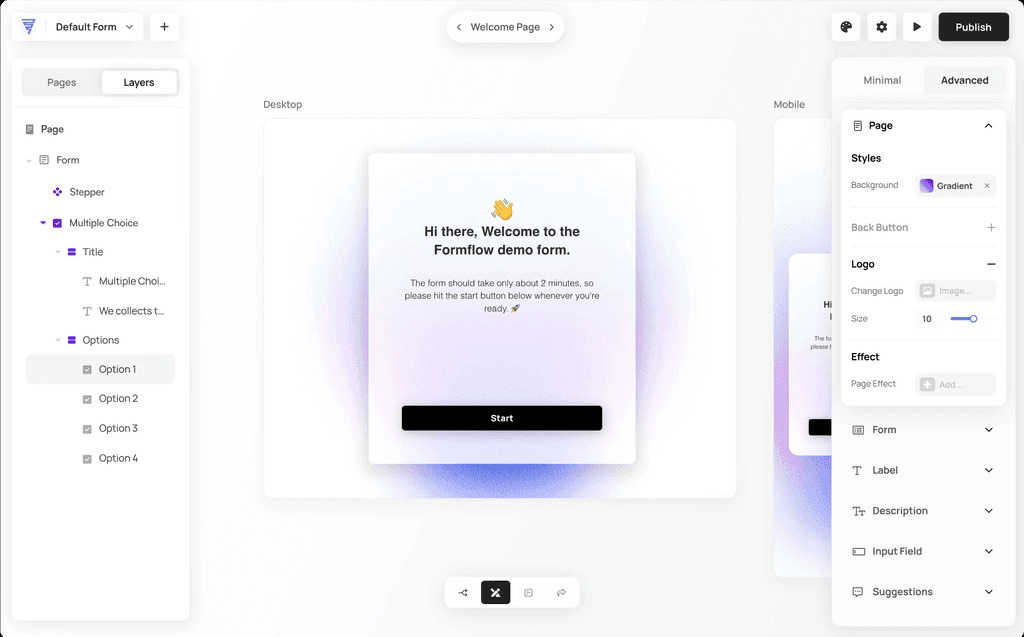
Formflow
Receipt Generator

Feature Comparison
Formflow
AI-Powered Form Copilot
Create fully functional, logic-driven forms in seconds by simply describing what you need. The AI assistant handles field creation, conditional logic, validation, and professional styling, dramatically reducing form-building time from hours to minutes without any technical skill required.
Visual Logic & Conditional Branching
Build complex, adaptive forms with a simple drag-and-drop interface. Create conditional paths that show or hide questions based on previous answers, enabling personalized user journeys that increase completion rates, all without writing a single line of code.
In-Flow Analytics & Calculation Engine
Gain real-time insights directly within the builder, tracking visitor numbers, exit rates, and conversion per step. Integrate the Calculation Engine to turn forms into interactive tools like quotes or estimators that process inputs and display dynamic results instantly.
Fully Customizable Design & Centralized Responses
Maintain brand consistency with complete control over fonts, colors, and layouts. All submissions are collected in a centralized responses page equipped with advanced filtering, search, notes, and ratings for efficient lead management and data analysis.
Receipt Generator
400+ Store-Specific Templates
Choose from an extensive library of over 400 professionally crafted receipt templates. These templates accurately replicate the layout, branding, and specific details of popular stores including Walmart, Target, CVS, Starbucks, Best Buy, and McDonald's. Each template includes authentic thermal-style fonts, correct store headers, and standard receipt sections like itemized lists, tax breakdowns, and payment details, providing a perfect starting point for any scenario.
AI "Place in Scene" Visualization
Transform your digital receipt into a photorealistic image without a printer. This advanced AI feature allows you to generate a photo of your receipt placed on any surface you choose, such as a wooden desk, kitchen counter, inside a wallet, or crumpled in a pocket. It adds realistic shadows, textures, and lighting to create a convincing image perfect for content mockups, inventory documentation, and visual storytelling projects.
Full Customization & Drag-and-Drop Editor
Maintain complete control over every element of your receipt. The intuitive drag-and-drop editor lets you add, remove, and rearrange nine different block types, including headers, line items, totals, barcodes, and QR codes. You can customize all text, prices, dates, store information, payment methods, and even stylistic elements like fonts, spacing, and paper texture to match your exact requirements.
Instant High-Resolution Export
Download your finished receipt immediately with no delays or mandatory account sign-ups. Export your creation as a high-resolution PNG or PDF file ready for use in presentations, expense reports, or digital content. Pro plans offer unlimited, watermark-free downloads, ensuring you get professional-quality files in seconds to streamline your workflow.
Use Cases
Formflow
Lead Generation & Qualification
Create interactive forms that qualify leads in real-time. Use conditional logic to ask follow-up questions based on initial responses, ensuring you capture high-intent contact information and detailed needs to prioritize sales outreach effectively.
Interactive Quizzes & Assessments
Build engaging quizzes, personality tests, or skill assessments that adapt to user choices. Provide personalized results or recommendations at the end, increasing user engagement and time on page while collecting valuable audience insights.
Order Forms & Smart Calculators
Design sophisticated order forms or service quote calculators. Use the calculation engine to automatically tally costs, apply discounts, and display a final price based on user selections, streamlining the purchase process and reducing support queries.
Customer Feedback & Research Surveys
Deploy multi-step surveys that feel like a conversation. Use branching logic to skip irrelevant sections, keeping surveys concise and respectful of the respondent's time, which leads to higher completion rates and more accurate, actionable data.
Receipt Generator
Small Business & Freelancer Expense Reporting
Create professional, customized receipts for expense tracking, client reimbursements, and tax documentation. Freelancers and small business owners can quickly generate receipts for services rendered, office supplies, or business meals using appropriate store templates, ensuring their financial records are clear, organized, and presentable for accounting purposes.
Content Creation & Social Media Mockups
Generate realistic receipt visuals for digital content, tutorials, advertisements, and social media posts. Content creators, marketers, and graphic designers use the AI "Place in Scene" feature to produce engaging photos of receipts in relatable settings, enhancing the authenticity of their stories, product reviews, budgeting tips, or promotional materials.
Reselling & Inventory Documentation
Document transactions and inventory for online reselling platforms like eBay, Poshmark, or Facebook Marketplace. Resellers can create proof-of-purchase receipts for buyers, verify the authenticity of goods, or maintain a personal record of acquisitions and sales by customizing receipts with specific item details, prices, and dates from relevant retailers.
Personal Finance & Budgeting Visualization
Mock up receipts for personal finance tracking, budgeting spreadsheets, or educational purposes. Individuals can visualize spending habits, create examples for financial literacy tutorials, or plan future purchases by generating realistic receipts from various stores to see a breakdown of costs, taxes, and potential savings.
Overview
About Formflow
Formflow is a next-generation form builder designed to transform static data collection into dynamic, interactive conversations. It moves beyond traditional forms to create personalized, logic-driven experiences that actively engage users and convert more leads. Built for marketers, creators, and business owners, its core value is delivering powerful functionality through an intuitive, no-code platform. With Formflow, you can build forms that feel like a natural extension of your brand, offering full control over styling, conditional logic, and user journey. From AI-powered creation with Formflow Copilot to multi-step questionnaires and smart calculators, it provides the tools to capture better data, understand your audience, and scale operations efficiently. The platform emphasizes performance and ease, featuring a fast-loading drag-and-drop builder, and starts with a comprehensive free plan, making advanced form building accessible to everyone without an initial investment.
About Receipt Generator
Receipt Generator is the definitive online tool for creating authentic, store-specific receipts in seconds. It provides a comprehensive library of over 400 professionally designed templates for major retailers like Walmart, Target, Starbucks, CVS, and Best Buy, as well as restaurants, pharmacies, and grocery stores. The platform offers full customization, allowing you to edit every detail including line items, prices, dates, taxes, and payment methods. Once customized, you can instantly download your receipt as a high-resolution PNG or PDF file. What truly sets it apart is its innovative AI "Place in Scene" feature, which generates photorealistic images of your digital receipts placed on real-world surfaces like desks, wallets, or countertops, eliminating the need for physical printing. Designed for legitimate business, creative, and personal use, it serves small business owners, freelancers, content creators, and resellers globally. With a free tier available and a focus on lightning-fast, no-lag performance, Receipt Generator combines extensive template options with powerful AI visualization for all your receipt creation needs.
Frequently Asked Questions
Formflow FAQ
How does the AI Form Builder work?
You describe the form you need in plain language (e.g., "a customer feedback survey for a SaaS product"). Formflow Copilot then uses AI to generate a complete form with relevant fields, logical sequencing, and styling in under 90 seconds, which you can then further customize.
Can I use Formflow for free?
Yes, Formflow offers a free forever plan that includes core features like the form builder, basic logic, and response collection. It requires no credit card to start, allowing you to build, test, and publish forms without any initial cost.
How does Formflow compare to Typeform or Jotform?
Formflow positions itself as more powerful by combining an intuitive no-code interface with advanced features like robust visual logic, in-flow analytics, and a built-in calculation engine, aiming to offer greater flexibility and interactivity for complex data collection needs.
Where can I embed my Formflow forms?
You can embed forms anywhere you can add HTML code, including websites, landing pages, and blogs. Forms are designed to be fully responsive, ensuring they look and function perfectly on all devices, from desktops to mobile phones.
Receipt Generator FAQ
Is Receipt Generator free to use?
Yes, Receipt Generator offers a free tier that allows you to create and download receipts. However, receipts downloaded on the free plan include a watermark. To access unlimited downloads without watermarks, save custom templates, and use AI credits for the "Place in Scene" feature, you can upgrade to a paid Pro plan or a one-time Lifetime plan.
What is the AI "Place in Scene" feature?
The AI "Place in Scene" feature is a tool that uses artificial intelligence to generate a photorealistic image of your digital receipt placed onto a photo of a real-world surface. You can choose scenes like a desk, countertop, or wallet. The AI seamlessly blends your receipt into the image with proper lighting and perspective, creating a realistic photo without ever needing to print the receipt.
Can I customize every part of the receipt?
Absolutely. Receipt Generator provides full customization capabilities. You can edit all text, including store names, addresses, phone numbers, line item descriptions, quantities, unit prices, taxes, discounts, and payment details. The drag-and-drop editor also allows you to change the structure by adding or removing sections like barcodes, QR codes, and footers.
Are the receipts legally valid for returns or taxes?
No. Receipt Generator is designed for legitimate business, creative, and personal use only, such as mockups, documentation, and expense visualization. The receipts created are not intended and should not be used for fraudulent purposes, including attempting returns at retail stores, claiming false expenses on taxes, or deceiving others. Always refer to the platform's Terms of Service for acceptable use guidelines.
Alternatives
Formflow Alternatives
Formflow is a leading no-code platform for building interactive, personalized forms that enhance user engagement and data collection. It transforms static forms into dynamic, conversational experiences. Users often explore alternatives for various reasons, such as budget constraints, specific feature requirements, or the need for deeper integration with their existing tech stack. Finding the right fit depends on your unique priorities. When evaluating options, consider the balance of ease-of-use versus advanced functionality, the depth of customization and branding control, and the overall value relative to pricing. The goal is to find a tool that scales with your needs.
Receipt Generator Alternatives
Receipt Generator is a comprehensive online tool in the productivity and management category, designed for creating custom, high-quality receipts. Users often explore alternatives for various reasons, such as budget constraints, the need for different feature sets like advanced data export, or a preference for a different platform like a mobile app or desktop software. When evaluating other options, key considerations include the template library's size and realism, the level of customization available for receipt details, and the quality of the final output. It's also wise to assess the pricing model, any usage limits, and whether the tool offers unique capabilities like AI-enhanced visual features for realistic mockups. Ultimately, the best choice depends on your specific use case, whether for business documentation, content creation, or personal finance tracking. Prioritizing ease of use, output quality, and value for money will guide you to the right solution for your receipt generation needs.