
Dreamflow vs PUNKU.AI
Side-by-side comparison to help you choose the right AI tool.

Dreamflow
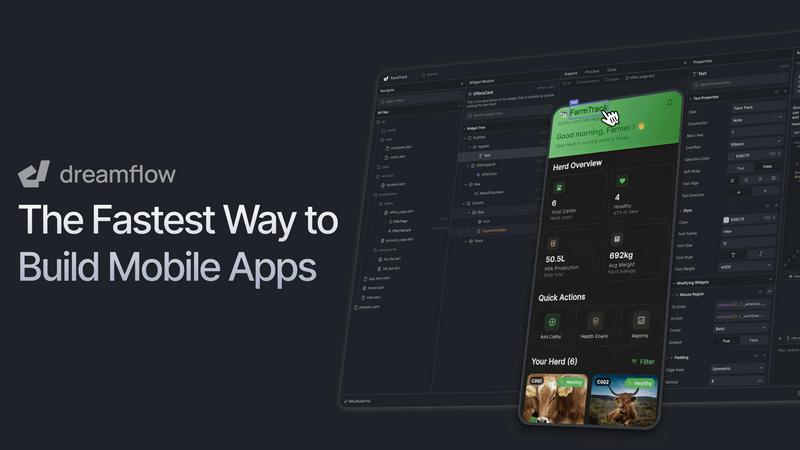
Dreamflow instantly builds production-ready mobile apps with AI, visual design, and full code control.
Last updated: March 1, 2026

PUNKU.AI
PUNKU.AI automates your tasks effortlessly in plain English with customizable templates, no coding required.
Last updated: February 28, 2026
Visual Comparison
Dreamflow
PUNKU.AI

Feature Comparison
Dreamflow
Tri-Surface Editing
Switch seamlessly between AI prompts, a visual canvas, and raw code. Every change you make in one surface—whether asking an AI agent, dragging a component, or editing code—is instantly reflected across all others. This keeps your workflow fluid and prevents you from being locked into a single mode of development.
AI-Powered Development
Utilize context-aware AI generation that understands app patterns and best practices. The AI agent can scaffold entire features, generate UI components, and suggest logic based on your natural language descriptions, dramatically accelerating the initial build and iteration process.
Build for Any Screen
Create robust, responsive applications that automatically adapt to every device size, powered by Flutter. Dreamflow handles the complexity of responsive design, enabling you to deploy a single codebase to iOS, Android, and the web with just a few clicks for maximum reach.
Backend Integrations
Build full-stack applications from day one with out-of-the-box backend integrations. Dreamflow provides managed connections to Firebase or Supabase, handling authentication, databases, and storage so you can focus on building your app's core functionality without backend setup headaches.
PUNKU.AI
User-Friendly Automation Creation
PUNKU.AI allows users to describe their automation needs in plain English, eliminating the need for technical jargon or coding. This feature makes the tool accessible to everyone, regardless of technical expertise.
Extensive API Integration
With the ability to connect to over 3,000 APIs, PUNKU.AI seamlessly integrates with popular applications like Gmail, Slack, and more. This feature enables users to synchronize their existing tools, ensuring a smooth workflow.
Visual Node Graphs
PUNKU.AI provides users with a clear visual representation of their automation processes through node graphs. This feature enhances transparency, allowing users to understand how their automations function at a glance.
Pre-Built Templates
Offering over 100 pre-built templates, PUNKU.AI allows users to quickly set up automations tailored to various business functions. Users can customize these templates to fit their specific needs, saving time and effort.
Use Cases
Dreamflow
Rapid Prototyping and MVPs
Founders and product managers can transform an idea into a working minimum viable product in hours, not weeks. Describe the app concept, use the AI and visual editor to build a fully interactive prototype, and deploy it to gather real user feedback quickly.
Developer Acceleration
Developers can use Dreamflow to generate boilerplate code, scaffold complex UI layouts, and integrate backend services visually. This streamlines repetitive tasks, allowing them to focus on custom logic, performance optimization, and diving directly into the clean, exportable Flutter code.
Cross-Platform App Development
Teams needing to launch on both mobile app stores and the web can use Dreamflow to build once and deploy everywhere. The Flutter foundation ensures native performance and a consistent user experience across all platforms from a single project.
Design-to-Code Handoff
Designers and developers can collaborate more effectively. Designers can contribute to the visual structure in the canvas, while developers can simultaneously work on the logic and code export, all within the same synchronized project environment.
PUNKU.AI
Customer Support Automation
Businesses can utilize PUNKU.AI to create customer service chatbots that handle inquiries 24/7. This automation improves response times and customer satisfaction while reducing the workload on support teams.
Lead Generation
PUNKU.AI can automate lead generation through custom bots that capture and qualify leads. This allows sales teams to focus on nurturing high-potential prospects rather than spending time on initial outreach.
Email Campaign Management
Marketers can leverage PUNKU.AI to automate email marketing campaigns. With the ability to schedule and send emails based on user-defined triggers, this feature enhances marketing efficiency and effectiveness.
Meeting Coordination
PUNKU.AI simplifies meeting scheduling by connecting to calendars and automatically sending invitations. This feature ensures that teams can coordinate meetings effortlessly, reducing scheduling conflicts.
Overview
About Dreamflow
Dreamflow is a visual AI builder designed to create production-ready mobile and web applications at unprecedented speed. It unifies three powerful development surfaces—AI prompting, a visual drag-and-drop editor, and full Flutter code—into one seamless platform. This unique approach allows developers, founders, and product teams to start building by simply describing features to an AI agent, visually refine the UI and logic on a canvas, and dive directly into clean, exportable Flutter code for complete control. Unlike restrictive no-code tools or prototype-only platforms, Dreamflow ensures all three surfaces are always in sync, eliminating vendor lock-in. Built by the team behind FlutterFlow and trusted by over 2 million builders, it enables the creation of real, scalable apps that can be deployed directly to the App Store, Google Play Store, and the web with a few clicks. Dreamflow delivers the speed of AI, the clarity of visual design, and the confidence of owning your codebase, all in one platform with no install required.
About PUNKU.AI
PUNKU.AI is a groundbreaking automation tool specifically designed for users who want to streamline their workflows without needing any coding skills. It acts as an intelligent assistant, engaging in detailed conversations with users to understand their specific requirements and edge cases. This ensures that the automations created not only meet but exceed user expectations. With PUNKU.AI, users can visualize their automation processes through intuitive node graphs, enhancing clarity and understanding. The platform boasts integration capabilities with over 3,000 APIs, including popular tools like Gmail and Slack, making it an ideal solution for businesses looking to automate repetitive tasks. Trusted by over 200 organizations, PUNKU.AI eliminates mundane work, freeing teams to concentrate on high-priority tasks. Featuring over 100 pre-built templates, users can easily customize solutions for various operational needs, such as customer support and sales follow-ups, achieving efficiency in minutes.
Frequently Asked Questions
Dreamflow FAQ
What makes Dreamflow different from other no-code tools?
Dreamflow is not a traditional no-code platform. It uniquely combines AI, visual editing, and full access to professional-grade Flutter code. This means you are never locked into the platform's abstractions; you can start visually and export or edit the complete codebase anytime for full control and scalability.
Can I really deploy to the App Store and Google Play?
Yes. Dreamflow builds production-ready, native Flutter applications. The Hobby plan and above provide one-click deployment workflows that package and publish your app directly to the Apple App Store and Google Play Store, as well as to the web.
What are "credits" used for in pricing?
Credits are consumed when you use the AI agent to generate features, code, or make significant changes based on prompts. They meter the usage of the platform's AI-powered development capabilities. Each plan includes a monthly allotment of credits.
Do I own the code generated by Dreamflow?
Absolutely. You maintain complete ownership of all the code and assets in your project. Dreamflow allows full code export at any time, enabling you to take your project, run it locally, and continue development in any standard Flutter environment without restriction.
PUNKU.AI FAQ
What makes PUNKU.AI different from other AI platforms?
PUNKU.AI stands out due to its emphasis on user-friendliness. Users can describe their needs in plain English without any technical knowledge. The platform handles the backend setup, making automation accessible to all.
Do I need technical knowledge to use PUNKU.AI?
No, you do not need any technical knowledge. Simply explain what you want to automate in natural language, and PUNKU.AI will take care of the technical details and setup for you.
How long does it take to get started?
Getting started with PUNKU.AI is quick and easy. Most users can set up their first automation within minutes by utilizing the pre-built templates and intuitive interface.
How secure is my data on PUNKU.AI?
PUNKU.AI prioritizes data security. The platform implements industry-standard security measures to protect user data during integrations and automations, ensuring confidentiality and integrity.
Alternatives
Dreamflow Alternatives
Dreamflow is a visual AI builder for creating production-ready mobile applications. It belongs to the modern app development platform category, unifying AI prompting, visual editing, and full Flutter code control into one synchronized workflow. Users may explore alternatives for various reasons, such as budget constraints, specific feature requirements, a preference for different coding languages, or the need to integrate with an existing tech stack. The ideal platform depends heavily on your team's skills and project goals. When evaluating alternatives, consider the core workflow. Look for the right balance between development speed and control. Key factors include the quality and ownership of the generated code, the platform's flexibility for complex logic, deployment options, and long-term scalability without vendor lock-in.
PUNKU.AI Alternatives
PUNKU.AI is a no-code automation tool designed to simplify workflows for businesses. By using a conversational approach to gather requirements, it eliminates the need for coding, making automation accessible to users without technical expertise. However, users may seek alternatives due to various factors, including pricing, specific feature sets, or compatibility with other platforms and tools they currently use. When choosing an alternative, consider the ease of use, integration capabilities, and the ability to customize workflows according to your specific needs. It's also important to evaluate customer support options and the overall reliability of the platform to ensure it meets your business requirements effectively.