

Dreamflow
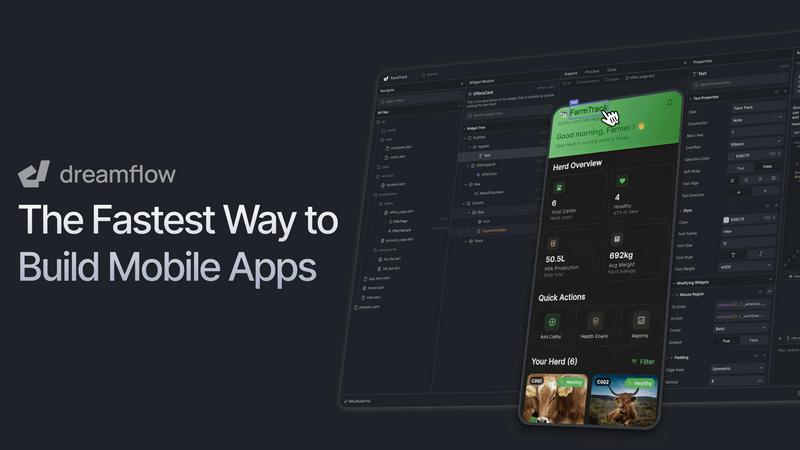
Dreamflow instantly builds production-ready mobile apps with AI, visual design, and full code control.
About Dreamflow
Dreamflow is a visual AI builder designed to create production-ready mobile and web applications at unprecedented speed. It unifies three powerful development surfaces—AI prompting, a visual drag-and-drop editor, and full Flutter code—into one seamless platform. This unique approach allows developers, founders, and product teams to start building by simply describing features to an AI agent, visually refine the UI and logic on a canvas, and dive directly into clean, exportable Flutter code for complete control. Unlike restrictive no-code tools or prototype-only platforms, Dreamflow ensures all three surfaces are always in sync, eliminating vendor lock-in. Built by the team behind FlutterFlow and trusted by over 2 million builders, it enables the creation of real, scalable apps that can be deployed directly to the App Store, Google Play Store, and the web with a few clicks. Dreamflow delivers the speed of AI, the clarity of visual design, and the confidence of owning your codebase, all in one platform with no install required.
Features
Tri-Surface Editing
Switch seamlessly between AI prompts, a visual canvas, and raw code. Every change you make in one surface—whether asking an AI agent, dragging a component, or editing code—is instantly reflected across all others. This keeps your workflow fluid and prevents you from being locked into a single mode of development.
AI-Powered Development
Utilize context-aware AI generation that understands app patterns and best practices. The AI agent can scaffold entire features, generate UI components, and suggest logic based on your natural language descriptions, dramatically accelerating the initial build and iteration process.
Build for Any Screen
Create robust, responsive applications that automatically adapt to every device size, powered by Flutter. Dreamflow handles the complexity of responsive design, enabling you to deploy a single codebase to iOS, Android, and the web with just a few clicks for maximum reach.
Backend Integrations
Build full-stack applications from day one with out-of-the-box backend integrations. Dreamflow provides managed connections to Firebase or Supabase, handling authentication, databases, and storage so you can focus on building your app's core functionality without backend setup headaches.
Use Cases
Rapid Prototyping and MVPs
Founders and product managers can transform an idea into a working minimum viable product in hours, not weeks. Describe the app concept, use the AI and visual editor to build a fully interactive prototype, and deploy it to gather real user feedback quickly.
Developer Acceleration
Developers can use Dreamflow to generate boilerplate code, scaffold complex UI layouts, and integrate backend services visually. This streamlines repetitive tasks, allowing them to focus on custom logic, performance optimization, and diving directly into the clean, exportable Flutter code.
Cross-Platform App Development
Teams needing to launch on both mobile app stores and the web can use Dreamflow to build once and deploy everywhere. The Flutter foundation ensures native performance and a consistent user experience across all platforms from a single project.
Design-to-Code Handoff
Designers and developers can collaborate more effectively. Designers can contribute to the visual structure in the canvas, while developers can simultaneously work on the logic and code export, all within the same synchronized project environment.
Pricing
Dreamflow offers simple, transparent pricing tiers. You can start for free and upgrade as your needs grow.
Free ($0/month): Explore the platform with private projects, visual and code editing, managed backend integrations (Firebase/Supabase), one-click web deployment, and a one-time starter pack of 10 AI credits.
Hobby ($20/month): Build and launch complete applications. Includes everything in Free, plus one-click deployment to iOS and Android app stores, full code export, ability to run apps on simulators/devices, and 100 AI credits per month.
Pro ($90/month): For production workflows. Includes everything in Hobby, plus version control (Git), priority access to premium AI models, and 500 AI credits per month. This is the most popular plan for serious development.
Enterprise (Custom): For teams using Dreamflow as a core platform. Includes dedicated support, onboarding, advanced access control, bring your own AI models, SLA guarantees, and private cloud deployment options.
Frequently Asked Questions
What makes Dreamflow different from other no-code tools?
Dreamflow is not a traditional no-code platform. It uniquely combines AI, visual editing, and full access to professional-grade Flutter code. This means you are never locked into the platform's abstractions; you can start visually and export or edit the complete codebase anytime for full control and scalability.
Can I really deploy to the App Store and Google Play?
Yes. Dreamflow builds production-ready, native Flutter applications. The Hobby plan and above provide one-click deployment workflows that package and publish your app directly to the Apple App Store and Google Play Store, as well as to the web.
What are "credits" used for in pricing?
Credits are consumed when you use the AI agent to generate features, code, or make significant changes based on prompts. They meter the usage of the platform's AI-powered development capabilities. Each plan includes a monthly allotment of credits.
Do I own the code generated by Dreamflow?
Absolutely. You maintain complete ownership of all the code and assets in your project. Dreamflow allows full code export at any time, enabling you to take your project, run it locally, and continue development in any standard Flutter environment without restriction.
Similar to Dreamflow

Partly
Snap the receipt, let AI read the items, and see who owes whom in your flat, trip or dinner group.
Wordy
Learn languages with real movie and TV show clips.
MotionVault
MotionVault: Motion Graphics, Video Templates & Overlays for Editors
Forms Plugin
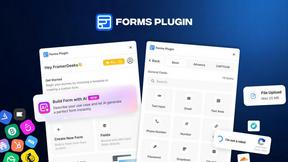
The #1 Native Form Builder Plugin for Framer - No Code, No Embeds, No External Platforms.


New AI Blog
Explore AI apps, agents and automation with New AI Blog. Read practical guides covering features, pricing, privacy and everyday workflows.
Shopeasy.ai
Shopeasy.ai is an AI-native Commerce OS unifying storefront, payments, logistics, and POS into one platform for modern merchants.