
DocuExtractor vs Nabbed
Side-by-side comparison to help you choose the right AI tool.

DocuExtractor
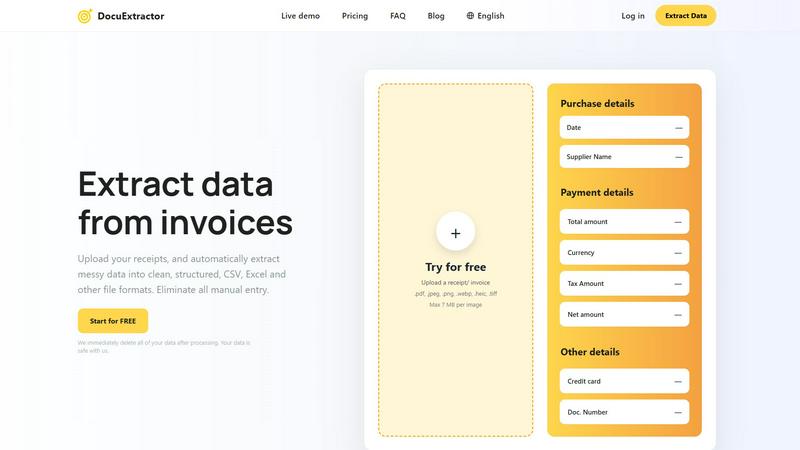
DocuExtractor instantly turns messy receipts and invoices into clean, structured Excel or CSV files.
Last updated: February 28, 2026

Nabbed is your career CRM that helps sales professionals track jobs, contacts, and AI tools to manage their job search like a sales pipeline.
Last updated: April 13, 2026
Visual Comparison
DocuExtractor
Nabbed

Feature Comparison
DocuExtractor
Triple AI-Powered Extraction Engine
DocuExtractor combines Optical Character Recognition (OCR), Deep Learning (DL), and Large Language Models (LLM/AI) to accurately identify and extract data. This multi-layered approach ensures high precision in reading text, understanding document context, and pulling out specific fields like dates, totals, supplier names, and tax amounts from even messy or complex documents.
High-Volume, Secure Processing
The platform is built for scale and security, reliably processing over 500,000 documents every month. It features enterprise-grade reliability and a firm privacy commitment: all uploaded documents and extracted data are permanently deleted immediately after conversion is complete, ensuring your sensitive financial information never remains on the servers.
Multi-Language & Multi-Format Support
Automatically process documents in over 45 languages with built-in language detection. DocuExtractor accepts a wide range of file types, including PDFs, JPG, PNG, WebP, HEIC, and TIFF images, making it a versatile tool for global teams and diverse document sources without the need for pre-processing.
Intuitive Drag-and-Drop Workflow
Designed for ease of use, the platform features a simple, three-step process. Users can drag and drop documents—even in large batches—into the workspace. The AI automatically extracts the data, and users can download the structured results in their chosen format (CSV or Excel) within seconds, requiring minimal training or setup.
Nabbed
Dual Sales Pipelines
Manage your entire search with two interconnected Kanban boards: one for job applications and one for networking contacts. Drag and drop roles through stages like Outreach, Discovery, and Closed Won, while simultaneously tracking your relationship pipeline with potential referrals and hiring managers. This provides clear momentum tracking and velocity analytics for your career move.
AI Career Suite
Access four integrated AI tools that accelerate the most time-consuming parts of a job search. Generate tailored cover letters, optimize your resume for specific postings, prepare for interviews with simulated coaching, and compose professional outreach emails. The AI is trained to write in your tone, saving hours of manual work.
Chrome Extension with Autofill
The free browser extension is the engine of your search. With one click, save jobs from any site to your pipeline. It then autofills application fields across 25+ ATS platforms like Greenhouse and Workday, using your stored profile. It also captures contact details from LinkedIn and enables stealth application mode.
Company Intelligence Dashboard
Get instant, enriched profiles on every company you target. The dashboard automatically displays key data like recent funding rounds, employee headcount, tech stack, Glassdoor ratings, and open positions. This eliminates manual research, allowing you to quickly assess company fit and stability.
Use Cases
DocuExtractor
Automated Accounts Payable Processing
Finance teams can upload batches of supplier invoices and receipts directly into DocuExtractor. The AI instantly extracts key payment details like invoice numbers, dates, amounts, and vendor information, outputting a clean CSV file ready for import into accounting software, drastically reducing the AP cycle time and manual entry errors.
Bookkeeping and Month-End Close
Bookkeepers and accountants use DocuExtractor to quickly process a month's worth of bank statements, receipts, and expense reports. By converting these unstructured documents into structured Excel data, they can swiftly reconcile accounts, categorize expenses, and prepare financial reports, accelerating the month-end closing process by hours.
Receipt and Expense Management
Employees or managers can upload individual or bulk receipts for business expenses. DocuExtractor extracts the merchant name, date, total, and tax, organizing all data into a standardized format. This eliminates manual logbooks, simplifies expense report creation, and ensures accurate record-keeping for compliance and reimbursement.
Financial Data Migration and Auditing
During audits or system migrations, professionals need to digitize and structure historical paper-based or PDF financial records. DocuExtractor processes these legacy documents at scale, creating organized digital datasets that are easy to analyze, verify, and migrate into new accounting or audit software systems.
Nabbed
Strategic Career Transition for Sales Leaders
A VP of Sales planning a move to a larger company uses Nabbed to identify and track 50 target accounts. They use the company intelligence to prioritize well-funded, growing startups, and the contact CRM to map warm introductions through their network, managing all outreach sequences within the platform.
Active Job Seeker Maximizing Efficiency
An Account Executive actively applying for roles uses the Chrome extension to one-click save 10 jobs per day and autofill all applications in seconds. They use the AI tools to tailor each resume and cover letter, and rely on email open tracking to prioritize follow-ups with engaged recruiters.
Passive Candidate Monitoring the Market
A content professional happy in their role uses Nabbed to maintain a "always-on" pipeline. They save interesting roles occasionally and use hiring signal alerts to be notified when dream companies start expanding their team, allowing them to strike at the perfect moment with a prepared application.
Networking-Focused Role Acquisition
A professional seeking a role through referrals rather than cold applications uses the Contact CRM exclusively. They log every coffee chat, track follow-up dates, and move contacts through a dedicated networking pipeline from "Intro" to "Referral Secured," ensuring no connection falls through the cracks.
Overview
About DocuExtractor
DocuExtractor is an advanced AI-powered software designed to automate financial data entry by transforming unstructured documents into clean, structured data. It serves accountants, bookkeepers, and finance teams, eliminating the tedious and error-prone task of manual data input. The platform specializes in extracting key details from receipts, invoices, bank statements, and PDFs, converting them into ready-to-use formats like CSV and Excel. By leveraging a powerful combination of Optical Character Recognition (OCR), Deep Learning, and Large Language Models (AI), it achieves a remarkable 99.6% accuracy rate. With support for over 45 languages, an intuitive drag-and-drop interface, and processing over 500,000 documents monthly, DocuExtractor streamlines workflows, saving professionals hours of work. It is built with a strong commitment to security, automatically deleting all user data immediately after processing.
About Nabbed
Nabbed is the first Career CRM, built specifically for sales and revenue professionals to manage their job search with the same precision they manage their sales pipeline. It transforms a chaotic, reactive job hunt into a strategic, data-driven process. The platform provides a centralized dashboard to track job applications in a visual pipeline, build a contact CRM for networking, and gain AI-powered intelligence on target companies. Its powerful Chrome extension automates the application process across 60+ ATS platforms and enables email tracking to see when recruiters open your messages. Nabbed is designed for those who understand that finding a top role is a sales process: it involves targeting the right accounts (companies), nurturing leads (contacts), and moving opportunities (job applications) through a pipeline to a successful close. With a free tier available and a Core plan starting at $19/month, it provides enterprise-grade search tools for individual professionals.
Frequently Asked Questions
DocuExtractor FAQ
What types of documents can DocuExtractor process?
DocuExtractor is specialized for financial documents. It can process receipts, invoices, bank statements, and general PDF files. Supported file formats include PDF, JPG, PNG, WebP, HEIC, and TIFF, with a maximum size of 7 MB per image file.
How accurate is the data extraction?
DocuExtractor delivers a consistently high accuracy rate of 99.6%. This is achieved through its specialized triple-engine AI system (OCR, Deep Learning, and LLM) that is specifically trained to understand and extract data from financial document layouts and contexts.
Is my data secure and private?
Yes. Security and privacy are core principles. DocuExtractor is built with enterprise-grade security measures. Most importantly, the platform is designed to delete all your uploaded documents and the extracted data immediately after the conversion process is complete. Your data is not stored or used for training.
What output formats are available?
After processing, you can download your extracted and structured data in two universally compatible formats: CSV (Comma-Separated Values) and Excel (XLSX). These formats are ready for direct import into accounting software like QuickBooks, Xero, or spreadsheet applications for further analysis.
Nabbed FAQ
How does the email tracking work?
Nabbed adds a secure, invisible tracking pixel to the emails you send through its integrated Gmail sync or templates. When the recipient opens the email, the pixel loads, and you receive an instant notification in your Nabbed dashboard. This provides real-time intent signals without the recipient knowing.
What is the Job Fit Score?
The Job Fit Score is an AI-powered analysis that matches your profile (resume, skills, experience) against a specific job listing. It provides a percentage score and highlights key matches and gaps, helping you understand your competitiveness and what to emphasize in your application before you apply.
Which job boards does Nabbed search?
Nabbed aggregates listings from 11 major job sources in one search, including Google Jobs, Indeed, LinkedIn, Glassdoor, AngelList, and company career pages. This saves you from having to visit each site individually, ensuring you see all relevant opportunities in one place.
Is my data safe and private?
Yes. Nabbed uses enterprise-grade security protocols to protect your data. You control your information, and it is never sold. The platform uses cookies and similar technologies for core functionality, analytics, and to improve your experience, as detailed in its Privacy Policy and Cookie Policy.
Alternatives
DocuExtractor Alternatives
DocuExtractor is a specialized document automation tool that converts unstructured receipts, invoices, and PDFs into structured Excel or CSV data. It falls into the financial productivity and data extraction software category, designed to eliminate manual data entry for finance teams and professionals. Users often explore alternatives for various reasons, including budget constraints, specific feature requirements like custom API integrations, or the need for a platform that works within a particular existing software ecosystem. Different business sizes and workflows can also drive the search for a different solution. When evaluating alternatives, key considerations should include the accuracy of data extraction, supported file formats and output types, security and data handling policies, volume processing capabilities, and overall ease of use. The right tool should seamlessly fit into your financial workflow without creating additional steps.
Nabbed Alternatives
Nabbed is a specialized productivity tool designed as a CRM for job seekers and sales professionals managing their career search. It combines job tracking, contact management, and AI-powered intelligence into a single platform. Users may seek alternatives for various reasons, such as budget constraints, a need for different feature sets, or a preference for a platform that integrates with their existing workflow. Some may require a simpler tool or one focused on a specific aspect of the job search process. When evaluating alternatives, consider your primary needs: Is it robust application tracking, deep company research, or seamless application autofill? Also, assess pricing models, platform compatibility, and the quality of integrations with email and job boards to find the best fit.