
DigitalMagicWand vs MeetingMind
Side-by-side comparison to help you choose the right AI tool.

DigitalMagicWand
DigitalMagicWand seamlessly transforms visuals, audio, video, and text with advanced AI tools for creative and professional use.
Last updated: March 18, 2026

MeetingMind
MeetingMind automatically records and summarizes your Zoom meetings, ensuring you never miss important details again.
Last updated: March 1, 2026
Visual Comparison
DigitalMagicWand

MeetingMind
Feature Comparison
DigitalMagicWand
Accurate AI Detector for Text
Instantly determine if text is human-written or AI-generated with our one-click AI detector. It provides clear confidence scores, ensuring you have reliable insights into content authenticity. This feature is perfect for educators, editors, and content managers who need to verify sources quickly and efficiently.
Undetectable AI Text Humanizer
Transform machine-generated text into natural human writing with our advanced AI humanizer. Utilizing proprietary algorithms, it removes detectable patterns while maintaining the original message. This is ideal for anyone needing to repurpose AI-generated content for academic, creative, or professional contexts.
Digital Ear™: Convert Piano Tracks to MIDI
Experience unparalleled audio-to-MIDI conversion with Digital Ear™. This feature specializes in solo piano performances, accurately transcribing complex nuances into MIDI format. It's a must-have for musicians looking to digitize their compositions or analyze piano pieces for deeper musical understanding.
AI Image Editor
Elevate your image editing experience with our AI Image Editor. Swap backgrounds, remove unwanted elements, and enhance photos with ease. This powerful tool allows users to create stunning visuals without needing advanced design skills, making it perfect for social media marketers, bloggers, and casual users alike.
MeetingMind
Automatic Detection
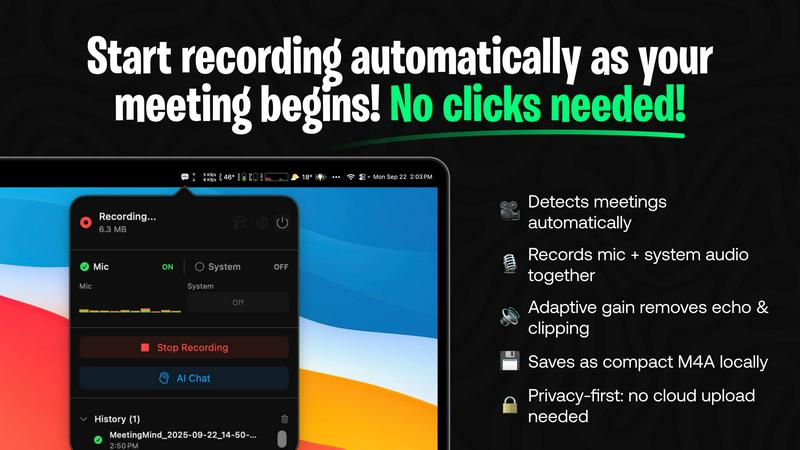
MeetingMind automatically detects when you start or join a Zoom meeting, eliminating any need for manual clicks or prompts. This seamless integration ensures that you never miss a detail, allowing you to focus entirely on the discussion at hand.
Records Everything
The app captures both microphone and system audio simultaneously, utilizing adaptive gain technology for optimal sound quality. This comprehensive recording capability ensures that every voice and sound during the meeting is accurately documented.
AI Assistant
Choose between local processing via Ollama or cloud-based summaries using OpenRouter. This flexibility allows you to tailor the app to your preferences while receiving insightful AI-generated summaries and action items post-meeting.
Markdown Export
Post-meeting, MeetingMind generates formatted markdown files containing transcripts and summaries. This feature provides you with a clean and easily accessible format for storing and reviewing important meeting details.
Use Cases
DigitalMagicWand
Content Creation for Educators
Educators can utilize the Accurate AI Detector to ensure the integrity of student submissions. By verifying content authenticity, they can focus on providing constructive feedback, thereby enhancing the learning experience.
Music Production for Musicians
Musicians can take advantage of Digital Ear™ to convert their piano tracks into MIDI files, allowing for easier editing and integration into larger musical projects. This feature streamlines the production process and fosters creativity.
Image Enhancement for Marketers
DigitalMagicWand's AI Image Editor is perfect for digital marketers who need to create visually appealing content for campaigns. With quick background changes and element removal, they can produce professional-quality images that stand out.
Text Refinement for Writers
Writers can benefit from the Undetectable AI Text Humanizer to refine AI-generated drafts, making them more suitable for publication. This ensures that the final output reads naturally and engages the target audience effectively.
MeetingMind
Effortless Meeting Documentation
MeetingMind is perfect for busy professionals who attend multiple meetings daily. By automatically capturing and summarizing discussions, users can save time and focus on their responsibilities rather than manual note-taking.
Enhanced Collaboration
Teams can utilize MeetingMind to ensure that all members have access to comprehensive meeting records. This fosters better communication and collaboration, as everyone can review summaries and action items, regardless of their attendance.
Improved Accountability
With AI-generated summaries and action items, MeetingMind helps teams stay accountable for tasks discussed in meetings. Users can easily track who is responsible for what, leading to improved project management and follow-through.
Ideal for Remote Work
As remote work becomes more common, MeetingMind serves as an essential tool for remote teams. It ensures that all discussions are documented and accessible, bridging the communication gap that can occur in virtual environments.
Overview
About DigitalMagicWand
DigitalMagicWand™ is an advanced online platform that harnesses the power of artificial intelligence to transform digital content creation. It offers a comprehensive suite of tools for image, audio, video, and text processing, catering to a wide range of users including content creators, musicians, educators, and businesses. Whether you are looking to enhance your multimedia projects, generate stunning visuals from text, or analyze and manipulate audio tracks, DigitalMagicWand provides intuitive solutions that promote creativity and efficiency. Its AI-driven technology ensures high-quality results with minimal effort, allowing users to focus on their creative vision rather than technical challenges. With features designed for both professionals and casual users, DigitalMagicWand is a one-stop shop for all your digital content needs.
About MeetingMind
MeetingMind is an intelligent meeting assistant designed specifically for macOS, aimed at professionals, remote workers, and teams who rely heavily on video conferencing tools like Zoom. This innovative software automatically captures, transcribes, and summarizes meetings, removing the burden of manual note-taking. With an intuitive setup, MeetingMind detects when you join a Zoom meeting and begins recording both microphone and system audio immediately, ensuring clear and accurate capture. Utilizing on-device AI, it generates real-time, speaker-attributed transcripts and post-meeting summaries in clean markdown format. The app's core value proposition lies in delivering a comprehensive, searchable record of discussions with zero effort, all while prioritizing user privacy through local processing. This allows you to remain fully engaged in conversations, while MeetingMind efficiently handles documentation.
Frequently Asked Questions
DigitalMagicWand FAQ
What types of content can I create with DigitalMagicWand?
You can create and enhance images, audio tracks, videos, and text. Our suite of AI tools allows for diverse content transformation and generation.
Is it easy to use DigitalMagicWand?
Yes, DigitalMagicWand is designed to be user-friendly. Most features require no technical skills, enabling users to achieve professional results effortlessly.
Can I trust the AI Detector for text verification?
Absolutely. The Accurate AI Detector provides clear confidence scores, giving you reliable insights into whether content is human-written or generated by AI tools.
Are there any specific requirements to use the platform?
DigitalMagicWand is web-based, so you only need a compatible browser and an internet connection. There are no special software installations required.
MeetingMind FAQ
How does MeetingMind ensure privacy?
MeetingMind prioritizes user privacy by conducting all processing locally on your Apple Silicon Mac. This means that your meeting data never leaves your device, keeping your discussions secure and private.
What if I only need to record short meetings?
MeetingMind offers a free tier that allows 60 minutes of recording per day. This is ideal for daily stand-ups or brief meetings, ensuring that you can capture essential details without needing a full subscription.
Is there a subscription model for MeetingMind?
No, MeetingMind operates on a one-time purchase model for its unlimited version. You pay once to unlock unlimited recording capabilities and enjoy lifetime updates without any recurring fees.
How do I get started with MeetingMind?
Getting started is simple. Just download MeetingMind from the Mac App Store, grant the necessary permissions, and you'll be set up in less than a minute. After that, you can join a Zoom meeting, and the app will take care of the rest.
Alternatives
DigitalMagicWand Alternatives
DigitalMagicWand is an AI-driven platform that offers tools for enhancing and creating visuals, audio, video, and text. As a part of the AI Assistants category, it provides users with advanced technology to streamline their digital content creation process. Users often seek alternatives to DigitalMagicWand due to various reasons such as pricing constraints, specific feature requirements, or compatibility with different platforms. When evaluating potential alternatives, it's essential to consider factors including the range of features offered, ease of use, customer support, and overall value for money.
MeetingMind Alternatives
MeetingMind is an intelligent meeting assistant designed for macOS that captures, transcribes, and summarizes Zoom meetings, making it an innovative tool in the productivity and management category. Users often seek alternatives for various reasons, including pricing, specific feature requirements, or compatibility with other platforms. It’s essential to consider factors such as ease of use, integration capabilities, transcription accuracy, and privacy features when selecting a suitable alternative. Finding the right solution involves evaluating whether it meets your unique needs, especially concerning audio capture quality, AI-powered transcription capabilities, and the ability to summarize and store meeting data securely. A thoughtful approach to selecting an alternative can enhance your meeting productivity and documentation processes, ensuring you choose a tool that aligns with your workflow.