
Decode This Text vs Kaizen OCR
Side-by-side comparison to help you choose the right AI tool.

Decode This Text
Decode This Text quickly clarifies confusing conversations with human-like insights in just 30 seconds.
Last updated: February 28, 2026
Kaizen OCR
Kaizen OCR extracts text from images and PDFs completely offline with 100% privacy.
Last updated: February 28, 2026
Visual Comparison
Decode This Text

Kaizen OCR
Feature Comparison
Decode This Text
Analyze Conversations
Paste your chat or upload a screenshot to receive an analysis that understands the nuances of your conversation. This feature allows users to bypass confusion and gain insight into the dynamics at play.
Emotional Tone Assessment
Decode This Text evaluates the emotional tone of messages, determining whether they are friendly, sarcastic, or cold. This helps users gauge the mood of the conversation to respond appropriately.
Intent Detection
The tool identifies underlying intentions behind messages, informing users if the sender is interested, annoyed, or simply busy. This feature provides clarity on how to approach replies effectively.
Response Suggestions
Unsure how to reply? Decode This Text offers three tailored response options—calm, direct, or firm. This empowers users to communicate confidently without second-guessing their words.
Kaizen OCR
AI-Powered Text Extraction
Utilizes an advanced, fully offline AI/ML engine for superior accuracy on complex documents. It excels at extracting structured data like tables with proper row/column formatting and automatically detecting key-value pairs. This feature supports major languages including English, Chinese, Arabic, Japanese, and Korean, all while guaranteeing complete privacy.
Extract Text from Image (Tesseract)
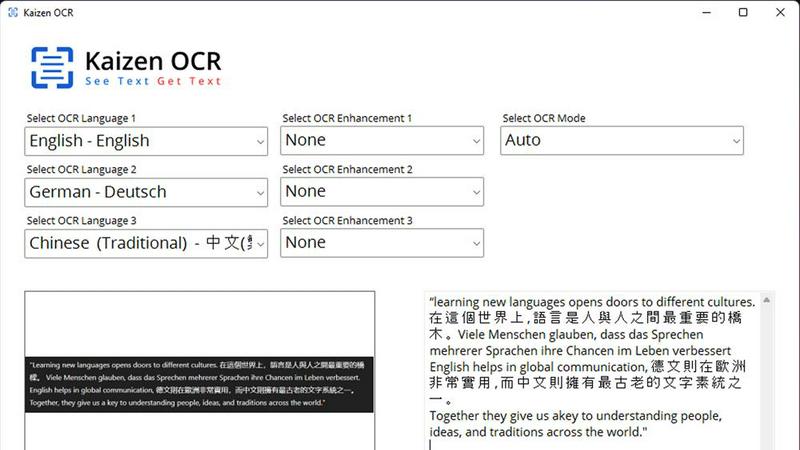
Leverages the powerful Tesseract OCR engine to pull text from any image file, such as photos of documents, receipts, or screenshots. It supports over 100 languages, allows selection of up to three languages simultaneously, and applies 11 image preprocessing steps to enhance clarity and accuracy before batch processing unlimited files.
Screenshot OCR
Features a built-in snipping tool for capturing any part of your screen and extracting text instantly. Perfect for grabbing text from videos, presentations, or locked web pages. It offers an optional hotkey (F6) for quick capture and includes table detection to maintain data structure from the source.
Merge, Split & Create PDFs
Provides comprehensive PDF manipulation tools. You can combine pages from multiple PDFs into one document, rearrange pages via drag-and-drop, insert blank pages, and add custom text annotations with personalized styling. This creates a fully offline toolkit for document assembly and customization.
Use Cases
Decode This Text
Understanding Ambiguous Texts
When a friend sends a vague message, Decode This Text can clarify their intentions, helping you determine if they are genuinely busy or losing interest.
Deciphering Professional Emails
For professionals receiving terse emails from bosses or colleagues, this tool interprets the underlying tone and intent, aiding in crafting appropriate responses.
Navigating Family Dynamics
In family group chats, Decode This Text helps users understand the emotional undercurrents, ensuring that misunderstandings are avoided and relationships are maintained.
Enhancing Communication Skills
By regularly using Decode This Text, individuals can develop better communication skills and build confidence in their interactions, both personally and professionally.
Kaizen OCR
Academic Research & Study
Students and researchers can quickly digitize notes from textbooks, capture text from research papers or online journals via screenshot, and compile information into editable documents. The batch processing and multi-language support make literature reviews and sourcing quotes from various materials significantly faster.
Legal & Administrative Document Processing
Legal professionals and administrators handle sensitive contracts, forms, and scanned archives. Kaizen OCR allows them to extract text from these documents offline for editing and analysis, merge relevant PDFs, and add password protection—all without risking data privacy by uploading to the cloud.
Business & Receipt Management
Business users can process batches of receipts, invoices, and reports. Extract line-item details and tables into spreadsheets for expense tracking or accounting. The auto-crop and deskew features clean up phone-captured document photos, making them professional and readable.
Content Creation & Translation
Writers, translators, and content creators can extract text from images, screenshots, or foreign language PDFs as a starting point for their work. Supporting 100+ languages, it facilitates quick translation bases and repurposing of content from visual sources like infographics or video frames.
Overview
About Decode This Text
Decode This Text is an innovative communication tool designed to help users interpret the hidden meanings behind text messages and emails that may be confusing or ambiguous. Ideal for professionals, friends, and family members, this tool provides clarity in communication, helping users navigate both personal and professional interactions. By simply pasting the conversation or describing the context, users receive an in-depth analysis of emotional tones, intentions, and tailored response suggestions. With its user-friendly interface and rapid response time, Decode This Text empowers individuals to enhance their communication skills, improve relationships, and eliminate misunderstandings. The tool is perfect for anyone who often finds themselves overanalyzing messages or wondering about the true intentions behind what they read.
About Kaizen OCR
Kaizen OCR is a comprehensive, all-in-one desktop software for Windows that transforms how you handle documents. It combines powerful, AI-enhanced Optical Character Recognition (OCR) with essential PDF utilities in a single, fully offline package. Designed for professionals, students, researchers, and anyone who regularly works with documents, it extracts text from virtually any source: images, screenshots, and PDFs. Its core value is delivering high-accuracy text recognition without ever requiring an internet connection, ensuring 100% data privacy as your sensitive files never leave your computer. With support for over 100 languages, unlimited batch processing, and a suite of editing tools, it replaces the need for multiple online subscriptions, offering a robust, secure, and efficient solution for any digital document workflow.
Frequently Asked Questions
Decode This Text FAQ
How does Decode This Text ensure privacy?
Decode This Text guarantees 100% anonymity, meaning that no human reads your texts. Your conversations are treated with the utmost confidentiality.
Can I use Decode This Text for professional emails?
Yes, Decode This Text is designed to analyze both personal messages and professional communications, helping users understand the nuances in various contexts.
What types of messages can I analyze?
You can analyze any text-based communication, including SMS, emails, and social media messages. Just paste the conversation or describe the context for analysis.
How quickly will I receive my analysis?
With Decode This Text, you can expect a comprehensive analysis in just 30 seconds, allowing you to respond promptly and confidently.
Kaizen OCR FAQ
Is Kaizen OCR truly 100% offline?
Yes. All processing, including the advanced AI text extraction, occurs locally on your Windows computer. No internet connection is required at any point, and no data is ever uploaded to external servers, ensuring complete privacy and security for your documents.
What languages does the OCR support?
Kaizen OCR supports over 100 languages for its Tesseract-based image OCR. The AI-powered extraction mode specifically supports English, Chinese, Arabic, Japanese, and Korean. You can select up to three languages simultaneously for mixed-language documents.
Can I process multiple files at once?
Absolutely. Kaizen OCR includes robust batch processing capabilities. You can add an unlimited number of images or PDF files to a queue and let the software extract text, convert formats, or apply password protection to all of them in one go, saving considerable time.
What is the difference between Tesseract and AI OCR?
The Tesseract engine is excellent for standard text extraction across many languages. The AI-powered OCR is a more advanced, offline neural network designed for higher accuracy on complex layouts, such as documents with tables, forms, or poor image quality, preserving the structural integrity of the data.
Alternatives
Decode This Text Alternatives
Decode This Text is a cutting-edge tool within the Productivity & Management category, designed to help users unravel the complexities of communication. By providing quick, human-like analyses of messages, it allows individuals to gain clarity from confusing conversations, enhancing their overall communication skills. Users often seek alternatives due to factors such as pricing, feature sets, or specific platform requirements that may not be fully met by Decode This Text. When selecting an alternative, consider essential features like analysis speed, user interface simplicity, and the ability to interpret emotional tones. Additionally, assess the support offered for various communication formats to ensure the tool meets your particular needs without compromising on effectiveness.
Kaizen OCR Alternatives
Kaizen OCR is a desktop software for Windows that falls into the productivity category. It specializes in extracting text from images, screenshots, and PDFs using powerful, fully offline OCR engines. This ensures all data processing happens locally on your computer for maximum privacy and security. Users may explore alternatives for various reasons. Some might seek different pricing models, such as free online tools or subscription-based services. Others may require specific features, like integration with cloud storage, or need software that runs on macOS or Linux. The search often centers on balancing cost, platform compatibility, and specific workflow needs. When evaluating an alternative, key considerations include privacy policies, offline functionality, and accuracy. Determine if the tool processes data online or locally. Check its supported languages, batch processing capabilities, and whether it includes additional utilities like PDF editing. The goal is to find a solution that matches your specific requirements for security, convenience, and power.