
Cosy vs LuxSign
Side-by-side comparison to help you choose the right AI tool.

Cosy automates Slack community onboarding and engagement to save you time.
Last updated: February 28, 2026

LuxSign lets you securely sign and manage documents online in minutes, ensuring legal validity across the EU.
Last updated: February 26, 2026
Visual Comparison
Cosy
LuxSign

Feature Comparison
Cosy
Automated Onboarding
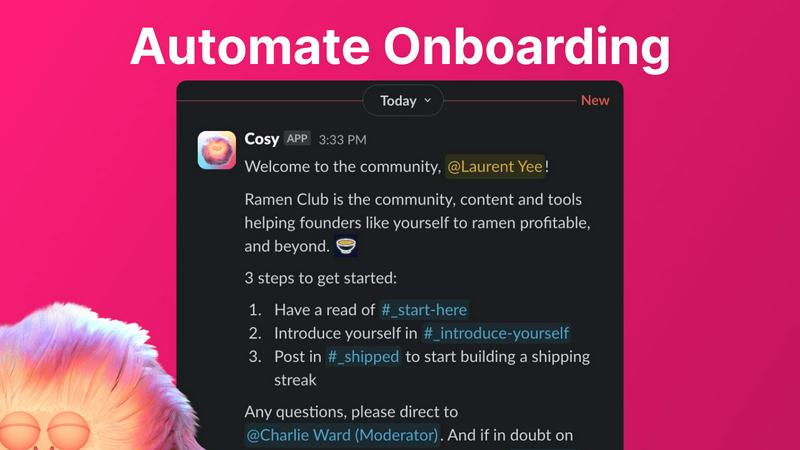
Create and automate up to 10 distinct welcome DM sequences for new members, sent from you, a team member, or the Cosy bot. Fully customize messages with member names, links, and emojis, and set time delays from immediate to months in the future. This ensures every new member is welcomed personally, even outside business hours, saving hours of manual outreach and follow-up while providing a consistent, warm first impression.
Connect Your Members
Grow engagement by automatically introducing opted-in community members to each other via direct messages. You customize the intro message, cadence (every 1-4 weeks), and timing. Introductions happen in a 3-person DM including both members and the Cosy bot, fostering serendipitous connections. The system randomly pairs members while avoiding recent matches, automating relationship-building to create a more engaged and interconnected network.
Member Directory
Build a simple, searchable directory of all community members without leaving Slack. Create custom profile fields (text, single-select, or multi-choice) and notify members to fill them via a one-click prompt. Members can search by keyword and filter for completed profiles using the Cosy app or a slash command. This tool helps members discover each other easily, fostering a more cohesive and supportive community environment.
Content Highlights
Instantly surface the most valuable conversations in your community with quick slash commands. Identify the top 10 most engaged posts in a specific channel or across all public channels. Alternatively, find messages that have received no replies to ensure no question goes unanswered. This feature helps community managers and members quickly find high-signal content and identify opportunities for engagement.
LuxSign
Multiple Signature Methods
LuxSign supports various signature methods, allowing users to draw their signature, type their name, or upload an image. This flexibility makes it simple for signers to complete documents quickly and according to their preferences.
Advanced Security
The platform employs industry-standard encryption to secure documents during upload, storage, and transmission. With secure hosting in Luxembourg, LuxSign guarantees compliance with GDPR and local data protection laws, providing peace of mind for businesses.
Collaboration Workspaces
LuxSign enables teams to create shared workspaces for better collaboration. Users can organize documents in folders, manage member access, and work together seamlessly on signing workflows, enhancing productivity and teamwork.
Complete Audit Trail
Every action taken within LuxSign is logged with detailed timestamps, IP addresses, and signer information. This comprehensive audit trail aids in compliance and verification, ensuring that organizations can maintain transparency and accountability in their signing processes.
Use Cases
Cosy
Professional Network Communities
Community leaders running industry groups or professional networks on Slack can use Cosy to automate member onboarding, ensuring every new professional feels welcomed. The automated member introductions foster valuable peer-to-peer networking, while the searchable directory helps members find relevant contacts, mentors, or collaborators, significantly increasing the network's value and activity.
Customer Success & Support Communities
Companies hosting customer communities on Slack can leverage Cosy to automate welcome sequences that guide new users to resources. The content highlights feature surfaces common questions and popular solutions, helping reduce repetitive support queries. The safe environment monitoring helps maintain a professional, helpful space, enhancing customer satisfaction and product adoption.
Internal Company Teams
Internal team leaders can use Cosy to boost camaraderie and cross-departmental collaboration within their company's Slack. Automated introductions break down silos by connecting employees from different teams. The member directory helps staff find colleagues with specific expertise, and highlighting top content ensures important company announcements and wins get the visibility they deserve.
Online Course & Cohort-Based Communities
Educators and course creators managing student cohorts on Slack can automate student onboarding with tailored sequences. The connection feature helps students find accountability partners or study groups, enhancing the learning experience. Content highlights allow facilitators to easily spot trending discussion topics and unanswered student questions, enabling more targeted support.
LuxSign
Contract Signing for Remote Teams
LuxSign allows remote teams to sign contracts quickly and securely. By using its cloud-based platform, team members can sign documents from anywhere, ensuring that workflows remain uninterrupted despite geographical barriers.
Compliance Documentation
Businesses in regulated industries can use LuxSign to manage compliance documentation requiring multiple signatures. The platform's advanced security features and audit trails help organizations stay compliant while efficiently processing necessary paperwork.
Real Estate Transactions
Real estate professionals can leverage LuxSign to facilitate the signing of purchase agreements and lease contracts. With its easy-to-use interface and multiple signing options, agents can ensure timely signatures, speeding up the closing process.
Human Resources Onboarding
HR departments can utilize LuxSign to streamline the onboarding process. By digitizing the signing of employment contracts and policy documents, organizations can enhance their onboarding efficiency while maintaining security and compliance.
Overview
About Cosy
Cosy is a powerful, Slack-native application designed to transform your Slack workspace into a vibrant, self-sustaining community. It automates the manual, time-consuming tasks of community management, freeing leaders to focus on strategy and meaningful engagement. Built specifically for Slack, Cosy integrates seamlessly to handle critical functions like automated member onboarding, fostering connections between members, creating a searchable member directory, highlighting valuable content, and maintaining a safe environment. It is the ideal tool for community managers, founders, and team leaders who run professional networks, customer communities, or internal teams on Slack. The core value proposition is clear: save significant manual effort every week while systematically growing a more connected, active, and valuable community directly within the platform your members already use and love.
About LuxSign
LuxSign is a cutting-edge electronic signature platform designed for businesses that prioritize security and compliance. Built in Luxembourg, it offers a reliable, cloud-based solution that ensures all documents are encrypted end-to-end and stored locally, thereby maintaining full compliance with GDPR regulations. LuxSign is tailored for organizations that require a legally valid signature solution across the European Union, supporting eIDAS SES standards. Its user-friendly interface allows for quick document signing and management, making it ideal for professionals and teams who need an efficient way to handle contracts and agreements. With features such as automated notifications, advanced audit trails, and collaborative workspaces, LuxSign empowers businesses to streamline their signing processes while ensuring maximum security and compliance.
Frequently Asked Questions
Cosy FAQ
How does Cosy handle member introductions?
Cosy introduces opted-in community members to each other on a customizable cadence (every 1, 2, 3, or 4 weeks). The introduction is sent as a 3-person DM including both members and the Cosy bot. You can customize the intro message template, the weekday, and the time (in UTC). The system randomly pairs members while avoiding recent matches to encourage diverse connections.
Can I customize the onboarding messages?
Yes, onboarding messages are fully customizable. You can create up to 10 distinct welcome DM sequences. Messages can include the member's name, links, emojis, and you can set specific time delays for each message—from immediately to minutes, hours, or even months after a member joins. Messages can be sent from you, a team member, or the Cosy bot.
How do members access the Member Directory?
Members can access the directory in two ways: by opening the Cosy app directly within Slack, or by using the /member-directory slash command in any public channel, which provides a quick link. The directory is searchable by keywords and can be filtered to show only profiles that have been filled in, making it easy to find relevant community members.
Is there a free plan available?
Yes, Cosy offers a free plan for communities with up to 250 members. For communities needing to support unlimited members, a 30-day free trial is available. This allows teams to fully test all premium features and automate their community management workflows before committing to a paid subscription.
LuxSign FAQ
What documents can I sign with LuxSign?
LuxSign supports PDF, DOC, and DOCX formats, allowing users to upload files up to 10MB. The platform automatically converts documents as needed, simplifying the signing process.
Is LuxSign GDPR compliant?
Yes, LuxSign is fully compliant with GDPR and Luxembourg data protection laws. All documents are encrypted and stored securely within the country, ensuring your data privacy is maintained.
Can I track the signing process?
Absolutely. LuxSign provides real-time tracking of document status, including when documents are sent, viewed, and signed. Users receive automatic email notifications to stay informed throughout the process.
How does LuxSign ensure security?
LuxSign employs end-to-end encryption for documents during upload, storage, and transmission. Additionally, all actions are logged with tamper-proof audit trails, ensuring transparency and security for all signed documents.
Alternatives
Cosy Alternatives
Cosy is a Slack-native productivity tool that automates community management tasks like onboarding and member introductions. It saves community leaders significant time by handling repetitive administrative work directly within Slack. Users often explore alternatives for various reasons. These can include budget constraints, a need for features beyond Slack automation, or a requirement to manage communities on platforms other than Slack. The specific needs of a community's size, stage, and goals are key drivers in this search. When evaluating alternatives, consider the core platform (Slack, Discord, etc.), the depth of automation for key workflows, pricing transparency, and the tool's ability to scale with your community's growth. The right solution should align with your primary goal, whether it's saving time, boosting engagement, or expanding to new platforms.
LuxSign Alternatives
LuxSign is a cloud-based electronic signature platform based in Luxembourg, designed for businesses that require secure and compliant signing solutions. As an eIDAS SES compliant service, it ensures that signatures are legally valid across all EU member states. With features like end-to-end encryption and GDPR compliance, it caters to organizations focused on document security and regulatory adherence. Users often seek alternatives to LuxSign for various reasons, including cost considerations, specific feature requirements, and integration capabilities with existing systems. When evaluating alternatives, it's essential to prioritize factors such as ease of use, compliance with legal standards, and the ability to customize workflows and branding to suit business needs.