
Cosy vs HeyVid
Side-by-side comparison to help you choose the right AI tool.

Cosy automates Slack community onboarding and engagement to save you time.
Last updated: February 28, 2026

HeyVid is an all-in-one AI tool that seamlessly generates high-quality videos and images from text or images, streamlining your creative process.
Last updated: April 4, 2026
Visual Comparison
Cosy
HeyVid

Feature Comparison
Cosy
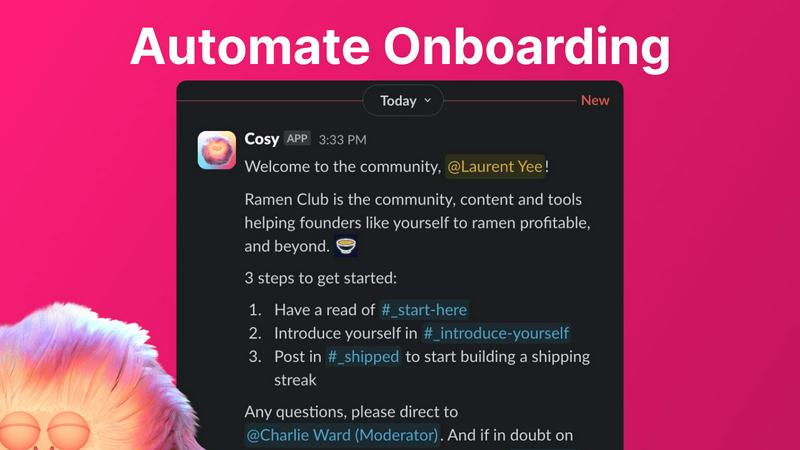
Automated Onboarding
Create and automate up to 10 distinct welcome DM sequences for new members, sent from you, a team member, or the Cosy bot. Fully customize messages with member names, links, and emojis, and set time delays from immediate to months in the future. This ensures every new member is welcomed personally, even outside business hours, saving hours of manual outreach and follow-up while providing a consistent, warm first impression.
Connect Your Members
Grow engagement by automatically introducing opted-in community members to each other via direct messages. You customize the intro message, cadence (every 1-4 weeks), and timing. Introductions happen in a 3-person DM including both members and the Cosy bot, fostering serendipitous connections. The system randomly pairs members while avoiding recent matches, automating relationship-building to create a more engaged and interconnected network.
Member Directory
Build a simple, searchable directory of all community members without leaving Slack. Create custom profile fields (text, single-select, or multi-choice) and notify members to fill them via a one-click prompt. Members can search by keyword and filter for completed profiles using the Cosy app or a slash command. This tool helps members discover each other easily, fostering a more cohesive and supportive community environment.
Content Highlights
Instantly surface the most valuable conversations in your community with quick slash commands. Identify the top 10 most engaged posts in a specific channel or across all public channels. Alternatively, find messages that have received no replies to ensure no question goes unanswered. This feature helps community managers and members quickly find high-signal content and identify opportunities for engagement.
HeyVid
Text to Video
Transform written content into engaging videos seamlessly. By simply inputting your text, HeyVid's AI generates compelling videos that capture your message effectively, making it perfect for marketers and educators.
Image to Video
Convert static images into dynamic video presentations effortlessly. This feature allows users to animate their visuals, creating eye-catching content ideal for storytelling and promotions.
AI Image Generator
Create stunning images using advanced AI models like Midjourney and Dall-E. Users can generate diverse visuals tailored to their needs, from social media graphics to marketing materials, enhancing their creative output.
One-Click Video Maker
Simplify the video creation process with HeyVid's one-click functionality. Users can quickly generate videos by selecting AI models and providing prompts, streamlining their workflow and saving valuable time.
Use Cases
Cosy
Professional Network Communities
Community leaders running industry groups or professional networks on Slack can use Cosy to automate member onboarding, ensuring every new professional feels welcomed. The automated member introductions foster valuable peer-to-peer networking, while the searchable directory helps members find relevant contacts, mentors, or collaborators, significantly increasing the network's value and activity.
Customer Success & Support Communities
Companies hosting customer communities on Slack can leverage Cosy to automate welcome sequences that guide new users to resources. The content highlights feature surfaces common questions and popular solutions, helping reduce repetitive support queries. The safe environment monitoring helps maintain a professional, helpful space, enhancing customer satisfaction and product adoption.
Internal Company Teams
Internal team leaders can use Cosy to boost camaraderie and cross-departmental collaboration within their company's Slack. Automated introductions break down silos by connecting employees from different teams. The member directory helps staff find colleagues with specific expertise, and highlighting top content ensures important company announcements and wins get the visibility they deserve.
Online Course & Cohort-Based Communities
Educators and course creators managing student cohorts on Slack can automate student onboarding with tailored sequences. The connection feature helps students find accountability partners or study groups, enhancing the learning experience. Content highlights allow facilitators to easily spot trending discussion topics and unanswered student questions, enabling more targeted support.
HeyVid
Marketing Campaigns
Leverage HeyVid to create captivating video ads and promotional content that resonate with your target audience. The platform's intuitive features make it easy to design effective marketing strategies.
Educational Content
Educators can utilize HeyVid to produce engaging tutorials and presentations. The AI-generated videos enhance learning experiences, making complex topics more accessible and enjoyable for students.
Brand Storytelling
Craft compelling brand narratives with visually stunning videos. HeyVid enables businesses to connect emotionally with their audience, showcasing their mission and values through dynamic visual storytelling.
Social Media Content
Generate eye-catching visuals and videos for social media platforms effortlessly. HeyVid helps creators produce shareable content that boosts engagement and drives traffic to their profiles.
Overview
About Cosy
Cosy is a powerful, Slack-native application designed to transform your Slack workspace into a vibrant, self-sustaining community. It automates the manual, time-consuming tasks of community management, freeing leaders to focus on strategy and meaningful engagement. Built specifically for Slack, Cosy integrates seamlessly to handle critical functions like automated member onboarding, fostering connections between members, creating a searchable member directory, highlighting valuable content, and maintaining a safe environment. It is the ideal tool for community managers, founders, and team leaders who run professional networks, customer communities, or internal teams on Slack. The core value proposition is clear: save significant manual effort every week while systematically growing a more connected, active, and valuable community directly within the platform your members already use and love.
About HeyVid
HeyVid is a cutting-edge AI-driven platform designed to simplify and enhance the content creation process for videos and images. With its comprehensive suite of tools, it empowers users to quickly generate high-quality visual content without the need for extensive editing skills. Whether you are a marketer, educator, entrepreneur, or content creator, HeyVid caters to your creative needs, enabling you to produce professional-grade media effortlessly. The platform supports a variety of content generation, including text-to-video, image-to-video, and image refinement, making it a versatile solution for diverse applications. By leveraging advanced AI models, HeyVid ensures that users can transform their ideas into captivating visuals with minimal effort and maximum impact.
Frequently Asked Questions
Cosy FAQ
How does Cosy handle member introductions?
Cosy introduces opted-in community members to each other on a customizable cadence (every 1, 2, 3, or 4 weeks). The introduction is sent as a 3-person DM including both members and the Cosy bot. You can customize the intro message template, the weekday, and the time (in UTC). The system randomly pairs members while avoiding recent matches to encourage diverse connections.
Can I customize the onboarding messages?
Yes, onboarding messages are fully customizable. You can create up to 10 distinct welcome DM sequences. Messages can include the member's name, links, emojis, and you can set specific time delays for each message—from immediately to minutes, hours, or even months after a member joins. Messages can be sent from you, a team member, or the Cosy bot.
How do members access the Member Directory?
Members can access the directory in two ways: by opening the Cosy app directly within Slack, or by using the /member-directory slash command in any public channel, which provides a quick link. The directory is searchable by keywords and can be filtered to show only profiles that have been filled in, making it easy to find relevant community members.
Is there a free plan available?
Yes, Cosy offers a free plan for communities with up to 250 members. For communities needing to support unlimited members, a 30-day free trial is available. This allows teams to fully test all premium features and automate their community management workflows before committing to a paid subscription.
HeyVid FAQ
What types of content can I create with HeyVid?
HeyVid allows you to create a wide range of content, including videos from text and images, as well as high-quality images from prompts. The platform supports various formats to suit different needs.
Is HeyVid user-friendly for beginners?
Yes, HeyVid is designed with an intuitive interface that caters to both beginners and experienced users. The streamlined process makes it easy for anyone to dive into content creation without prior experience.
Can I use HeyVid for professional projects?
Absolutely. HeyVid’s AI tools are built to deliver professional-grade content suitable for business presentations, marketing campaigns, and more, ensuring high-quality outputs for various applications.
Are there any limitations on the content I can generate?
While HeyVid provides extensive capabilities, users should be mindful of the creativity guidelines and ethical considerations when generating content, ensuring originality and respect for copyright.
Alternatives
Cosy Alternatives
Cosy is a Slack-native productivity tool that automates community management tasks like onboarding and member introductions. It saves community leaders significant time by handling repetitive administrative work directly within Slack. Users often explore alternatives for various reasons. These can include budget constraints, a need for features beyond Slack automation, or a requirement to manage communities on platforms other than Slack. The specific needs of a community's size, stage, and goals are key drivers in this search. When evaluating alternatives, consider the core platform (Slack, Discord, etc.), the depth of automation for key workflows, pricing transparency, and the tool's ability to scale with your community's growth. The right solution should align with your primary goal, whether it's saving time, boosting engagement, or expanding to new platforms.
HeyVid Alternatives
HeyVid is an all-in-one AI video and image generator that streamlines the process of creating high-quality multimedia content. As part of the productivity and management category, it caters to users seeking efficient solutions for their visual content needs. However, users might seek alternatives due to various reasons such as pricing, specific feature sets, or compatibility with their preferred platforms. When exploring alternatives, it’s essential to consider factors like ease of use, the quality of generated content, available features, customer support, and pricing structures. Assessing these elements will help users identify a solution that best fits their unique requirements and enhances their content creation process.