
conceptviz vs LLMWise
Side-by-side comparison to help you choose the right AI tool.

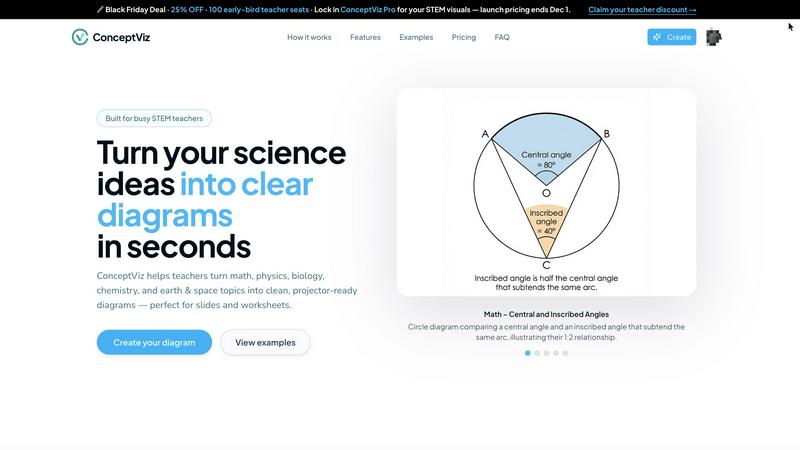
ConceptViz creates clear, science-ready diagrams in three easy steps for teachers, students, and researchers.
Last updated: March 1, 2026

LLMWise
Access 62+ AI models with one API, auto-routing prompts to the best options without subscriptions, just pay as you go.
Last updated: February 26, 2026
Visual Comparison
conceptviz
LLMWise

Feature Comparison
conceptviz
User-Friendly Interface
ConceptViz boasts an intuitive interface, allowing users to create diagrams effortlessly. By simply signing in and describing their desired visuals in plain English, users can generate diagrams quickly, making it accessible for all skill levels.
Subject and Grade Presets
The platform includes quick presets tailored for various STEM subjects, including physics, biology, chemistry, earth & space, and math. These presets are designed for specific U.S. grade bands, ensuring that diagrams are appropriate for elementary, middle, or high school students.
Projector-Ready Clarity
Diagrams created with ConceptViz are designed for high visibility in classrooms. The tool prioritizes thick, legible lines and simple backgrounds, ensuring that visuals remain clear and effective in any teaching environment.
High-Resolution Exports
Users can download their generated diagrams in high-resolution PNG format, making it easy to incorporate visuals into presentations or printed materials. This feature ensures that educators can seamlessly integrate diagrams into PowerPoint, Google Slides, or worksheets.
LLMWise
Smart Routing
LLMWise features intelligent routing that automatically directs prompts to the optimal model. For example, coding queries are sent to GPT, while creative writing prompts go to Claude, and translation tasks are assigned to Gemini. This ensures that every request is handled by the most capable model, enhancing the quality of responses.
Compare & Blend
This feature allows users to run prompts across multiple models simultaneously, enabling side-by-side comparisons. The blending function combines the best parts of each model's output into a single, stronger response. This is particularly useful for generating high-quality content or making critical decisions based on the best insights from different models.
Always Resilient
LLMWise includes a circuit-breaker failover system that automatically reroutes requests to backup models if a primary provider goes down. This ensures that applications remain operational at all times, significantly reducing downtime and maintaining reliability.
Test & Optimize
Developers can take advantage of comprehensive benchmarking suites, batch tests, and optimization policies tailored for speed, cost, or reliability. Automated regression checks help maintain performance standards and ensure that applications remain efficient and effective over time.
Use Cases
conceptviz
Classroom Instruction
Educators can use ConceptViz to create engaging visual aids for their lessons. By generating diagrams that illustrate complex concepts, teachers can enhance student understanding and retention during lectures.
Student Projects
Students can leverage ConceptViz for their projects, allowing them to create professional-looking diagrams that effectively communicate their research findings. This tool encourages creativity and improves presentation quality.
Lab Reports
Researchers and students conducting experiments can utilize ConceptViz to generate clear diagrams that represent their methodologies and results. This aids in creating visually appealing lab reports that are easy to understand.
Homework Assignments
ConceptViz can assist students in completing homework assignments by providing them with the means to create accurate diagrams that support their answers. This feature helps students articulate their understanding of complex topics.
LLMWise
Application Development
Developers can utilize LLMWise to create applications that require diverse AI functionalities. By accessing multiple models through a single API, they can build more sophisticated features without the overhead of managing different systems.
Content Creation
Writers and marketers can leverage LLMWise to generate high-quality content. By using the compare and blend features, they can produce articles, social media posts, and marketing materials that leverage the strengths of various LLMs.
Data Analysis
Analysts can use LLMWise to process and interpret large datasets. By routing data queries to the most appropriate model, they can obtain insights and generate reports more efficiently, improving decision-making processes.
Language Translation
Businesses operating in multiple regions can rely on LLMWise for accurate and context-aware translations. By utilizing its routing capabilities, they can choose the best model for language translation tasks, ensuring clarity and accuracy in communication.
Overview
About conceptviz
ConceptViz is an innovative diagramming tool specifically crafted for educators, students, and researchers within STEM education. This platform is designed to simplify the creation of accurate and visually appealing diagrams, making complex scientific concepts more accessible and understandable. Ideal for K-12 and higher education environments, ConceptViz streamlines the process of transforming intricate ideas into clear, classroom-ready visuals. Users can quickly generate high-quality diagrams simply by describing their needs in plain English, eliminating the need for design skills. With a focus on clarity and usability, ConceptViz ensures that all diagrams are projector-ready, featuring legible labels and minimal visual distractions. This makes it a valuable resource for educators seeking effective visual aids for lesson plans, labs, and assessments, ultimately enhancing the learning experience and saving preparation time.
About LLMWise
LLMWise is a revolutionary AI integration platform that streamlines access to multiple large language models (LLMs) through a single API. By aggregating major providers like OpenAI, Anthropic, Google, Meta, xAI, and DeepSeek, LLMWise eliminates the hassle of managing various subscriptions and keys. It intelligently routes prompts to the most suitable model based on task requirements—whether it's coding, creative writing, or translation. This versatility allows developers to optimize their applications without the complexity of juggling different APIs. With features like side-by-side comparisons, blending outputs, and failover resilience, LLMWise is designed for developers who demand the best AI solutions across tasks without incurring unnecessary costs. Its flexible pricing model permits pay-as-you-go usage, ensuring that you only pay for what you need.
Frequently Asked Questions
conceptviz FAQ
How do I get started with ConceptViz?
To get started, simply sign up for a free account on the ConceptViz website. After signing in, you can select your subject and grade level, then describe the diagram you need.
Can I use ConceptViz for subjects beyond STEM?
While ConceptViz is primarily designed for STEM education, its capabilities can be adapted for various subjects requiring visual representations. Users can experiment with different topics to see how the tool fits their needs.
Are the generated diagrams suitable for printing?
Yes, all diagrams produced by ConceptViz are high-resolution and designed to be printer-friendly. Users can easily download their diagrams in PNG format for use in handouts or printed materials.
Is there a limit to the number of diagrams I can create?
ConceptViz allows users to create multiple diagrams, providing flexibility for educators and students. However, users should check their account details to understand any limitations based on their subscription tier.
LLMWise FAQ
What models does LLMWise support?
LLMWise provides access to over 62 models from 20 different providers, including major names like OpenAI, Anthropic, Google, Meta, and more.
How does the pricing work?
LLMWise operates on a pay-as-you-go model, allowing users to only pay for the credits they use. There are also 30 free models available for unlimited testing and fallback options without any charges.
Can I use my existing API keys?
Yes, LLMWise supports a "Bring Your Own Key" (BYOK) feature, enabling users to integrate their existing API keys for various providers, ensuring flexibility and cost management.
How quickly can I get started with LLMWise?
Getting started is straightforward: sign up for an account, obtain your API key, and begin making requests within minutes. The platform is designed to be user-friendly and efficient for developers.
Alternatives
conceptviz Alternatives
ConceptViz is an innovative tool designed for educators, researchers, and students, focusing on generating clear, science-ready diagrams for STEM education. As part of the AI Assistants and Content Creation category, it streamlines the diagram creation process, making it accessible even to those without design skills. Users often seek alternatives to ConceptViz for various reasons, such as pricing, specific feature needs, or compatibility with different platforms. When choosing an alternative, consider factors like user-friendliness, available templates for STEM subjects, print-ready quality, and the ability to download high-resolution files.
LLMWise Alternatives
LLMWise is an innovative API platform that provides seamless access to multiple large language models (LLMs) such as GPT, Claude, and Gemini. It falls under the AI Assistants category, streamlining the process of utilizing various AI technologies without needing to manage multiple providers. Users commonly seek alternatives to LLMWise for reasons such as pricing, specific feature sets, or compatibility with their existing systems. When choosing an alternative, it's crucial to consider aspects like model coverage, ease of integration, reliability, and flexibility in pricing to ensure it meets your unique requirements.