
BlitzCut vs conceptviz
Side-by-side comparison to help you choose the right AI tool.

BlitzCut
BlitzCut is an AI video editor that quickly removes silence and adds captions, turning raw clips into engaging posts in.
Last updated: February 26, 2026

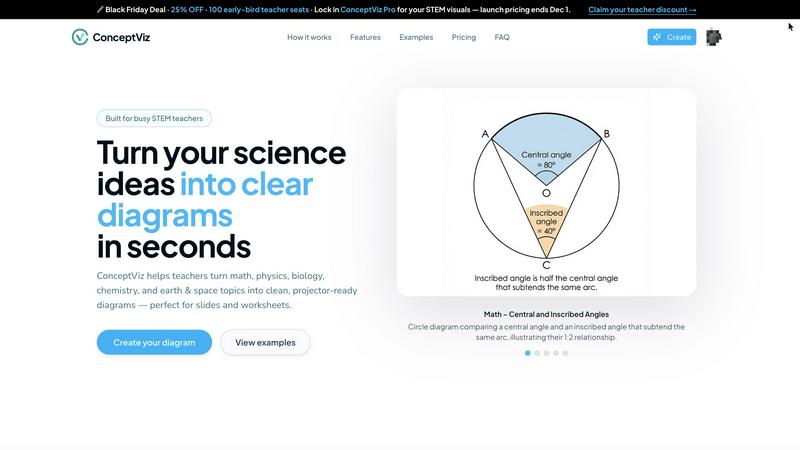
ConceptViz creates clear, science-ready diagrams in three easy steps for teachers, students, and researchers.
Last updated: March 1, 2026
Visual Comparison
BlitzCut

conceptviz
Feature Comparison
BlitzCut
Automatic Silence Removal
BlitzCut utilizes advanced AI technology to automatically detect and remove unwanted pauses in video clips. This feature significantly reduces editing time, allowing creators to focus on the content rather than tedious manual cutting. In just 30 seconds, the app can process a video to eliminate silence, ensuring a more engaging final product.
AI Captions
With over 95% accuracy, BlitzCut's AI captioning feature generates styled captions that enhance viewer engagement. This not only saves time but also ensures that content is accessible to a wider audience, including those who watch videos without sound. The stylish captions can be customized to fit the creator's brand, making them a vital tool for social media success.
Text-Based Editing
BlitzCut introduces a unique text-based editing feature that allows users to edit their videos by simply deleting sentences from the transcription. This intuitive approach makes it easier for creators to refine their content quickly and efficiently, as they can see the text representation of their video and make adjustments in real time.
Mobile-First Design
BlitzCut is designed with a mobile-first approach, meaning it is fully optimized for iPhone, iPad, and Mac devices. This ensures that creators can edit videos anytime and anywhere, making it ideal for those who need to produce content on the go. The seamless integration with mobile devices allows for quick importing, editing, and exporting.
conceptviz
User-Friendly Interface
ConceptViz boasts an intuitive interface, allowing users to create diagrams effortlessly. By simply signing in and describing their desired visuals in plain English, users can generate diagrams quickly, making it accessible for all skill levels.
Subject and Grade Presets
The platform includes quick presets tailored for various STEM subjects, including physics, biology, chemistry, earth & space, and math. These presets are designed for specific U.S. grade bands, ensuring that diagrams are appropriate for elementary, middle, or high school students.
Projector-Ready Clarity
Diagrams created with ConceptViz are designed for high visibility in classrooms. The tool prioritizes thick, legible lines and simple backgrounds, ensuring that visuals remain clear and effective in any teaching environment.
High-Resolution Exports
Users can download their generated diagrams in high-resolution PNG format, making it easy to incorporate visuals into presentations or printed materials. This feature ensures that educators can seamlessly integrate diagrams into PowerPoint, Google Slides, or worksheets.
Use Cases
BlitzCut
Social Media Content Creation
BlitzCut is perfect for social media influencers and marketers who need to produce high-quality video content quickly. By automating the editing process, users can maintain a consistent posting schedule without sacrificing quality, ensuring they stay relevant in a fast-paced digital landscape.
Vlog Editing
Vloggers can significantly streamline their editing workflow using BlitzCut. The automatic silence removal and captioning features help to create engaging vlogs without the lengthy editing sessions typically required, allowing creators to focus on storytelling and creativity.
Promotional Videos
Businesses looking to create promotional content can leverage BlitzCut's quick editing capabilities. The app allows for the rapid production of engaging videos that capture the essence of a brand while ensuring that marketing campaigns can be executed swiftly.
Educational Content
Educators and trainers can benefit from BlitzCut by creating instructional videos that are concise and engaging. The text-based editing feature allows for quick updates to content, ensuring that learners receive up-to-date information in a timely manner.
conceptviz
Classroom Instruction
Educators can use ConceptViz to create engaging visual aids for their lessons. By generating diagrams that illustrate complex concepts, teachers can enhance student understanding and retention during lectures.
Student Projects
Students can leverage ConceptViz for their projects, allowing them to create professional-looking diagrams that effectively communicate their research findings. This tool encourages creativity and improves presentation quality.
Lab Reports
Researchers and students conducting experiments can utilize ConceptViz to generate clear diagrams that represent their methodologies and results. This aids in creating visually appealing lab reports that are easy to understand.
Homework Assignments
ConceptViz can assist students in completing homework assignments by providing them with the means to create accurate diagrams that support their answers. This feature helps students articulate their understanding of complex topics.
Overview
About BlitzCut
BlitzCut is a revolutionary AI-powered video editing tool designed specifically for content creators, particularly those focused on social media platforms like TikTok, Instagram, and YouTube Shorts. Its mission is to make professional video editing accessible to everyone by prioritizing speed over an overwhelming array of features. With BlitzCut, creators can transform their raw video clips into polished, post-ready content in under two minutes. The application is mobile-first, meaning it is optimized for use on iPhones, iPads, and Macs, allowing creators to edit videos on the go. By automating tedious tasks like silence removal and captioning, BlitzCut empowers creators to focus on their craft rather than getting bogged down by the editing process. With its user-friendly interface and robust AI capabilities, BlitzCut is a game-changer for anyone looking to streamline their video production workflow.
About conceptviz
ConceptViz is an innovative diagramming tool specifically crafted for educators, students, and researchers within STEM education. This platform is designed to simplify the creation of accurate and visually appealing diagrams, making complex scientific concepts more accessible and understandable. Ideal for K-12 and higher education environments, ConceptViz streamlines the process of transforming intricate ideas into clear, classroom-ready visuals. Users can quickly generate high-quality diagrams simply by describing their needs in plain English, eliminating the need for design skills. With a focus on clarity and usability, ConceptViz ensures that all diagrams are projector-ready, featuring legible labels and minimal visual distractions. This makes it a valuable resource for educators seeking effective visual aids for lesson plans, labs, and assessments, ultimately enhancing the learning experience and saving preparation time.
Frequently Asked Questions
BlitzCut FAQ
How does BlitzCut remove silence from videos?
BlitzCut employs advanced AI algorithms to detect silent gaps in video recordings and automatically removes them, significantly reducing editing time.
Can I use BlitzCut on devices other than iPhone and Mac?
Currently, BlitzCut is optimized for iPhone, iPad, and Mac devices. Future updates may expand compatibility to other platforms.
Do I need to create an account to use BlitzCut?
No, BlitzCut is designed for ease of use, allowing users to download and start editing without the need for account creation.
How accurate are the AI-generated captions?
BlitzCut boasts over 95% accuracy in its AI-generated captions, making them reliable and effective for engaging audiences across social media platforms.
conceptviz FAQ
How do I get started with ConceptViz?
To get started, simply sign up for a free account on the ConceptViz website. After signing in, you can select your subject and grade level, then describe the diagram you need.
Can I use ConceptViz for subjects beyond STEM?
While ConceptViz is primarily designed for STEM education, its capabilities can be adapted for various subjects requiring visual representations. Users can experiment with different topics to see how the tool fits their needs.
Are the generated diagrams suitable for printing?
Yes, all diagrams produced by ConceptViz are high-resolution and designed to be printer-friendly. Users can easily download their diagrams in PNG format for use in handouts or printed materials.
Is there a limit to the number of diagrams I can create?
ConceptViz allows users to create multiple diagrams, providing flexibility for educators and students. However, users should check their account details to understand any limitations based on their subscription tier.
Alternatives
BlitzCut Alternatives
BlitzCut is an AI-powered video editor designed to simplify the video editing process for content creators. It excels in automating tedious tasks, such as removing silences and adding captions, making it ideal for social media content. Users often seek alternatives due to factors like pricing, specific feature sets, or compatibility with different platforms. When choosing an alternative, consider aspects such as ease of use, editing speed, and the ability to cater to your specific content needs. --- [{"question": "What is BlitzCut?", "answer": "BlitzCut is an AI-powered video editor that automates tasks like silence removal and captioning, allowing for quick video creation."},{"question": "Who is BlitzCut for?", "answer": "BlitzCut is designed for content creators looking to streamline their video editing process and produce engaging social media content swiftly."},{"question": "Is BlitzCut free?", "answer": "The provided content does not specify if BlitzCut is free; users should check the official website for pricing details."}]
conceptviz Alternatives
ConceptViz is an innovative tool designed for educators, researchers, and students, focusing on generating clear, science-ready diagrams for STEM education. As part of the AI Assistants and Content Creation category, it streamlines the diagram creation process, making it accessible even to those without design skills. Users often seek alternatives to ConceptViz for various reasons, such as pricing, specific feature needs, or compatibility with different platforms. When choosing an alternative, consider factors like user-friendliness, available templates for STEM subjects, print-ready quality, and the ability to download high-resolution files.